
.NET Windows Form 改变窗体类名(Class Name)有多难?
研究WinForm的东西,是我的一个个人兴趣和爱好,以前做的项目,多与WinForm相关,然而这几年,项目都与WinForm没什么关系了,都转为ASP.NET MVC与WPF了。关于今天讨论的这个问题,以前也曾深入研究过,只是最近有朋友问到这个问题,就再挖挖这个坟(坑)。
一、类名是啥?
打开神器SPY++,VS2013 在【工具】菜单里:

VS2013之前的VS版本,在【开始菜单】里:
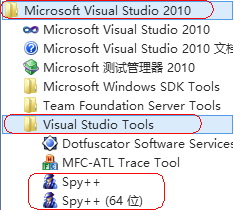
打开SPY++,点击标注的按钮,
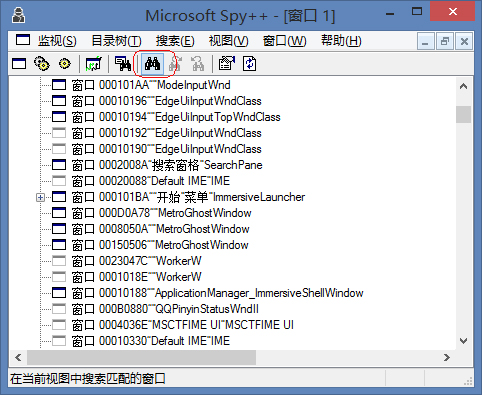
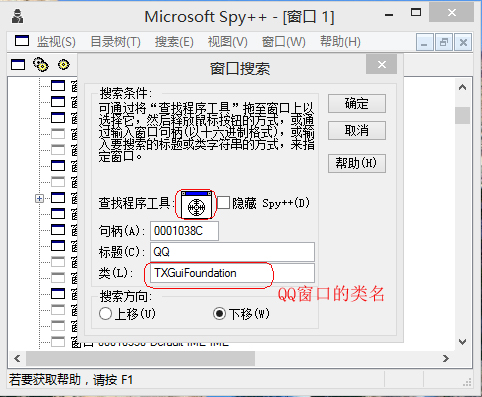
在打开的窗口上,把雷达按钮拖到你想查看的窗口,就可以看到它的类名了,下面就是QQ的类名:
再看看.NET WinForm的窗体类名:

一大串啊,有没有,我不想这样,我想要一个有个性的、简单的类名,咋办?
二、 不是有个CreateParams属性吗?
作为一个有多年WinForm开发经验的程序猿,这有啥难的,WinForm的控件不是都有个CreateParams属性吗?里面可以不是就可以设置窗口类名吗?看看:
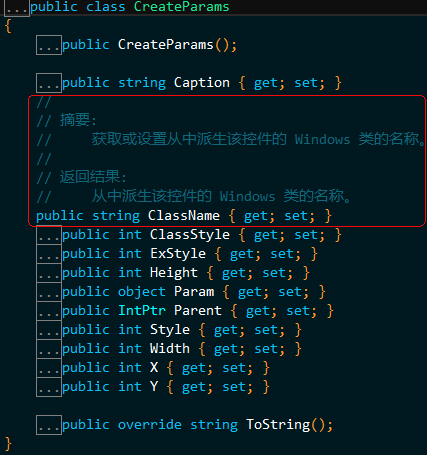
真的有,这不就简单了嘛,动手,于是有下面代码:
    public partial class FormMain : Form

    {

        public FormMain()

        {

            InitializeComponent();

        }

        protected override CreateParams CreateParams

        {

            get

            {

                CreateParams createParams = base.CreateParams;

                createParams.ClassName = "Starts2000.Window"; //这就是我想要的窗体类名。

                return createParams;

            }

        }

    }
编译,运行,结果却是这样的:
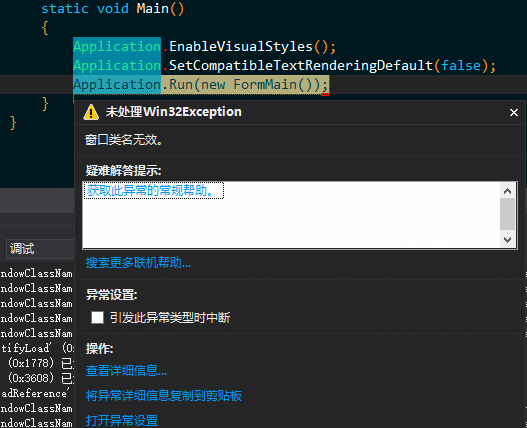
泥煤啊,这是什么啊,翻~墙,一通谷歌,原来类名使用前都需要注册啊,难道微软只注册了自己的类名,我个性化的他就不帮我注册,那我就自己注册吧,坑爹的微软啊。
三、注册一个窗口类名吧
注册窗口类名需要用到Windows API函数了,用C#进行P/Invoke?太麻烦了,做了这么多年的WinForm开发,我可是练了《葵花宝典(C++/CLI)》的,只是因为没自宫,所以没大成,不过,简单用用还是可以的。
创建一个C++空项目,设置项目属性-配置属性-常规,如下图:
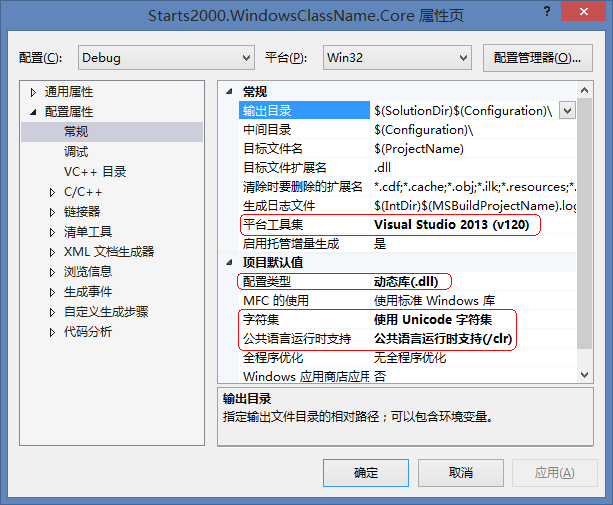
于是有了下面的代码:
1. FormEx.h
#pragma once

#include <Windows.h>

#include <vcclr.h>

#define CUSTOM_CLASS_NAME  L"Starts2000.Window"

namespace Starts2000

{

	namespace WindowsClassName

	{

		namespace Core

		{

			using namespace System;

			using namespace System::Windows::Forms;

			using namespace System::Runtime::InteropServices;

			private delegate LRESULT WndProc(HWND hWnd, UINT msg, WPARAM wParam, LPARAM lParam);

			public ref class FormEx :

				public Form

			{

			public:

				static FormEx();

				FormEx();

			private:

				static LRESULT WndProc(HWND hWnd, UINT msg, WPARAM wParam, LPARAM lParam);

				static void ProcessExit(Object^ sender, EventArgs^ e);

			};

		}

	}

}
2. FormEx.cpp
#include "FormEx.h"

namespace Starts2000

{

	namespace WindowsClassName

	{

		namespace Core

		{

			static FormEx::FormEx()

			{

				WNDCLASSEX wc;

				Starts2000::WindowsClassName::Core::WndProc ^windowProc =

					gcnew Starts2000::WindowsClassName::Core::WndProc(FormEx::WndProc);

				pin_ptr<Starts2000::WindowsClassName::Core::WndProc^> pWindowProc = &windowProc;

				ZeroMemory(&wc, sizeof(WNDCLASSEX));

				wc.cbSize = sizeof(WNDCLASSEX);

				wc.style = CS_DBLCLKS;

				wc.lpfnWndProc = reinterpret_cast<WNDPROC>(Marshal::GetFunctionPointerForDelegate(windowProc).ToPointer());

				wc.hInstance = GetModuleHandle(NULL);

				wc.hCursor = LoadCursor(NULL, IDC_ARROW);

				wc.hbrBackground = (HBRUSH)COLOR_WINDOW; //(HBRUSH)GetStockObject(HOLLOW_BRUSH);

				wc.lpszClassName = CUSTOM_CLASS_NAME;

				ATOM classAtom = RegisterClassEx(&wc);

				DWORD lastError = GetLastError();

				if (classAtom == 0 && lastError != ERROR_CLASS_ALREADY_EXISTS)

				{

					throw gcnew ApplicationException("Register window class failed!");

				}

				System::AppDomain::CurrentDomain->ProcessExit += gcnew System::EventHandler(FormEx::ProcessExit);

			}

			FormEx::FormEx() : Form()

			{

			}

			LRESULT FormEx::WndProc(HWND hWnd, UINT msg, WPARAM wParam, LPARAM lParam)

			{

				System::Windows::Forms::Message message = System::Windows::Forms::Message::Create((IntPtr)hWnd,

					(int)msg, (IntPtr)((void*)wParam), (IntPtr)((void*)lParam));

				System::Diagnostics::Debug::WriteLine(message.ToString());

				return DefWindowProc(hWnd, msg, wParam, lParam);

			}

			void FormEx::ProcessExit(Object^ sender, EventArgs^ e)

			{

				UnregisterClass(CUSTOM_CLASS_NAME, GetModuleHandle(NULL));

			}

		}

	}

}
3. 创建一个C# WinForm项目,引用上面创建的C++/CLI项目生成的DLL,代码跟最开始的区别不大。
    public partial class FormMain : /*Form*/ FormEx

    {

        public FormMain()

        {

            InitializeComponent();

        }

        protected override CreateParams CreateParams

        {

            get

            {

                CreateParams createParams = base.CreateParams;

                createParams.ClassName = "Starts2000.Window"; //这就是我想要的窗体类名。

                return createParams;

            }

        }

    }
编译,运行,结果却仍然是这样的:
泥煤啊,微软到底干了什么,我只是想搞点小玩意,满足下我的虚荣心,你竟然……,心中千万头“羊驼”奔腾而过。
没办法了,微软不都开源了吗,也不需要反编译了,直接下源代码看吧。
四、也不反编译了,直接找源代码看吧
在微软的网站(http://referencesource.microsoft.com/)Down下代码,从Form→ContainerControl→ScrollableControl→Control,在Control里找到NativeWindow,再在NativeWindow里面找到了WindowClass,在WindowClass里找到了坑爹的RegisterClass方法,恍然大悟了,有没有,具体看代码,我加了注释。
private void RegisterClass() {

    NativeMethods.WNDCLASS_D wndclass = new NativeMethods.WNDCLASS_D();

    if (userDefWindowProc == IntPtr.Zero) {

        string defproc = (Marshal.SystemDefaultCharSize == 1 ? "DefWindowProcA" : "DefWindowProcW");

        userDefWindowProc = UnsafeNativeMethods.GetProcAddress(new HandleRef(null, UnsafeNativeMethods.GetModuleHandle("user32.dll")), defproc);

        if (userDefWindowProc == IntPtr.Zero) {

            throw new Win32Exception();

        }

    }

    string localClassName = className;

    if (localClassName == null) {  //看看是否自定义了classnName,就是我们在 CreateParams ClassName设置的值。

        // If we don't use a hollow brush here, Windows will "pre paint" us with COLOR_WINDOW which

        // creates a little bit if flicker.  This happens even though we are overriding wm_erasebackgnd.

        // Make this hollow to avoid all flicker.

        //

        wndclass.hbrBackground = UnsafeNativeMethods.GetStockObject(NativeMethods.HOLLOW_BRUSH); //(IntPtr)(NativeMethods.COLOR_WINDOW + 1);

        wndclass.style = classStyle;

        defWindowProc = userDefWindowProc;

        localClassName = "Window." + Convert.ToString(classStyle, 16);

        hashCode = 0;

    }

    else {   //坑爹的就在这里了

        NativeMethods.WNDCLASS_I wcls = new NativeMethods.WNDCLASS_I();

        /*注意下面这句代码,特别注意 NativeMethods.NullHandleRef,MSDN说明:

            * BOOL WINAPI GetClassInfo(

            *    _In_opt_ HINSTANCE  hInstance,

            *    _In_     LPCTSTR    lpClassName,

            *    _Out_    LPWNDCLASS lpWndClass

            *  );

            * hInstance [in, optional]

            *  Type: HINSTANCE

            *  A handle to the instance of the application that created the class.

            * To retrieve information about classes defined by the system (such as buttons or list boxes),

            * set this parameter to NULL.

            * 就是说,GetClassInfo 的第一个参数为 NULL(NativeMethods.NullHandleRef)的时候,只有系统注册的 ClassName

            * 才会返回 True,所以当我们设置了CreateParams ClassName的值后,只要设置的不是系统注册的 ClassName,都会

            * 抛出后面的 Win32Exception 异常,泥煤啊。

        */

        bool ok = UnsafeNativeMethods.GetClassInfo(NativeMethods.NullHandleRef, className, wcls);

        int error = Marshal.GetLastWin32Error();

        if (!ok) {

            throw new Win32Exception(error, SR.GetString(SR.InvalidWndClsName));

        }

        wndclass.style = wcls.style;

        wndclass.cbClsExtra = wcls.cbClsExtra;

        wndclass.cbWndExtra = wcls.cbWndExtra;

        wndclass.hIcon = wcls.hIcon;

        wndclass.hCursor = wcls.hCursor;

        wndclass.hbrBackground = wcls.hbrBackground;

        wndclass.lpszMenuName = Marshal.PtrToStringAuto(wcls.lpszMenuName);

        localClassName = className;

        defWindowProc = wcls.lpfnWndProc;

        hashCode = className.GetHashCode();

    }

    // Our static data is different for different app domains, so we include the app domain in with

    // our window class name.  This way our static table always matches what Win32 thinks.

    //

    windowClassName = GetFullClassName(localClassName);

    windowProc = new NativeMethods.WndProc(this.Callback);

    wndclass.lpfnWndProc = windowProc;

    wndclass.hInstance = UnsafeNativeMethods.GetModuleHandle(null);

    wndclass.lpszClassName = windowClassName;

    short atom = UnsafeNativeMethods.RegisterClass(wndclass);

    if (atom == 0) {

        int err = Marshal.GetLastWin32Error();

        if (err == NativeMethods.ERROR_CLASS_ALREADY_EXISTS) {

            // Check to see if the window class window

            // proc points to DefWndProc.  If it does, then

            // this is a class from a rudely-terminated app domain

            // and we can safely reuse it.  If not, we've got

            // to throw.

            NativeMethods.WNDCLASS_I wcls = new NativeMethods.WNDCLASS_I();

            bool ok = UnsafeNativeMethods.GetClassInfo(new HandleRef(null, UnsafeNativeMethods.GetModuleHandle(null)), windowClassName, wcls);

            if (ok && wcls.lpfnWndProc == NativeWindow.UserDefindowProc) {

                // We can just reuse this class because we have marked it

                // as being a nop in another domain.  All we need to do is call SetClassLong.

                // Only one problem:  SetClassLong takes an HWND, which we don't have.  That leaves

                // us with some tricky business. First, try this the easy way and see

                // if we can simply unregister and re-register the class.  This might

                // work because the other domain shutdown would have posted WM_CLOSE to all

                // the windows of the class.

                if (UnsafeNativeMethods.UnregisterClass(windowClassName, new HandleRef(null, UnsafeNativeMethods.GetModuleHandle(null)))) {

                    atom = UnsafeNativeMethods.RegisterClass(wndclass);

                    // If this fails, we will always raise the first err above.  No sense exposing our twiddling.

                }

                else {

                    // This is a little harder.  We cannot reuse the class because it is

                    // already in use.  We must create a new class.  We bump our domain qualifier

                    // here to account for this, so we only do this expensive search once for the

                    // domain.

                    do {

                        domainQualifier++;

                        windowClassName = GetFullClassName(localClassName);

                        wndclass.lpszClassName = windowClassName;

                        atom = UnsafeNativeMethods.RegisterClass(wndclass);

                    } while (atom == 0 && Marshal.GetLastWin32Error() == NativeMethods.ERROR_CLASS_ALREADY_EXISTS);

                }

            }

        }

        if (atom == 0) {

            windowProc = null;

            throw new Win32Exception(err);

        }

    }

    registered = true;

}
五、吓尿了!自己动手,丰衣足食
看到微软的源码后,只能表示尿了,不可能继承Form实现自定义类名了,那么就自己动手,丰衣足食吧,还记得上面的C++/CLI代码吧,简单的加一些内容,就可以实现我们自定义窗口类名的愿望了,代码如下:
1. CustomForm.h
#pragma once

#include <Windows.h>

#include <vcclr.h>

#define CUSTOM_CLASS_NAME  L"Starts2000.Window"

namespace Starts2000

{

	namespace WindowsClassName

	{

		namespace Core

		{

			using namespace System;

			using namespace System::Windows::Forms;

			using namespace System::Runtime::InteropServices;

			private delegate LRESULT WndProc(HWND hWnd, UINT msg, WPARAM wParam, LPARAM lParam);

			public ref class CustomForm

			{

			public:

				static CustomForm();

				CustomForm();

				CustomForm(String ^caption);

				~CustomForm();

				void Create();

				void Show();

			private:

				String ^_caption;

				HWND _hWnd;

				static GCHandle _windowProcHandle;

				static LRESULT WndProc(HWND hWnd, UINT msg, WPARAM wParam, LPARAM lParam);

				static void ProcessExit(Object^ sender, EventArgs^ e);

			};

		}

	}

}
2. CustomForm.cpp
#include "CustomForm.h"

namespace Starts2000

{

	namespace WindowsClassName

	{

		namespace Core

		{

			static CustomForm::CustomForm()

			{

				WNDCLASSEX wc;

				Starts2000::WindowsClassName::Core::WndProc ^windowProc =

					gcnew Starts2000::WindowsClassName::Core::WndProc(CustomForm::WndProc);

				_windowProcHandle = GCHandle::Alloc(windowProc);

				ZeroMemory(&wc, sizeof(WNDCLASSEX));

				wc.cbSize = sizeof(WNDCLASSEX);

				wc.style = CS_DBLCLKS;

				wc.lpfnWndProc = reinterpret_cast<WNDPROC>(Marshal::GetFunctionPointerForDelegate(windowProc).ToPointer());

				wc.hInstance = GetModuleHandle(NULL);

				wc.hCursor = LoadCursor(NULL, IDC_ARROW);

				wc.hbrBackground = (HBRUSH)COLOR_WINDOW; //(HBRUSH)GetStockObject(HOLLOW_BRUSH);

				wc.lpszClassName = CUSTOM_CLASS_NAME;

				ATOM classAtom = RegisterClassEx(&wc);

				DWORD lastError = GetLastError();

				if (classAtom == 0 && lastError != ERROR_CLASS_ALREADY_EXISTS)

				{

					throw gcnew ApplicationException("Register window class failed!");

				}

				System::AppDomain::CurrentDomain->ProcessExit += gcnew System::EventHandler(CustomForm::ProcessExit);

			}

			CustomForm::CustomForm() : _caption("Starts2000 Custom ClassName Window")

			{

			}

			CustomForm::CustomForm(String ^caption) : _caption(caption)

			{

			}

			CustomForm::~CustomForm()

			{

				if (_hWnd)

				{

					DestroyWindow(_hWnd);

				}

			}

			void CustomForm::Create()

			{

				DWORD styleEx = 0x00050100;

				DWORD style = 0x17cf0000;

				pin_ptr<const wchar_t> caption = PtrToStringChars(_caption);

				_hWnd = CreateWindowEx(styleEx, CUSTOM_CLASS_NAME, caption, style,

					CW_USEDEFAULT, CW_USEDEFAULT, CW_USEDEFAULT, CW_USEDEFAULT,

					NULL, NULL, GetModuleHandle(NULL), NULL);

				if (_hWnd == NULL)

				{

					throw gcnew ApplicationException("Create window failed! Error code:" + GetLastError());

				}

			}

			void CustomForm::Show()

			{

				if (_hWnd)

				{

					ShowWindow(_hWnd, SW_NORMAL);

				}

			}

			LRESULT CustomForm::WndProc(HWND hWnd, UINT msg, WPARAM wParam, LPARAM lParam)

			{

				System::Windows::Forms::Message message = System::Windows::Forms::Message::Create((IntPtr)hWnd,

					(int)msg, (IntPtr)((void*)wParam), (IntPtr)((void*)lParam));

				System::Diagnostics::Debug::WriteLine(message.ToString());

				if (msg == WM_DESTROY)

				{

					PostQuitMessage(0);

					return 0;

				}

				return DefWindowProc(hWnd, msg, wParam, lParam);

			}

			void CustomForm::ProcessExit(Object^ sender, EventArgs^ e)

			{

				UnregisterClass(CUSTOM_CLASS_NAME, GetModuleHandle(NULL));

				if (CustomForm::_windowProcHandle.IsAllocated)

				{

					CustomForm::_windowProcHandle.Free();

				}

			}

		}

	}

}
最后仍然用我们熟悉的C#来调用:
using System;

using System.Windows.Forms;

using Starts2000.WindowsClassName.Core;

namespace Starts2000.WindowClassName.Demo

{

    static class Program

    {

        /// <summary>

        /// 应用程序的主入口点。

        /// </summary>

        [STAThread]

        static void Main()

        {

            //Application.EnableVisualStyles();

            //Application.SetCompatibleTextRenderingDefault(false);

            //Application.Run(new FormMain());

            CustomForm form = new CustomForm();

            form.Create();

            form.Show();

            Application.Run();

        }

    }

}
编译,运行,拿出神器SPY++看一看:
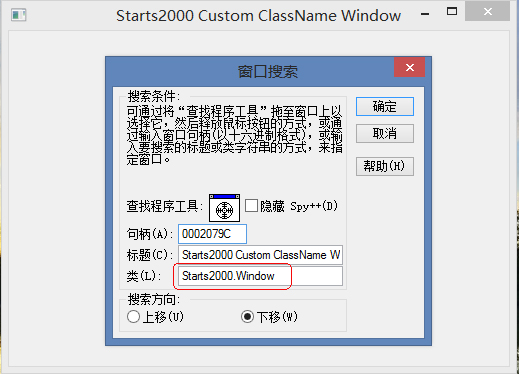
目标终于达成。
最后,所有代码的下载(项目使用的是VS2013编译、调试,不保证其他版本VS能正常编译):猛击我。
.NET Windows Form 改变窗体类名(Class Name)有多难?的更多相关文章
- 变不可能为可能 - .NET Windows Form 改变窗体类名(Class Name)有多难?续篇
发布<.NET Windows Form 改变窗体类名(Class Name)有多难?>转眼大半年过去了,要不是在前几天有园友对这篇文章进行评论,基本上已经很少关注它了,毕竟那只是一个解惑 ...
- windows form (窗体) 之间传值小结
windows form (窗体) 之间传值小结 windows form (窗体) 之间传值小结 在windows form之间传值,我总结了有四个方法:全局变量.属性.窗体构造函数和deleg ...
- windows sdk编程禁止改变窗体大小
#include <windows.h> /*消息处理函数声明*/ HRESULT CALLBACK WindowProc(HWND hwnd, UINT message, WPARAM ...
- 如何用Web技术开发Windows Form应用
现在H5很热,很多互联网公司的产品都采用混合编程,其中各个平台客户端的“壳”为原生控件,但是内容很多都是Web网页,因此可以做出很多炫酷的效果.随着Node.js和Ionic等框架的出现,现在感觉Ja ...
- PyQt通过resize改变窗体大小时ListWidget显示异常
前几天开始的pygame音乐播放器Doco,做的差不多了,上午做到了歌词显示和搜索页面.遇到bug,即通过resize改变ui大小时ListWidget显示异常 #目的: 增加一部分窗口用来显示歌词和 ...
- windows form参数传递过程
三.windows form参数传递过程 在Windows 程序设计中参数的传递,同样也是非常的重要的. 这里主要是通过带有参数的构造函数来实现的, 说明:Form1为主窗体,包含控件:文本框text ...
- 【译】.NET 5. 0 中 Windows Form 的新特性
自从 Windows Form 在 2018 年底开源并移植到 .NET Core 以来,团队和我们的外部贡献者都在忙于修复旧的漏洞和添加新功能.在这篇文章中,我们将讨论 .NET 5.0 中 Win ...
- WPF实现无边框窗体拖拽右下角▲ 改变窗体大小【framwork4.0】 谢谢大家关注
效果图:(右下角拖拽改变窗体大小) 第一步:添加xaml代码: <Border Name="ResizeBottomRight" MouseMove="Resize ...
- Windows Form 中快捷键设置
在Windows Form程序中使用带下划线的快捷键只需要进行设置: 就能够工作.
随机推荐
- 教你如何制作饼干icon教程
Hello,不露又和大家见面了,今天给大家带来的是一个可爱Q弹的icon~ 看起来像块饼干是吧~ 做起来非常简单哦,快打开PS一起躁起来吧. 先来看看效果图: 步骤1:打开PS,新建一个800*600 ...
- OSGi 系列(三)之 bundle 事件监听
OSGi 系列(三)之 bundle 事件监听 bundle 的事件监听是在 bundle 生命周期的不同状态相互转换时,OSGi 框架会发出各种不同的事件供事先注册好的事件监听器处理. 1. 事件监 ...
- C语言中以字符串形式输出枚举变量
C语言中以字符串形式输出枚举变量 摘自:https://blog.csdn.net/haifeilang/article/details/41079255 2014年11月13日 15:17:20 h ...
- R 语言安装问题集锦
R安装问题R CMD INSTALL -l /data1/jhh/envirment/R/R_lib /data1/jhh/software/qvalue_2.10.0.tar.gz 问题1 :con ...
- IE10中KendoUI treeview 点击后出现虚线框的解决方案
在head中添加:<meta http-equiv="X-UA-Compatible" content="IE=edge"> 修改渲染模式即可.
- 【JS】判断浏览器类型
判断原理 JavaScript是前端开发的主要语言,我们可以通过 编写JavaScript程序来判断浏览器的类型及版本.JavaScript判断浏览器类型一般有两种办法,一种是根据各种浏览器独有的属性 ...
- UVaLive 3487 Duopoly (最小割)
题意:有两个公司A和B在申请一些资源,现在给出两个公司所申请的内容,内容包括价钱和申请的资源 ,现在你做为官方,你只能拒绝一个申请或者接受一个申请,同一个资源不能两个公司都拥有,且申请的资源不能只给部 ...
- ubuntu16.4中开启vncserver进行远程桌面
使用x11vnc作为vncserver端 1 安装x11vnc $ sudo apt-get update $ sudo apt-get install x11vnc 2 生成密码 $ x11vnc ...
- netty 原理
netty 实现 1. 各组件之间的关系 每个ServerBootstrap与一个事件循环对象(一个线程)都会与一个Channel绑定,如NioServerSocketChannel 2. 如何绑定 ...
- STL中的内存与效率
STL中的内存与效率 1. 使用reserve()函数提前设定容量大小,避免多次容量扩充操作导致效率低下. 关于STL容器,最令人称赞的特性之一就是是只要不超过它们的最大大小,它们就可以自动增长到足 ...