
Flask基础-基础实例
1. 10行代码的迷你程序 flask项目
from flask import  Flask

app = Flask(__name__)

@app.route("/index")

def inde():

    return "heeello world"

if __name__ =="__main__":

    app.run()
2.页面登录的小程序+session简单用法.
from flask import  Flask,render_template,request,redirect,session

app = Flask(__name__)
app.secret_key="dd"

@app.route("/login",methods =["GET","POST"])
def login():
    if request.method =='GET':

        return render_template("login.html")

    #request.form为post请求
    user =request.form.get("user")
    pwd =request.form.get("pwd")
    if user =="hailong" and pwd =="kuang":

        #设置session , flask的session存放在cookie当中
        session["user_infor"]=user
        print(22)
        return redirect("/index")
    print(111)
    return  render_template("login.htm",msg ="用户密码错误")

@app.route("/index")
def index():

    #获取cookie 判断是否存在,如果存在并匹配进行跳转到相关页面
    user_infor =session.get("user_infor")
    print(222,user_infor)
    if not user_infor:
        return redirect("/login")
    return render_template("index.html")

if __name__ =="__main__":
    app.run()
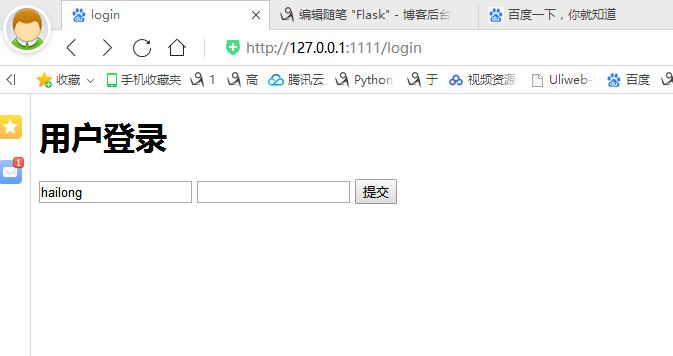
login页面
<!DOCTYPE html>

<html lang="en">

<head>

    <meta charset="UTF-8">

    <title>login</title>

</head>

</head>

<body>

    <h1>     用户登录</h1>

<form method="post">

    <input type="text" name ="user">

    <input type="password" name ="pwd">

    <input type="submit" value="提交">{{msg}}

</form>

</body>

</html>
index界面
<!DOCTYPE html>

<html lang="en">

<head>

    <meta charset="UTF-8">

    <title>Title</title>

</head>

<body>

        <h1>欢迎来到郝龙江家里</h1>

</body>

</html>

3 .auth认证.
 from flask import Flask,render_template,request,redirect,session

 app = Flask(__name__)

 app.secret_key = '39jrlasdfoajslfu8af'

 import functools

 def auth(func):

     @functools.wraps(func) # 保留函数的元信息

     def inner(*args,**kwargs):

         if not session.get('user_info'):

             return redirect('/login')

         ret = func(*args,**kwargs)

         return ret

     return inner

 @app.route('/login',methods=['GET','POST'])

 def login():

     if request.method == 'GET':

         return render_template('login.html')

     user = request.form.get('user')

     pwd = request.form.get('pwd')

     if user == 'hailong' and pwd == 'kuang':

         session['user_info'] = user

         return redirect('/index')

     return render_template('login.html',msg="用户名或密码错误")

 @app.route('/index')

 @auth

 def index():

     kuang_list = [

         {'id':1,'name':'一矿','address':'大同'},

         {'id':2,'name':'二矿','address':'大同'},

         {'id':3,'name':'三矿','address':'大同'},

     ]

     return render_template('index.html',klist=kuang_list)

     # return render_template('index.html',**{'klist':kuang_list})

 @app.route('/detail')

 @auth

 def detail():

     nid = request.args.get('nid')

     return render_template('detail.html')

 @app.route('/logout')

 def logout():

     del session['user_info']

     return redirect('/login')

 if __name__ == '__main__':

     app.run()
4.中间件

 from flask import Flask,render_template,request,redirect,session

 app = Flask(__name__)

 app.secret_key = '39jrlasdfoajslfu8af'

 @app.before_request

 def xxxxxxxxxxxxxx():

     if request.path == '/login':

         return None

     if not session.get('user_info'):

         return redirect('/login')

 @app.route('/login',methods=['GET','POST'])

 def login():

     print('我是login')

     if request.method == 'GET':

         return render_template('login.html')

     user = request.form.get('user')

     pwd = request.form.get('pwd')

     if user == 'hailong' and pwd == 'kuang':

         session['user_info'] = user

         return redirect('/index')

     return render_template('login.html',msg="用户名或密码错误")

 @app.route('/index')

 def index():

     print('我是index')

     kuang_list = [

         {'id':1,'name':'一矿','address':'大同'},

         {'id':2,'name':'二矿','address':'大同'},

         {'id':3,'name':'三矿','address':'大同'},

     ]

     return render_template('index.html',klist=kuang_list)

     # return render_template('index.html',**{'klist':kuang_list})

 @app.route('/detail')

 def detail():

     nid = request.args.get('nid')

     return render_template('detail.html')

 @app.route('/logout')

 def logout():

     del session['user_info']

     return redirect('/login')

 if __name__ == '__main__':

     app.run()
Flask基础-基础实例的更多相关文章
- 超实用的Flask入门基础教程,新手必备!
Flask入门基础教程 Flask简介 Flask是一个轻量级的可定制框架,使用Python语言编写,较其他同类型框架更为灵活.轻便.安全且容易上手.它可以很好地结合MVC模式进行开发,开发人员分工合 ...
- AutoCAD ObjectARX(VC)开发基础与实例教程2014版光盘镜像
AutoCAD ObjectARX(VC)开发基础与实例教程2014,最新版,光盘镜像 作者:张帆 朱文俊 编著 出版社:中国电力出版社 出版时间:2014年6月 点击一下
- 基础 jQuery 实例
基础 jQuery 实例 jQuery 原则: 由于 jQuery 是为处理 HTML 事件而特别设计的,那么当您遵循以下原则时,您的代码会更恰当且更易维护: 把所有 jQuery 代码置于事件处理函 ...
- 知了课堂 Python Flask零基础 笔记整理
目录 起步 安装Python2.7: Python虚拟环境介绍与安装: pip安装flask: 认识url: URL详解 web服务器和应用服务器以及web应用框架: Flask 第一个flask程序 ...
- expect基础及实例
expect基础及实例 http://blog.csdn.net/zhuying_linux/article/details/6900805
- SVG基础绘图实例
SVG可缩放矢量图(Scalable Vector Graphics),是使用 XML 来描述二维图形和绘图程序的语言,图像在放大或改变尺寸的情况下其图形质量不会有所损失,是万维网联盟的标准. 下面整 ...
- flask之基础概念
[应用]一个 Flask 应用是一个 Flask 类的实例.可以在一个被称为应用工厂的函数内部创建 Flask实例.所有应用相关的配置.注册和其他设置都会在函数内部完成,然后返回这个应用.__init ...
- python基础-基础知识(包括:函数递归等知识)
老男孩 Python 基础知识练习(三) 1.列举布尔值为 False 的值空,None,0, False, ", [], {}, () 2.写函数:根据范围获取其中 3 和 7 整除的所有 ...
- 2、flask之基础知识点
本篇导航: 路由系统 视图函数 请求与响应 模版语法 session 蓝图(blueprint).闪现 (flash) 扩展 一.路由系统 1.可传入参数: @app.route('/user/< ...
随机推荐
- MongoDB的文档、集合、数据库(二)
为了理解MongoDB的名词,可以将其于关系型数据库进行对比: 一.文档 概述 文档是MongoDB的核心概念,是数据的基本单元,非常类似于关系数据库中的行.在MongoDB中,文档表示为键值对的一个 ...
- MongoDB安装(一)
详细图解,记录 win7 64 安装mongo数据库的过程.安装的版本是 MongoDB-win32-x86_64-2008plus-ssl-3.4.1-signed. 示例版本:mongodb-wi ...
- 'WebElement' object is not iterable
checkbox.html源码: <html> <head> <meta http-equiv="content-type" content=&quo ...
- php下的原生ajax请求
浏览器中为我们提供了一个JS对象XMLHttpRequet,它可以帮助我们发送HTTP请求,并接受服务端的响应. 意味着我们的浏览器不提交,通过JS就可以请求服务器. ajax(Asynchron ...
- js记录
--获取后缀名,结果 .jpg var extName = "/upload/head_img/20150902102539.jpg";var ta = extName.subst ...
- c++11多线程学习笔记之二 mutex使用
// 1111111.cpp : 定义控制台应用程序的入口点. // #include "stdafx.h" #include <iostream> #include ...
- /etc/inittab加入自动启动格式
R01:35:respawn:/usr/bin/exe_program 说明 R01:标识,每一行必须唯一(R01并无特殊含义,可自定义). 35:有效模式,3字符界面启动,5图形界面启动 respa ...
- 提高搜狗SR值和关键词排名
凭借“输入法-浏览器-搜索”三级火箭战略,搜狗搜狗使用率已超过10%,并成功挤掉谷歌成为国内第二大搜索引擎服务提供商.随着搜狗的快速发展,越来越多的站长将目光投向针对搜狗搜索的关键词优化. 大家都知道 ...
- 使用PrintWriter out=response.getWriter();输出script脚本时乱码解决
使用PrintWriter out=response.getWriter();输出script脚本时乱码解决 最近遇到了一个奇怪的事情,仅仅用out.print("<script ty ...
- [转]Go与C语言的互操作
Go有强烈的C背景,除了语法具有继承性外,其设计者以及其设计目标都与C语言有着千丝万缕的联系.在Go与C语言互操作(Interoperability)方面,Go更是提供了强大的支持.尤其是在Go中使用 ...