
[翻译] DDExpandableButton
DDExpandableButton
https://github.com/ddebin/DDExpandableButton
Purpose - 目的
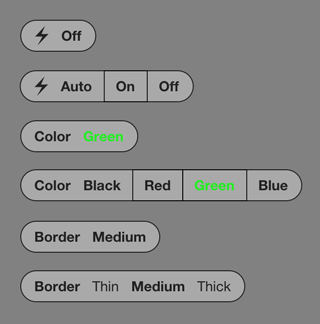
DDExpandableButton is a single-file iOS 5.0+ non-ARC class (ARC compatible) designed to be used like an expandable UIButton ; as seen in the iOS Camera app for the flash button.
DDExpandableButton 是一个MRC的类(兼容ARC),用来点击时展开UIButton;与iOS照相机应用的flash按钮一样。
Originally inspired by ExpandyButton.
Properties - 属性
A DDExpandableButton has the following properties:
有以下属性列表:
@property (nonatomic,assign) BOOL expanded;Current button status (if expanded or shrunk). 当前按钮的状态(展开了还是未展开)@property (nonatomic,assign) BOOL useAnimation;Use animation during button state transitions. 在button状态改变时是否使用动画效果@property (nonatomic,assign) BOOL toggleMode;Use button as a toggle (like "HDR On" / "HDR Off" button in camera app). 是否用作开关(像照相机应用中的“HDR On / HDR Off”按钮一样)@property (nonatomic,assign) CGFloat timeout;To shrink the button after a timeout. Use0if you want to disable timeout. 一个未展开的超时时间,用0可以禁用超时时间@property (nonatomic,assign) CGFloat horizontalPadding;Horizontal padding space between items. 按钮间的水平距离@property (nonatomic,assign) CGFloat verticalPadding;Vertical padding space above and below items. 按钮间的垂直距离@property (nonatomic,assign) CGFloat borderWidth;Width (thickness) of the button border. 按钮边缘的厚度@property (nonatomic,assign) CGFloat innerBorderWidth;Width (thickness) of the inner borders between items. 按钮内边缘的厚度@property (nonatomic,assign) NSUInteger selectedItem;Selected item number. 选择的第几个@property (nonatomic,retain) UIColor *borderColor;Color of the button and inner borders. 按钮内边缘颜色@property (nonatomic,retain) UIColor *textColor;Color of text labels. 文本的颜色@property (nonatomic,retain) UIFont *labelFont;Font of text labels. 文本的字体@property (nonatomic,retain) UIFont *unSelectedLabelFont;Font of unselected text labels.Nilif not different fromlabelFont. 没有选择的按钮的字体,如果为nil的话,就没有区别@property (nonatomic,readonly) NSArray *labels;AccessUIViewused to draw labels. 所有label
Methods - 方法
A DDExpandableButton has the following methods:
DDExpandableButton 有着如下的一些方法:
- (id)initWithPoint:(CGPoint)point leftTitle:(id)leftTitle buttons:(NSArray *)buttons;Init method where you can specifyleftTitleandbuttons. 初始化方法,你可以用来指定标题以及按钮- (void)setSelectedItem:(NSUInteger)selected animated:(BOOL)animated;Animated version of- (void)setSelectedItem:(NSUInteger)selected. 这个方法- (void)setSelectedItem:(NSUInteger)selected的动画版本- (void)setExpanded:(BOOL)expanded animated:(BOOL)animated;Animated version of- (void)setExpanded:(BOOL)expanded. 这个方法- (void)setExpanded:(BOOL)expanded的动画版本- (void)setLeftTitle:(id)leftTitle;Set left title view : you can use aNSString, anUIImageor anyUIView(but the view must implementDDExpandableButtonViewSourceprotocol). 设置左侧view:你可以用字符串,UIImage或者任何UIView- (void)setButtons:(NSArray *)buttons;Set buttons views : you can use aNSString, anUIImageor anyUIView(but the view must implementDDExpandableButtonViewSourceprotocol). 设置buttons,你可以用字符串,UIImage或者任何UIView- (void)disableTimeout;If you want to disable timeout shrunk. You can settimeoutto0also. 如果你想关闭超时时间,你可以将timeout设置成0- (void)updateDisplay;When modifying button parameters, use this method to update button display. 但编辑按钮的参数时,你需要用这个方法来更新按钮的显示
Protocols - 协议
The DDExpandableButtonViewSource protocol, used when you specify the title or the different buttons, has the following methods:
DDExpandableButtonViewSource 协议,当你在制定标题或者不同的按钮时,有着如下的一些方法:
- (CGSize)defaultFrameSize;Returns default frame size of the view, used when expanding the button. 展开按钮的时候返回view的默认尺寸- (void)setHighlighted:(BOOL)highlighted;Optional, used to change appearance of selected items. 可选的,用来修改选中按钮的外观
Usage - 使用
Example : a button with four text labels and a hook when value change.
NSArray *buttons = [NSArray arrayWithObjects:@"Black", @"Red", @"Green", @"Blue", nil];

DDExpandableButton *colorButton = [[[DDExpandableButton alloc] initWithPoint:CGPointMake(20, 70) leftTitle:@"Color" buttons:buttons] autorelease];

[[self view] addSubview:colorButton];

[colorButton addTarget:self action:@selector(toggleColor:) forControlEvents:UIControlEventValueChanged];
[翻译] DDExpandableButton的更多相关文章
- 《Django By Example》第五章 中文 翻译 (个人学习,渣翻)
书籍出处:https://www.packtpub.com/web-development/django-example 原作者:Antonio Melé (译者@ucag注:大家好,我是新来的翻译, ...
- 《Django By Example》第四章 中文 翻译 (个人学习,渣翻)
书籍出处:https://www.packtpub.com/web-development/django-example 原作者:Antonio Melé (译者注:祝大家新年快乐,这次带来<D ...
- [翻译]开发文档:android Bitmap的高效使用
内容概述 本文内容来自开发文档"Traning > Displaying Bitmaps Efficiently",包括大尺寸Bitmap的高效加载,图片的异步加载和数据缓存 ...
- 【探索】机器指令翻译成 JavaScript
前言 前些时候研究脚本混淆时,打算先学一些「程序流程」相关的概念.为了不因太枯燥而放弃,决定想一个有趣的案例,可以边探索边学. 于是想了一个话题:尝试将机器指令 1:1 翻译 成 JavaScript ...
- 《Django By Example》第三章 中文 翻译 (个人学习,渣翻)
书籍出处:https://www.packtpub.com/web-development/django-example 原作者:Antonio Melé (译者注:第三章滚烫出炉,大家请不要吐槽文中 ...
- 《Django By Example》第二章 中文 翻译 (个人学习,渣翻)
书籍出处:https://www.packtpub.com/web-development/django-example 原作者:Antonio Melé (译者注:翻译完第一章后,发现翻译第二章的速 ...
- 《Django By Example》第一章 中文 翻译 (个人学习,渣翻)
书籍出处:https://www.packtpub.com/web-development/django-example 原作者:Antonio Melé (译者注:本人目前在杭州某家互联网公司工作, ...
- 【翻译】Awesome R资源大全中文版来了,全球最火的R工具包一网打尽,超过300+工具,还在等什么?
0.前言 虽然很早就知道R被微软收购,也很早知道R在统计分析处理方面很强大,开始一直没有行动过...直到 直到12月初在微软技术大会,看到我软的工程师演示R的使用,我就震惊了,然后最近在网上到处了解和 ...
- ASP.NET MVC with Entity Framework and CSS一书翻译系列文章之第一章:创建基本的MVC Web站点
在这一章中,我们将学习如何使用基架快速搭建和运行一个简单的Microsoft ASP.NET MVC Web站点.在我们马上投入学习和编码之前,我们首先了解一些有关ASP.NET MVC和Entity ...
随机推荐
- Pycharm 问题:Clear Read-Only Status
用的是ubuntu系统,一直在普通用户模式下打开Git下建的项目,今天运行神经网络程序时,由于有一个cudnn错误,必须要在sudo模式下才不会报错,所以用sudo试着打开了pycharm,发现是完全 ...
- Centos 安装python3
安装python3 大多数云平台没有安装zlib和openssl的devel包,需要提前安装 下载python源码 cd /home/cheat wget https://www.python.o ...
- pthread和semaphore的简单应用以及四个典型的多线程问题
pthread和semaphore的简单应用以及四个典型的多线程问题 pthread常用函数简单介绍 创建线程 int pthread_create(pthread_t * thread, pt ...
- Spring配置Quartz任务调度、及 ThreadPool 线程池
ONE.除了引入 Spring 相关的 jar 包,还要引入 Quartz 的 jar 包 <dependency> <groupId>org.springframework& ...
- C# 新建 exe文件,并且自定义协议从浏览器中启动该程序
1. C# 新建一个 exe 文件: 打开你的 vs ,[文件] ---> [新建] ---> [项目] 选择 Windows 窗体应用,并起一个名字: 接着该文件会在当前项目的 myap ...
- Sass进阶之路,之二(进阶篇)
Sass之二(进阶篇) 1. 数据类型 1.1 Number 数字类型,小数类型,带有像素单位的数字类型,全部都属于Number类型 Number类型详情请点击这里,下面是小例子 1.$n1: 1.2 ...
- python学习之类和实例的属性;装饰器@property
无论是类还是实例,一切皆是对象. Python是强动态语言,和java在这点上有所不同. class Ab(): a = 666 # 定义类对象Ab,自带属性a,值为666 # 使用Ab.__dict ...
- .NET环境下使用水晶报表
.NET环境下使用水晶报表 听语音 | 浏览:3280 | 更新:2013-12-20 13:36 1 2 3 4 5 6 7 分步阅读 水晶报表(Crystal Reports)-商务智能软件,通常 ...
- automapper 自动映射 集成asp.net Core2.1
学习博文:https://www.cnblogs.com/yan7/p/8085410.html 1.使用nuget 安装 <PackageReference Include="Aut ...
- NSLog演化
使用下面代码打印行号,功能函数,以及要打印的内容 #if DEBUG #define MBLog(format, ...) NSLog((@"%s--[Line:%d]--" fo ...