
使用FluentScheduler实现定时任务管理
之前定时任务一直用的Windows服务,前段时间发现FluentScheduler这个框架,他跟Quarz.Net,Hangfire一样都是任务调度框架,但是相对使用而言我觉得FluentScheduler更加方便简单一些.
1.新建一个mvc项目
2.nuget直接安装FluentScheduler
3.新建一个类
using System;

using System.Collections.Generic;

using System.Linq;

using System.Web;

namespace FluentSchedulerWeb

{

    using FluentScheduler;

    using System.Diagnostics;

    using System.IO;

    using System.Threading;

    public class MyJob : Registry

    {

        public MyJob()

        {

            // 每2秒一次循环

            Schedule<MyJob1>().ToRunNow().AndEvery().Seconds();

            // 5秒后,只一次

            Schedule<MyOtherJob>().ToRunOnceIn().Seconds();

            //每天晚上21:15分执行

            Schedule(() => Console.WriteLine("Timed Task - Will run every day at 9:15pm: " + DateTime.Now)).ToRunEvery().Days().At(, );

            // 每个月的执行

            Schedule(() =>

            {

                Console.WriteLine("Complex Action Task Starts: " + DateTime.Now);

                Thread.Sleep();

                Console.WriteLine("Complex Action Task Ends: " + DateTime.Now);

            }).ToRunNow().AndEvery().Months().OnTheFirst(DayOfWeek.Monday).At(, );

            //先执行第一个Job、再执行第二个Job;完成后等5秒继续循环

            Schedule<MyFirstJob>().AndThen<MySecoundJob>().ToRunNow().AndEvery().Seconds();

        }

    }

    public class MyJob1 : IJob

    {

        void IJob.Execute()

        {

            Trace.WriteLine("循环每2秒执行一次;现在时间是:" + DateTime.Now);

            var str = "循环每2秒执行一次;现在时间是:" + DateTime.Now.ToString();

            System.IO.StreamWriter writer = null;

            try

            {

                //写入日志

                string path = string.Empty;

                path = @"F:\ErrorLogs\";

                //不存在则创建错误日志文件夹

                if (!Directory.Exists(path))

                {

                    Directory.CreateDirectory(path);

                }

                path += string.Format(@"\{0}.txt", DateTime.Now.ToString("yyyy-MM-dd"));

                writer = !System.IO.File.Exists(path) ? System.IO.File.CreateText(path) : System.IO.File.AppendText(path); //判断文件是否存在,如果不存在则创建,存在则添加

                writer.WriteLine(str);

                writer.WriteLine("********************************************************************************************");

            }

            finally

            {

                if (writer != null)

                {

                    writer.Close();

                }

            }

        }

    }

    public class MyOtherJob : IJob

    {

        void IJob.Execute()

        {

            Trace.WriteLine("5秒后只执行一次 ,现在时间是:" + DateTime.Now);

        }

    }

    public class MyFirstJob : IJob

    {

        void IJob.Execute()

        {

            Trace.WriteLine("执行第一个 Job ,现在时间是:" + DateTime.Now);

        }

    }

    public class MySecoundJob : IJob

    {

        void IJob.Execute()

        {

            Trace.WriteLine("执行第二个 Job ,现在时间是:" + DateTime.Now);

        }

    }

}
4.Global.asax中启用FluentScheduler
 protected void Application_Start()

{

   AreaRegistration.RegisterAllAreas();

   RouteConfig.RegisterRoutes(RouteTable.Routes);

   //启用

   JobManager.Initialize(new MyJob());

}
这样FluentScheduler就可以使用了
当然在使用过程中发布到iis必然面临着iis回收的问题
下面两种方法亲测可用
方法一.IIS预加载
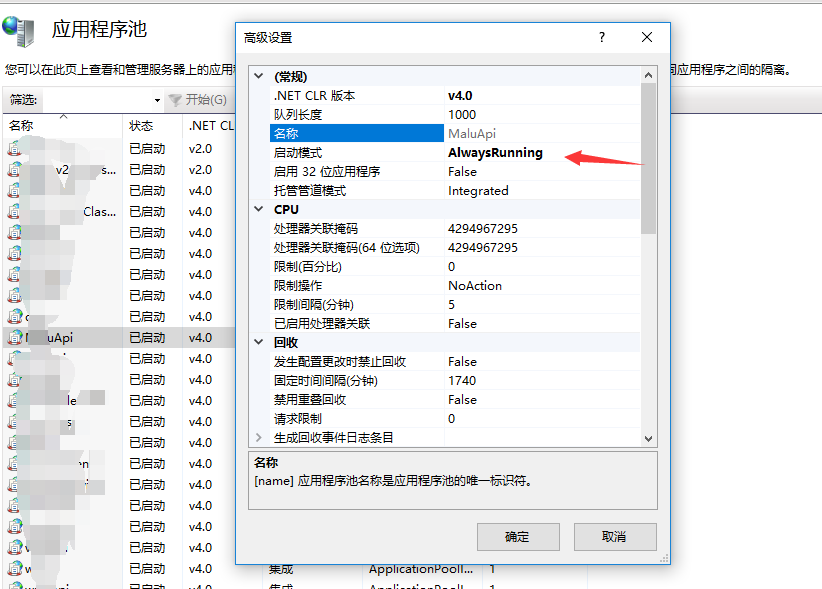
(1)修改应用程序池启动模式
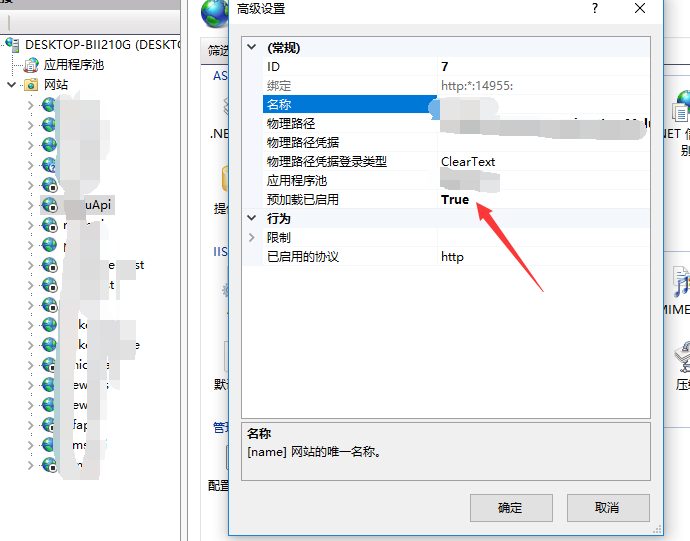
(2)开启对应网站预加载(IIS7.5没有这个)
(3).增加配置编辑器,编写默认预加载的请求页面


hostName是地址,initializationPage是要加载的页面
这样预加载就搞定了
方法二:通过代码实现iis回收之后自动访问页面来唤醒服务
using FluentScheduler;

using System;

using System.Collections.Generic;

using System.IO;

using System.Linq;

using System.Web;

using System.Web.Mvc;

using System.Web.Routing;

namespace FluentSchedulerWeb2

{

    public class MvcApplication : System.Web.HttpApplication

    {

        protected void Application_Start()

        {

            AreaRegistration.RegisterAllAreas();

            RouteConfig.RegisterRoutes(RouteTable.Routes);

            //启用

            JobManager.Initialize(new MyJob());

        }

        protected void Application_End()

        {

            WriteLog("进程即将被IIS回收"+DateTime.Now);

            WriteLog("重新访问一个页面,以唤醒服务" + DateTime.Now);

            string strURL = System.Configuration.ConfigurationManager.AppSettings["homeURL"].ToString();

            try

            {

                System.Net.WebClient wc = new System.Net.WebClient();

                System.IO.Stream stream = wc.OpenRead(strURL);

                System.IO.StreamReader reader = new StreamReader(stream);

                string html = reader.ReadToEnd();

                if (!string.IsNullOrWhiteSpace(html))

                {

                    WriteLog("唤醒程序成功" + DateTime.Now);

                }

                reader.Close();

                reader.Dispose();

                stream.Close();

                stream.Dispose();

                wc.Dispose();

            }

            catch (Exception ex)

            {

                WriteLog("唤醒异常"+ex.Message+DateTime.Now);

            }

        }

        public void WriteLog(string str)

        {

            System.IO.StreamWriter writer = null;

            try

            {

                //写入日志

                string path = string.Empty;

                path = @"F:\ErrorLogs\";

                //不存在则创建错误日志文件夹

                if (!Directory.Exists(path))

                {

                    Directory.CreateDirectory(path);

                }

                path += string.Format(@"\{0}.txt", DateTime.Now.ToString("yyyy-MM-dd"));

                writer = !System.IO.File.Exists(path) ? System.IO.File.CreateText(path) : System.IO.File.AppendText(path); //判断文件是否存在,如果不存在则创建,存在则添加

                writer.WriteLine(str);

                writer.WriteLine("********************************************************************************************");

            }

            finally

            {

                if (writer != null)

                {

                    writer.Close();

                }

            }

        }

    }

}
这样就搞定了
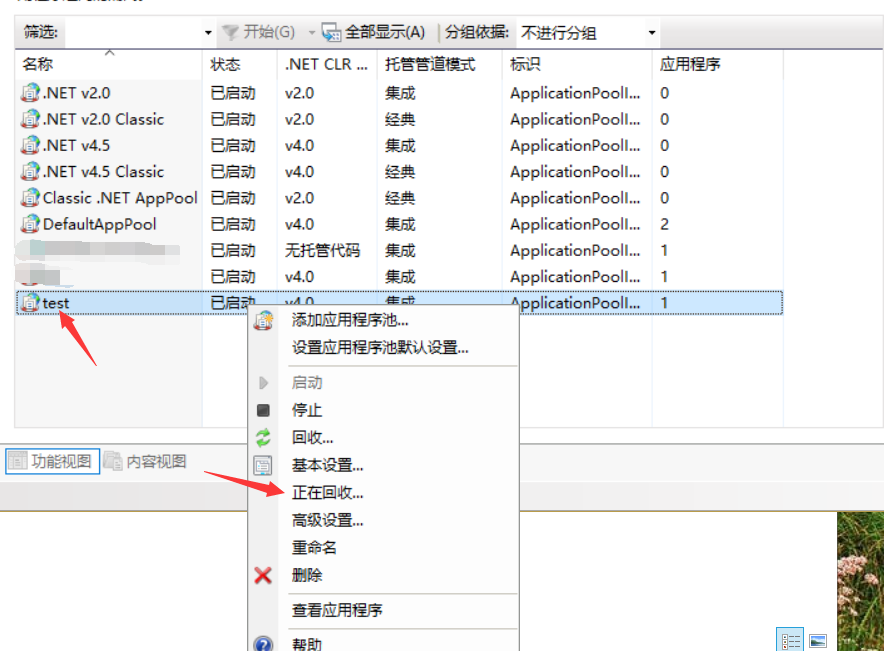
那么,我们如何测试呢,可以更改IIS的回收时间
在应用程序池中右键当前应用程序池,正在回收
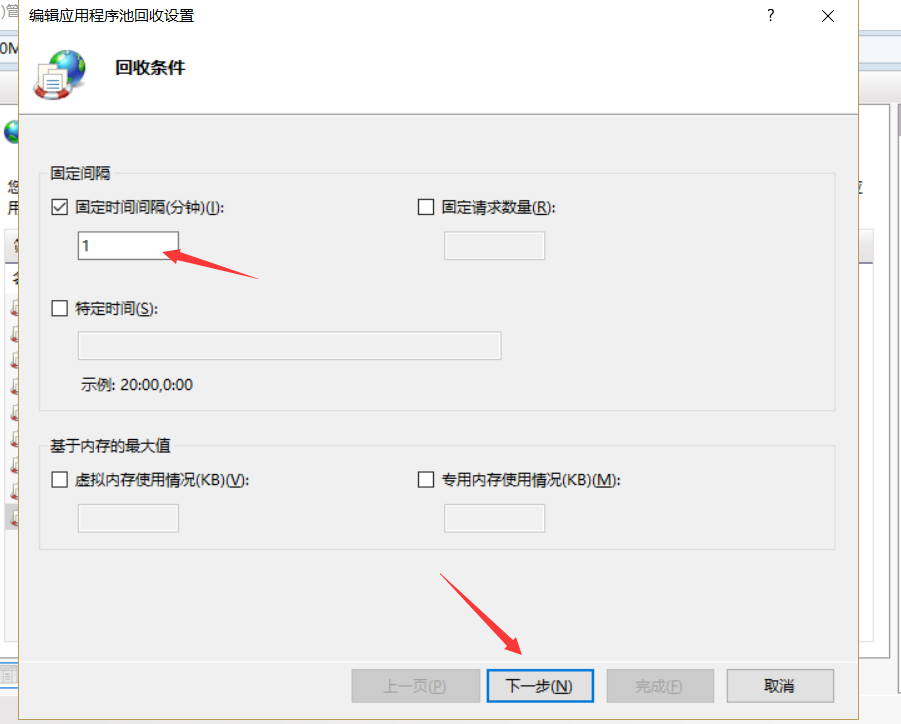
设置回收间隔 我设置1分钟
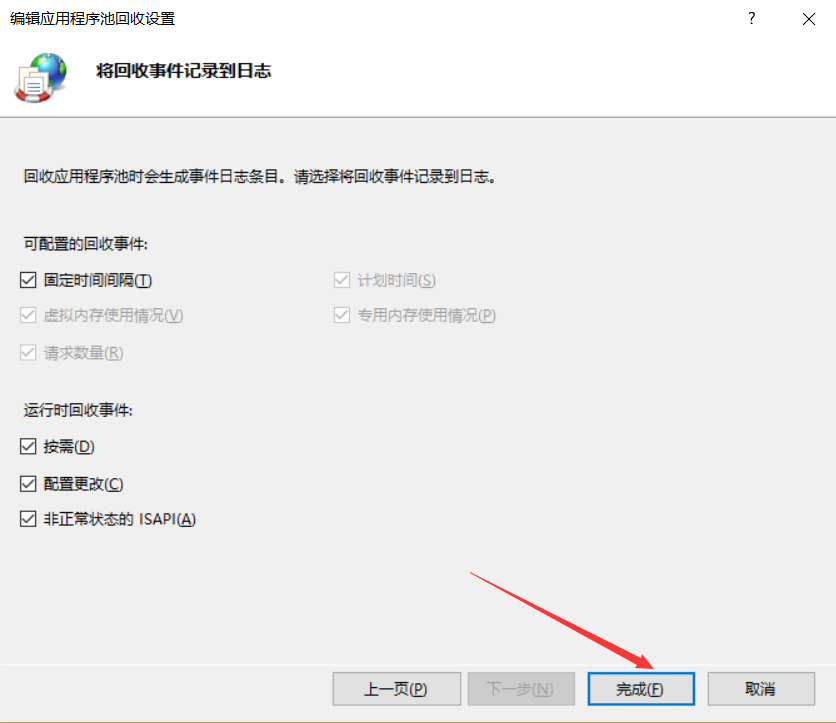
这样可以再去看日志

使用FluentScheduler实现定时任务管理的更多相关文章
- Quartz 定时任务管理
前言 将项目中的所有定时任务都统一管理吧,使用 quartz 定时任务 设计思路 使用 quartz 的相关jar 包,懒得去升级了,我使用的是 quart 1.6 写一个定时任务管理类 用一张数据库 ...
- 基于PHP的crontab定时任务管理
BY JENNER · 2014年11月10日· 阅读次数:6 linux的crontab一直是server运维.业务开展的利器.但当定时任务增多时,管理和迁移都变得非常麻烦,并且easy出问题.以下 ...
- 定时任务管理中心(dubbo+spring)-我们到底能走多远系列47
我们到底能走多远系列47 扯淡: 又是一年新年时,不知道上一年你付出了多少,收获了多少呢?也许你正想着老板会发多少奖金,也许你正想着明年去哪家公司投靠. 这个时间点好好整理一下,思考总结一下,的确是个 ...
- 基于Spring4的定时任务管理
在项目中,有时会遇到定时任务的处理,下面介绍一下我的做法. 此做法基于Spring4,Spring框架搭建成功,另需引入quartz.jar,pom.xml文件中加入 <dependency&g ...
- 定时任务管理之python篇celery使用
一.为什么要用celery celery是一个简单.灵活.可靠的,处理大量消息的分布式系统,并且提供维护这样一个系统的必须工具.他是一个专注于实时处理的任务队列,同时也支持任务调度. celery是异 ...
- Linux编译安装、压缩打包、定时任务管理
编译安装 压缩打包 定时任务管理 一.编译安装 使用源代码,编译打包软件 1.特点 1.可以定制软件 2.按需构建软件 2.编译安装 1.下载源代码包 wget https://nginx.org/d ...
- 使用FluentScheduler和IIS预加载在asp.net中实现定时任务管理
FluentScheduler介绍 github地址:https://github.com/fluentscheduler/FluentScheduler FluentScheduler是一个简单的任 ...
- Windows Service 服务搭配FluentScheduler实现定时任务调度
Windows Service 服务 创建Windows Service 项目 创建一个Windows Service项目,并将项目名称改为 TaskWindowService 在解决方案资源管理器内 ...
- Quartz简单实现定时任务管理(SSM+Quartz)
首先你得有一个用Maven搭好的SSM框架,数据库用的Mysql,这里只有关于Quartz的部分.其实有大神总结的很好了,但做完后总有些地方不一样,所以写这篇作为笔记.这里先把大神的写的分享给大家:h ...
随机推荐
- River Hopscotch
River Hopscotch http://poj.org/problem?id=3258 Time Limit: 2000MS Memory Limit: 65536K Total Submi ...
- httplib:AttributeError: 'module' object has no attribute 'HTTPConnection'
# -*-coding:gb2312-*- #Function:学习python的httplib模块 import httplib conn = httplib.HTTPConnection(&quo ...
- Swift 基本语法03-"if let"和"guard let"
1. /// 如果JY_WINDOW有rootViewController, 并且rootViewController类型是AdvertisementViewController,就执行stopPla ...
- ueditor使用注意
问题1:后端配置项没有正常加载,上传插件不能正常使用! 我用的是开发版,1.4.3.3 .Net版 网上查了很多,后来发现只是配置的问题而已. 1.在根目录下:config.json 其中有Img上传 ...
- js 判断字符串是否包含某字符串,String对象中查找子字符,indexOf
var Cts = "bblText"; if(Cts.indexOf("Text") > 0 ) { alert('Cts中包含Text字符 ...
- geoserver 的缓存技术
geoserver提到的缓存工具共有两个:tilecache和geowebcache.geowebcache是java写的,整合进geoserer中. tilecache则是python写的一个小程序 ...
- 数学整合 新(LUOGU)
1.卡特兰数(P2532) 递推式:h(n)=C(2n,n)/(n+1) (n=0,1,2,...) 前十项(从零开始):1, 1, 2, 5, 14, 42, 132, 429, 1430, 486 ...
- Vue.js2 + Laravel5 采用 CORS 方式解决 AJAX 跨域的问题
一.建立中间件 php artisan make:middleware CorsAjax 二.编写中间件 CorsAjax <?phpnamespace App\Http\Middleware; ...
- 在Excel中根据某一个单元格的出生日期自动精确计算年龄
=IF(MONTH(NOW())<MONTH(G4),INT(YEAR(NOW())-YEAR(G4))-1,IF(MONTH(NOW())>MONTH(G4),YEAR(NOW())-Y ...
- 原生JS 实现元素排序
<!DOCTYPE html PUBLIC "-//W3C//DTD XHTML 1.0 Transitional//EN" "http://www.w3.org/ ...