JQuery时代,我们使用ajax向后台提交数据请求,Vue时代,Axios提供了前端对后台数据请求的各种方式。

什么是Axios

Axios是基于Promise的Http客户端,可以在浏览器和node.js中使用。

为什么使用Axios

Axios非常适合前后端数据交互,另一种请求后端数据的方式是vue-resource,vue-resource已经不再更新了,且只支持浏览器端使用,而Axios同时支持浏览器和Node端使用。

Vue开发者推荐使用更好的第三方工具,这就是Axios,详细的文件,请参考Evan You的这篇文章

安装

Axios的安装支持多种方式

npm安装
1
npm install axios
cdn
1
<script src="https://cdn.bootcss.com/axios/0.18.0/axios.min.js"></script>

使用方式介绍

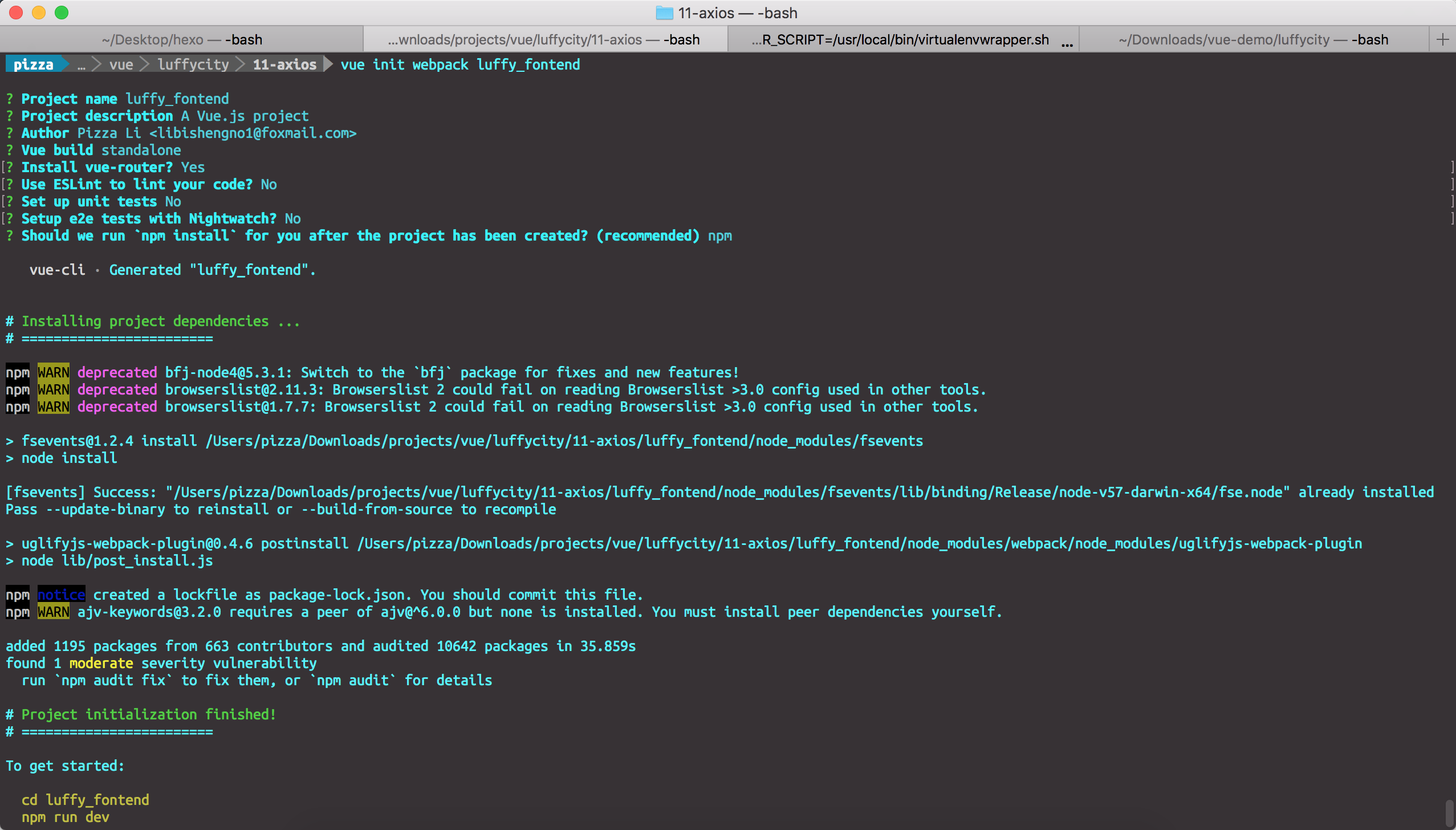
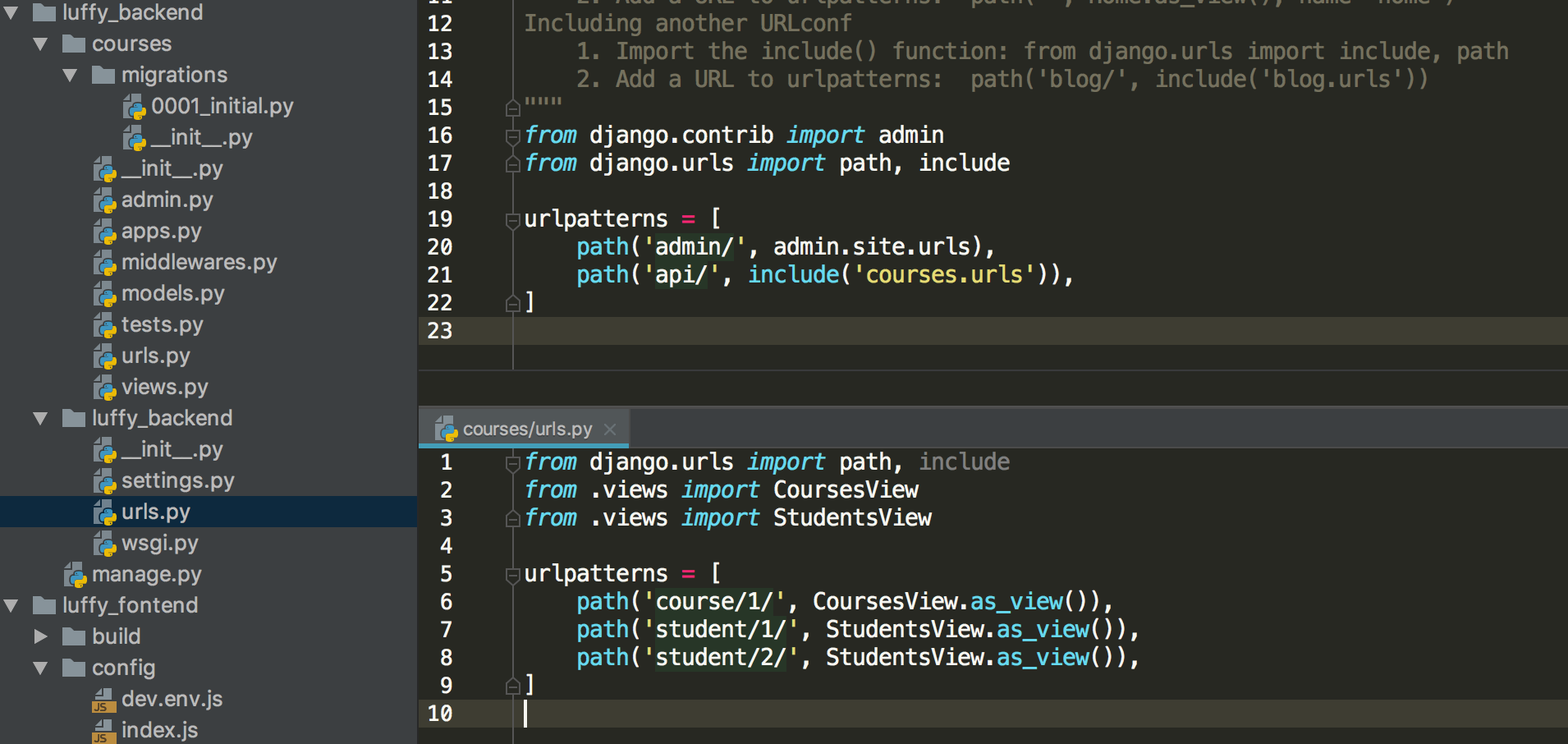
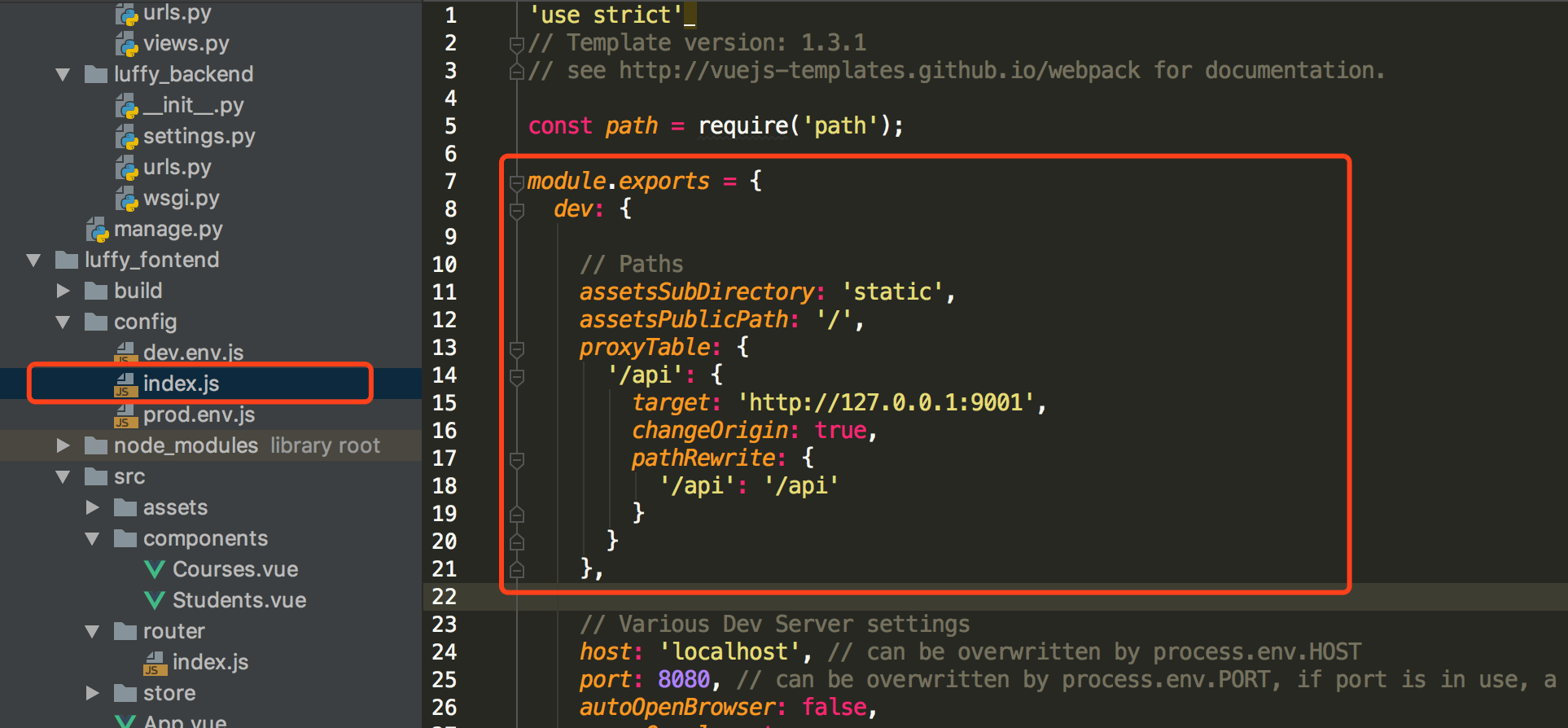
接下来,我们使用Django,搭建一个后台程序,并使用Vue Cli搭建一个前端程序,使用Axios进行前后端数据交互。

使用Vue Cli创建一个前端程序
1
vue init webpack luffy_fontend

使用Django创建一个后端程序luffy_backend
1
django-admin startproject luffy_backend
创建一个courses应用
1
2
cd luffy_backend
python manage.py startapp courses
在models.py中创建两个类
1
2
3
4
5
6
7
8
9
10
11
12
13
14
15
16
17
18
19
20
21
from django.db import models

# Create your models here.

class Courses(models.Model):
course_name = models.CharField(max_length=32)
course_price = models.IntegerField()
course_teacher = models.CharField(max_length=16)
start_date = models.DateField(auto_now=True, null=False)
end_date = models.DateField(auto_now=True, null=False) def __str__(self):
return self.course_name class Students(models.Model):
student_name = models.CharField(max_length=16)
student_id = models.IntegerField()
student_phone = models.IntegerField()
student_address = models.CharField(max_length=128)
插入数据
1
2
3
4
5
6
7
8
9
10
11
12
13
14
15
// courses_courses
insert into courses_courses(course_name, course_price, course_teacher, start_date, end_date) values('Python全栈中级开发', 12800, 'Pizza', '2018-10-01', '2018-10-02');
insert into courses_courses(course_name, course_price, course_teacher, start_date, end_date) values('Python全栈高级开发', 19800, 'Alex', '2018-10-03', '2018-10-04');
insert into courses_courses(course_name, course_price, course_teacher, start_date, end_date) values('Linux高级运维', 12800, 'Oldboy', '2018-10-05', '2018-10-06');
insert into courses_courses(course_name, course_price, course_teacher, start_date, end_date) values('高级网络工程师', 12800, 'Egon', '2018-10-07', '2018-10-08');
insert into courses_courses(course_name, course_price, course_teacher, start_date, end_date) values('Go全栈高级开发', 12800, 'Yuan', '2018-10-09', '2018-10-10');
insert into courses_courses(course_name, course_price, course_teacher, start_date, end_date) values('Vue高级开发', 12800, 'Xiaoma', '2018-10-11', '2018-10-12'); // courses_students
insert into courses_students(id, student_name, student_id, student_phone, student_address) values(1, 'Alex', 100001, 1378061875, '北京市大兴区智障一中');
insert into courses_students(id, student_name, student_id, student_phone, student_address) values(2, 'Pizza', 100002, 1378161875, '北京市朝阳区第一中学');
insert into courses_students(id, student_name, student_id, student_phone, student_address) values(2, 'Egon', 100003, 1378261875, '北京市房山智障三中');
insert into courses_students(id, student_name, student_id, student_phone, student_address) values(4, 'Oldboy', 100004, 1378361875, '北京市大兴区智障三中');
insert into courses_students(id, student_name, student_id, student_phone, student_address) values(5, 'Yuanhao', 100005, 1378460275, '北京市丰台区智障四中');
insert into courses_students(id, student_name, student_id, student_phone, student_address) values(6, 'Jinxin', 100006, 1378560875, '北京市海淀区智障五中');
在views.py中写好接口
1
2
3
4
5
6
7
8
9
10
11
12
13
14
15
16
17
18
19
20
21
22
23
24
25
26
27
28
29
30
31
32
33
34
35
36
37
38
39
40
41
42
43
44
45
46
47
48
49
50
51
52
53
54
55
56
from django.shortcuts import render, HttpResponse
from rest_framework.views import APIView import json from luffy_backend import settings
from .models import Courses
from .models import Students
# Create your views here. class CoursesView(APIView):
def get(self, request):
print("Courses Get Methods Exec!")
courses = list() for item in Courses.objects.all(): course = {
"course_name": item.course_name,
"course_price": item.course_price,
'course_teacher': item.course_teacher,
'start_date': str(item.start_date),
'end_date': str(item.end_date)
} courses.append(course) print(courses) return HttpResponse(json.dumps(courses, ensure_ascii=False)) class StudentsView(APIView):
def get(self, request):
print("Student Get Methods Exec!")
students = list() for item in Students.objects.all():
student = {
'student_name': item.student_name,
'student_id': item.student_id,
'student_phone': item.student_phone,
'student_address': item.student_address
} students.append(student) return HttpResponse(json.dumps(students, ensure_ascii=False)) def post(self, request):
print("Student Post Methods Exec!")
print(request.body.decode('utf-8')) response = json.dumps(request.POST)
return HttpResponse(response)
定义接口

配置后台接口

获取课程信息
1
2
3
4
5
6
7
8
9
10
11
12
13
14
15
16
17
18
19
20
21
22
23
24
25
26
27
28
29
30
31
32
33
34
35
36
37
38
39
40
41
42
43
44
45
46
47
48
49
50
51
52
53
54
55
56
57
58
<template>
<div>
<span>这是课程详情页面</span>
<button @click="getCourses">点击获取全部课程</button>
<div v-if="isShow">
<table border="1">
<thead>
<tr>
<th>课程名称</th>
<th>课程价格</th>
<th>授课老师</th>
<th>开课日期</th>
<th>结课日期</th>
</tr>
</thead>
<tbody>
<tr v-for="(course, index) in courses" :key="index">
<td>{{ course.course_name }}</td>
<td>{{ course.course_price }}</td>
<td>{{ course.course_teacher }}</td>
<td>{{ course.start_date }}</td>
<td>{{ course.end_date }}</td>
</tr>
</tbody>
</table>
</div>
</div> </template> <script>
export default {
name: "Courses",
data() {
return {
isShow: false,
courses: []
}
},
methods: {
getCourses: function () {
let ts = this;
this.$axios.get('/api/course/1/')
.then(function (response) {
ts.isShow = true;
ts.courses = response.data;
})
.catch(function (error) {
console.log(error);
});
}
}
}
</script> <style scoped> </style>
获取学生信息
1
2
3
4
5
6
7
8
9
10
11
12
13
14
15
16
17
18
19
20
21
22
23
24
25
26
27
28
29
30
31
32
33
34
35
36
37
38
39
40
41
42
43
44
45
46
47
48
49
50
51
52
53
54
55
56
57
58
59
60
61
62
63
64
65
66
67
68
69
70
71
72
<template>
<div>
<span>这是学员信息页面</span>
<button @click="getStudents">点击获取学生信息</button>
<button @click="changeStudents">点击修改学生信息</button>
<div v-if="isShow">
<table border="1">
<thead>
<tr>
<th>学生ID</th>
<th>学生姓名</th>
<th>学生电话</th>
<th>学生地址</th>
</tr>
</thead>
<tbody>
<tr v-for="(student, index) in students" :key="index">
<td>{{ student.student_id }}</td>
<td><input v-model="student.student_name"/></td>
<td><input v-model="student.student_phone"/></td>
<td><input v-model="student.student_address"/></td>
</tr>
</tbody>
</table>
</div>
</div>
</template> <script>
export default {
name: "Students",
data() {
return {
isShow: false,
students: []
}
},
methods: {
getStudents: function () {
let ts = this;
this.$axios.get('/api/student/1/')
.then(function (response) {
console.log(response);
ts.isShow = true;
ts.students = response.data;
})
.catch(function (error) {
console.log(error);
})
},
changeStudents: function () {
let ts = this;
this.$axios.post('/api/student/2/', {
student_name: 1,
student_id: 100001,
student_phone: 1347658765,
student_address: "北京市石景山区智障六中"
})
.then(function (response) { })
.catch(function (error) {
console.log(error);
})
}
}
}
</script> <style scoped> </style>

以上,就是我们通过Axios的get和post请求与后台进行数据交互的全过程。

vue学习七之Axios的更多相关文章

  1. day 84 Vue学习六之axios、vuex、脚手架中组件传值

    Vue学习六之axios.vuex.脚手架中组件传值   本节目录 一 axios的使用 二 vuex的使用 三 组件传值 四 xxx 五 xxx 六 xxx 七 xxx 八 xxx 一 axios的 ...

  2. day 85 Vue学习七之vue-cookie

      Vue学习七之vue-cookie   通过vue如何操作cookie呢 参考链接:https://www.jianshu.com/p/535b53989b39 第一步:安装vue-cookies ...

  3. day 87 Vue学习六之axios、vuex、脚手架中组件传值

      本节目录 一 axios的使用 二 vuex的使用 三 组件传值 四 xxx 五 xxx 六 xxx 七 xxx 八 xxx 一 axios的使用 Axios 是一个基于 promise 的 HT ...

  4. day 87-1 Vue学习七之vue-cookie

      通过vue如何操作cookie呢 参考链接:https://www.jianshu.com/p/535b53989b39 第一步:安装vue-cookies npm install vue-coo ...

  5. vue 学习七 组件上使用插槽

    我们有时候可能会在组件上添加元素,就像下面那样 <template> <div id="a"> <com1> <p>我是渲染的值&l ...

  6. vue学习(七) v-model 双向数据绑定

    //html <div id="app"> <input type="text"v-model="msg" style=& ...

  7. vue学习目录 vue初识 this指向问题 vue组件传值 过滤器 钩子函数 路由 全家桶 脚手架 vuecli element-ui axios bus

    vue学习目录 vue学习目录 Vue学习一之vue初识 Vue学习二之vue结合项目简单使用.this指向问题 Vue学习三之vue组件 Vue学习四之过滤器.钩子函数.路由.全家桶等 Vue学习之 ...

  8. vue学习【二】vue结合axios动态引用echarts

    大家好,我是一叶,本篇是vue学习的第二篇,本篇将要讲述vue结合axios动态引用echarts. 在vue中,异步刷新使用的是axios,类似于大家常用的ajax,其实axios已经是vue的第二 ...

  9. AntDesign vue学习笔记(七)Form 读写与图片上传

    AntDesign Form使用布局相比传统Jquery有点繁琐 (一)先读写一个简单的input为例 <a-form :form="form" layout="v ...

随机推荐

  1. javaWeb项目重命名的问题

    tomcat项目名称修改 步骤: 1.对工程重命名(选择工程,右键Refactor->Rename)      2.修改Web路径(选择工程,右键Properties->MyEclipse ...

  2. 非IMU模式下DML语句产生的REDO日志内容格式解读

    实验内容:非IMU模式下DML语句产生的REDO日志内容格式解读 最详细的解读是UPDATE的. 实验环境准备 11G中默认是开启IMU特性的,做此实验需要关闭此特性. alter system se ...

  3. 【Spring Boot&&Spring Cloud系列】Spring Boot中使用NoSql数据库Redis

    github地址:https://github.com/AndyFlower/Spring-Boot-Learn/tree/master/spring-boot-nosql-redis 一.加入依赖到 ...

  4. 通俗大白话来理解TCP协议的三次握手和四次分手

    通俗理解: 但是为什么一定要进行三次握手来保证连接是双工的呢,一次不行么?两次不行么?我们举一个现实生活中两个人进行语言沟通的例子来模拟三次握手. 引用网上的一些通俗易懂的例子,虽然不太正确,后面会指 ...

  5. office excel Query 功能

    Microsoft Query 合并查询 Excel 2016 默认已集成 Power Query 功能

  6. mysql5.6.35的安装脚本

    #!/bin/bashfunction help() ( cat << EOF $ [-h] $ -c <CharaterSet> EOF exit ) ----------- ...

  7. minix中二分查找bsearch的实现

    在看minix中bsearch实现的源代码之前,先学习一下C 语言中void类型以及void*类型的使用方法与技巧. void的含义: void的字面意思是“无类型”,void *则为“无类型指针”, ...

  8. 23种设计模式之策略模式(Strategy)

    策略模式是一种对象的行为型模式,定义一系列算法,并将每一个算法封装起来,并让它们可以相互替换.策略模式比算法独立于使用它的客户而变化,其目的是将行为和环境分隔,当出现新的行为时,只需要实现新的策略类. ...

  9. Android Popup Window 居于控件上方突出显示

    public class TestPopupWindowActivity extends PopupWindow { Activity context; public TestPopupWindowA ...

  10. A simple guide to 9-patch for Android UI

    extends:http://radleymarx.com/blog/simple-guide-to-9-patch/ While I was working on my first Android ...