
c#实现word,excel转pdf代码及部分Office 2007文件格式转换为xps和pdf代码整理
转换功能是通过调用安装了转换XPS和PDF的AddIn的Office2007对象模型完成的. 代码支持Office 2007支持的一切文件格式:
|
Office 2007组件 |
扩展名 |
|
Word |
DOC, DOCX, DOCM, DOTX, DOTM, DOT, TXT, RTP, RTF |
|
Excel |
XLS, XLSX, XLSM, XML |
|
PowerPoint |
PPT, PPTX, PPTM, POTX, PPSX, PPSM, POTM |
添加对三个组件的引用: 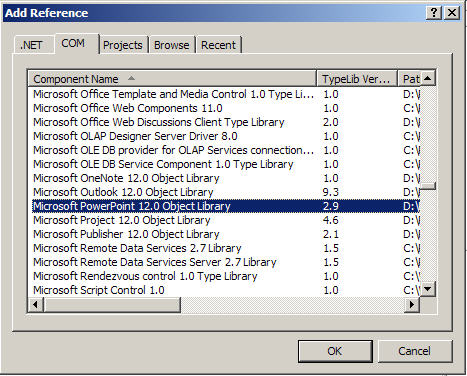

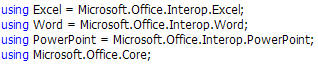
这里使用一个枚举类型来来决定生成文件的类型,包括: 

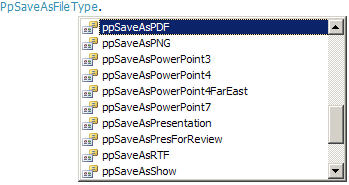 其实可以使用个方法来实现这个功能,这里Word和Excel我使用了ExportAsFixedFormat,PowerPoint使用了SaveAs,对于Word和PowerPoint效果是一样的。只是SaveAs支持的格式更多, 但我发现似乎Excel不支持SaveAs.
Word转换代码:
 private bool Convert(string sourcePath, string targetPath, Word.WdExportFormat exportFormat)

        {

            bool result;

            object paramMissing = Type.Missing;

            Word.ApplicationClass wordApplication = new Word.ApplicationClass();

            Word.Document wordDocument = null;

            try

            {

                object paramSourceDocPath = sourcePath;

                string paramExportFilePath = targetPath;

                Word.WdExportFormat paramExportFormat = exportFormat;

                bool paramOpenAfterExport = false;

                Word.WdExportOptimizeFor paramExportOptimizeFor =

                    Word.WdExportOptimizeFor.wdExportOptimizeForPrint;

                Word.WdExportRange paramExportRange = Word.WdExportRange.wdExportAllDocument;

                int paramStartPage = ;

                int paramEndPage = ;

                Word.WdExportItem paramExportItem = Word.WdExportItem.wdExportDocumentContent;

                bool paramIncludeDocProps = true;

                bool paramKeepIRM = true;

                Word.WdExportCreateBookmarks paramCreateBookmarks =

                    Word.WdExportCreateBookmarks.wdExportCreateWordBookmarks;

                bool paramDocStructureTags = true;

                bool paramBitmapMissingFonts = true;

                bool paramUseISO19005_1 = false;

                wordDocument = wordApplication.Documents.Open(

                    ref paramSourceDocPath, ref paramMissing, ref paramMissing,

                    ref paramMissing, ref paramMissing, ref paramMissing,

                    ref paramMissing, ref paramMissing, ref paramMissing,

                    ref paramMissing, ref paramMissing, ref paramMissing,

                    ref paramMissing, ref paramMissing, ref paramMissing,

                    ref paramMissing);

                if (wordDocument != null)

                    wordDocument.ExportAsFixedFormat(paramExportFilePath,

                        paramExportFormat, paramOpenAfterExport,

                        paramExportOptimizeFor, paramExportRange, paramStartPage,

                        paramEndPage, paramExportItem, paramIncludeDocProps,

                        paramKeepIRM, paramCreateBookmarks, paramDocStructureTags,

                        paramBitmapMissingFonts, paramUseISO19005_1,

                        ref paramMissing);

                result = true;

            }

            finally

            {

                if (wordDocument != null)

                {

                    wordDocument.Close(ref paramMissing, ref paramMissing, ref paramMissing);

                    wordDocument = null;

                }

                if (wordApplication != null)

                {

                    wordApplication.Quit(ref paramMissing, ref paramMissing, ref paramMissing);

                    wordApplication = null;

                }

                GC.Collect();

                GC.WaitForPendingFinalizers();

                GC.Collect();

                GC.WaitForPendingFinalizers();

            }

            return result;

        }
Excel转换代码:
private bool Convert(string sourcePath, string targetPath, XlFixedFormatType targetType)

        {

            bool result;

            object missing = Type.Missing;

            ApplicationClass application = null;

            Workbook workBook = null;

            try

            {

                application = new ApplicationClass();

                object target = targetPath;

                object type = targetType;

                workBook = application.Workbooks.Open(sourcePath, missing, missing, missing, missing, missing,

                    missing, missing, missing, missing, missing, missing, missing, missing, missing);

                workBook.ExportAsFixedFormat(targetType, target, XlFixedFormatQuality.xlQualityStandard, true, false, missing, missing, missing, missing);

                result = true;

            }

            catch

            {

                result = false;

            }

            finally

            {

                if (workBook != null)

                {

                    workBook.Close(true, missing, missing);

                    workBook = null;

                }

                if (application != null)

                {

                    application.Quit();

                    application = null;

                }

                GC.Collect();

                GC.WaitForPendingFinalizers();

                GC.Collect();

                GC.WaitForPendingFinalizers();

            }

            return result;

        }
PowerPoint转换代码:
 private bool Convert(string sourcePath, string targetPath, PpSaveAsFileType targetFileType)

        {

            bool result;

            object missing = Type.Missing;

            ApplicationClass application = null;

            Presentation persentation = null;

            try

            {

                application = new ApplicationClass();

                persentation = application.Presentations.Open(sourcePath, MsoTriState.msoTrue, MsoTriState.msoFalse, MsoTriState.msoFalse);

                persentation.SaveAs(targetPath, targetFileType, Microsoft.Office.Core.MsoTriState.msoTrue);

                result = true;

            }

            catch

            {

                result = false;

            }

            finally

            {

                if (persentation != null)

                {

                    persentation.Close();

                    persentation = null;

                }

                if (application != null)

                {

                    application.Quit();

                    application = null;

                }

                GC.Collect();

                GC.WaitForPendingFinalizers();

                GC.Collect();

                GC.WaitForPendingFinalizers();

            }

            return result;

        }
c#实现word,excel转pdf代码及部分Office 2007文件格式转换为xps和pdf代码整理的更多相关文章
- VSTO 为Office已有右键菜单添加自己的菜单项(word,Excel)
原文:VSTO 为Office已有右键菜单添加自己的菜单项(word,Excel) private void AddRightMenu() { Microsoft ...
- PDF/WORD/EXCEL/PPT 文档在线阅读
查资料看了2种解决方法: 1.通过办公软件dll转换,用flans去看 2.通过Aspose转换成pdf格式,在用js前台读pdf(我用的pdf.js) 今天我解决的就是WORD/EXCEL/PPT ...
- lucent检索技术之创建索引:使用POI读取txt/word/excel/ppt/pdf内容
在使用lucent检索文档时,必须先为各文档创建索引.索引的创建即读出文档信息(如文档名称.上传时间.文档内容等),然后再经过分词建索引写入到索引文件里.这里主要是总结下读取各类文档内容这一步. 一. ...
- Java解析OFFICE(word,excel,powerpoint)以及PDF的实现方案及开发中的点滴分享
Java解析OFFICE(word,excel,powerpoint)以及PDF的实现方案及开发中的点滴分享 在此,先分享下写此文前的经历与感受,我所有的感觉浓缩到一个字,那就是:"坑&qu ...
- java 如何将 word,excel,ppt如何转pdf --openoffice (1)
承上启下,可折叠 上一篇说的是:服务器是windows server时,用jacob将msoffice(指的是word,excel,ppt)转换成pdf. 若被部署项目的服务器是centOS等linu ...
- word/excel/ppt 2 PDF
PHP 实现 word/excel/ppt 转换为 PDF 一般最常见的就是利用OpenOffice来转换,来看看实现的核心代码: class PDFConverter { private $com; ...
- Java通过openOffice实现word,excel,ppt转成pdf实现在线预览
Java通过openOffice实现word,excel,ppt转成pdf实现在线预览 一.OpenOffice 1.1 下载地址 1.2 JodConverter 1.3 新建实体类PDFDemo ...
- Office系列---将Office文件(Word、PPT、Excel)转换为PDF文件,提取Office文件(Word、PPT)中的所有图片
将Office文件转换为PDF文件,提取Office文件中的所有图片 1.Office系列---将Office文件(Word.PPT.Excel)转换为PDF文件 1.1 基于Office实现的解决方 ...
- Atitit.office word excel ppt pdf 的web在线预览方案与html转换方案 attilax 总结
Atitit.office word excel ppt pdf 的web在线预览方案与html转换方案 attilax 总结 1. office word excel pdf 的web预览要求 ...
随机推荐
- Android开发(十一)——ImageView的尺寸设置scaleType
ImageView的属性android:scaleType,即 ImageView.setScaleType(ImageView.ScaleType). android:scaleType是控制图片如 ...
- Java中ArrayList实现原理
简述: ArrayList可以理解为动态数组,与Java中的数组相比,它的容量能动态增长.超出限制时会增加50%容量,用System.arraycopy()复制到新的数组中,因此最好能给出数组大小的预 ...
- C语言 · 身份证排序
算法提高 身份证排序 时间限制:1.0s 内存限制:256.0MB 问题描述 安全局搜索到了一批(n个)身份证号码,希望按出生日期对它们进行从大到小排序,如果有相同日期,则按身份证号 ...
- Java编程的逻辑 (29) - 剖析String
本系列文章经补充和完善,已修订整理成书<Java编程的逻辑>,由机械工业出版社华章分社出版,于2018年1月上市热销,读者好评如潮!各大网店和书店有售,欢迎购买,京东自营链接:http: ...
- 【进阶修炼】——改善C#程序质量(9)
140,使用默认的访问修饰符. 如果不加访问修饰符,成员变量的默认是private的,类默认是internal的.为了明确访问的权限,我倒是建议都加上访问修饰符,这省不了多少代码. 141,不知道该不 ...
- jQuery(三):样式操作
一.DOM操作分类 DOM Core:任何一种支持DOM的编程语言都可以使用它,例如:getElementById(). HTML-DOM:用于处理HTML文档,例如:document.forms. ...
- oracle数据库表中,插入数据的时候如何产生一个 字母+数字 编号?
Oracle 语句中“||”代表什么啊? oracle数据库表中,插入数据的时候如何产生一个 字母+数字 编号? 排序的话,用order by来处理即可.比如:cola123a234b999b335s ...
- NetBeans Support Weblog
https://blogs.oracle.com/NetBeansSupport/entry/tomcat_log_files ———————————————————————————————————— ...
- 给data设置数据
console.log(JSON.stringify(that.data.navigator[0].content) + "--____+" + JSON.stringify(th ...
- 电源PI相关知识讲解
电源层与地线层的谐振控制 一旦PCB的电源与地层的形状.距离以及中间介质定下来以后,发生谐振的频率也就定下来了. 采用LC等效电路,不考虑PCB上的损耗,而这些损耗往往在高频影响尤为明显,例如趋肤效应 ...