
Linux系统——PXE高效能批量网络装机
PXE:Pre-boot Excution Environment,预启动执行环境,石油Intel公司开发的网络引导技术,工作在Client、Server模式,允许客户机通过网络从远程服务器下载阴道镜像,并记载安装文件或者整个操作系统。
搭建PXE网络体系,必须要满足一下条件:
1. 客户机的网卡支持PXE协议(集成BOOTROM芯片),且主板支持网络引导。
2. 网络中有一台DHCP服务器,一边为客户机分配地址、指定引导文件位置
服务器通过TFTP简单文件传输协议提供引导镜像文件的下载。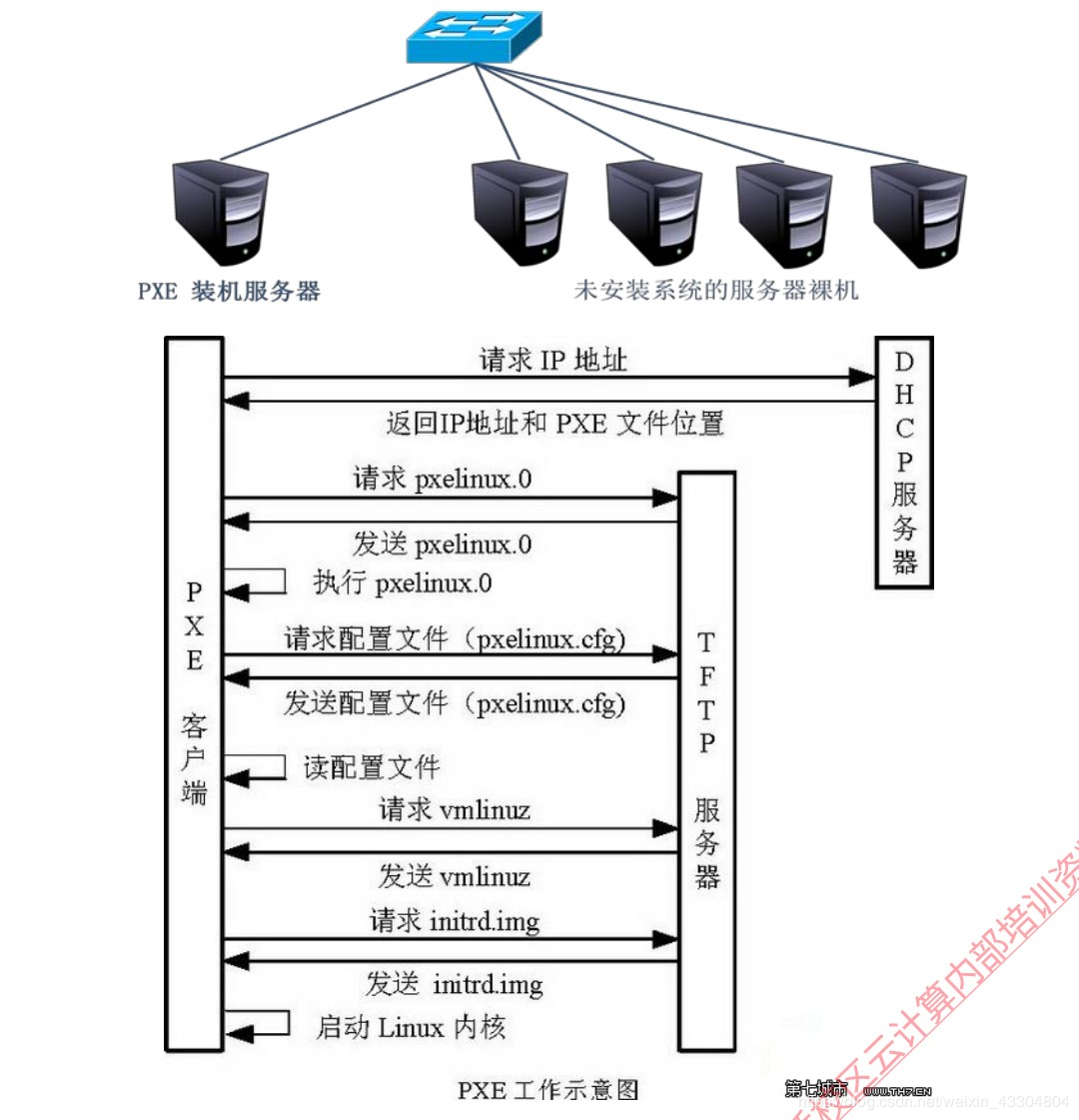
工作过程:
工作站开机后,PXE BootROM(自启动芯片)获得控制权之前先做自我测试,然后以广播形式发出一个请求FIND帧。如果服务器收到工作站所送出的要求,就会送回DHCP回应,内容包括用户端的IP地址,预设通讯通道及开机应许昂文件。否则,服务器会忽略这个要求。工作站收到服务器发回的响应后则会回应一个帧,以请求传送启动所需文件。之后,将有更多的讯息在工作站与服务器之间作应答,用以决定启动参数。BootROM由TFTP通信协议从服务器下载开机映像档,这个映像档就是软盘的映像文件。工作站树勇TFTP协议接受启动文件后,将控制权转交启动快,引导操作系统,完成远程启动。
#### 搭建PXE远程安装服务器
1. 安装并启动TFTP服务
```
[root@localhost ~]# mkdir -p /var/ftp/centos6
[root@localhost ~]# cd /var/ftp/centos6/
[root@localhost centos6]# cp -rp /media/cdrom/* .
[root@localhost ~]# mount /dev/sr0 /media/cdrom
mount: block device /dev/sr0 is write-protected, mounting read-only
[root@localhost ~]# yum -y install tftp-server
[root@localhost centos6]# vim /etc/xinetd.d/tftp
# default: off
# description: The tftp server serves files using the trivial file transfer \
# protocol. The tftp protocol is often used to boot diskless \
# workstations, download configuration files to network-aware printers, \
# and to start the installation process for some operating systems.
service tftp
{
socket_type = dgram
protocol = udp
wait = no # 无需等待,同一时刻可以多个客户端连接
user = root
server = /usr/sbin/in.tftpd
server_args = -s /var/lib/tftpboot #tftp服务的根目录
disable = no #开启tftp服务
per_source = 11
cps = 100 2
flags = IPv4
}
```
2. 启动tftp
```
[root@localhost centos6]# /etc/init.d/xinetd start
Starting xinetd: [ OK ]
[root@localhost centos6]# chkconfig tftp on
```
3. 准备Linux内核、初始化镜像文件
```
[root@localhost ~]# cd /var/ftp/centos6/isolinux/
[root@localhost isolinux]# ls
boot.cat initrd.img memtest vesamenu.c32
boot.msg isolinux.bin splash.jpg vmlinuz
grub.conf isolinux.cfg TRANS.TBL
[root@localhost isolinux]# cp vmlinuz initrd.img /var/lib/tftpboot/
[root@localhost isolinux]# ls /var/lib/tftpboot/
initrd.img vmlinuz
```
4. 准备PXE引导程序、启动菜单文件
准备引导程序
```
[root@localhost isolinux]# yum -y install syslinux
[root@localhost isolinux]# cp /usr/share/syslinux/pxelinux.0 /var/lib/tftpboot/
[root@localhost isolinux]# ls /var/lib/tftpboot/
initrd.img pxelinux.0 vmlinuz
[root@localhost isolinux]#
```
准备启动菜单
```
[root@localhost ~]# cp /var/ftp/centos6/isolinux/isolinux.cfg /var/lib/tftpboot/
[root@localhost ~]# cd /var/lib/tftpboot/
[root@localhost tftpboot]# chmod 644 isolinux.cfg
[root@localhost tftpboot]# vim isolinux.cfg
default linux #改个名字
prompt 0 #不进行交互
#timeout 600
display boot.msg
#menu background splash.jpg
#menu title Welcome to CentOS 6.5!
#menu color border 0 #ffffffff #00000000
#menu color sel 7 #ffffffff #ff000000
#menu color title 0 #ffffffff #00000000
#menu color tabmsg 0 #ffffffff #00000000
#menu color unsel 0 #ffffffff #00000000
#menu color hotsel 0 #ff000000 #ffffffff
#menu color hotkey 7 #ffffffff #ff000000
#menu color scrollbar 0 #ffffffff #00000000
label linux
menu label ^Install or upgrade an existing system
menu default
kernel vmlinuz
append initrd=initrd.img
label text #对原数据进行更改
menu label Install system with ^basic video driver
kernel vmlinuz
append text initrd=initrd.img xdriver=vesa nomodeset #对原数据进行更改
label rescue
menu label ^Rescue installed system
kernel vmlinuz
append rescue initrd=initrd.img rescue #对原数据进行更改
label local
menu label Boot from ^local drive
localboot 0xffff
label memtest86
menu label ^Memory test
kernel memtest
append -
[root@localhost tftpboot]# cd /var/lib/tftpboot/
[root@localhost tftpboot]# mkdir pxelinux.cfg
[root@localhost tftpboot]# mv isolinux.cfg ./pxelinux.cfg/default
```
5. 安装并启动DHCP服务(pxe服务端)
```
[root@localhost tftpboot]# yum -y install dhcp
[root@localhost tftpboot]# cp /usr/share/doc/dhcp*/dhcpd.conf.sample .
[root@localhost tftpboot]# cat dhcpd.conf.sample > /etc/dhcp/dhcpd.conf
[root@localhost tftpboot]# vim /etc/dhcp/dhcpd.conf
# dhcpd.conf
#
# Sample configuration file for ISC dhcpd
#
# option definitions common to all supported networks...
option domain-name "www.yunjisuan.com";
option domain-name-servers 192.168.239.2;
default-lease-time 21600;
max-lease-time 43200;
# Use this to enble / disable dynamic dns updates globally.
#ddns-update-style none;
# If this DHCP server is the official DHCP server for the local
# network, the authoritative directive should be uncommented.
#authoritative;
# Use this to send dhcp log messages to a different log file (you also
# have to hack syslog.conf to complete the redirection).
log-facility local7;
# No service will be given on this subnet, but declaring it helps the
# DHCP server to understand the network topology.
# This is a very basic subnet declaration.
subnet 192.168.239.0 netmask 255.255.255.0 {
range 192.168.239.100 192.168.239.200;
option routers 192.168.239.2;
next-server 192.168.239.132; #PXE的IP地址
filename "pxelinux.0";
}
[root@localhost tftpboot]# /etc/init.d/dhcpd start
Starting dhcpd: [ OK ]
[root@localhost tftpboot]# netstat -antup | grep 67
udp 0 0 0.0.0.0:67 0.0.0.0:* 1528/dhcpd
[root@localhost tftpboot]# yum -y install vsftpd
[root@localhost tftpboot]# /etc/init.d/vsftpd start
Starting vsftpd for vsftpd: [ OK ]
```
6. 测试连接ftp功能(pxe客户端)
```
[root@localhost ~]# mount /dev/sr0 /media/cdrom
mount: block device /dev/sr0 is write-protected, mounting read-only
[root@localhost ~]# yum -y install ftp
[root@localhost ~]# ftp 192.168.239.132
Connected to 192.168.239.132 (192.168.239.132).
220 (vsFTPd 2.2.2)
Name (192.168.239.132:root): ftp
331 Please specify the password.
Password: #密码为空
230 Login successful.
Remote system type is UNIX.
Using binary mode to transfer files.
ftp> ls
227 Entering Passive Mode (192,168,239,132,90,93).
150 Here comes the directory listing.
drwxr-xr-x 7 0 0 4096 Dec 02 15:32 centos6
drwxr-xr-x 2 0 0 4096 Mar 22 2017 pub
226 Directory send OK.
ftp> cd centos6
250 Directory successfully changed.
ftp> ls
227 Entering Passive Mode (192,168,239,132,90,223).
150 Here comes the directory listing.
-r--r--r-- 1 0 0 14 Nov 29 2013 CentOS_BuildTag
dr-xr-xr-x 3 0 0 4096 Nov 29 2013 EFI
-r--r--r-- 1 0 0 212 Nov 27 2013 EULA
-r--r--r-- 1 0 0 18009 Nov 27 2013 GPL
dr-xr-xr-x 2 0 0 282624 Nov 29 2013 Packages
-r--r--r-- 1 0 0 1354 Nov 27 2013 RELEASE-NOTES-en-US.html
-r--r--r-- 1 0 0 1706 Nov 27 2013 RPM-GPG-KEY-CentOS-6
-r--r--r-- 1 0 0 1730 Nov 27 2013 RPM-GPG-KEY-CentOS-Debug-6
-r--r--r-- 1 0 0 1730 Nov 27 2013 RPM-GPG-KEY-CentOS-Security-6
-r--r--r-- 1 0 0 1734 Nov 27 2013 RPM-GPG-KEY-CentOS-Testing-6
-r--r--r-- 1 0 0 3380 Nov 29 2013 TRANS.TBL
dr-xr-xr-x 3 0 0 4096 Nov 29 2013 images
dr-xr-xr-x 2 0 0 4096 Nov 29 2013 isolinux
dr-xr-xr-x 2 0 0 4096 Nov 29 2013 repodata
226 Directory send OK.
ftp> exit
221 Goodbye.
```
7. 新建虚拟机进行验证
(1)调整BIOS,一边从网络引导(不调整默认从网络引导)
在工具栏的【虚拟机】选项,选择【电源】,点击【打开电源时进入固件】进入BIOS界面,将network boot from Intel E1000调整到第一位

(2)自动获取IP地址,并指向centos安装源
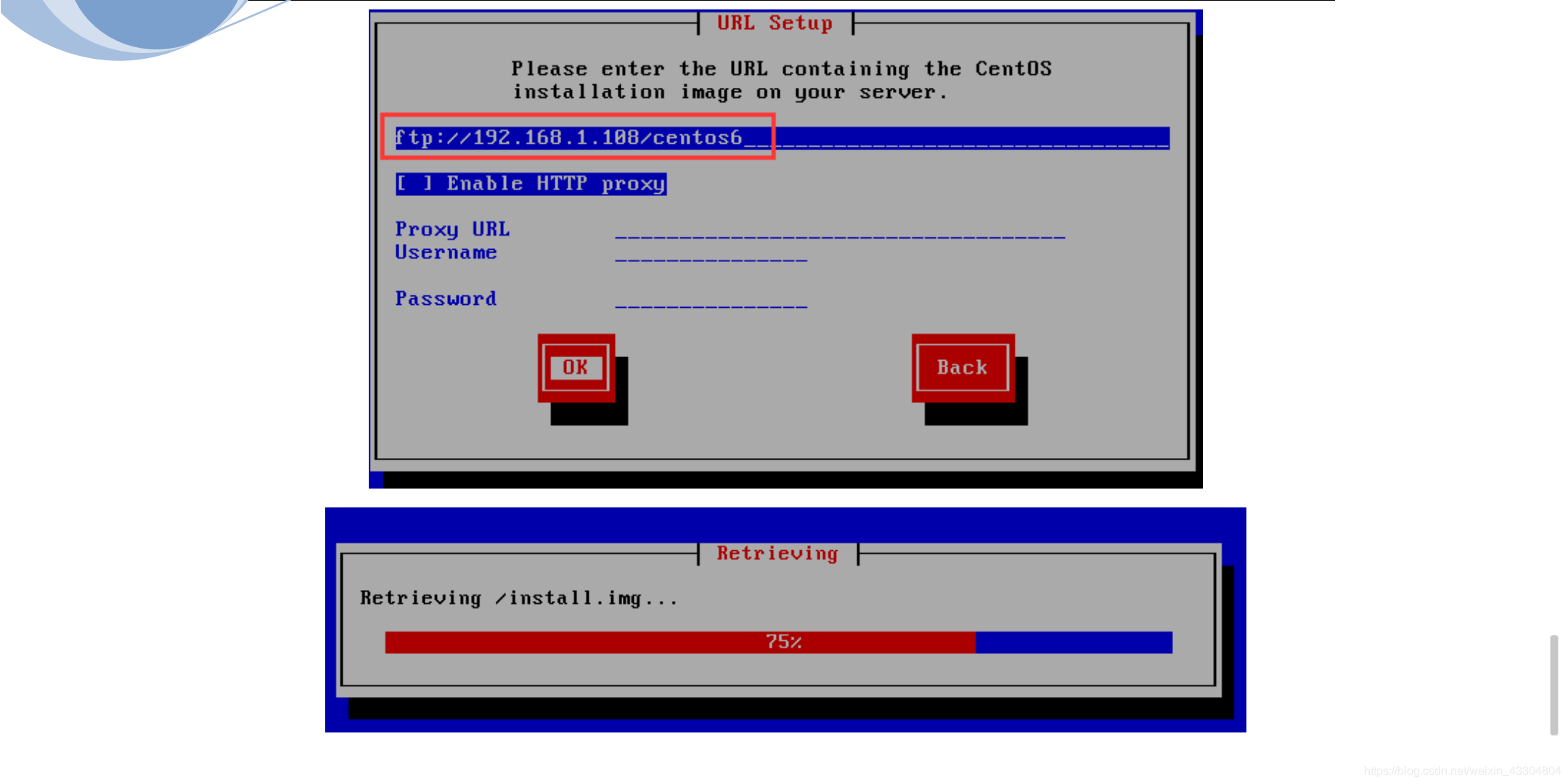
在URL setup输入ftp的URL(连接对方的IP地址),进行正常装机
#### 实现kickstart无人值守安装
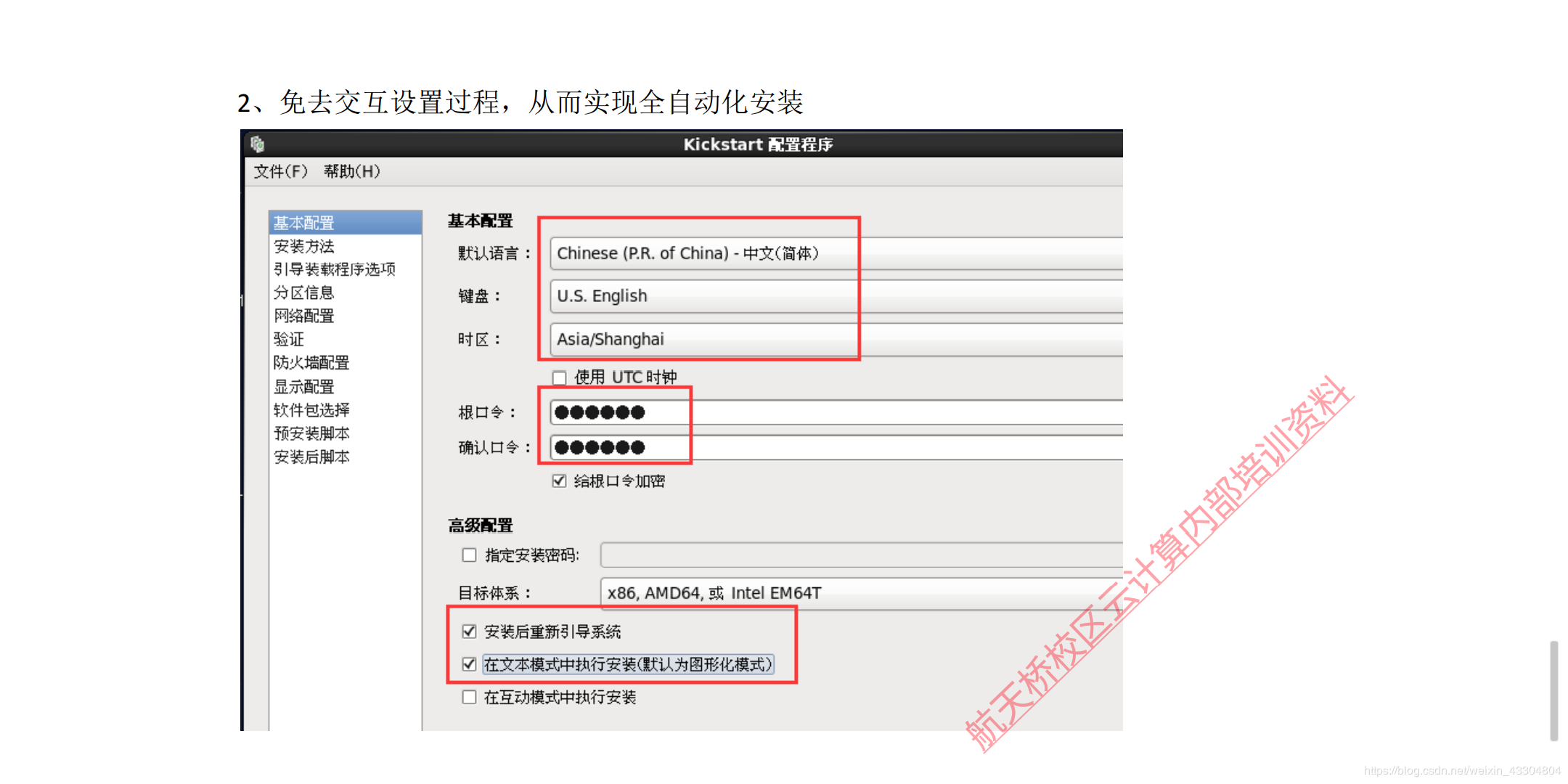
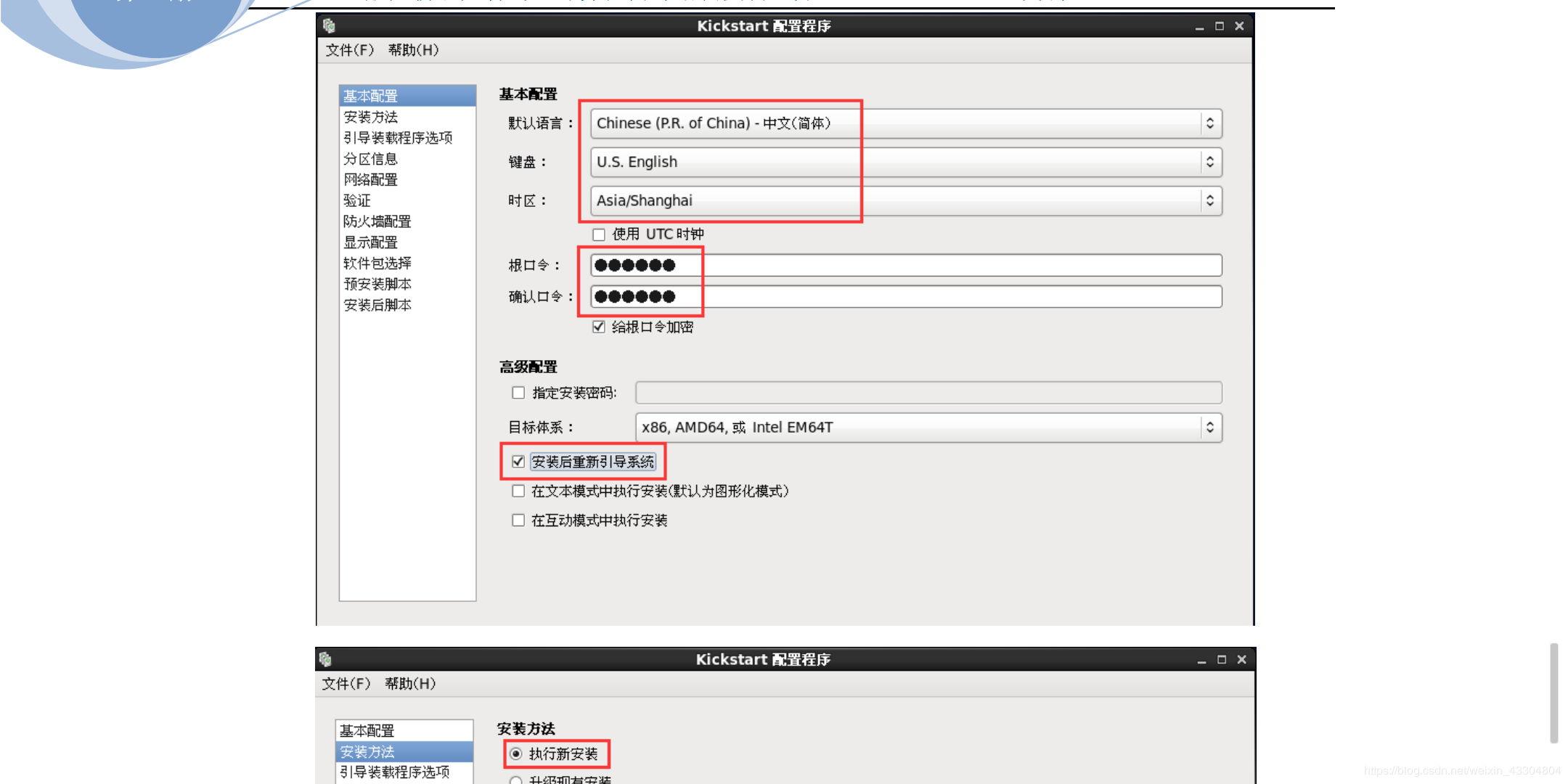
1. 创建应答文件
```
[root@localhost ~]# mount /dev/sr0 /media/cdrom
[root@localhost ~]# yum -y install system-config-kickstart
```


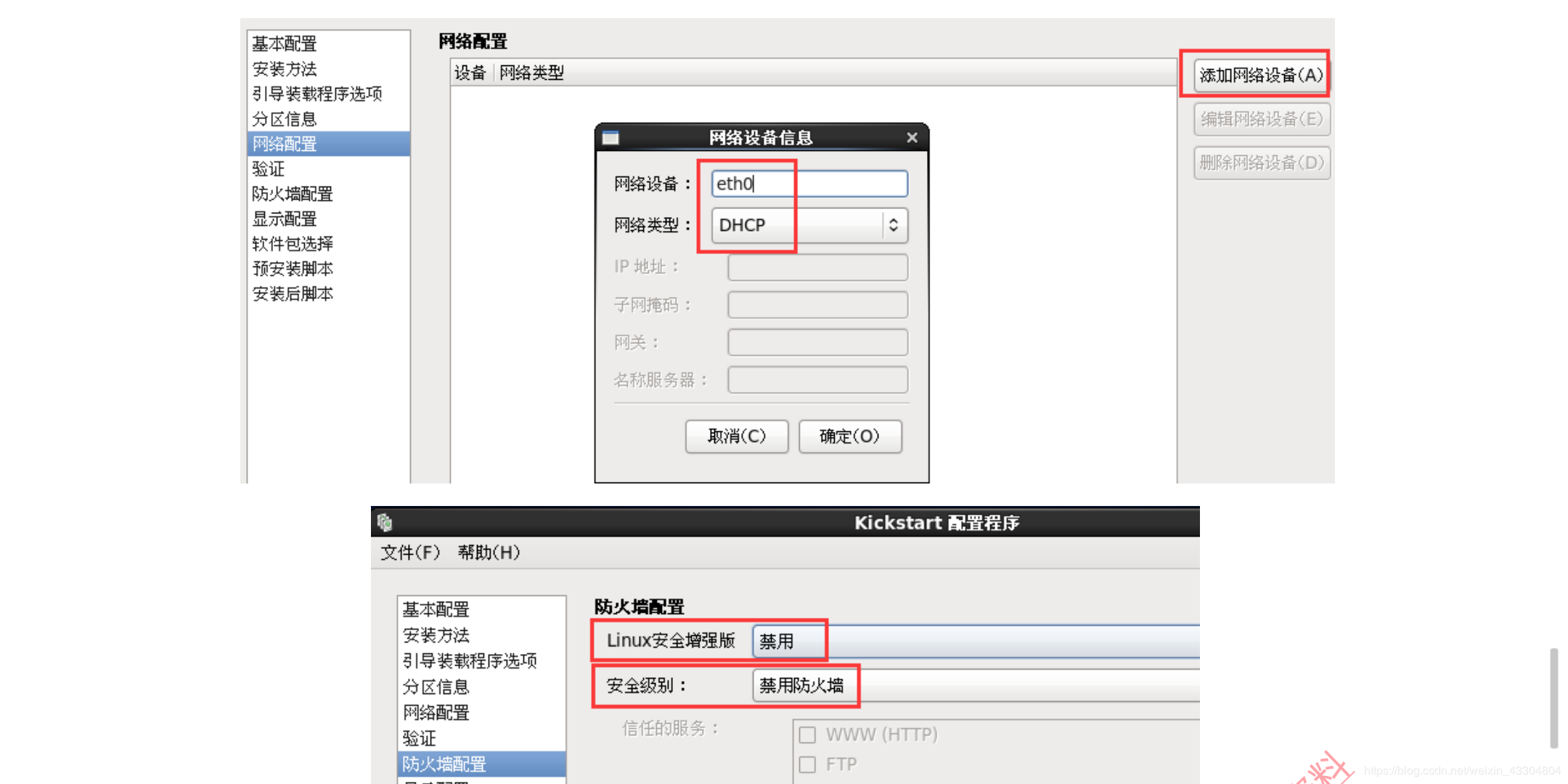
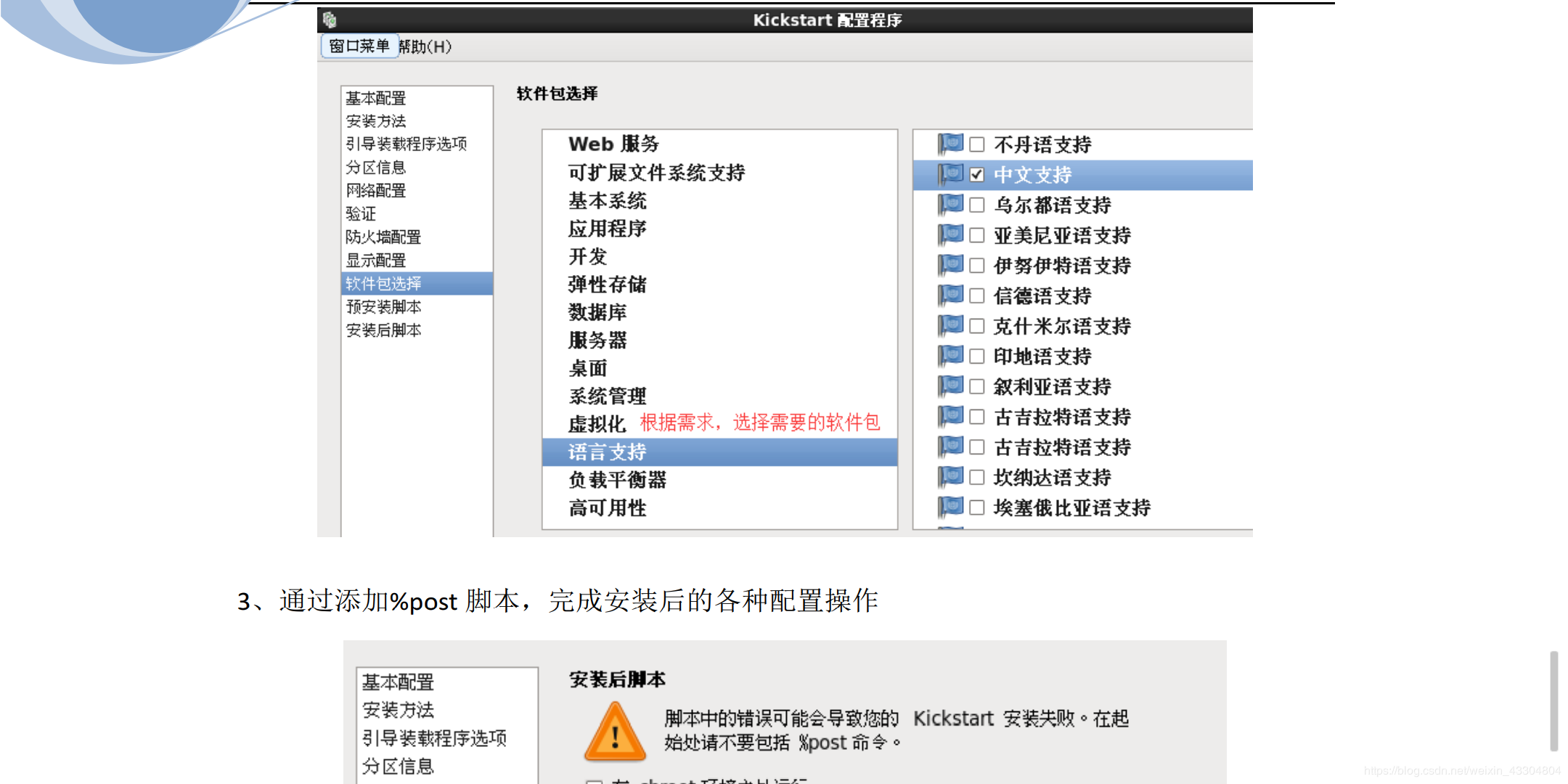
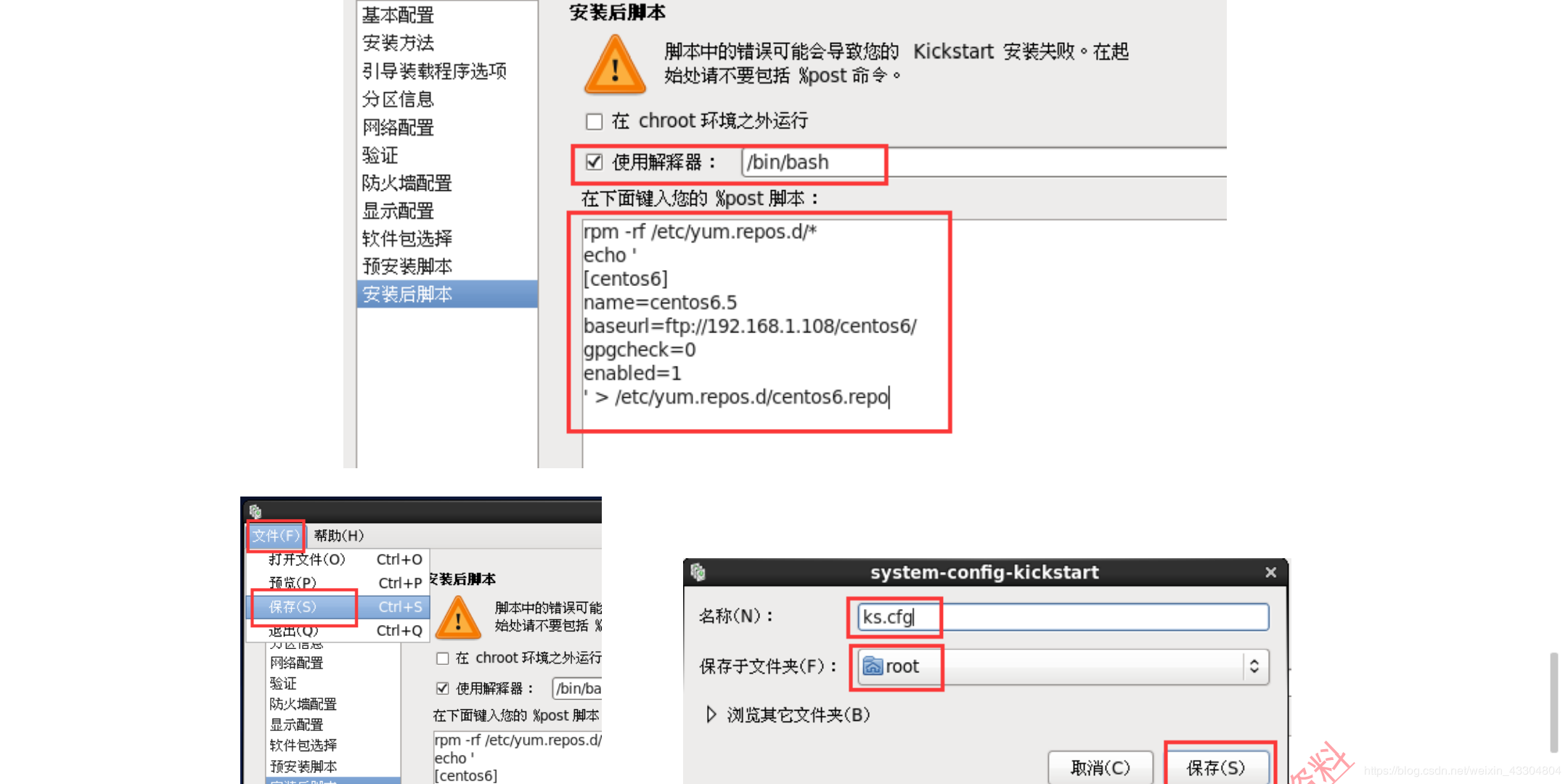
Linux系统——PXE高效能批量网络装机的更多相关文章
- Linux网络服务第六章PXE高效能批量网络装机
1.IP地址配置 2.关闭防火墙以及selinux状态如下 systemctl stop firewalld Iptables -F Setenforce 0 三.部署FTP服务 1.安装F ...
- PXE高效能批量网络装机
PXE简绍 PXE(preboot execute environment,预启动执行环境)是由Intel公司开发的最新技术,工作于Client/Server的网络模式,支持工作站通过网络从远端服务器 ...
- 项目(三)PXE高效能批量网络装机
PXE:预启动执行环境 PXE是由intel公司开发的网络引导技术,工作在Client/Server模式,允许客户机通过网络从远程服务器下载引导镜像,并加载安装文件或者整个操作系统. 若要搭建PXE网 ...
- 教你 PXE高效批量网络装机
PXE高效批量网络装机一.PXE概述① PXE (Preboot eXcution Environment)② PXE批量部署的优点③ 服务端④ 客户端二.部署PXE远程安装服务搭建PXE远程安装服务 ...
- PXE高效批量网络装机
PXE高效批量网络装机 一.PXE概述 1)PXE (Preboot eXcution Environment) ...
- Linux系统——MHA-Atlas-MySQL高可用集群
Linux系统——MHA-Atlas-MySQL高可用集群 MHA MHA介绍MHA(Master High Availability)目前在MySQL高可用方面是一个相对成熟的解决方案,是一套优秀的 ...
- linux 系统负载高 如何检查
1:load Average 1.1:什么是Load?什么是Load Average? Load 就是对计算机干活多少的度量(WikiPedia:the system Load is a mea ...
- linux系统PXE+Kickstart自动安装系统
一.PXEPXE(Pre-boot Execution Environment,预启动执行环境)是由Intel公司开发的最新技术,工作于Client/Server的网络模式,支持工作站通过网络从远端服 ...
- Linux 系统下10个查看网络与监听的命令
下面列出来的10个基础的每个linux用户都应该知道的网络和监控命令.网络和监控命令类似于这些: hostname, ping, ifconfig, iwconfig, netstat, nslook ...
随机推荐
- vue Element动态设置el-menu导航当前选中项
1,npm install vuex --save 2,在src下新建vuex文件夹,新建store.js文件: store.js import Vue from 'vue' import Vuex ...
- tcp连接的状态变迁以及如何调整tcp连接中处于time_wait的时间
一.状态变迁图 二.time_wait状态 针对time_wait和close_wait有个简单的描述帮助理解: Due to the way TCP/IP works, connections ca ...
- 画一条0.5px的边
1.scale方法 { height: 1px; transform: scaleY(0.5); transform-origin: 50% 100%; // 要指定origin值, 要不然会模糊 c ...
- 2015.8.2js-19(完美运动框架)
/*完美运动框架*/ //1.先清除定时期,2,获取样式,如果是opacity则单独解决,3,定义速度,4,定义当前值是否到达目的地,5,判断当前值是否到达目的地,6运动基本,如果是opacity f ...
- howdoi 简单分析
对howdoi的一个简单分析. 曾经看到过下面的这样一段js代码: try{ doSth(); } catch (e){ ask_url = "https://stackoverflow.c ...
- Maven:版本管理 【SNAPSHOT】【Release】【maven-release-plugin】【nexus】
什么是版本管理 首先,这里说的版本管理(version management)不是指版本控制(version control),但是本文假设你拥有基本的版本控制的知识,了解subversion的基本用 ...
- 【BZOJ1004】[HNOI2008]Cards Burnside引理
[BZOJ1004][HNOI2008]Cards 题意:把$n$张牌染成$a,b,c$,3种颜色.其中颜色为$a,b,c$的牌的数量分别为$sa,sb,sc$.并且给出$m$个置换,保证这$m$个置 ...
- IOS开发 REST请求 ASIHTTPRequest用法
ASIHTTPRequest类库简介和使用说明 官方网站: http://allseeing-i.com/ASIHTTPRequest/ .可以从上面下载到最新源码,以及获取到相关的资料. 使用iOS ...
- Unity3D 面试三 ABCDE
说说AB两次面试: “金三银四” 三月份末又面试过两家:共和新路2989弄1号1001这家找了我半天,哇好漂亮的办公大楼!问了保安才知道,这个地址是小区地址.另一家也是创业公司面试我的自称是在腾讯做过 ...
- thinkphp自动验证详解
自动验证时THINKPHP提供的一种比较好的验证方式,可以在使用create创建数据对象的时候自动进行数据验证. 数据进行自动验证的方式有两种: 1.静态方式:在模型类里面通过$_validate属性 ...