
Hadoop:开发机运行spark程序,抛出异常:ERROR Shell: Failed to locate the winutils binary in the hadoop binary path
问题:
windows开发机运行spark程序,抛出异常:ERROR Shell: Failed to locate the winutils binary in the hadoop binary path,但是可以正常执行,并不影响结果。
// :: WARN NativeCodeLoader: Unable to load native-hadoop library for your platform... using builtin-java classes where applicable

// :: ERROR Shell: Failed to locate the winutils binary in the hadoop binary path

java.io.IOException: Could not locate executable null\bin\winutils.exe in the Hadoop binaries.

    at org.apache.hadoop.util.Shell.getQualifiedBinPath(Shell.java:)

    at org.apache.hadoop.util.Shell.getWinUtilsPath(Shell.java:)

    at org.apache.hadoop.util.Shell.<clinit>(Shell.java:)

    at org.apache.hadoop.util.StringUtils.<clinit>(StringUtils.java:)

    at org.apache.hadoop.security.Groups.parseStaticMapping(Groups.java:)

    at org.apache.hadoop.security.Groups.<init>(Groups.java:)

    at org.apache.hadoop.security.Groups.<init>(Groups.java:)

    at org.apache.hadoop.security.Groups.getUserToGroupsMappingService(Groups.java:)

    at org.apache.hadoop.security.UserGroupInformation.initialize(UserGroupInformation.java:)

    at org.apache.hadoop.security.UserGroupInformation.ensureInitialized(UserGroupInformation.java:)

    at org.apache.hadoop.security.UserGroupInformation.loginUserFromSubject(UserGroupInformation.java:)

    at org.apache.hadoop.security.UserGroupInformation.getLoginUser(UserGroupInformation.java:)

    at org.apache.hadoop.security.UserGroupInformation.getCurrentUser(UserGroupInformation.java:)

    at org.apache.spark.util.Utils$$anonfun$getCurrentUserName$.apply(Utils.scala:)

    at org.apache.spark.util.Utils$$anonfun$getCurrentUserName$.apply(Utils.scala:)

    at scala.Option.getOrElse(Option.scala:)

    at org.apache.spark.util.Utils$.getCurrentUserName(Utils.scala:)

    at org.apache.spark.SparkContext.<init>(SparkContext.scala:)

    at org.apache.spark.api.java.JavaSparkContext.<init>(JavaSparkContext.scala:)

    at com.lm.sparkLearning.utils.SparkUtils.getJavaSparkContext(SparkUtils.java:)

    at com.lm.sparkLearning.rdd.RddLearning.main(RddLearning.java:)

// :: WARN RddLearning: singleOperateRdd mapRdd->[, , , ]

// :: WARN RddLearning: singleOperateRdd flatMapRdd->[, , , , , , , ]

// :: WARN RddLearning: singleOperateRdd filterRdd->[, ]

// :: WARN RddLearning: singleOperateRdd distinctRdd->[, , ]

// :: WARN RddLearning: singleOperateRdd sampleRdd->[, ]

// :: WARN RddLearning: the program end
这里所执行的程序是:
package com.lm.sparkLearning.rdd;

import java.util.Arrays;

import java.util.Iterator;

import java.util.List;

import org.apache.spark.api.java.JavaPairRDD;

import org.apache.spark.api.java.JavaRDD;

import org.apache.spark.api.java.JavaSparkContext;

import org.apache.spark.api.java.function.FlatMapFunction;

import org.apache.spark.api.java.function.Function;

import org.apache.spark.api.java.function.Function2;

import org.apache.spark.api.java.function.VoidFunction;

import org.slf4j.Logger;

import org.slf4j.LoggerFactory;

import com.lm.sparkLearning.utils.SparkUtils;

public class RddLearning {

    private static Logger logger = LoggerFactory.getLogger(RddLearning.class);

    public static void main(String[] args) {

        JavaSparkContext jsc = SparkUtils.getJavaSparkContext("RDDLearning", "local[2]", "WARN");

        SparkUtils.createRddExternal(jsc, "D:/README.txt");

        singleOperateRdd(jsc);

        jsc.stop();

        logger.warn("the program end");

    }

    public static void singleOperateRdd(JavaSparkContext jsc) {

        List<Integer> nums = Arrays.asList(new Integer[] { 1, 2, 3, 3 });

        JavaRDD<Integer> numsRdd = SparkUtils.createRddCollect(jsc, nums);

        // map

        JavaRDD<Integer> mapRdd = numsRdd.map(new Function<Integer, Integer>() {

            private static final long serialVersionUID = 1L;

            @Override

            public Integer call(Integer v1) throws Exception {

                return (v1 + 1);

            }

        });

        logger.warn("singleOperateRdd mapRdd->" + mapRdd.collect().toString());

        JavaRDD<Integer> flatMapRdd = numsRdd.flatMap(new FlatMapFunction<Integer, Integer>() {

            private static final long serialVersionUID = 1L;

            @Override

            public Iterable<Integer> call(Integer t) throws Exception {

                return Arrays.asList(new Integer[] { 2, 3 });

            }

        });

        logger.warn("singleOperateRdd flatMapRdd->" + flatMapRdd.collect().toString());

        JavaRDD<Integer> filterRdd = numsRdd.filter(new Function<Integer, Boolean>() {

            private static final long serialVersionUID = 1L;

            @Override

            public Boolean call(Integer v1) throws Exception {

                return v1 > 2;

            }

        });

        logger.warn("singleOperateRdd filterRdd->" + filterRdd.collect().toString());

        JavaRDD<Integer> distinctRdd = numsRdd.distinct();

        logger.warn("singleOperateRdd distinctRdd->" + distinctRdd.collect().toString());

        JavaRDD<Integer> sampleRdd = numsRdd.sample(false, 0.5);

        logger.warn("singleOperateRdd sampleRdd->" + sampleRdd.collect().toString());

    }

}
解决方案:
1.下载winutils的windows版本
GitHub上,有人提供了winutils的windows的版本,项目地址是:https://github.com/srccodes/hadoop-common-2.2.0-bin,直接下载此项目的zip包,下载后是文件名是hadoop-common-2.2.0-bin-master.zip,随便解压到一个目录。
2.配置环境变量
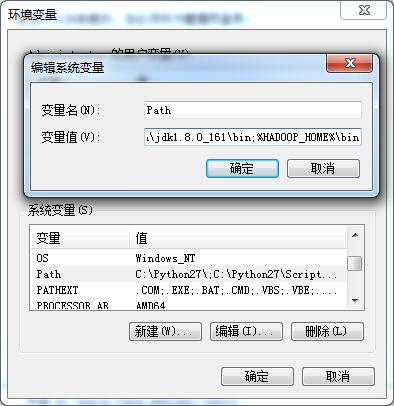
增加用户变量HADOOP_HOME,值是下载的zip包解压的目录,然后在系统变量path里增加$HADOOP_HOME\bin 即可。
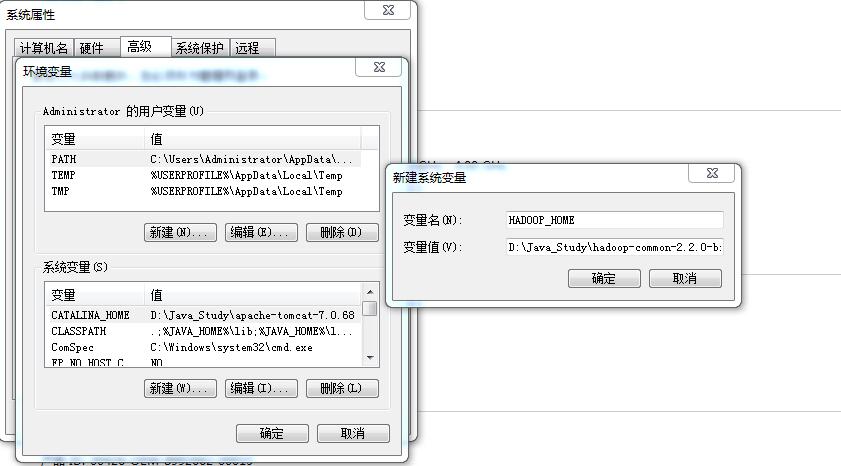
添加“%HADOOP%\bin”到path
再次运行程序,正常执行。
Hadoop:开发机运行spark程序,抛出异常:ERROR Shell: Failed to locate the winutils binary in the hadoop binary path的更多相关文章
- ERROR Shell: Failed to locate the winutils binary in the hadoop binary path
文章发自:http://www.cnblogs.com/hark0623/p/4170172.html 转发请注明 14/12/17 19:18:53 ERROR Shell: Failed to ...
- Spark- ERROR Shell: Failed to locate the winutils binary in the hadoop binary path java.io.IOException: Could not locate executable null\bin\winutils.exe in the Hadoop binaries.
运行 mport org.apache.log4j.{Level, Logger} import org.apache.spark.rdd.RDD import org.apache.spark.{S ...
- Windows本地运行调试Spark或Hadoop程序失败:ERROR util.Shell: Failed to locate the winutils binary in the hadoop binary path
报错内容 ERROR util.Shell: Failed to locate the winutils binary in the hadoop binary path java.io.IOExce ...
- idea 提示:ERROR util.Shell: Failed to locate the winutils binary in the hadoop binary path java.io.IOException解决方法
Windows系统中的IDEA链接Linux里面的Hadoop的api时出现的问题 提示:ERROR util.Shell: Failed to locate the winutils binary ...
- windows本地调试安装hadoop(idea) : ERROR util.Shell: Failed to locate the winutils binary in the hadoop binary path
1,本地安装hadoop https://mirrors.tuna.tsinghua.edu.cn/apache/hadoop/common/ 下载hadoop对应版本 (我本意是想下载hadoop ...
- ERROR [org.apache.hadoop.util.Shell] - Failed to locate the winutils binary in the hadoop binary path
错误日志如下: -- ::, DEBUG [org.apache.hadoop.metrics2.lib.MutableMetricsFactory] - field org.apache.hadoo ...
- WIN7下运行hadoop程序报:Failed to locate the winutils binary in the hadoop binary path
之前在mac上调试hadoop程序(mac之前配置过hadoop环境)一直都是正常的.因为工作需要,需要在windows上先调试该程序,然后再转到linux下.程序运行的过程中,报Failed to ...
- Windows7系统运行hadoop报Failed to locate the winutils binary in the hadoop binary path错误
程序运行的过程中,报Failed to locate the winutils binary in the hadoop binary path Java.io.IOException: Could ...
- Spark报错:Failed to locate the winutils binary in the hadoop binary path
之前在mac上调试hadoop程序(mac之前配置过hadoop环境)一直都是正常的.因为工作需要,需要在windows上先调试该程序,然后再转到linux下.程序运行的过程中,报 Failed to ...
随机推荐
- 让Win2008+IIS7+ASP.NET支持10万并发请求
今天下午17点左右,博客园博客站点出现这样的错误信息: Error Summary: HTTP Error 503.2 - Service Unavailable The serverRuntime@ ...
- 【Go命令教程】7. go run
Go 源码文件包括:命令源码文件.库源码文件 和 测试源码文件.其中,命令源码文件 总应该属于 main 代码包,且在其中有无参数声明.无结果声明的 main 函数.单个命令源码文件可以被单独编译,也 ...
- build-your-own-lisp
https://www.gitbook.com/book/ksco/build-your-own-lisp/details
- github view source
https://insight.io/ http://www.cnplugins.com/devtool/octotree/
- [Win32]获取指定进程的父进程PID
// // #include <Windows.h> #include <winnt.h> #include <winternl.h> typedef NTSTAT ...
- fdLocalSql使用方法
fdLocalSql使用方法 fdLocalSql可以对fdMemTable内存表进行SQL查询(可以对多个fdMemTable内存表进行联表查询哦),fdLocalSql使用SQLITE引擎,而FI ...
- Ora-01536:超出了表空间users的空间限量
正在开会,同事跑过来说数据库有问题,通讯程序不能入库,赶快获取一条insert into a values()语句后在toad工具中手动插入,发现报错:Ora-01536:超出了表空间users的 ...
- 详细解读Volley(五)—— 通过源码来分析业务流程
一.初始化请求队列并运行 我们用Volley时,最先开始的就是初始化请求队列,一种常见的写法如下: public class MyApplication extends Application { p ...
- 多个类定义attr属性重复的问题:Attribute "xxx" has already been defined
有时候做自定义控件时就会遇到命名冲突,改变有冲突的名字自然是最直接有效的方式,但是感觉很傻.我搜了下别人的解决方案,觉得很值得借鉴.就是把重名的属性,独立出来写一下,然后在定义时直接写属性名字即可. ...
- 用开源项目RangBar来实现有范围的SeekBar
RangeBar是一个可以有选择范围的Seekbar,用这个项目其实是很简单的.就是一个自定义控件~ 一.布局文件 这里可以看到有很多属性可以定制,除了通过xml来定义也可以再java代码中进行定义. ...