
Java获取正在执行的函数名
利用StackTrace堆栈轨迹获取某个时间的调用堆栈状态。
 package com.dsp.demo;

 public class TechDemo {

     public static void main(String[] args) {

         System.out.println("Hello dsp!");

         System.out.printf("%x\n", 2129);

         aMethod();

     }

     private static String getExecutingMethodName() {

         StackTraceElement[] stackTrace = Thread.currentThread().getStackTrace();

         StackTraceElement e = stackTrace[2];

         return e.getMethodName();

     }

     private static void aMethod() {

         System.out.println("######### aMethod #########");

         //String executingMethodName = Thread.currentThread().getStackTrace()[2].getMethodName();

         String executingMethodName = getExecutingMethodName();

         System.out.println(executingMethodName);

         String className = Thread.currentThread().getStackTrace()[2].getClassName();

         System.out.println(className);

         String fileName = Thread.currentThread().getStackTrace()[2].getFileName();

         System.out.println(fileName);

         System.out.println("******** aMethod ******");

         bMethod();

     }

     private static void bMethod() {

         System.out.println("######### bMethod #########");

         // String executingMethodName = Thread.currentThread().getStackTrace()[2].getMethodName();

         String executingMethodName = getExecutingMethodName();

         System.out.println(executingMethodName);

         String className = Thread.currentThread().getStackTrace()[2].getClassName();

         System.out.println(className);

         String fileName = Thread.currentThread().getStackTrace()[2].getFileName();

         System.out.println(fileName);

         System.out.println("******** bMethod ******");

         cMethod();

     }

     private static void cMethod() {

         System.out.println("######### cMethod #########");

         String executingMethodName = getExecutingMethodName();

         System.out.println(executingMethodName);

         String className = Thread.currentThread().getStackTrace()[2].getClassName();

         System.out.println(className);

         String fileName = Thread.currentThread().getStackTrace()[2].getFileName();

         System.out.println(fileName);

         saveA();

         updateB();

         System.out.println("******** cMethod ******");

     }

     public static void saveA() {

         System.out.println("######### saveA #########");

         // ###

         String executingMethodName = getExecutingMethodName();

         System.out.println(executingMethodName);

         // ###

         String name = new Object(){}.getClass().getEnclosingMethod().getName();

         System.out.println(name);

         System.out.println("******** saveA ******");

     }

     public static void updateB() {

         System.out.println("######### updateB #########");

         String executingMethodName = getExecutingMethodName();

         System.out.println(executingMethodName);

         System.out.println("******** updateB ******");

     }

 }
执行结果:
Hello dsp!

851

######### aMethod #########

aMethod

com.dsp.demo.TechDemo

TechDemo.java

******** aMethod ******

######### bMethod #########

bMethod

com.dsp.demo.TechDemo

TechDemo.java

******** bMethod ******

######### cMethod #########

cMethod

com.dsp.demo.TechDemo

TechDemo.java

######### saveA #########

saveA

saveA

******** saveA ******

######### updateB #########

updateB

******** updateB ******

******** cMethod ******

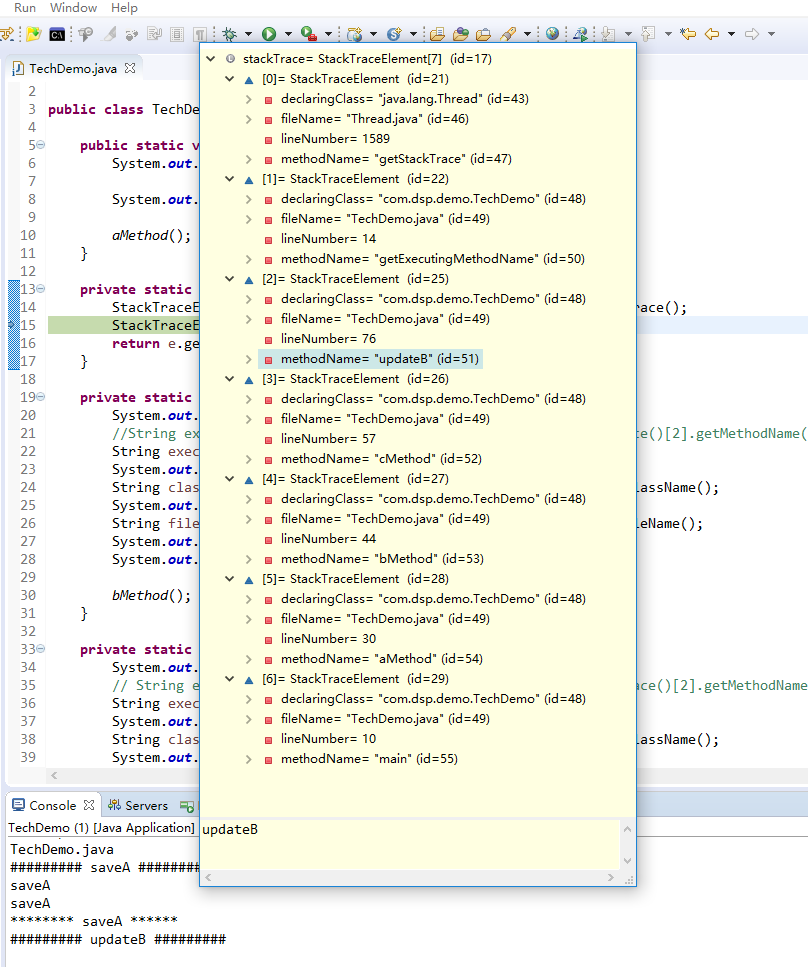
另附:
Java获取正在执行的函数名的更多相关文章
- C#获得当前执行的函数名、当前代码行、源代码文件名
http://blog.csdn.net/newegg2009/article/details/6220385 C#获得当前执行的函数名.当前代码行.源代码文件名 [日期:2010-10-18 11: ...
- Java: 获取当前执行位置的文件名/类名/方法名/行号
在 JAVA 程序有时需要获取当前代码位置, 于是就利用 Thread.currentThread().getStackTrace() 写了下面这个工具类, 用来获取当前执行位置处代码的文件名/类名/ ...
- PHP获取当前类名、函数名、方法名
PHP获取当前类名.方法名 __CLASS__ 获取当前类名 __FUNCTION__ 当前函数名(confirm) __METHOD__ 当前方法名 (bankcard::confirm) _ ...
- PHP获取类名及所有函数名
PHP获取当前类名.方法名 __CLASS__ 获取当前类名 __FUNCTION__ 当前函数名(confirm) __METHOD__ 当前方法名 (bankcard::confirm) _ ...
- Java获取多线程执行结果方式的归纳与总结
在日常的项目开发中,我们会经常遇到通过多线程执行程序并需要返回执行结果的场景,下面我们就对获取多线程返回结果的几种方式进行一下归纳,并进行简要的分析与总结. 一.Thread.join 在一些简单的应 ...
- java 获取 正在执行的方法名
//获取调用该方法的方法名.... String method = Thread.currentThread().getStackTrace()[2].getMethodName(); //获取正在执 ...
- java获取当前执行文件的路径
需要知道执行jar包时,jar包所在的路径. 开始使用了 p.getClass().getResource("/").getPath(); 结果在IDE里面使用是好的,但是在命令行 ...
- 【Python】动态获取python类名、函数名&多线程
import time import random import threading import inspect def get_current_function_name(): return in ...
- Python学习总结11:获取当前运行类名和函数名
一. 使用内置方法和修饰器方法获取类名.函数名 1. 外部获取 从外部的情况好获取,可以使用指向函数的对象,然后用__name__属性. def a(): pass a.__name__ 或者 get ...
随机推荐
- (转)Maven学习-处理资源文件
转自:http://www.cnblogs.com/now-fighting/p/4888343.html 在前面两篇文章中,我们学习了Maven的基本使用方式和Maven项目的标准目录结构.接下来, ...
- setRequestedOrientation
setRequestedOrientation(ActivityInfo.SCREEN_ORIENTATION_LANDSCAPE);//通过程序改变屏幕显示的方向 1.landscape:横屏(风景 ...
- vue项目的搭建
ps: 想了解更多vue相关知识请点击VUE学习目录汇总 Vue作为前端三大框架之一截至到目前在github上以收获44,873颗星,足以说明其以悄然成为主流.16年10月Vue发布了2.x版本,经过 ...
- Cisco交换机堆叠与HSRP之间的区别
随着Internet的日益普及,人们对网络的依赖性也越来越强.这同时对网络的稳定性提出了更高的要求,人们自然想到了基于设备的备份结构,就像在服务器中为提高数据的安全性而采用双硬盘结构一样.核心交换机是 ...
- 三者互ping,PC,虚拟机,uboot,nfs网络文件系统搭建
要想实现三者互ping,韦老师虽然专门出了视频说明,但是在自己配置过程还是出现了问题,这里记录一下解决办法,虽然我也不知道原因,但是解决了出现的问题也实现了三者互ping. 首先,我的硬件设备是PC通 ...
- 基于jquery结婚电子请柬特效素材
分享基于jquery结婚电子请柬特效素材总共包含3个部分,第一部分是开着小轿车缓缓进入场景,第二部分是相册,第三部分是祝福墙.效果图如下: 在线预览 源码下载 实现的代码. html代码: < ...
- android中画图类的介绍Path
Paint类相关属性: /** * Paint类介绍 * * Paint即画笔,在绘图过程中起到了极其重要的作用,画笔主要保存了颜色, * 样式等绘制信息,指定了如何绘制文本和图形,画笔对象有很多设置 ...
- [转] 机器学习是什么——周志华
机器学习现在是一大热门,研究的人特多,越来越多的新人涌进来. 不少人其实并没有真正想过,这是不是自己喜欢搞的东西,只不过看见别人都在搞,觉着跟大伙儿走总不会吃亏吧. 问题是,真有个"大伙儿& ...
- [开发笔记]-Linq to xml学习笔记
最近需要用到操作xml文档的方法,学习了一下linq to xml,特此记录. 测试代码: class Program { //参考: LINQ to XML 编程基础 - luckdv - 博客园 ...
- win10用filezilla server搭建ftp服务器一直无法访问
win10用filezilla server搭建ftp服务器一直无法访问?? 是防火墙导致的,防火墙中允许filezilla server程序的