
[从零开始搭网站六]为域名申请免费SSL证书(https),并为Tomcat配置https域名所用的多SSL证书
点击下面连接查看从零开始搭网站全系列
由于国内的网络环境比较恶劣,运营商流量劫持的情况比较严重,一般表现为别人打开你的网站的时候会弹一些莫名其妙的广告...更过分的会跳转至别的网站.
那么为了解决这种情况,那么我们就要申请SSL证书,并且配置服务器.
并且,我准备再学习并写一个微信小程序,而微信小程序所有接口都需要走https,那么全线https就势在必行.
目前免费https其实有很多家,我之前出过一个教程是 用Let's Encrypt实现Https(Windows环境+Tomcat+Java) ,这个我现在也不准备用了,一是我现在开发环境从windows server换成了Linux,二是现在找到了更好用的免费SSL证书.
我推荐大家使用两家的免费SSL证书,一个是阿里云的,一个是腾讯的(当然,实际上都是赛门铁克的证书,我说他俩只是在他俩家可以免费买).免费的安全性,权威性肯定要差一点,但是我们个人建站挂个https就足够了.如果有需要,这两家有付费的更好的选择.
1:由于我是阿里云重度依赖用户嘛,所以我们先打开阿里免费证书发放的网站: https://www.aliyun.com/product/cas?spm=5176.8142029.388261.255.b1KqKz
或者可以在管理控制台产品里在这找到:
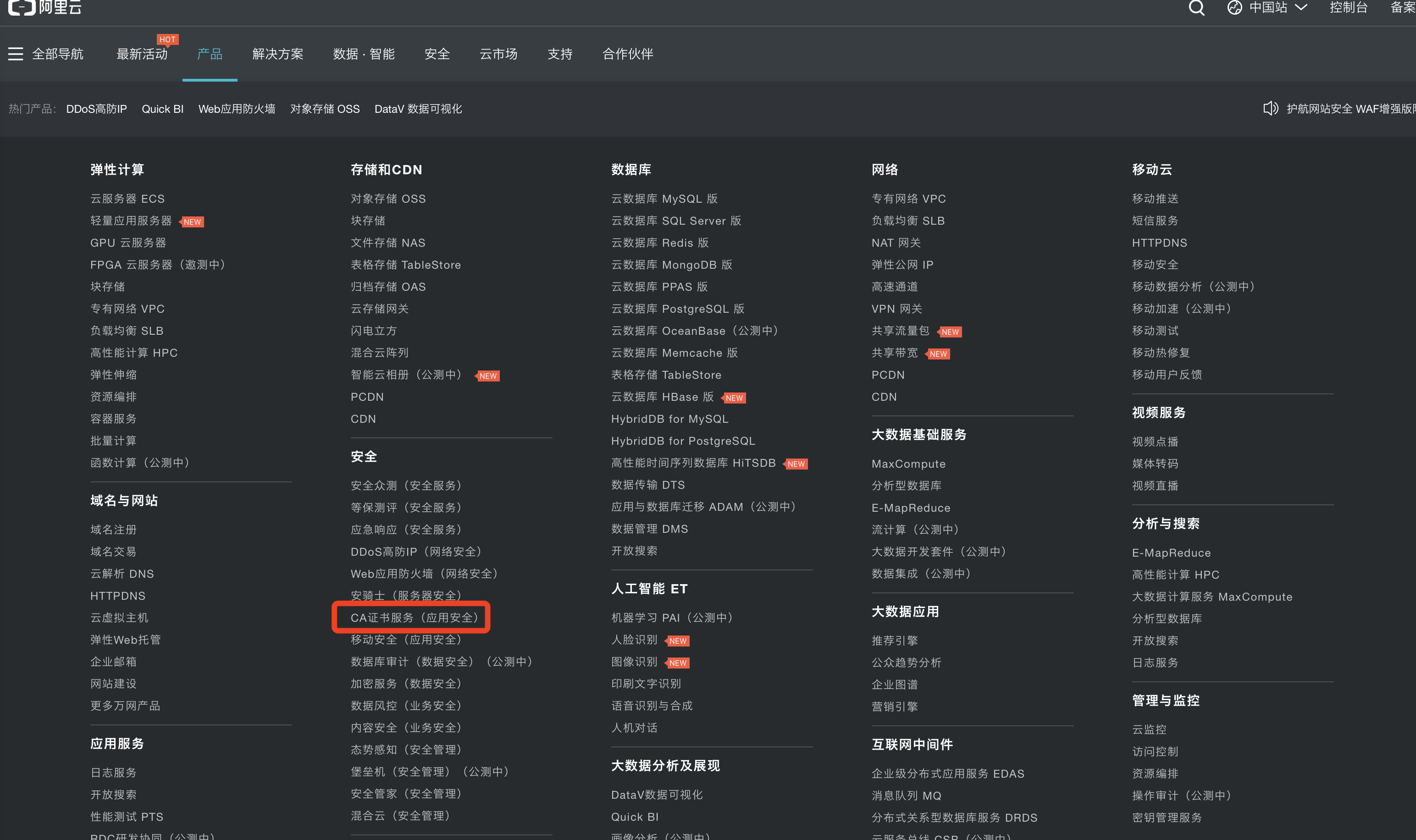
2:点立即购买,选择免费型:

3:去支付-->立即付款-->跳转至证书控制台-->补全-->嗯...........................本地教程到此结束谢谢大家(开玩笑的下面还有)

4:难道就因为这世界上有一个牌子是LV?所以我就不能给LV域名上SSL证书?还是因为绿绿?宗教歧视?阿里你这不清真啊,从你阿里旅行改名叫飞猪我就看出来了,你们阿里不是一家清真公司,哼!我们转投腾讯好了.
5:打开腾讯云证书管理页面: https://console.qcloud.com/ssl 申请证书
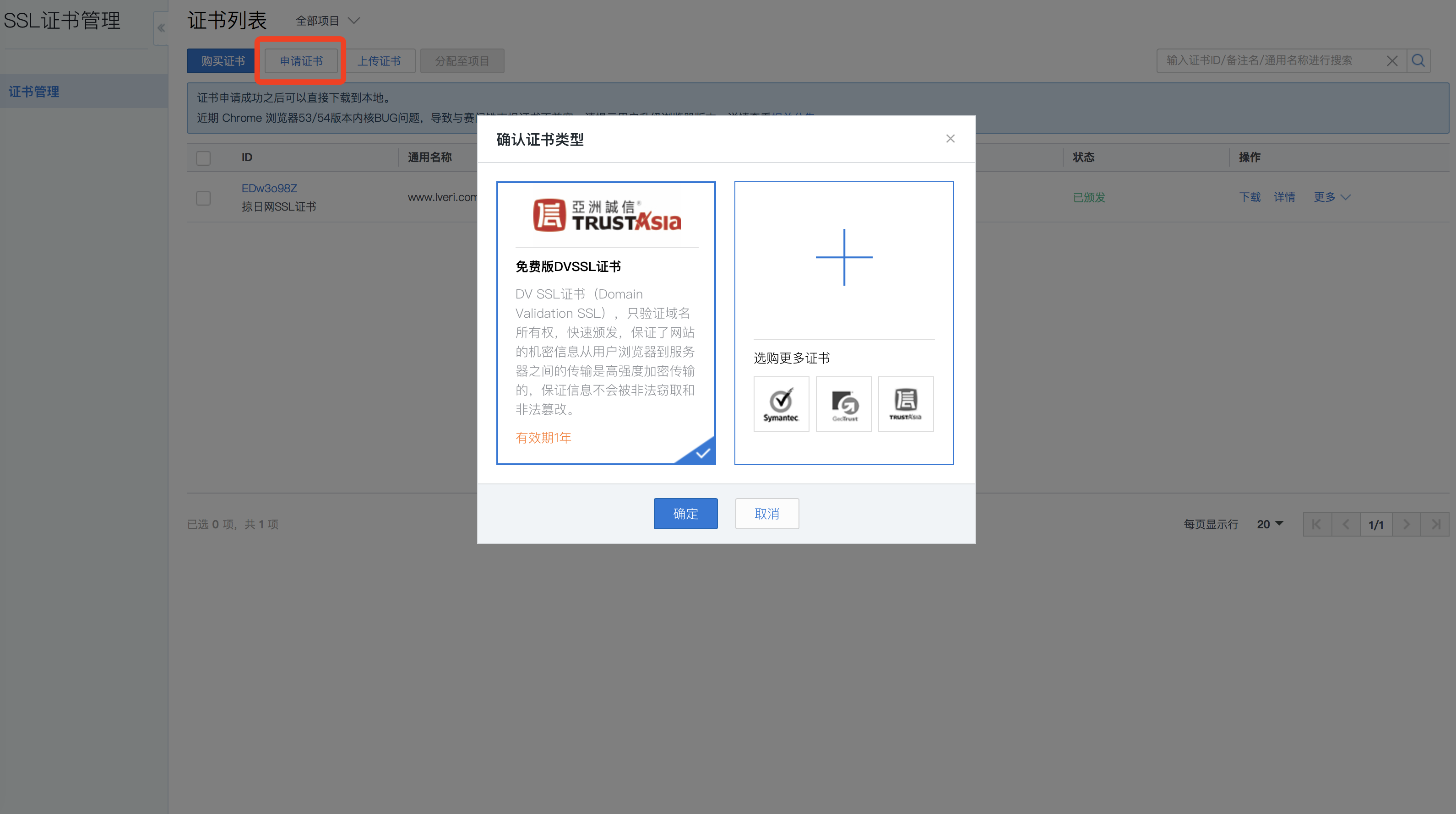
6:填写子域名和申请邮箱,密码和备注都可以不写
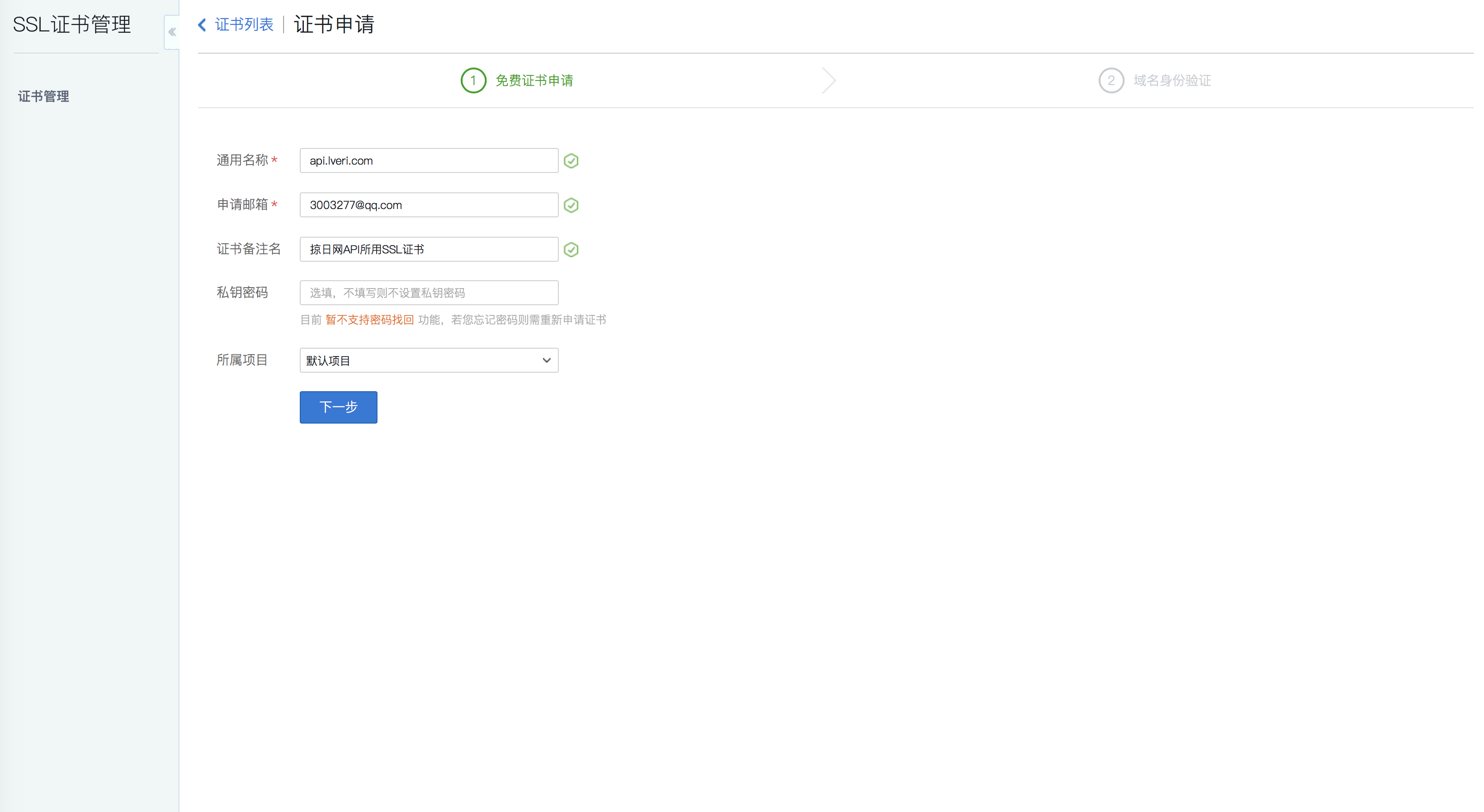
7:下一步,强烈建议选择手动DNS解析,硬要选择文件验证的...那你选吧我也拦不住...
8:确认申请-->查看证书详情,如下图所示:

9:去你的域名DNS解析那里添加一条这样的解析,如下图所示:
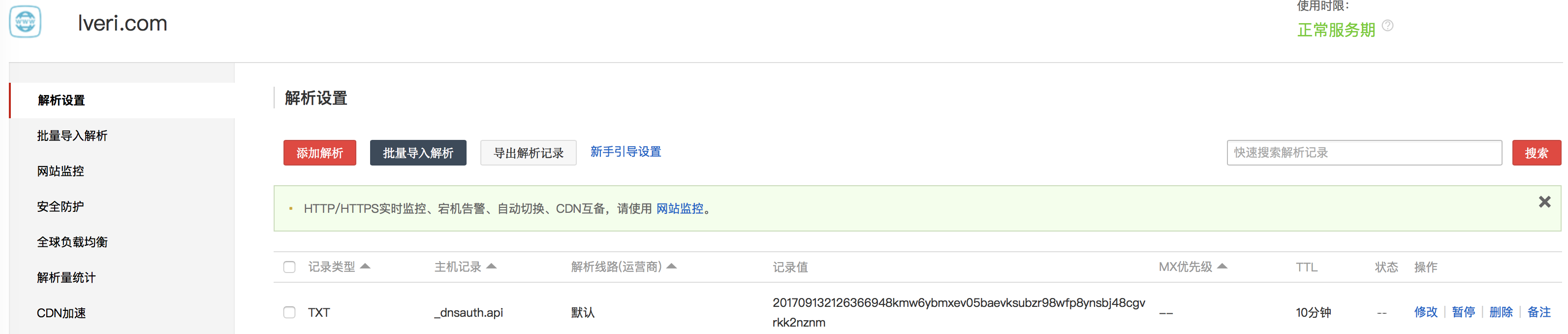
10:返回你的证书列表,等人家给你发邮件和短信就行了,我申请的这两都在1分钟之内通过了,非常快速,差点图都截不上了.

11:证书申请好了,接下来该往tomcat里配置了,这里腾讯官方说的很明白,我就不献丑了,直接上官方文档吧 : https://www.qcloud.com/document/product/400/4143#4.-tomcat-.E8.AF.81.E4.B9.A6.E9.83.A8.E7.BD.B2
12:别急,还没完,我这么长的男人,怎么会到此结束了,下面还有很长呢
13:好,大家现在想一个问题,经过第11步官方文档的配置,你所有请求都走了443端口,验证了443端口所配的SSL证书了.可是.由于咱们申请的是单域名证书,而tomcat里明明可以配置多域名多项目,目前来看一个端口只能配一个证书,那么你其他网站怎么办,你其他有证书的域名怎么往tomcat里配呢?这就是我接下来要说的了----单tomcat,单ip,配多SSL证书
14:网上的各种教程都是在要么配多tomcat,要么tomcat里配多IP,这样就可以有多个443端口,导致我一度认为实在是没有办法配单tomcat单SSL证书了.但是我之前知道nginx可以配置多SSL证书,我就去查了一下,原来原理是打开SNI设置,那么tomcat支不支持呢?经过查证,8.5以上的版本也支持SNI,这就很开心了(8.5以下是实在没有办法了,要不然你们升级tomcat版本跟我这个教程走,要不然再配一个nginx,请求先走ngnix代理一下)
15:经过数小时的摸索,查阅了百度,谷歌等网站,由于tomcat9.0版本很新,使用的人很少(大多数人还是老版本不出错就用老版本呐...),查到的资料比较少,结合一点点的信息,再加上官方网站: http://tomcat.apache.org/tomcat-9.0-doc/config/http.html#SSL_Support_-_SSLHostConfig 和 https://tomcat.apache.org/tomcat-9.0-doc/ssl-howto.html 网站后,终于让我的两个证书都能在tomcat里生效,在这里我贴出我的server.xml 大家复制粘贴过去,对应修改就好了,配置非常简单(但是在调试通之前是非常的痛苦,log的日志信息非常的少,中英文能参考的文献也非常的少)
配置ssl证书这里,.jks文件是腾讯云提供给你下载的,把这个文件放在服务器/usr/tomcat/conf路径下,后面那个密码如果你在申请证书的时候填了就是那个,没填就是下载下来跟.jks文件在一起的另一个文件.
<?xml version='1.0' encoding='utf-8'?>

<!--

       Licensed to the Apache Software Foundation (ASF) under one or more

  contributor license agreements.  See the NOTICE file distributed with

  this work for additional information regarding copyright ownership.

  The ASF licenses this file to You under the Apache License, Version 2.0

  (the "License"); you may not use this file except in compliance with

  the License.  You may obtain a copy of the License at

      http://www.apache.org/licenses/LICENSE-2.0

  Unless required by applicable law or agreed to in writing, software

  distributed under the License is distributed on an "AS IS" BASIS,

  WITHOUT WARRANTIES OR CONDITIONS OF ANY KIND, either express or implied.

  See the License for the specific language governing permissions and

  limitations under the License.

-->

<!-- Note:  A "Server" is not itself a "Container", so you may not

          define subcomponents such as "Valves" at this level.

     Documentation at /docs/config/server.html

 -->

<Server port="" shutdown="SHUTDOWN">

  <Listener className="org.apache.catalina.startup.VersionLoggerListener" />

  <!-- Security listener. Documentation at /docs/config/listeners.html

         <Listener className="org.apache.catalina.security.SecurityListener" />

  -->

  <!--APR library loader. Documentation at /docs/apr.html -->

  <Listener className="org.apache.catalina.core.AprLifecycleListener" SSLEngine="on" />

  <!-- Prevent memory leaks due to use of particular java/javax APIs-->

  <Listener className="org.apache.catalina.core.JreMemoryLeakPreventionListener" />

  <Listener className="org.apache.catalina.mbeans.GlobalResourcesLifecycleListener" />

  <Listener className="org.apache.catalina.core.ThreadLocalLeakPreventionListener" />

  <!-- Global JNDI resources

              Documentation at /docs/jndi-resources-howto.html

  -->

  <GlobalNamingResources>

    <!-- Editable user database that can also be used by

                  UserDatabaseRealm to authenticate users

    -->

    <Resource name="UserDatabase" auth="Container"

              type="org.apache.catalina.UserDatabase"

              description="User database that can be updated and saved"

              factory="org.apache.catalina.users.MemoryUserDatabaseFactory"

              pathname="conf/tomcat-users.xml" />

  </GlobalNamingResources>

  <!-- A "Service" is a collection of one or more "Connectors" that share

              a single "Container" Note:  A "Service" is not itself a "Container",

       so you may not define subcomponents such as "Valves" at this level.

       Documentation at /docs/config/service.html

   -->

  <Service name="Catalina">

    <!--The connectors can use a shared executor, you can define one or more named thread pools-->

    <!--

             <Executor name="tomcatThreadPool" namePrefix="catalina-exec-"

        maxThreads="" minSpareThreads=""/>

    -->

    <!-- A "Connector" represents an endpoint by which requests are received

                  and responses are returned. Documentation at :

         Java HTTP Connector: /docs/config/http.html (blocking & non-blocking)

         Java AJP  Connector: /docs/config/ajp.html

         APR (HTTP/AJP) Connector: /docs/apr.html

         Define a non-SSL/TLS HTTP/1.1 Connector on port

    -->

    <Connector port="" protocol="HTTP/1.1"

               connectionTimeout=""

               redirectPort="" />

   <!-- A "Connector" using the shared thread pool-->

    <!--

             <Connector executor="tomcatThreadPool"

               port="" protocol="HTTP/1.1"

               connectionTimeout=""

               redirectPort="" />

    -->

    <!-- Define a SSL/TLS HTTP/1.1 Connector on port

                  This connector uses the NIO implementation that requires the JSSE

         style configuration. When using the APR/native implementation, the

         OpenSSL style configuration is required as described in the APR/native

         documentation -->

    <Connector port="" protocol="org.apache.coyote.http11.Http11Nio2Protocol" defaultSSLHostConfigName="www.lveri.com"

               maxThreads="" SSLEnabled="true" >

        <SSLHostConfig hostName="www.lveri.com">

            <Certificate certificateKeystoreFile="conf/www.lveri.com.jks" certificateKeystorePassword="x4f96s6l03152c" type="RSA" />

        </SSLHostConfig>

          <SSLHostConfig hostName="api.lveri.com">

              <Certificate certificateKeystoreFile="conf/api.lveri.com.jks" certificateKeystorePassword="ei25vtm4ag" type="RSA" />

          </SSLHostConfig>

    </Connector>

    <!-- Define an AJP 1.3 Connector on port  -->

    <Connector port="" protocol="AJP/1.3" redirectPort="" />

    <!-- An Engine represents the entry point (within Catalina) that processes

                  every request.  The Engine implementation for Tomcat stand alone

         analyzes the HTTP headers included with the request, and passes them

         on to the appropriate Host (virtual host).

         Documentation at /docs/config/engine.html -->

    <!-- You should set jvmRoute to support load-balancing via AJP ie :

             <Engine name="Catalina" defaultHost="localhost" jvmRoute="jvm1">

    -->

    <Engine name="Catalina" defaultHost="localhost">

      <!--For clustering, please take a look at documentation at:

                     /docs/cluster-howto.html  (simple how to)

          /docs/config/cluster.html (reference documentation) -->

      <!--

                 <Cluster className="org.apache.catalina.ha.tcp.SimpleTcpCluster"/>

      -->

      <!-- Use the LockOutRealm to prevent attempts to guess user passwords

                      via a brute-force attack -->

      <Realm className="org.apache.catalina.realm.LockOutRealm">

        <!-- This Realm uses the UserDatabase configured in the global JNDI

                          resources under the key "UserDatabase".  Any edits

             that are performed against this UserDatabase are immediately

             available for use by the Realm.  -->

        <Realm className="org.apache.catalina.realm.UserDatabaseRealm"

               resourceName="UserDatabase"/>

      </Realm>

        <Host name="www.lveri.com"  appBase="webapps" unpackWARs="true" autoDeploy="true"><Context path="" docBase="lveri" reloadable="true" debug="" /></Host>

        <Host name="api.lveri.com"  appBase="webapps" unpackWARs="true" autoDeploy="true"><Context path="" docBase="lveri" reloadable="true" debug="" /></Host>

    </Engine>

  </Service>

</Server>
16:终于完了,几乎可以算是国内出tomcat配置多SSL证书教程的前几人了...
[从零开始搭网站六]为域名申请免费SSL证书(https),并为Tomcat配置https域名所用的多SSL证书的更多相关文章
- [从零开始搭网站七]CentOS上安装Mysql
点击下面连接查看从零开始搭网站全系列 从零开始搭网站 通过前面6章,我们买好了服务器,配置了服务器连接,服务器上配置了JDK和Tomcat,准备了域名(这个我没教,自己去阿里/百度/腾讯买,买东西我相 ...
- [从零开始搭网站五]http网站Tomcat配置web.xml和server.xml
点击下面连接查看从零开始搭网站全系列 从零开始搭网站 上一章我们在CentOS下搭建了Tomcat,但是还是没有跑起来...那么这一章就把最后的配置给大家放上去. 有两种方式:一种是用 rm -f 给 ...
- [从零开始搭网站四]CentOS配置Tomcat
点击下面连接查看从零开始搭网站全系列 从零开始搭网站 上一章带大家配置了JDK,那么现在就要来配置Tomcat容器了. 1:去 http://tomcat.apache.org/download-90 ...
- [从零开始搭网站三]CentOS配置JDK
点击下面连接查看从零开始搭网站全系列 从零开始搭网站 上一章我介绍了,如何不用每次都输密码连接服务器.那么这一章终于要开始服务器的开发环境配置了. 1:先输入以下代码来检验有没有已经安装的CDK: r ...
- [从零开始搭网站二]服务器环境配置:Mac电脑连接CentOS不用每次都输入密码
上一篇讲了如何购买服务器,并且***.看这里的第一篇文章: 从零开始搭网站 从这里开始的文章,我会默认大家都是最起码是入门级的程序员,如果你完全不懂我在说什么,那就退出好了. 作为开发人员,接下来为了 ...
- 【Tomcat】tomcat配置多域名和虚拟路径
当我们用浏览器在访问网页的时候,如访问www.baidu.com,一般都认为会在DNS服务器上找这个域名对应的IP,然后向这个IP发送请求 并响应,其实在DNS服务器解析之前,本机会先在你的系统配置文 ...
- tomcat配置通过域名访问项目
tomcat配置通过域名访问项目,是修改conf/server.xml里面的配置信息实现.具体如下: (1)修改Connector节点的port属性值 <Connector port=" ...
- Tomcat配置多域名 Alias
在Tomcat配置多域名,目的是和apache相对应,实现多域名访问. 使用 < Alias></ Alias>,务必注意,使用的是首字母大写. 我刚开配置使用小写,如果hos ...
- Certbot为域名申请免费SSL证书
Certbot(Let's Encrypt)是一个非盈利性认证机构通过运行互联网安全研究小组(ISRG)提供X.509 证书的传输层安全性不收取任何费用(TLS)加密.证书有效期为90天,在此期间可以 ...
随机推荐
- android本地数据库,微信数据库WCDB for Android 使用实例
android本地数据库,微信数据库WCDB for Android 使用实例 Home · Tencent/wcdb Wikihttps://github.com/Tencent/wcdb/wiki ...
- Centos搭建Seafile个人网盘
1.安装依赖环境 yum install python python-setuptools python-imaging python-ldap python-memcached MySQL-pyth ...
- spring使用@Value标签读取.properties文件的中文乱码问题的解决
最近测试某个老系统的时候,启动的时候发@Value注入的中文是乱码,文件使用GBK/UTF-8的时候均会出现乱码问题,但是spring配置文件里面注入的占位符并没有这个问题,bean文件设置了file ...
- 爬虫的基本操作 requests / BeautifulSoup 的使用
爬虫的基本操作 爬虫基础知识 什么是爬虫? 在最开始,还没有诞生Google和百度等一系列搜索引擎的公司的时候,人们进入一些公司的网站只能通过在浏览器地址栏输入网址的方式访问,如同在很早之前前手机不流 ...
- clnt_create: RPC: Program not registered
原因:[root@nfs nfs]# systemctl start nfs-utils 解决方法:[root@nfs nfs]# systemctl start nfs
- topcoder srm 490 div1
problem1 link 首先每$n*m$一定是一个循环,所以只需要考虑时间$[0,n*m-1]$即可.这个期间一共出现了$n$个,第i个的出现时间为$m*i$,离开的时间为$\left \lcei ...
- Restful framework【第一篇】RESTful 规范
什么是RESTful REST与技术无关,代表的是一种软件架构风格,REST是Representational State Transfer的简称,中文翻译为“表征状态转移” REST从资源的角度类审 ...
- 在fedora23中安装virtualbox, 然后实现虚拟机irtualbox 或者 vmware 下的xp操作系统
参考: http://blog.csdn.net/statdm/article/details/7756788 参考: http://www.cnblogs.com/fengbohello/p/488 ...
- ZooKeeper单机伪集群搭建与启动
下载解压 [xiaobai@xiaobai ~]$ tar -zvxf zookeeper-3.4.9.tar.gz 本机ip地址映射 [xiaobai@xiaobai /]$ su - rootPa ...
- BFS广度优先 vs DFS深度优先 for Binary Tree
https://www.geeksforgeeks.org/bfs-vs-dfs-binary-tree/ What are BFS and DFS for Binary Tree? A Tree i ...