
如何使用Ajax从FastReport Web API获取报表
在文章“如何在ASP.NET Web API中使用FastReport.Net”中,我们已经讨论了如何创建一个用于生成报表的Web服务。然后我们会收到报表的链接,现在我们来看看如何获取报表并使用ajax脚本显示它。
让我提醒你一下,我们的服务可以返回以这些格式之一导出的报表:PDF、HTML、PNG。我们将以HTML格式接收报表,并使用ajax脚本将其显示在网页上。
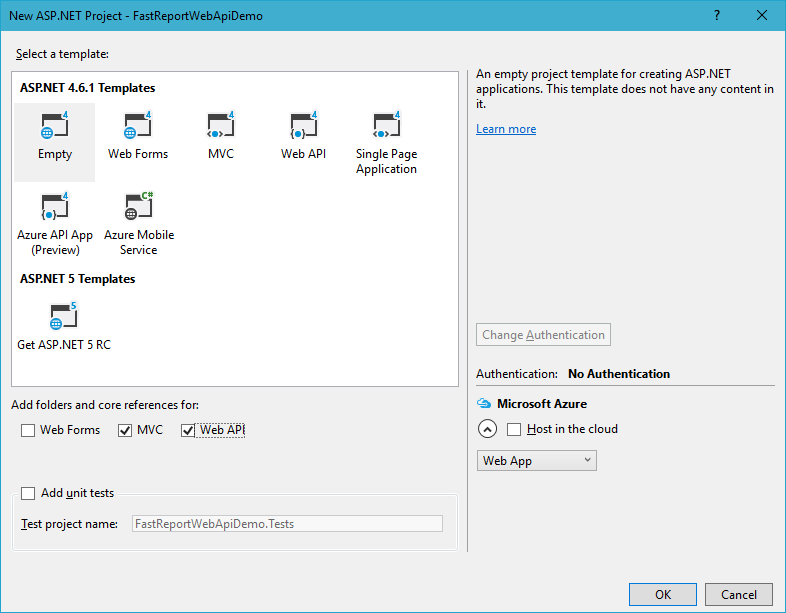
我们接下来讲解一下从头开始创建WebApi应用程序的过程。首先,创建一个ASP.Net应用程序,WebAPI。选择空模板并勾选选项:MVC和WebApi。
在项目引用中,添加FastReport.dll库。
我们继续创建一个数据模型。现在Model文件夹是空的。点击右键并选择“Add”,“Class”。
将其命名为Reports.cs。添加两个字段:Id和ReportName:
namespace FastReportWebApiDemo.Models

{

 public class Reports

 {

 // Report ID

 public int Id { get; set; }

 // Report File Name

 public string ReportName { get; set; }

 }

}
你需要将报表模板和数据库文件放在App_Data文件夹中。在我们的例子中,我们把这两个报表放进去:“Simple List.frx”和“Barcode.frx”;
现在,在Controllers文件夹中,添加控制器ReportsController。它将包含应用程序的所有逻辑。我们使用Controllers文件夹的上下文菜单执行此操作。选择“添加” - >“控制器“:
using System;

using System.Collections.Generic;

using System.Linq;

using System.Net;

using System.Net.Http;

using System.Web.Http;

using FastReport;

using FastReport.Export.Image;

using FastReport.Export.Html;

using FastReport.Export.Pdf;

using FastReport.Utils;

using FastReportWebApiDemo.Models;

using System.Web.Hosting;

using System.Data;

using System.IO;

using System.Net.Http.Headers;

namespace FastReportWebApiDemo.Controllers

{

// Transfer class with parameters for requesting a report

 public class ReportQuery

 {

 // Format of resulting report: png, pdf, html

 public string Format { get; set; }

 // Value of "Parameter" variable in report

 public string Parameter { get; set; }

 // Enable Inline preview in browser (generates "inline" or "attachment")

 public bool Inline { get; set; }

 }

 public class ReportsController : ApiController

 { //Reports list

 Reports[] reportItems = new Reports[]

 {

 new Reports { Id = 1, ReportName = "Simple List.frx" },

 new Reports { Id = 2, ReportName = "Barcode.frx" }

 };

 // Get list of reports

 public IEnumerable<Reports> GetAllReports()

 {

 return reportItems;

 }

 // Get report by ID from request

 public HttpResponseMessage GetReportById(int id, [FromUri] ReportQuery query)

 {

 // Find report

 Reports reportItem = reportItems.FirstOrDefault((p) => p.Id == id);

 if (reportItem != null)

 {

 string reportPath = HostingEnvironment.MapPath("~/App_Data/" + reportItem.ReportName);

 string dataPath = HostingEnvironment.MapPath("~/App_Data/nwind-employees.xml");

 MemoryStream stream = new MemoryStream();

 try

 {

 using (DataSet dataSet = new DataSet())

 {

// Fill the data source with the data

 dataSet.ReadXml(dataPath);

// Enable FastReport web mode

 Config.WebMode = true;

 using (Report report = new Report())

 {

 report.Load(reportPath); // Load the report

 report.RegisterData(dataSet, "NorthWind"); // Register the data in the report

 if (query.Parameter != null)

 {

 report.SetParameterValue("Parameter", query.Parameter); // Set the value of the parameter in the report. The very meaning we take from the URL

 }

 // Two phases of preparation to exclude the display of any dialogs

 report.PreparePhase1();

 report.PreparePhase2();

 if (query.Format == "pdf")

 {

// Export the report to PDF

 PDFExport pdf = new PDFExport();

// We use the stream to store the report so that we do not produce files

 report.Export(pdf, stream);

 }

 else if (query.Format == "html")

 {

// Export the report to HTML

 HTMLExport html = new HTMLExport();

 html.SinglePage = true;

 html.Navigator = false;

 html.EmbedPictures = true;

 report.Export(html, stream);

 }

 else if (query.Format == "png")

 {

// Export the report to PNG

 using (ImageExport img = new ImageExport())

 {

 img.ImageFormat = ImageExportFormat.Png;

 img.SeparateFiles = false;

 img.ResolutionX = 96;

 img.ResolutionY = 96;

 report.Export(img, stream);

 query.Format = "png";

 }

 }

 else

 {

 WebReport webReport = new WebReport();// Create a report object

 webReport.Report.Load(reportPath); // Load the report

 webReport.Report.RegisterData(dataSet, "NorthWind"); // Register the data source in the report

 if (query.Parameter != null)

 {

 webReport.Report.SetParameterValue("Parameter", query.Parameter); // Set the value of the report parameter

 }

 // inline registration of FastReport javascript

 webReport.InlineRegistration = true; // Allows you to register scripts and styles in the body of the html-page instead of placing them in the title

 webReport.Width = Unit.Percentage(100);

 webReport.Height = Unit.Percentage(100);

 // get control

 HtmlString reportHtml = webReport.GetHtml(); // load the report into HTML

 byte[] streamArray = Encoding.UTF8.GetBytes(reportHtml.ToString());

 stream.Write(streamArray, 0, streamArray.Length); // Write the report to the stream

 }

}

 }

// create the resulting variable

 HttpResponseMessage result = new HttpResponseMessage(HttpStatusCode.OK)

 {

 Content = new ByteArrayContent(stream.ToArray())

 };

 stream.Dispose();

 result.Content.Headers.ContentDisposition =

 new System.Net.Http.Headers.ContentDispositionHeaderValue(query.Inline ? "inline" : "attachment")

 {

// Set the file extension depending on the type of export

 FileName = String.Concat(Path.GetFileNameWithoutExtension(reportPath), ".", query.Format)

 };

// Define the content type for the browser

result.Content.Headers.ContentType =

 new MediaTypeHeaderValue("application/" + query.Format);

 return result;

 }

// Handle Exceptions

 catch

 {

 return new HttpResponseMessage(HttpStatusCode.InternalServerError);

 }

 }

 else

 return new HttpResponseMessage(HttpStatusCode.NotFound);

 }

 }

}
在ReportsController类中,我们创建了一个报表数组和两个方法。名称和报表标识符在数组中定义。GetAllReports () 方法返回可用报表的列表。第二种方法 GetReportById (int id, [FromUri] ReportQuery query) 通过标识符返回一个报表。从查询属性中,我们可以得到参数格式、内联和参数。这三者分别决定:报表的导出格式,报表是否会直接在浏览器中打开,传递给报表的参数的值。特别有趣的是 webReport.GetHtml () 方法,它可以让你获得报表的HTML视图。这就是我们使用ajax在页面上显示的内容。
在Web.config文件中,你需要添加两个处理句柄:
<handlers>

…

<add name="ExtensionlessUrlHandler-Integrated-4.0" path="*." verb="*" type="System.Web.Handlers.TransferRequestHandler" preCondition="integratedMode,runtimeVersionv4.0" />

 <add name="FastReportHandler" path="FastReport.Export.axd" verb="*" type="FastReport.Web.Handlers.WebExport" />

…

</handlers>
现在添加网页。在项目上点击右键并选择Add-> HTML Page。
一般我们习惯将起始页命名为Index。将以下代码添加到页面中:
<!DOCTYPE html>

<html>

<head>

 <title></title>

 <meta charset="utf-8" />

 <script type="text/javascript" src="http://ajax.googleapis.com/ajax/libs/jquery/1.6.4/jquery.min.js"></script>

</head>

<body>

 <script type="text/javascript" language="javascript">

 function call() {

 var msg = $('#formx').serialize();

 $.ajax({

 type: 'GET',// Type

 url: 'http://localhost:58005/api/reports/1', // We receive a file from Rest service

 cache: false,// Caching

 timeout: 30000,// Timeout

 data: msg,

 success: function (data) {// The function will work if the data is successfully received

 $('#results').html(data);// We display the data in the form },

 beforeSend: function (data) {// The function is activated during the waiting period of data

 $('#results').html('<p> Waiting for data...</p>');

 },

 dataType: "html", // Data type

 error: function (data) {// Function will work if an error occurs

 $('#results').html('<p> Failed to load report</p>');

 }

 });

 }

 </script>

<form method="GET" id="formx" action="javascript:void(null);" onsubmit="call()">

 <input value="Загрузить" type="submit">

 </form>

 <div id="results" typeof="submit"></div><!-- Here the result will be displayed-->

</body>

</html>
从代码中可以看到,我们只是通过从服务链接请求来加载HTML报表文件。
从文件夹App_Start打开文件WebApiConfig.cs。为Index页面添加一个MapHttpRoute:
public static void Register(HttpConfiguration config)

 {

 // Web API configuration and services

 // Web API routes

 config.MapHttpAttributeRoutes();

 config.Routes.MapHttpRoute(

 name: "Index",

 routeTemplate: "{id}.html",

 defaults: new { id = "index" }

 );

 config.Routes.MapHttpRoute(

 name: "DefaultApi",

 routeTemplate: "api/{controller}/{id}",

 defaults: new { id = RouteParameter.Optional }

 );

 }
在同一个文件夹中,找到RouteConfig.cs文件。它可以被删除。
打开文件Global.asax。删除该行:
RouteConfig.RegisterRoutes(RouteTable.Routes);
现在路由只能通过WebApiConfig来完成。
运行该应用程序,然后单击“下载”按钮:
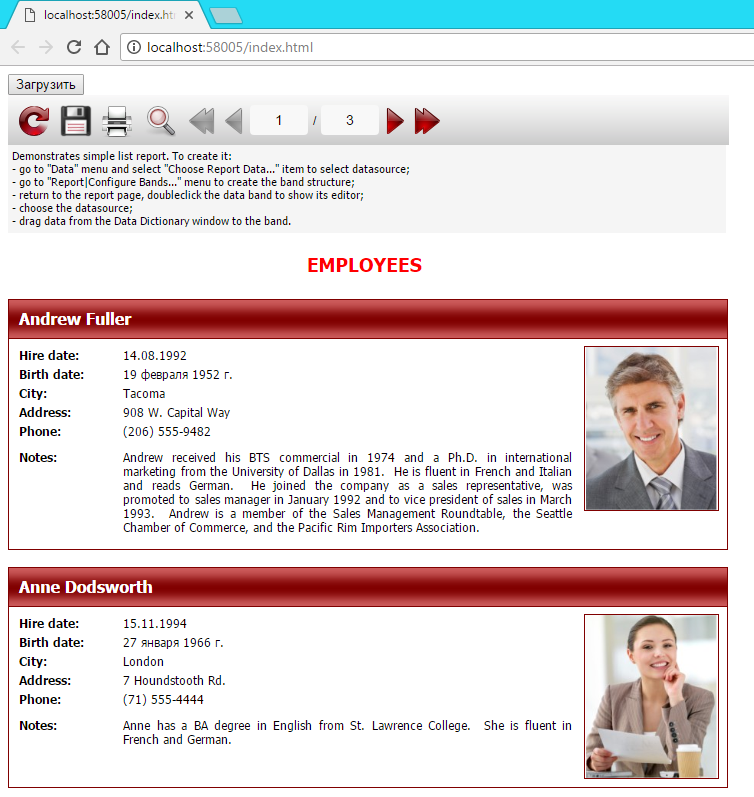
就这样,我们收到了报表。
从上面的例子可以清楚的看出,使用Ajax进行报表处理是非常简单的。
如何使用Ajax从FastReport Web API获取报表的更多相关文章
- ASP.NET Core Web APi获取原始请求内容
前言 我们讲过ASP.NET Core Web APi路由绑定,本节我们来讲讲如何获取客户端请求过来的内容. ASP.NET Core Web APi捕获Request.Body内容 [HttpPos ...
- Dynamics CRM2016 Web API获取实体元数据Picklist属性的Text&Value
通过组织服务中获取实体picklist字段的text和value可以通过RetrieveAttributeRequest实现,但在使用web api的今天该怎么实现,本文即来一探究竟,本篇基于SDK中 ...
- .Net Web Api——获取client浏览器信息
第一次接触到web api,发现这个东西是REST风格的:---- 微软的web api是在vs2012上的mvc4项目绑定发行的.它提出的web api是全然基于RESTful标准的,全然不同于之前 ...
- ASP.NET Web API获取Model元数据
using System; using System.Web.Http; using Common; namespace ConsoleApp { internal class Program { p ...
- .net core web api 获取request body的纯文本
本文代码 https://github.com/wuhaibo/readPlainTextDotNetCoreWepApi 总有些时候我们希望获得Request body 的纯文本 那么怎么做呢?很简 ...
- web api 获取传过来的Json
public async void PostOrder(HttpRequestMessage request) { String responseBodyAsText = await request. ...
- Identity Server 4 从入门到落地(五)—— 使用Ajax访问Web Api
前面的部分: Identity Server 4 从入门到落地(一)-- 从IdentityServer4.Admin开始 Identity Server 4 从入门到落地(二)-- 理解授权码模式 ...
- 在一个空ASP.NET Web项目上创建一个ASP.NET Web API 2.0应用
由于ASP.NET Web API具有与ASP.NET MVC类似的编程方式,再加上目前市面上专门介绍ASP.NET Web API 的书籍少之又少(我们看到的相关内容往往是某本介绍ASP.NET M ...
- 通过扩展让ASP.NET Web API支持JSONP
同源策略(Same Origin Policy)的存在导致了"源"自A的脚本只能操作"同源"页面的DOM,"跨源"操作来源于B的页面将会被拒 ...
随机推荐
- Jquery ajax ajaxStart()和ajaxStop()加载前的优雅表现
Jquery中当一个Ajax请求启动时,并且没有其他未完成的Ajax请求时,将调用ajaxStart()方法.同样,ajaxStop()方法则是在所有Ajax请求都完成时调用.这些方法的参数都是一个函 ...
- 原生NodeJs制作一个简易聊天室
准备工作 安装NodeJs环境 安装编译器Sublime 如果网速不理想,可以百度一下如何加快npm的速度~ 使用node搭建一个简单的网站后台 做完准备工作之后,新建文件夹chatroom,在cha ...
- linux服务器上安装python 3.6.3
一.下载源码包 地址https://www.python.org/ftp/python/3.6.3/Python-3.6.3.tar.xz 二.解压源码包 1.下载解压工具xz #yum -y ins ...
- 一步步分析为什么B+树适合作为索引的结构
在MySQL中,主要有四种类型的索引,分别为:B-Tree索引,Hash索引,Fulltext索引和R-Tree索引,本文讲的是B-Tree索引. 什么是索引 索引(Index)是帮助数据库高效获取数 ...
- python自然语言处理函数库nltk从入门到精通
1. 关于Python安装的补充 若在ubuntu系统中同时安装了Python2和python3,则输入python或python2命令打开python2.x版本的控制台:输入python3命令打开p ...
- delphi中怎么获取服务器的时间
下面是公司的代码,调整成ADO控件,给你参考一下: function GetNetDate: TDateTime; begin with TADOQuery.Create(nil) do begin ...
- Layui_2.x_上传插件使用
一.上传类 package com.ebd.application.common.utils; import java.awt.geom.AffineTransform; import java.aw ...
- importlib 模块
根据字符串的模块名实现动态导入模块的库 目录结构 ├── aaa.py ├── bbb.py └── mypackage ├── __init__.py └── xxx.py bbb.py impor ...
- bzoj2142: 礼物
2142: 礼物 Description 一年一度的圣诞节快要来到了.每年的圣诞节小E都会收到许多礼物,当然他也会送出许多礼物.不同的人物在小E心目中的重要性不同,在小E心中分量越重的人,收到的礼物会 ...
- Deep Learning(深度学习)学习笔记整理系列 一
声明: 1)该Deep Learning的学习系列是整理自网上很大牛和机器学习专家所无私奉献的资料的.具体引用的资料请看参考文献.具体的版本声明也参考原文献. 2)本文仅供学术交流,非商用.所以每一部 ...