
Matlab 中S-函数的使用 sfuntmpl
function [sys,x0,str,ts,simStateCompliance] = sfuntmpl(t,x,u,flag)

%SFUNTMPL General MATLAB S-Function Template

%   With MATLAB S-functions, you can define you own ordinary differential

%   equations (ODEs), discrete system equations, and/or just about

%   any type of algorithm to be used within a Simulink block diagram.

%

%   The general form of an MATLAB S-function syntax is:

%       [SYS,X0,STR,TS,SIMSTATECOMPLIANCE] = SFUNC(T,X,U,FLAG,P1,...,Pn)

%

%   What is returned by SFUNC at a given point in time, T, depends on the

%   value of the FLAG, the current state vector, X, and the current

%   input vector, U.

%

%   FLAG   RESULT             DESCRIPTION

%   -----  ------             --------------------------------------------

%         [SIZES,X0,STR,TS]  Initialization, return system sizes in SYS,

%                             initial state in X0, state ordering strings

%                             in STR, and sample times in TS.

%         DX                 Return continuous state derivatives in SYS.

%         DS                 Update discrete states SYS = X(n+)

%         Y                  Return outputs in SYS.

%         TNEXT              Return next time hit for variable step sample

%                             time in SYS.

%                            Reserved for future (root finding).

%         []                 Termination, perform any cleanup SYS=[].

%

%

%   The state vectors, X and X0 consists of continuous states followed

%   by discrete states.

%

%   Optional parameters, P1,...,Pn can be provided to the S-function and

%   used during any FLAG operation.

%

%   When SFUNC is called with FLAG = , the following information

%   should be returned:

%

%      SYS() = Number of continuous states.

%      SYS() = Number of discrete states.

%      SYS() = Number of outputs.

%      SYS() = Number of inputs.

%               Any of the first four elements in SYS can be specified

%               as - indicating that they are dynamically sized. The

%               actual length for all other flags will be equal to the

%               length of the input, U.

%      SYS() = Reserved for root finding. Must be zero.

%      SYS() = Direct feedthrough flag (=yes, =no). The s-function

%               has direct feedthrough if U is used during the FLAG=

%               call. Setting this to  is akin to making a promise that

%               U will not be used during FLAG=. If you break the promise

%               then unpredictable results will occur.

%      SYS() = Number of sample times. This is the number of rows in TS.

%

%

%      X0     = Initial state conditions or [] if no states.

%

%      STR    = State ordering strings which is generally specified as [].

%

%      TS     = An m-by- matrix containing the sample time

%               (period, offset) information. Where m = number of sample

%               times. The ordering of the sample times must be:

%

%               TS = [      ,      : Continuous sample time.

%                           ,      : Continuous, but fixed in minor step

%                                      sample time.

%                     PERIOD OFFSET, : Discrete sample time where

%                                      PERIOD >  & OFFSET < PERIOD.

%                     -     ];     : Variable step discrete sample time

%                                      where FLAG= is used to get time of

%                                      next hit.

%

%               There can be more than one sample time providing

%               they are ordered such that they are monotonically

%               increasing. Only the needed sample times should be

%               specified in TS. When specifying more than one

%               sample time, you must check for sample hits explicitly by

%               seeing if

%                  abs(round((T-OFFSET)/PERIOD) - (T-OFFSET)/PERIOD)

%               is within a specified tolerance, generally 1e-. This

%               tolerance is dependent upon your model's sampling times

%               and simulation time.

%

%               You can also specify that the sample time of the S-function

%               is inherited from the driving block. For functions which

%               change during minor steps, this is done by

%               specifying SYS() =  and TS = [- ]. For functions which

%               are held during minor steps, this is done by specifying

%               SYS() =  and TS = [- ].

%

%      SIMSTATECOMPLIANCE = Specifices how to handle this block when saving and

%                           restoring the complete simulation state of the

%                           model. The allowed values are: 'DefaultSimState',

%                           'HasNoSimState' or 'DisallowSimState'. If this value

%                           is not speficified, then the block's compliance with

%                           simState feature is set to 'UknownSimState'.

%   Copyright - The MathWorks, Inc.

%

% The following outlines the general structure of an S-function.

%

switch flag,

  %%%%%%%%%%%%%%%%%%

  % Initialization %

  %%%%%%%%%%%%%%%%%%

  case ,

    [sys,x0,str,ts,simStateCompliance]=mdlInitializeSizes;

  %%%%%%%%%%%%%%%

  % Derivatives %

  %%%%%%%%%%%%%%%

  case ,

    sys=mdlDerivatives(t,x,u);

  %%%%%%%%%%

  % Update %

  %%%%%%%%%%

  case ,

    sys=mdlUpdate(t,x,u);

  %%%%%%%%%%%

  % Outputs %

  %%%%%%%%%%%

  case ,

    sys=mdlOutputs(t,x,u);

  %%%%%%%%%%%%%%%%%%%%%%%

  % GetTimeOfNextVarHit %

  %%%%%%%%%%%%%%%%%%%%%%%

  case ,

    sys=mdlGetTimeOfNextVarHit(t,x,u);

  %%%%%%%%%%%%%

  % Terminate %

  %%%%%%%%%%%%%

  case ,

    sys=mdlTerminate(t,x,u);

  %%%%%%%%%%%%%%%%%%%%

  % Unexpected flags %

  %%%%%%%%%%%%%%%%%%%%

  otherwise

    DAStudio.error('Simulink:blocks:unhandledFlag', num2str(flag));

end

% end sfuntmpl

%

%=============================================================================

% mdlInitializeSizes

% Return the sizes, initial conditions, and sample times for the S-function.

%=============================================================================

%

function [sys,x0,str,ts,simStateCompliance]=mdlInitializeSizes

%

% call simsizes for a sizes structure, fill it in and convert it to a

% sizes array.

%

% Note that in this example, the values are hard coded.  This is not a

% recommended practice as the characteristics of the block are typically

% defined by the S-function parameters.

%

sizes = simsizes;

sizes.NumContStates  = ;

sizes.NumDiscStates  = ;

sizes.NumOutputs     = ;

sizes.NumInputs      = ;

sizes.DirFeedthrough = ;

sizes.NumSampleTimes = ;   % at least one sample time is needed

sys = simsizes(sizes);

%

% initialize the initial conditions

%

x0  = [];

%

% str is always an empty matrix

%

str = [];

%

% initialize the array of sample times

%

ts  = [ ];

% Specify the block simStateCompliance. The allowed values are:

%    'UnknownSimState', < The default setting; warn and assume DefaultSimState

%    'DefaultSimState', < Same sim state as a built-in block

%    'HasNoSimState',   < No sim state

%    'DisallowSimState' < Error out when saving or restoring the model sim state

simStateCompliance = 'UnknownSimState';

% end mdlInitializeSizes

%

%=============================================================================

% mdlDerivatives

% Return the derivatives for the continuous states.

%=============================================================================

%

function sys=mdlDerivatives(t,x,u)

sys = [];

% end mdlDerivatives

%

%=============================================================================

% mdlUpdate

% Handle discrete state updates, sample time hits, and major time step

% requirements.

%=============================================================================

%

function sys=mdlUpdate(t,x,u)

sys = [];

% end mdlUpdate

%

%=============================================================================

% mdlOutputs

% Return the block outputs.

%=============================================================================

%

function sys=mdlOutputs(t,x,u)

sys = [];

% end mdlOutputs

%

%=============================================================================

% mdlGetTimeOfNextVarHit

% Return the time of the next hit for this block.  Note that the result is

% absolute time.  Note that this function is only used when you specify a

% variable discrete-time sample time [- ] in the sample time array in

% mdlInitializeSizes.

%=============================================================================

%

function sys=mdlGetTimeOfNextVarHit(t,x,u)

sampleTime = ;    %  Example, set the next hit to be one second later.

sys = t + sampleTime;

% end mdlGetTimeOfNextVarHit

%

%=============================================================================

% mdlTerminate

% Perform any end of simulation tasks.

%=============================================================================

%

function sys=mdlTerminate(t,x,u)

sys = [];

% end mdlTerminate
S-函数的几个概念:
1) 直接馈通
在编写S-函数时,初始化函数中需要对sizes.DirFeedthrough 进行设置,如果输出函数mdlOutputs或者对于变采样时间的mdlGetTimeOfNextVarHit是输入u的函数,则模块具有直接馈通的特性sizes.DirFeedthrough=1;否则为0。
2) 采样时间
仿真步长就是整个模型的基础采样时间,各个子系统或模块的采样时间,必须以这个步长为整数倍。
连续信号和离散信号对计算机而言其实都是采样而来的,只是采样时间不同,连续信号采样时间可认为趋于0且基于微分方程,离散信号采样时间比较长基于差分方程。离散信号当前状态由前一个时刻的状态决定,连续信号可以通过微分方程计算得到。如果要将连续信号离散化还要考虑下信号能否恢复的问题,即香农定理。
采样时间点的确定:下一个采样时间=(n*采样间隔)+ 偏移量,n表示当前的仿真步,从0开始。
对于连续采样时间,ts可以设置为[0 0],其中偏移量为0;
对于离散采样时间,ts假设为[0.25 0.1],表示在S-函数仿真开始后0.1s开始每隔0.25s运行一次,当然每个采样时刻都会调用mdlOutPuts和mdlUpdate函数;
对于变采样时间,即离散采样时间的两次采样时间间隔是可变的,每次仿真步开始时都需要用mdlGetTimeNextVarHit计算下一个采样时间的时刻值。ts可以设置为[-2 0]。
对于多个任务,每个任务都可以以不同的采样速率执行S-函数,假设任务A在仿真开始每隔0.25s执行一次,任务B在仿真后0.1s每隔1s执行一次,那么ts设置为[0.25 0.1;1.0 0.1],具体到S-函数的执行时间为[0 0.1 0.25 0.5 0.75 1.0 1.1…]。
如果用户想继承被连接模块的采样时间,ts只要设置为[-1 0]。
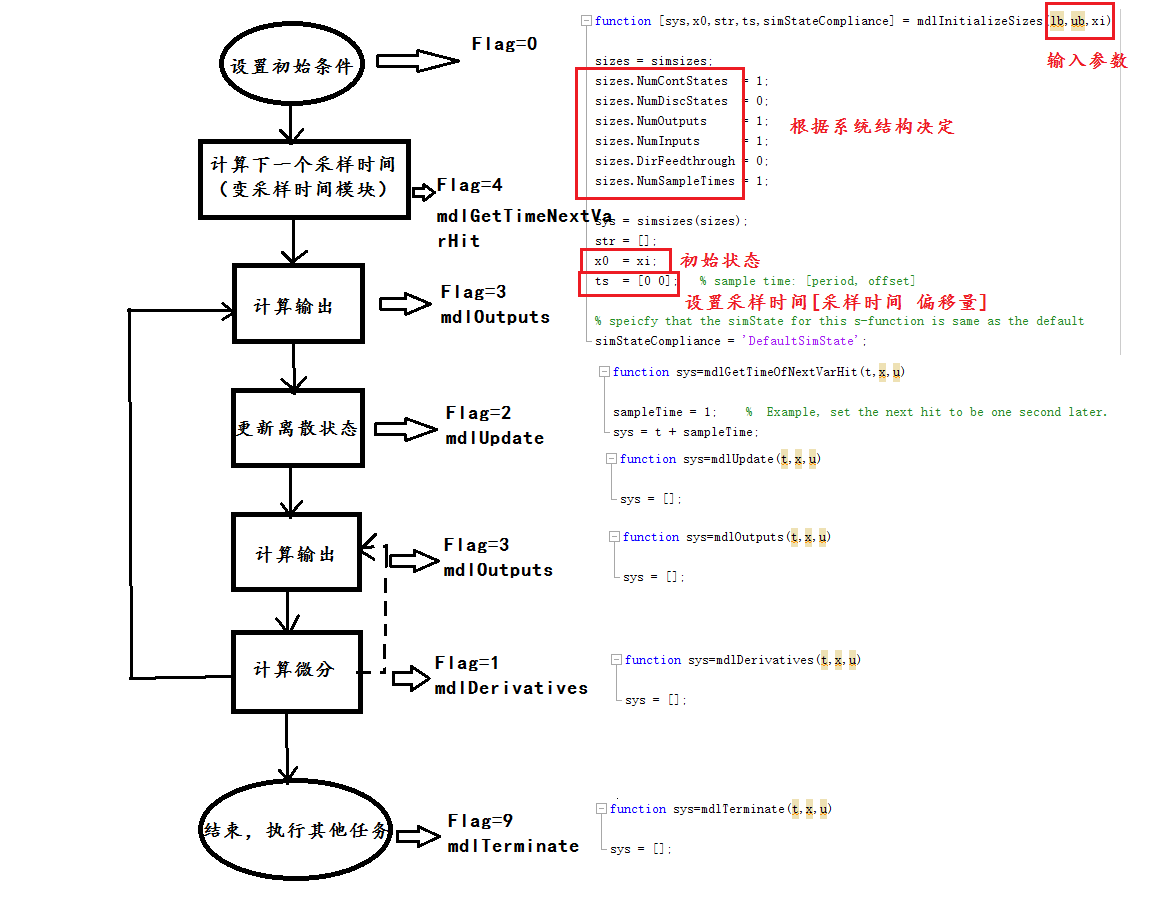
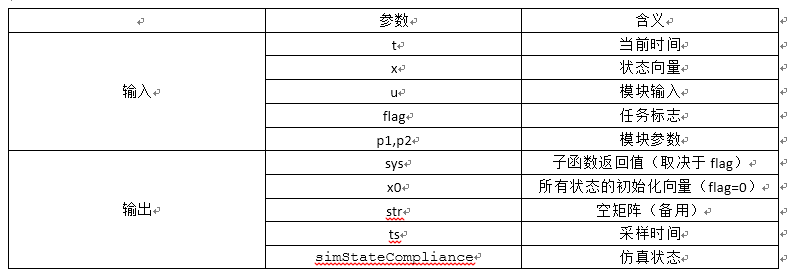
子函数的作用
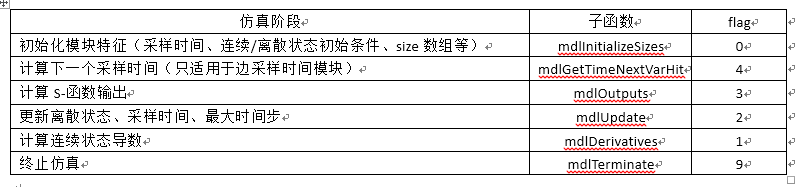
(1).mdlInitializeSizes函数-初始化函数
function[sys,x0,str,ts,simStateCompliance]=mdlInitializeSizes

sizes = simsizes;

sizes.NumContStates  = ;  %连续状态个数

sizes.NumDiscStates  = ;  %离散状态个数

sizes.NumOutputs     = ;  %输出个数

sizes.NumInputs      = ;  %输入个数

sizes.DirFeedthrough = ;  %是否直接馈通

sizes.NumSampleTimes = ;  %采样时间个数,至少一个

sys = simsizes(sizes);     %将size结构传到sys中

x0  = [];                     %初始状态向量,由传入的参数决定,没有为空

str = [];

ts  = [ ];                  %设置采样时间,这里是连续采样,偏移量为0

% Specify the blocksimStateCompliance. The allowed values are:

%    'UnknownSimState', < The defaultsetting; warn and assume DefaultSimState

%    'DefaultSimState', < Same sim state as abuilt-in block

%    'HasNoSimState',   < No sim state

%    'DisallowSimState' < Error out whensaving or restoring the model sim state

simStateCompliance = 'UnknownSimState';
(2).mdlGetTimeOfNextVarHit(t,x,u)函数-计算下一个采样时间
functionsys=mdlGetTimeOfNextVarHit(t,x,u)

sampleTime = ;    %  Example, set the next hit to be one secondlater.

sys = t + sampleTime;
(3).mdlOutputs函数-计算S函数输出
functionsys=mdlOutputs(t,x,u)

sys = [];
(4).mdlUpdate函数-更新

function sys=mdlUpdate(t,x,u)

sys = [];
(5).mdlDerivatives函数-微分函数(计算连续状态导数)
functionsys=mdlDerivatives(t,x,u)

sys = [];
(6).mdlTerminate函数-终止仿真

functionsys=mdlTerminate(t,x,u)

sys = [];
function [sys,x0,str,ts,simStateCompliance] = sfuntmpl_c(t,x,u,flag)

%%%%Simulink中s函数模板的翻译版

%[sys,x0,str,ts,simStateCompliance] = sfuntmpl(t,x,u,flag,p1,…pn)

% flag result 描述

% —– —— ——————————————–

%  [sizes,x0,str,Ts] 初始化,返回SYS的大小,初始状态x0,str,采样时间Ts

%  DX 返回连续状态微分SYS.

%  DS 更新离散状态 SYS = X(n+)

%  Y 返回输出SYS.

%  TNEXT Return next time hit for variable step sample time in SYS.

%  Reserved for future (root finding).

%  [] 结束 perform any cleanup SYS=[].

% 当flag=0时,以下信息必须赋值回传

% SYS() = 连续状态个数

% SYS() = 离散状态个数

% SYS() = 输出量个数

% SYS() = 输入量个数 注:上述4个变量可以赋值为-,表示其值可变

% SYS() = 保留值。为0.

% SYS() = 直接馈通标志(=yes, =no).如果u在flag=3时被使用,说明S函数是直接馈通,赋值为1. 否则为0.

% SYS() = 采样时间个数,Ts的行数

%

% X0 = 初始状态。没有则赋值为[].除flag=0外,被忽略。

% STR = 系统保留,设为[].

% TS = m* 矩阵。(采样周期,偏移量)

% TS = [ , : 连续采样

%  , : 在1个Ts后连续采样

% PERIOD OFFSET, : Discrete sample time where

% PERIOD >  & OFFSET < PERIOD.

% - ]; : 变步长离散采样,

% flag=4用于决定下一个采样时刻

% 注:

% 若希望每个时间步都运行,则设Ts=[,]

% 若希望继承采样时间运行,则设Ts=[-,]

% 若希望继承采样时间运行,且希望在微步内不变化,应该设Ts=[-,]

% 若希望仿真开始0.1s后每隔0.25秒运行,则设Ts=[0.25,0.1]

% 若希望按照不同速率执行不同任务,则Ts应按照升序排列。

% 即:每隔0.25秒执行一个任务,同时在开始0.1秒后,每隔1秒执行另一个任务

% Ts=[0.25,; 1.0,0.1],则simulink将在下列时刻执行s函数[,0.1,0.25,0.5,0.75,,1.1,…]

% 以下是S函数的主函数

switch flag,

case , % 初始化

[sys,x0,str,ts,simStateCompliance]=mdlInitializeSizes;

case , % 连续时间导数

sys=mdlDerivatives(t,x,u);

case , % 更新离散状态量

sys=mdlUpdate(t,x,u);

case , % 计算输出

sys=mdlOutputs(t,x,u);

case , % 计算下一步采样时刻

sys=mdlGetTimeOfNextVarHit(t,x,u);

case , % 结束仿真

sys=mdlTerminate(t,x,u);

otherwise % 未知flag值

DAStudio.error('Simulink:blocks:unhandledFlag', num2str(flag));

end % S函数主程序结束

%=============================================================================

% mdlInitializeSizes

% 返回s函数的sizes、初始条件、采样时刻

%=============================================================================

function [sys,x0,str,ts,simStateCompliance]=mdlInitializeSizes

% 调用simsizes函数为sizes结构赋值

% simsizes函数是S函数模块特有的。它的结构和代码是固定的。

sizes = simsizes;

sizes.NumContStates = ; %连续状态个数

sizes.NumDiscStates = ; %离散状态个数

sizes.NumOutputs = ; %输出量个数

sizes.NumInputs = ; %输入量个数

sizes.DirFeedthrough = ; %直接馈通标志

sizes.NumSampleTimes = ; % 至少有一个采样时刻

sys = simsizes(sizes);

x0 = ; % 状态初始化

str = []; % str 始终为空

ts = [ ];% 初始化采样时间

% 指定simStateCompliance的值.

% ‘UnknownSimState’, < 默认值; warn and assume DefaultSimState

% ‘DefaultSimState’, < Same sim state as a built-in block

% ‘HasNoSimState’, < No sim state

% ‘DisallowSimState’ < Error out when saving or restoring the model sim state

simStateCompliance = 'UnknownSimState';

% 子函数mdlInitializeSizes 结束

%=============================================================================

% mdlDerivatives

% 返回连续状态量的导数

%=============================================================================

function sys=mdlDerivatives(t,x,u)

sys = [];

% 子函数mdlDerivatives结束

%=============================================================================

% mdlUpdate

%更新离散时间状态,采样时刻和主时间步的要求。

%=============================================================================

function sys=mdlUpdate(t,x,u)

sys = [];

% 子函数 mdlUpdate 结束

%=============================================================================

% mdlOutputs

% 计算并返回模块输出量

%=============================================================================

function sys=mdlOutputs(t,x,u)

sys = [];

% 子函数 mdlOutputs 结束

%=============================================================================

% mdlGetTimeOfNextVarHit

% 返回下一个采样时刻。注意返回结果是一个绝对时间,只在Ts=[-,]时使用。

%=============================================================================

function sys=mdlGetTimeOfNextVarHit(t,x,u)

sampleTime = ; % 例子。设置下一个采样时刻为1s后。

sys = t + sampleTime;

% 子函数 mdlGetTimeOfNextVarHit 结束

%=============================================================================

% mdlTerminate

% 仿真结束

%=============================================================================

%

function sys=mdlTerminate(t,x,u)

sys = [];

% 子函数 mdlTerminate结束
function [sys,x0,str,ts,simStateCompliance]=limintm(t,x,u,flag,lb,ub,xi)
%传入的三个参数放在后面lb,ub,xi的位置

%LIMINTM Limited integrator implementation.

%   Example MATLAB file S-function implementing a continuous limited integrator

%   where the output is bounded by lower bound (LB) and upper bound (UB)

%   with initial conditions (XI).

%

%   See sfuntmpl.m for a general S-function template.

%

%   See also SFUNTMPL.

%   Copyright - The MathWorks, Inc.

%   $Revision: 1.1.6.2 $

switch flag

  %%%%%%%%%%%%%%%%%%

  % Initialization %

  %%%%%%%%%%%%%%%%%%

  case

    [sys,x0,str,ts,simStateCompliance] = mdlInitializeSizes(lb,ub,xi);

  %%%%%%%%%%%%%%%

  % Derivatives %

  %%%%%%%%%%%%%%%

  case

    sys = mdlDerivatives(t,x,u,lb,ub);

  %%%%%%%%%%%%%%%%%%%%%%%%

  % Update and Terminate %

  %%%%%%%%%%%%%%%%%%%%%%%%

  case {,}

    sys = []; % do nothing

  %%%%%%%%%%

  % Output %

  %%%%%%%%%%

  case

    sys = mdlOutputs(t,x,u);

  otherwise

    DAStudio.error('Simulink:blocks:unhandledFlag', num2str(flag));

end

% end limintm

%

%=============================================================================

% mdlInitializeSizes

% Return the sizes, initial conditions, and sample times for the S-function.

%=============================================================================

%

function [sys,x0,str,ts,simStateCompliance] = mdlInitializeSizes(lb,ub,xi)

sizes = simsizes;

sizes.NumContStates  = ;%1个连续状态,即积分状态

sizes.NumDiscStates  = ;

sizes.NumOutputs     = ;

sizes.NumInputs      = ;

sizes.DirFeedthrough = ;

sizes.NumSampleTimes = ;

sys = simsizes(sizes);

str = [];

x0  = xi; %积分状态初始条件‘

ts  = [ ];   % sample time: [period, offset]

% speicfy that the simState for this s-function is same as the default

simStateCompliance = 'DefaultSimState';

% end mdlInitializeSizes

%

%=============================================================================

% mdlDerivatives

% Compute derivatives for continuous states.

%=============================================================================

%

function sys = mdlDerivatives(t,x,u,lb,ub)

if (x <= lb & u < )  | (x>= ub & u> )

  sys = ;

else

  sys = u;

end

% end mdlDerivatives

%

%=============================================================================

% mdlOutputs

% Return the output vector for the S-function

%=============================================================================

%

function sys = mdlOutputs(t,x,u)

sys = x;

% end mdlOutputs

Matlab 中S-函数的使用 sfuntmpl的更多相关文章
- matlab中patch函数的用法
http://blog.sina.com.cn/s/blog_707b64550100z1nz.html matlab中patch函数的用法——emily (2011-11-18 17:20:33) ...
- matlab中subplot函数的功能
转载自http://wenku.baidu.com/link?url=UkbSbQd3cxpT7sFrDw7_BO8zJDCUvPKrmsrbITk-7n7fP8g0Vhvq3QTC0DrwwrXfa ...
- 【原创】Matlab中plot函数全功能解析
[原创]Matlab中plot函数全功能解析 该帖由Matlab技术论(http://www.matlabsky.com)坛原创,更多精彩内容参见http://www.matlabsky.com 功能 ...
- matlab 中max函数用法
Matlab中max函数在矩阵中求函数大小的实例如下:(1)C = max(A)返回一个数组各不同维中的最大元素.如果A是一个向量,max(A)返回A中的最大元素.如果A是一个矩阵,max(A)将A的 ...
- Matlab中plot函数全功能解析
Matlab中plot函数全功能解析 功能 二维曲线绘图 语法 plot(Y)plot(X1,Y1,...)plot(X1,Y1,LineSpec,...)plot(...,'PropertyName ...
- matlab中cumsum函数
matlab中cumsum函数通常用于计算一个数组各行的累加值.在matlab的命令窗口中输入doc cumsum或者help cumsum即可获得该函数的帮助信息. 格式一:B = cumsum(A ...
- 『转载』Matlab中fmincon函数获取乘子
Matlab中fmincon函数获取乘子 一.输出结构 [x,fval,exitflag,output,lambda] = fmincon(......) 二.结构说明 lambda结构 说 ...
- matlab中norm函数的用法
格式:n=norm(A,p) 功能:norm函数可计算几种不同类型的矩阵范数,根据p的不同可得到不同的范数 以下是Matlab中help norm 的解释 NORM Matrix or vecto ...
- matlab中fprintf函数的具体使用方法
matlab中fprintf函数的具体使用方法实例如下: fprintf函数可以将数据按指定格式写入到文本文件中.其调用格式为: 数据的格式化输出:fprintf(fid, format, varia ...
- matlab中repmat函数的用法(堆叠矩阵)
matlab中repmat函数的用法 B = repmat(A,m,n) B = repmat(A,[m n]) B = repmat(A,[m n p...]) 这是一个处理大矩阵且内容有重复时使用 ...
随机推荐
- 折腾Java设计模式之状态模式
原文地址 折腾Java设计模式之状态模式 状态模式 在状态模式(State Pattern)中,类的行为是基于它的状态改变的.这种类型的设计模式属于行为型模式.在状态模式中,我们创建表示各种状态的对象 ...
- jqGrid 常用 总结 -1
这篇文章是因为,我们在做的后台项目,里面有大量的表格统计,这个不可能自己手写,所以其中的表格使用的是jqgrid. 这个插件其实使用起来还是不错的,里面有很多的功能很赞.这篇博客就是自己的的一个记录, ...
- vue学习之ajax 简单快速使用axios
vue2.x 推荐使用axios 1.首先使用安装 npm install axios -S 2.在哪用在哪引入 import axios from 'axios' 或则在main.js 中引入 在申 ...
- 解决OracleOraDb10g_home1TNSListener服务无法启动
造成OracleOraDb10g_home1TNSListener服务无法启动可能有三种情况: listener.ora文件配置有错误导致无法启动 相关环境变量没设置好 删除客户端时导致服务端相关注册 ...
- 数据结构学习java(一点五)链式顺序表(链表)
java中没有将指针暴露给用户(以前做过看过一篇文章写有java中是有指针的,只是被藏起来了),所以得使用引用的方式. 何为引用请看下面这篇文章(写的很不错,当然肯定比我写的好): https://w ...
- SQLserver数据库反编译生成Hibernate实体类和映射文件
一.建立项目和sqlserver数据库 eclipse,我使用的版本是neon3 二.Data Source Explorer 选择OK 在data source Explorer的Database ...
- SimpleDateFormat日期格式化总结
1.new一个java.util.Date对象,调用它的setYear.setMonth等等方法,设置你要的年月日.不过这种做法不推荐,因为setYear等方法已经过时了.2.new一个java.ut ...
- 怪事年年有,今天特别多!org.mybatis.spring.MyBatisSystemException: nested exception is org.apache.ibatis.binding.BindingException: Parameter 'empno' not found. Available parameters are [emp, deptno, param1, param
错误: org.mybatis.spring.MyBatisSystemException: nested exception is org.apache.ibatis.binding.Binding ...
- 五 Struts 配置文件
一.struts.xml详解1.package:包 属性:name=命名 namespace=在action访问路径前面加的前缀 extends=继承另外的包 action:name=action的访 ...
- redis 初步认识二(c#调用redis)
前置:服务器安装redis 1.引用redis 2.使用redis(c#) 一 引用redis (nuget 搜索:CSRedisCore) 二 使用redis(c#) using System ...