
基于python创建一个简单的HTTP-WEB服务器
背景
大多数情况下主机资源只有开发和测试相关人员可以登录直接操作,且有些特定情况“答辩、演示、远程”等这些场景下是无法直接登录主机的。web是所有终端用户都可以访问了,解决了人员权限与特定场景带来的问题。那么我们就来看看最简单的web服务器是怎么创建的~~
具体实现
首先搭建python环境,涉及问题请移步http://www.cnblogs.com/xnchll/p/6431664.html。python内建模块SimpleHTTPServer,源码如下路径是/usr/lib64/python2.6/SimpleHTTPServer.py,有兴趣可看看
 """Simple HTTP Server.

 This module builds on BaseHTTPServer by implementing the standard GET

 and HEAD requests in a fairly straightforward manner.

 """

 __version__ = "0.6"

 __all__ = ["SimpleHTTPRequestHandler"]

 import os

 import posixpath

 import BaseHTTPServer

 import urllib

 import cgi

 import sys

 import shutil

 import mimetypes

 try:

     from cStringIO import StringIO

 except ImportError:

     from StringIO import StringIO

 class SimpleHTTPRequestHandler(BaseHTTPServer.BaseHTTPRequestHandler):

     """Simple HTTP request handler with GET and HEAD commands.

     This serves files from the current directory and any of its

     subdirectories.  The MIME type for files is determined by

     calling the .guess_type() method.

     The GET and HEAD requests are identical except that the HEAD

     request omits the actual contents of the file.

     """

     server_version = "SimpleHTTP/" + __version__

     def do_GET(self):

         """Serve a GET request."""

         f = self.send_head()

         if f:

             self.copyfile(f, self.wfile)

             f.close()

     def do_HEAD(self):

         """Serve a HEAD request."""

         f = self.send_head()

         if f:

             f.close()

     def send_head(self):

         """Common code for GET and HEAD commands.

         This sends the response code and MIME headers.

         Return value is either a file object (which has to be copied

         to the outputfile by the caller unless the command was HEAD,

         and must be closed by the caller under all circumstances), or

         None, in which case the caller has nothing further to do.

         """

         path = self.translate_path(self.path)

         f = None

         if os.path.isdir(path):

             if not self.path.endswith('/'):

                 # redirect browser - doing basically what apache does

                 self.send_response(301)

                 self.send_header("Location", self.path + "/")

                 self.end_headers()

                 return None

             for index in "index.html", "index.htm":

                 index = os.path.join(path, index)

                 if os.path.exists(index):

                     path = index

                     break

             else:

                 return self.list_directory(path)

         ctype = self.guess_type(path)

         try:

             # Always read in binary mode. Opening files in text mode may cause

             # newline translations, making the actual size of the content

             # transmitted *less* than the content-length!

             f = open(path, 'rb')

         except IOError:

             self.send_error(404, "File not found")

             return None

         self.send_response(200)

         self.send_header("Content-type", ctype)

         fs = os.fstat(f.fileno())

         self.send_header("Content-Length", str(fs[6]))

         self.send_header("Last-Modified", self.date_time_string(fs.st_mtime))

         self.end_headers()

         return f

     def list_directory(self, path):

         """Helper to produce a directory listing (absent index.html).

         Return value is either a file object, or None (indicating an

         error).  In either case, the headers are sent, making the

         interface the same as for send_head().

         """

         try:

             list = os.listdir(path)

         except os.error:

             self.send_error(404, "No permission to list directory")

             return None

         list.sort(key=lambda a: a.lower())

         f = StringIO()

         displaypath = cgi.escape(urllib.unquote(self.path))

         f.write('<!DOCTYPE html PUBLIC "-//W3C//DTD HTML 3.2 Final//EN">')

         f.write("<html>\n<title>creditAutoTest project  %s</title>\n" % displaypath)

         f.write("<body>\n<h2>Directory listing for %s</h2>\n" % displaypath)

         f.write("<hr>\n<ul>\n")

         for name in list:

             fullname = os.path.join(path, name)

             displayname = linkname = name

             # Append / for directories or @ for symbolic links

             if os.path.isdir(fullname):

                 displayname = name + "/"

                 linkname = name + "/"

             if os.path.islink(fullname):

                 displayname = name + "@"

                 # Note: a link to a directory displays with @ and links with /

             f.write('<li><a href="%s">%s</a>\n'

                     % (urllib.quote(linkname), cgi.escape(displayname)))

         f.write("</ul>\n<hr>\n</body>\n</html>\n")

         length = f.tell()

         f.seek(0)

         self.send_response(200)

         encoding = sys.getfilesystemencoding()

         self.send_header("Content-type", "text/html; charset=%s" % encoding)

         self.send_header("Content-Length", str(length))

         self.end_headers()

         return f

     def translate_path(self, path):

         """Translate a /-separated PATH to the local filename syntax.

         Components that mean special things to the local file system

         (e.g. drive or directory names) are ignored.  (XXX They should

         probably be diagnosed.)

         """

         # abandon query parameters

         path = path.split('?',1)[0]

         path = path.split('#',1)[0]

         path = posixpath.normpath(urllib.unquote(path))

         words = path.split('/')

         words = filter(None, words)

         path = os.getcwd()

         for word in words:

             drive, word = os.path.splitdrive(word)

             head, word = os.path.split(word)

             if word in (os.curdir, os.pardir): continue

             path = os.path.join(path, word)

         return path

     def copyfile(self, source, outputfile):

         """Copy all data between two file objects.

         The SOURCE argument is a file object open for reading

         (or anything with a read() method) and the DESTINATION

         argument is a file object open for writing (or

         anything with a write() method).

         The only reason for overriding this would be to change

         the block size or perhaps to replace newlines by CRLF

         -- note however that this the default server uses this

         to copy binary data as well.

         """

         shutil.copyfileobj(source, outputfile)

     def guess_type(self, path):

         """Guess the type of a file.

         Argument is a PATH (a filename).

         Return value is a string of the form type/subtype,

         usable for a MIME Content-type header.

         The default implementation looks the file's extension

         up in the table self.extensions_map, using application/octet-stream

         as a default; however it would be permissible (if

         slow) to look inside the data to make a better guess.

         """

         base, ext = posixpath.splitext(path)

         if ext in self.extensions_map:

             return self.extensions_map[ext]

         ext = ext.lower()

         if ext in self.extensions_map:

             return self.extensions_map[ext]

         else:

             return self.extensions_map['']

     if not mimetypes.inited:

         mimetypes.init() # try to read system mime.types

     extensions_map = mimetypes.types_map.copy()

     extensions_map.update({

         '': 'application/octet-stream', # Default

         '.py': 'text/plain',

         '.c': 'text/plain',

         '.h': 'text/plain',

         '.log':'text/plain',

         '.out':'text/plain',

         '.sql':'text/plain',

         '.conf':'text/plain'

         })

 def test(HandlerClass = SimpleHTTPRequestHandler,

          ServerClass = BaseHTTPServer.HTTPServer):

     BaseHTTPServer.test(HandlerClass, ServerClass)

 if __name__ == '__main__':

     test()
使用方式如下:
- 明确需要展示web的根目录,比如/user/src
- 了解SimpleHTTPServer模块的几个关键参数,只说一下web服务的启动端口port。比如python -m SimpleHTTPServer port
- 修改一下源码web说明和支撑多种文件格式等等:
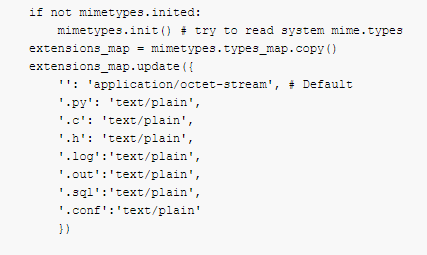
最后,启动web服务器:
python -m SimpleHTTPServer 8009
小建议,一般web服务都是常驻进程,这里建议也设置为常驻进程或者添加为linux系统服务。
结果展示:

基于python创建一个简单的HTTP-WEB服务器的更多相关文章
- SharePoint创建一个简单的Visio Web部件图
SharePoint创建一个简单的Visio Web部件图 Visio有很多强大的Mash-up混聚功能,使它能够轻松集成到SharePoint 2010中. 1. 打开Visio 2010,创建新的 ...
- 一个简单的Java web服务器实现
前言 一个简单的Java web服务器实现,比较简单,基于java.net.Socket和java.net.ServerSocket实现: 程序执行步骤 创建一个ServerSocket对象: 调用S ...
- Golang学习-第二篇 搭建一个简单的Go Web服务器
序言 由于本人一直从事Web服务器端的程序开发,所以在学习Golang也想从Web这里开始学起,如果对Golang还不太清楚怎么搭建环境的朋友们可以参考我的上一篇文章 Golang的简单介绍及Wind ...
- 使用eclipse创建一个简单的Java Web应用程序
关于Java JDK/JRE.Tomcat的配置等等都没什么好说的,主要记录一下使用Eclipse创建web工程时的一些点以及说一说自己用IDEA的创建失败的过程(IDEA没运行成功...暂时不想弄了 ...
- Python创建一个简单的区块链
区块链(Blockchain)是一种分布式账本(listributed ledger),它是一种仅供增加(append-only),内容不可变(immutable)的有序(ordered)链式数据结构 ...
- Python>>>创建一个简单的3D场景
首先安装PyOpengl pip install PyOpenGL PyOpenGL_accelerate
- nodeJS搭建一个简单的(代理)web服务器
前端获取数据时经常遇见跨域问题,以前一直用nginx做反向代理.最近在用vuejs,发现webpack-dev-server的代理简单好用.于是仿照写了一个简单的web服务器,用于非webpack的项 ...
- 创建一个简单的 Springboot web项目
1.点击Project 2.点击 Next 3.项目名 4.web 项目 4.确认 5.pom.xml <?xml version="1.0" encoding=" ...
- python创建一个简单的服务
python -m http.server 8000 --bind 0.0.0.0 8000为端口 0.0.0.0允许远程访问
随机推荐
- 如何让div水平居中呢?
一百度div居中,多数都是一个答案,但是有时候这种方法并不是万能的...不废话,将我知道的方法都列举一下好了,随时更新. 1.设置width值,指定margin-left和margin-right为a ...
- 深入研究Sphinx的底层原理和高级使用
深入研究Sphinx的底层原理和高级使用
- Mysql取随机数据效率测试(400W条中读取100条)
测试数据表的创建在文章:http://www.cnblogs.com/wt645631686/p/6868192.html 先看一下我的SQL方案 SELECT * FROM `emp` WHERE ...
- Unicode字符集,各个语言的区间
链接:http://www.cnblogs.com/zl0372/p/unicode.html 链接:http://www.unicode.org/ 链接:https://zh.wikipedia.o ...
- 聊聊JavaScript-闭包
今天聊聊闭包,网上五花八门的定义和解释很多很多,是不是搞得你很懵逼:每次看闭包,都不同,本来自己懂,看完别人的之后就开始怀疑自己了.在我看来,闭包简单的说就是函数里面套函数,再往大了说就是我函数外面想 ...
- WEB 小案例 -- 网上书城(二)
寒假结束了,自己的颓废时间同样结束了,早该继续写博客了,尽管我的格式以及内容由于各种原因老被卡,但必须坚持写下去!!! 上次我们对于本案例的数据库部分进行了阐述,这次主要接着上次的内容分享本案例的翻页 ...
- redis分布式锁的几种实现方式,以及Redisson的配置和使用
最近在开发中涉及到了多个客户端的对redis的某个key同时进行增删的问题.这里就会涉及一个问题:锁 先举例在分布式系统中不加锁会出现问题: redis中存放了某个用户的账户余额 ,例如100 (用户 ...
- 使用tcpcopy导入线上流量进行功能和压力测试
- 假设我们要上线一个两年内不会宕机的先进架构.在上线前,免不了单元测试,功能测试,还有使用ab,webbench等等进行压力测试. 但这些步骤非生产环境下正式用户的行为.或许你会想到灰度上线,但毕竟 ...
- 新手福音︱正则表达式小工具RegExr
由于之前在做NLP的内容,势必会接触正则表达式,但是呢,又觉得这个学不明白- 于是,这个工具还是蛮不错的,相当于在线正则速查+验证小工具,对于我这样的新手值得去玩玩. github:https://g ...
- 三十天学不会TCP,UDP/IP网络编程 - 绅士的开始
经过了过年的忙碌和年初的懈怠一切的日子,我又开始重新更新了~这是最新的一篇~完整版可以去gitbook(https://www.gitbook.com/@rogerzhu/)看到. 如果对和程序员有关 ...