
react-native modal
1.属性
animationType(动画类型) PropTypes.oneOf([‘none’, ‘slide’, ‘fade’])
none:没有动画
slide:从底部滑入
fade:淡入视野
onRequestClose(被销毁时会调用此函数)Platform.OS ===’android’?PropTypes.func.isRequired:PropTypes.func
在 ‘Android’ 平台,必需使用此函数
onShow(模态显示的时候被调用)function
transparent (透明度) bool
true时,使用透明背景渲染模态。
visible(可见性) bool
决定模态是否可见
onOrientationChange(方向改变时调用)PropTypes.func
在模态方向变化时调用,提供的方向只是 ” 或 ”。在初始化渲染的时候也会调用,但是不考虑当前方向。
supportedOrientations(允许模态旋转到任何指定取向)PropTypes.arrayOf(PropTypes.oneOf([‘portrait’, ‘portrait-upside-down’, ‘landscape’,’landscape-left’,’landscape-right’]))
在iOS上,模态仍然受 info.plist 中的 UISupportedInterfaceOrientations字段中指定的限制。
2.modal 基本使用
export default class TestModal extends Component {

	// 构造

    constructor(props) {

        super(props);

        // 初始状态

        this.state = {

            isModal:false

        };

    }

    showModal() {

        this.setState({

            isModal:true

        })

    }

    onRequestClose() {

        this.setState({

            isModal:false

        });

    }

    render() {

        return(

            <View style={styles.container}>

                {/* 初始化Modal */}

                <Modal

                    animationType='slide'           // 从底部滑入

                    transparent={false}             // 不透明

                    visible={this.state.isModal}    // 根据isModal决定是否显示

                    onRequestClose={() => {this.onRequestClose()}}  // android必须实现

                >

                    <View style={styles.modalViewStyle}>

                        {/* 关闭页面 */}

                        <TouchableOpacity

                            onPress={() => {{

                                this.setState({

                                    isModal:false

                                })

                            }}}

                        >

                            <Text>关闭页面</Text>

                        </TouchableOpacity>

                    </View>

                </Modal>

                {/* 返回按钮 */}

                <TouchableOpacity

                    onPress={() => {{

                        this.props.navigator.pop()

                    }}}

                >

                    <Text>返回</Text>

                </TouchableOpacity>

                {/* 模态跳转 */}

                <TouchableOpacity

                    onPress={() => this.showModal()}

                >

                    <Text>模态跳转</Text>

                </TouchableOpacity>

            </View>

        );

    }

}
3.modal 使用 —— 指示器
export default class TestModal extends Component {

    // 构造

    constructor(props) {

        super(props);

        // 初始状态

        this.state = {

            isModal:false

        };

    }

    showModal() {

        this.setState({

            isModal:true

        })

        setTimeout(() => {

            this.setState({

                isModal:false

            });

        }, 1500)

    }

    onRequestClose() {

        this.setState({

            isModal:false

        });

    }

    render() {

        return(

            <View style={styles.container}>

                {/* 初始化Modal */}

                <Modal

                    animationType='fade'            // 淡入淡出

                    transparent={true}              // 透明

                    visible={this.state.isModal}    // 根据isModal决定是否显示

                    onRequestClose={() => {this.onRequestClose()}}  // android必须实现

                >

                    <View style={styles.modalViewStyle}>

                        <View style={styles.hudViewStyle}>

                            <ActivityIndicator style={styles.chrysanthemumStyle}></ActivityIndicator>

                            <Text style={styles.hudTextStyle}>加载中…</Text>

                        </View>

                    </View>

                </Modal>

                {/* 返回按钮 */}

                <TouchableOpacity

                    onPress={() => {{

                        this.props.navigator.pop()

                    }}}

                >

                    <Text>返回</Text>

                </TouchableOpacity>

                {/* 显示指示器 */}

                <TouchableOpacity

                    onPress={() => this.showModal()}

                >

                    <Text>显示指示器</Text>

                </TouchableOpacity>

            </View>

        );

    }

}
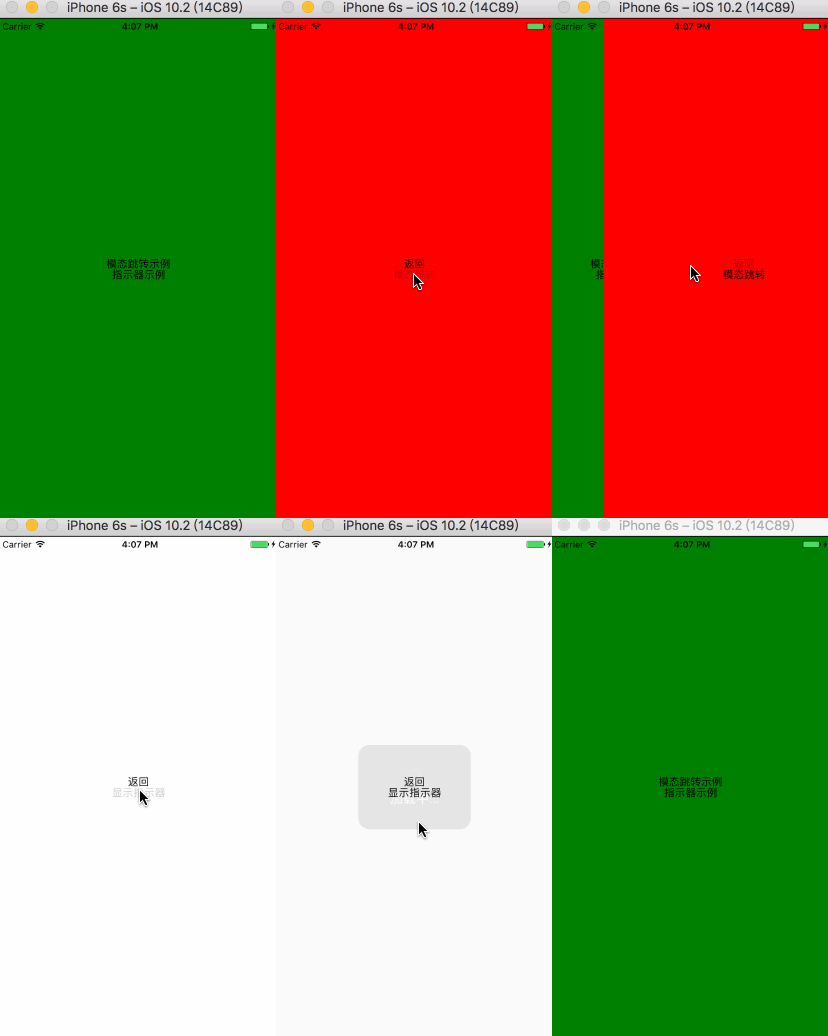
效果图
react-native modal的更多相关文章
- react native 入门实践
上周末开始接触react native,版本为0.37,边学边看写了个demo,语法使用es6/7和jsx.准备分享一下这个过程.之前没有native开发和react的使用经验,不对之处烦请指出.希望 ...
- [转] React Native Navigator — Navigating Like A Pro in React Native
There is a lot you can do with the React Native Navigator. Here, I will try to go over a few example ...
- 使用react native制作的一款网络音乐播放器
使用react native制作的一款网络音乐播放器 基于第三方库 react-native-video设计"react-native-video": "^1.0.0&q ...
- React Native 系列(八) -- 导航
前言 本系列是基于React Native版本号0.44.3写的.我们都知道,一个App不可能只有一个不变的界面,而是通过多个界面间的跳转来呈现不同的内容.那么这篇文章将介绍RN中的导航. 导航 什么 ...
- react native 中时间选择插件
npm install react-native-datepicker --save import DatePicker from 'react-native-datepicker'; <Vie ...
- React Native 0.50版本新功能简介
React Native在2017年经历了众多版本的迭代,从接触的0.29版本开始,到前不久发布的0.52版本,React Native作为目前最受欢迎的移动跨平台方案.虽然,目前存在着很多的功能和性 ...
- React Native (一) 入门实践
上周末开始接触react native,版本为0.37,边学边看写了个demo,语法使用es6/7和jsx.准备分享一下这个过程.之前没有native开发和react的使用经验,不对之处烦请指出.笔者 ...
- WEB通知和React Native之即时通讯(iOS Android)
WEB通知和React Native之即时通讯(iOS Android) 一,需求分析 1.1,允许服务器主动发送信息给客户端,客户端能监听到并且能接收. 1.2,为了方便同一个系统内的用户可以指定某 ...
- React Native——react-navigation的使用
在 React Native 中,官方已经推荐使用 react-navigation 来实现各个界面的跳转和不同板块的切换. react-navigation 主要包括三个组件: StackNavig ...
- beeshell —— 开源的 React Native 组件库
介绍 beeshell 是一个 React Native 应用的基础组件库,基于 0.53.3 版本,提供一整套开箱即用的高质量组件,包含 JavaScript(以下简称 JS)组件和复合组件(包含 ...
随机推荐
- 万万没想到,Spring Boot 竟然这么耗内存!
Spring Boot总体来说,搭建还是比较容易的,特别是Spring Cloud全家桶,简称亲民微服务. 但在发展趋势中,容器化技术已经成熟,面对巨耗内存的Spring Boot,小公司表示用不起. ...
- win10无法开启网络发现怎么办 如何启用网络发现
鼠标右键点击桌面左下角的开始按钮,在弹出的菜单中选择“运行”菜单项. 在打开的Windows10运行窗口中,输入Services.msc,然后点击确定按钮. 在打开的Windows10服务窗口 ...
- Ubuntu下通过apache建立虚拟主机
一个搞前端交互的,总会遇到这样那样的,不需要写代码去解决的问题,怎么搞?答:只能去大海里捞,问题很明确但答案不一定靠谱,因为回答的人不用去考虑你是否会给自己系统搞崩溃. 那么我只能把自己经过验证的答案 ...
- IDEA创建maven的web项目时,main文件夹下没有java,resources目录等源文件夹
https://blog.csdn.net/qq_34377273/article/details/83183307
- egon消失的一天,空虚寂寞冷,苑模块的时间
一.时间模块time python有三种表达时间的形式:时间戳.格式化字符串输出和元组. 时间戳:从1970年1月1日00:00:00开始按秒计算的偏移量,返回值是一个float型. 格式化字符串输出 ...
- The Complex Inversion Formula. Bromwich contour.
网址:http://www.solitaryroad.com/c916.html
- [lean scala]|How to create a SBT project with Intellij IDEA
this article show you how to create a SBT project with IDEA. prerequisite: 1.JDK8 2.Scala 2.11.8 3.I ...
- ASP.NET Core 基础知识(五) 依赖关系注入
参考https://www.cnblogs.com/jesse2013/p/di-in-aspnetcore.html 和 https://www.cnblogs.com/artech/p/net-c ...
- 排序二叉树、平衡二叉树、红黑树、B+树
一.排序二叉树(Binary Sort Tree,BST树) 二叉排序树,又叫二叉搜索树.有序二叉树(ordered binary tree)或排序二叉树(sorted binary tree). 1 ...
- 微信公众号接口类(PHP版本)
[项目需求] 通过微信提供的接口,实现微信公众号与后端的应用程序数据交互.消息响应等功能. [项目疑难点] 理解接口工作方式,统一接口API,响应速度.安全性等 [代码举例] WeixinAp ...