
Linux系统常用知识(centos7)
一、查看系统版本
1、查看linux内核版本
#cat /etc/redhat-release
二、主机名
2.1定义:
静态的(Static hostname):“静态”主机名也称为内核主机名,是系统在启动时从/etc/hostname自动初始化的主机名
瞬态的(Tansient hostname):“瞬态”主机名是在系统运行时临时分配的主机名,例如,通过DHCP或mDNS服务器分配。
灵活的(Pretty hostname):
“灵活”主机名也有人叫做“别名”主机名。
“灵活”主机名则允许使用自由形式(包括特殊/空白字符)的主机名,以展示给终端用户(如xh01@f5)。
“静态”主机名和“瞬态”主机名都遵从作为互联网域名同样的字符限制规则。
2.2查看主机名
2.2.1查看到的是瞬态的(Tansient hostname)
#hostname
2.2.2查看主机名配置文件,查看到的是静态的(Static hostname)
#cat /etc/hostname
2.2.3只查看静态、瞬态或灵活主机名,分别使用--static,--transient或--pretty选项
.hostnamectl --static          //静态

.hostnamectl --transient       //瞬态

.hostnamectl --pretty          //灵活主机名
2.3.4修改主机名
(1)临时修改
#hostname xxx //lzw为新的主机名
(2)永久修改
- 方法一:
#hostnamectl set-hostname xxx
- 方法二:
#vim /etc/hostname
#编辑模式,输入新的主机名即可
- 方法三:
通过nmtui修改,之后重启hostnamed
#nmcli general hostname servername

#systemctl restart systemd-hostnamed
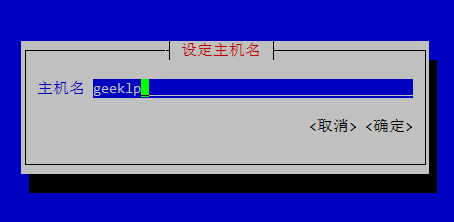
还可以通过nmtui进入图形界面来修改主机名。将光标通过键盘的上下键移动到“设定系统主机名”菜单处,按下回车键。

此时,屏幕出现“设定主机名”选项卡,输入需要设定的主机名,通过键盘方向键将光标移动到“确定”处,回车键确定即可完成主机名的修改。
三、设置网络信息
1、进入网卡
#cd /etc/sysconfig/network-scripts

#ls

#vim eth0

2、设置网络
四、设置dns解析
1、本地解析
#vim /etc/hosts

2、设置DNS服务器
#vim /etc/resolv.conf

五、Centos7中systemctl的使用
CentOS 7.x开始,CentOS开始使用systemd服务来代替daemon,原来管理系统启动和管理系统服务的相关命令全部由systemctl命令来代替。
1、原来的 service 命令与 systemctl 命令对比
| daemon命令 | systemctl命令 | 说明 |
|---|---|---|
| service [服务] start | systemctl start [unit type] | 启动服务 |
| service [服务] stop | systemctl stop [unit type] | 停止服务 |
| service [服务] restart | systemctl restart [unit type] | 重启服务 |
此外还是二个systemctl参数没有与service命令参数对应
- status:参数来查看服务运行情况
- reload:重新加载服务,加载更新后的配置文件(并不是所有服务都支持这个参数,比如network.service)
应用举例:
#启动网络服务

systemctl start network.service

#停止网络服务

systemctl stop network.service

#重启网络服务

systemctl restart network.service

#查看网络服务状态

systemctl status network.serivce
2、原来的chkconfig 命令与 systemctl 命令对比
2.1、设置开机启动/不启动
| daemon命令 | systemctl命令 | 说明 |
|---|---|---|
| chkconfig [服务] on | systemctl enable [unit type] | 设置服务开机启动 |
| chkconfig [服务] off | systemctl disable [unit type] | 设备服务禁止开机启动 |
应用举例:
#停止cup电源管理服务

systemctl stop cups.service

#禁止cups服务开机启动

systemctl disable cups.service

#查看cups服务状态

systemctl status cups.service

#重新设置cups服务开机启动

systemctl enable cups.service
2.2、查看系统上上所有的服务
命令格式:
systemctl [command] [–type=TYPE] [–all]
参数详解:
command - list-units:依据unit列出所有启动的unit。加上 –all 才会列出没启动的unit; - list-unit-files:依据/usr/lib/systemd/system/ 内的启动文件,列出启动文件列表
–type=TYPE - 为unit type, 主要有service, socket, target
应用举例:
| systemctl命令 | 说明 |
|---|---|
| systemctl | 列出所有的系统服务 |
| systemctl list-units | 列出所有启动unit |
| systemctl list-unit-files | 列出所有启动文件 |
| systemctl list-units –type=service –all | 列出所有service类型的unit |
| systemctl list-units –type=service –all grep cpu | 列出 cpu电源管理机制的服务 |
| systemctl list-units –type=target –all | 列出所有target |
3、systemctl特殊的用法
| systemctl命令 | 说明 |
|---|---|
| systemctl is-active [unit type] | 查看服务是否运行 |
| systemctl is-enable [unit type] | 查看服务是否设置为开机启动 |
| systemctl mask [unit type] | 注销指定服务 |
| systemctl unmask [unit type] | 取消注销指定服务 |
应用举例:
#查看网络服务是否启动

systemctl is-active network.service

#检查网络服务是否设置为开机启动

systemctl is-enable network.service

#停止cups服务

systemctl stop cups.service

#注销cups服务

systemctl mask cups.service

#查看cups服务状态

systemctl status cups.service

#取消注销cups服务

systemctl unmask cups.service
4、init 命令与systemctl命令对比
| init命令 | systemctl命令 | 说明 |
|---|---|---|
| init 0 | systemctl poweroff | 系统关机 |
| init 6 | systemctl reboot | 重新启动 |
与开关机相关的其他命令:
| systemctl命令 | 说明 |
|---|---|
| systemctl suspend | 进入睡眠模式 |
| systemctl hibernate | 进入休眠模式 |
| systemctl rescue | 强制进入救援模式 |
| systemctl emergency | 强制进入紧急救援模式 |
5、设置系统运行级别
5.1、运行级别对应表
| init级别 | systemctl target |
|---|---|
| 0 | shutdown.target |
| 1 | emergency.target |
| 2 | rescure.target |
| 3 | multi-user.target |
| 4 | 无 |
| 5 | graphical.target |
| 6 | 无 |
此外还是一个getty.target用来设置tty的数量。
5.2、设置运行级别
命令格式:
systemctl [command] [unit.target]
参数详解:
command:
- get-default :取得当前的target
- set-default :设置指定的target为默认的运行级别
- isolate :切换到指定的运行级别
- unit.target :为5.1表中列出的运行级别
| systemctl命令 | 说明 |
|---|---|
| systemctl get-default | 获得当前的运行级别 |
| systemctl set-default multi-user.target | 设置默认的运行级别为mulit-user |
| systemctl isolate multi-user.target | 在不重启的情况下,切换到运行级别mulit-user下 |
| systemctl isolate graphical.target | 在不重启的情况下,切换到图形界面下 |
6、使用systemctl分析各服务之前的依赖关系
命令格式:
systemctl list-dependencies [unit] [–reverse]
–reverse是用来检查寻哪个unit使用了这个unit
应用举例:
#获得当前运行级别的target

[root@www ~]# systemctl get-default

multi-user.target

#查看当前运行级别target(mult-user)启动了哪些服务

[root@www ~]# systemctl list-dependencies

default.target

├─abrt-ccpp.service

├─abrt-oops.service

├─vsftpd.service

├─basic.target

│ ├─alsa-restore.service

│ ├─alsa-state.service

.....(中间省略).....

│ ├─sockets.target

│ │ ├─avahi-daemon.socket

│ │ ├─dbus.socket

.....(中间省略).....

│ ├─sysinit.target

│ │ ├─dev-hugepages.mount

│ │ ├─dev-mqueue.mount

.....(中间省略).....

│ └─timers.target

│   └─systemd-tmpfiles-clean.timer

├─getty.target

│ └─getty@tty1.service

└─remote-fs.target

#查看哪些target引用了当前运行级别的target

[root@www ~]# systemctl list-dependencies --reverse

default.target

└─graphical.target
7、关闭网络服务
在使用systemctl关闭网络服务时有一些特殊 需要同时关闭unit.servce和unit.socket
使用systemctl查看开启的sshd服务
[root@www system]#  systemctl list-units --all | grep sshd

sshd-keygen.service loaded inactive dead        OpenSSH Server Key Generation

sshd.service        loaded active   running     OpenSSH server daemon

sshd.socket         loaded inactive dead        OpenSSH Server Socket
可以看到系统同时开启了 sshd.service 和 sshd.socket , 如果只闭关了 sshd.service 那么 sshd.socket还在监听网络,在网络上有要求连接 sshd 时就会启动 sshd.service 。因此如果想完全关闭sshd服务的话,需要同时停用 sshd.service 和 sshd.socket 。
systemctl stop sshd.service

systemctl stop sshd.socket

systemctl disable sshd.service sshd.socket
由于centos 7.x默认没有安装net-tools,因此无法使用netstat 来查看主机开发的商品。需要通过yum安装来获得该工具包:
yum -y install net-tools
查看是否关闭22端口
netstat -lnp |grep sshd
8、关闭防火墙firewall
Centos 7.x 中取消了iptables, 用firewall取而代之。要关闭防火墙并禁止开机启动服务使用下面的命令:
systemctl stop firewalld.service

systemctl disable firewalld.service
Linux系统常用知识(centos7)的更多相关文章
- Linux 学习手记(4):Linux系统常用Shell命令
日期时间 date命令:显示当前时间日期 date -u # 显示格林威治(UTC)事件 date +%Y-%m-%d # 格式显示日期 date -s '20:25:25' # 修改系统时间,需要使 ...
- Linux系统常用升级的基础包
Linux系统常用升级的基础包 yum -y install lrzsz gcc gcc-c++ make flex autoconf automake vixie-cron libjpeg libj ...
- linux系统常用的基本命令分类
linux系统常用的基本命令分类: 文件命令:vim vimdiff diff mkdir touch rm mv cp ln cd ls more less head tail cat grep e ...
- 9个Linux系统常用监控命令
我们的系统一旦上线跑起来我们自然希望它一直相安无事,不要宕机,不要无响应,不要慢腾腾的.但是这不是打开机器电源然后放任不管就可以得到的.所以我们要监视系统的运行状况,发现问题及时处理. 对于系统和网络 ...
- linux linux系统常用设置
linux linux系统常用设置 一.设置开机时开启数字键 修改rc.local文件 命令:vi /etc/rc.local rc.local文件中增加如下代码: INITTY=/dev/tty ...
- 一文详解 Linux 系统常用监控工一文详解 Linux 系统常用监控工具(top,htop,iotop,iftop)具(top,htop,iotop,iftop)
一文详解 Linux 系统常用监控工具(top,htop,iotop,iftop) 概 述 本文主要记录一下 Linux 系统上一些常用的系统监控工具,非常好用.正所谓磨刀不误砍柴工,花点时间 ...
- Linux系统基础知识整理
一.说明 本篇文章,我将结合自己的实践以及简介,来对linux系统做一个直观清晰的介绍,使得哪些刚接触Linux的小伙伴可以快速入门,也方便自己以后进行复习查阅. 二.基本知识整理 1.Linux文件 ...
- Linux系统基础知识整理(一)
本文来自于: https://www.cnblogs.com/hafiz/p/6686187.html#4196989 一.说明 本篇文章,我将结合自己的实践以及简介,来对linux系统做一个直观清晰 ...
- Linux 系统常用管理命令(精简笔记)
Linux是一套免费使用和自由传播的类Unix操作系统,下面的笔记是我从鸟菜中摘抄出来的重要命令,并进行了一定的排版,摒弃了一些用不到的乱七八糟的命令,目的是在生产环境中能够快速的定位并查询需要命令的 ...
随机推荐
- 父工程 pom版本
<!-- 集中定义依赖版本号 --> <properties> <junit.version>4.12</junit.version> <spri ...
- OC + RAC(七) RACSubject和RACSignal的区别
-(void)_test8{ /// RACSubject继承自RACSignal 但是RACSubject和RACSignal的区别? //1能接收1,2 //但是2只能接收2 RACSubject ...
- Android解析编译之后的所有文件(so,dex,xml,arsc)格式
我们在之前一篇一篇介绍了如何解析Android中编译之后的所有文件格式,所有的工作都完成了,这里我们就来做个总结,我们为什么要做这些工作: 第一篇:解析so文件格式 点击进入 这里我们解析so文件,主 ...
- JavaScript面向对象初步认识
一.面向对象初步认识 1.什么是对象? 一句话解释: 万物皆对象 对象是有属性的:用{ }来写入! 2.对象的应用(接口) json 接口简单的说就是后台提供给前端提供数据的,让我们进行渲染! 请求接 ...
- C-LeetCode-Shuffle an Array跑不过测试用例
使用time()作为随机数种子,一秒改变一次随机数还是不够随机,跑不过测试用例6 ,在加上个毫秒级计时精度的clock()作为随机数种子就达标了. 示例代码: typedef struct { int ...
- leetcode 141. 环形链表(C++)
给定一个链表,判断链表中是否有环. 为了表示给定链表中的环,我们使用整数 pos 来表示链表尾连接到链表中的位置(索引从 0 开始). 如果 pos 是 -1,则在该链表中没有环. 示例 1: 输入: ...
- 初次打开jenkins页面一片空白的解决办法
安装完成jenkins后,点击[使用admin账号继续]后,页面一片空白的解决办法: step1: Jenkins插件管理-高级设置界面==> http://localhost:8080/plu ...
- 测开之路七十七:性能测试蓝图之js
//定义全局的editor = nullvar editor = null; //ace_editor的初始化函数function ace_editor() { var editor = ace.ed ...
- CentOS7 - 安装 VirtualBox
参考资料 最新的可用安装包可以从这里下载 VirtualBox 是 x86 硬件虚拟化产品,功能上与 VMware Server.KVM.及 Xen 类似,但是 VirtualBox 不修改 Linu ...
- 【linux】 mail/mutt 发送邮件
mail: 比较常用,缺点是发送附件要同时安装其他软件: mutt:功能强大,注意发送html需要升级到1.5+版本: 用mail发送邮件: echo "邮件正文" | mai ...