
jackson json序列化 首字母大写 第二个字母需小写
有这样一个类:
@Setter

@Getter

@JsonNaming(value = PropertyNamingStrategy.UpperCamelCaseStrategy.class)

public class Student {

    private String bName;

}
序列化后,希望首字母大写,如下面的测试代码:
@Test

    public void contextLoads() throws IOException {

        Student test = new Student();

        test.setBName("234234");

        String s = objectMapper.writeValueAsString(test);

        Assert.assertEquals("{\"BName\":\"234234\"}", s);

    }
可实际运行后,结果与希望不一样:
org.junit.ComparisonFailure:

Expected :{"BName":"234234"}

Actual   :{"Bname":"234234"}
jackson在序列化时把第二个大写字母n转成了小写,这是为什么呢?
以下是跟踪源码的过程:
直接找到:com.fasterxml.jackson.databind.introspect.POJOPropertiesCollector#collectAll这个方法:
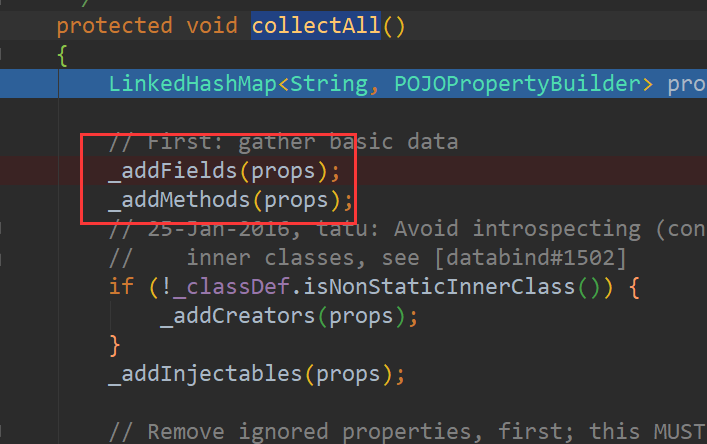
执行完_addFields(props)方法后:

执行完_addMethods(props)方法后:

一个是bName,一个是bname;
第一个bName取的是字段的名称,
第二个bname是取的它的set方法:
public static String okNameForIsGetter(AnnotatedMethod am, String name,

            boolean stdNaming)

    {

        if (name.startsWith("is")) { // plus, must return a boolean

            Class<?> rt = am.getRawType();

            if (rt == Boolean.class || rt == Boolean.TYPE) {

                return stdNaming

                        ? stdManglePropertyName(name, 2)

                        : legacyManglePropertyName(name, 2);

            }

        }

        return null;

    }
根据stdNaming来决定这个name是以什么标准输出,默认的是false;
stdManglePropertyName 就是原始输出。
legacyManglePropertyName 就是规范输出。
下面的代码就是规范输出:
protected static String legacyManglePropertyName(final String basename, final int offset)

    {

        final int end = basename.length();

        if (end == offset) { // empty name, nope

            return null;

        }

        // next check: is the first character upper case? If not, return as is

        char c = basename.charAt(offset);

        char d = Character.toLowerCase(c);

        if (c == d) {

            return basename.substring(offset);

        }

        // otherwise, lower case initial chars. Common case first, just one char

        StringBuilder sb = new StringBuilder(end - offset);

        sb.append(d);

        int i = offset+1;

        for (; i < end; ++i) {

            c = basename.charAt(i);

            d = Character.toLowerCase(c);

            if (c == d) {

                sb.append(basename, i, end);

                break;

            }

            sb.append(d);

        }

        return sb.toString();

    }
主要逻辑在for循环中,去除set后,第一个字母小写,
第二字母小写后,与第二个字母比较,如果都是小写,则直接接上,返回,
如果第二字母大写,就如我们的这种情况,就以小写的情况,接上,再去找下一个字母,直到找到小写字母为止。
意思就是为了满足驼峰命名规则,要规范输出。
如果我们的字段命名正如它的规范的话,props是只有一条记录的,因为:名称相同,就不插入了,由于咱们的名称不同,所以就有两条记录。
protected POJOPropertyBuilder _property(Map<String, POJOPropertyBuilder> props,

            String implName)

    {

        POJOPropertyBuilder prop = props.get(implName);

        if (prop == null) {

            prop = new POJOPropertyBuilder(_config, _annotationIntrospector, _forSerialization,

                    PropertyName.construct(implName));

            props.put(implName, prop);

        }

        return prop;

    }
可是我们输出中只有一条,没有bName这条,
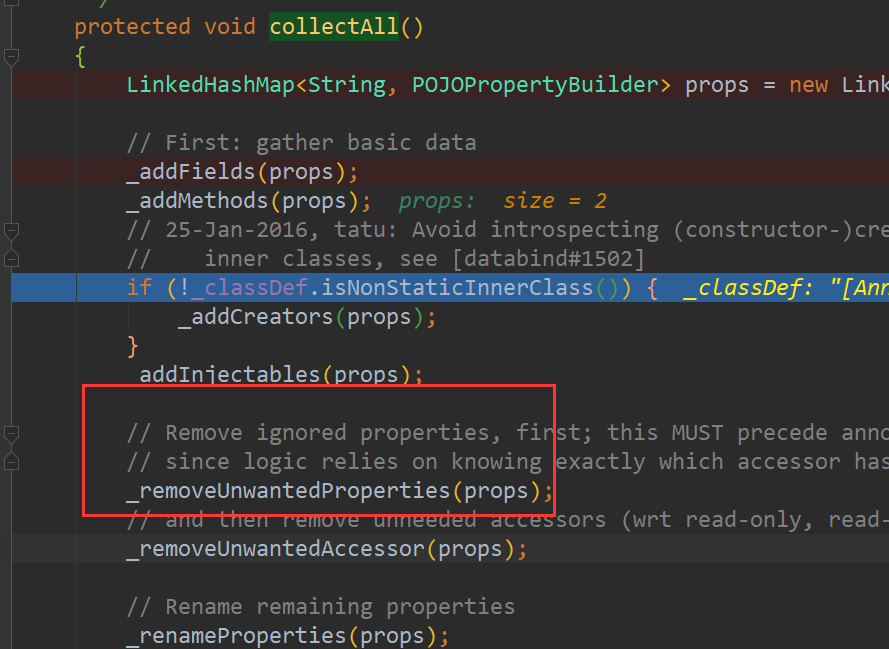
其实在是这里把第一条删除了。因为:
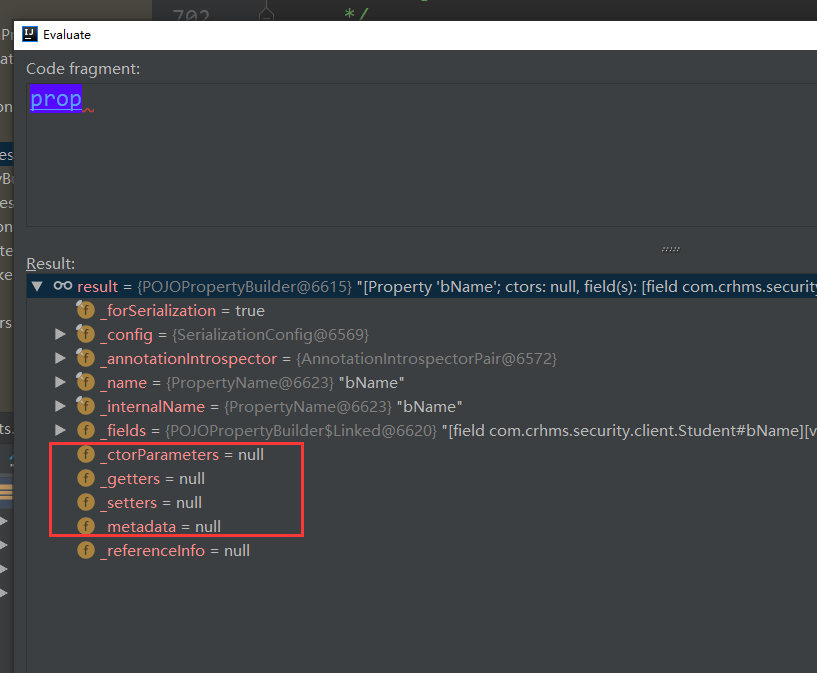
这些属性为空,导致这个字段不可见:
protected void _removeUnwantedProperties(Map<String, POJOPropertyBuilder> props)

    {

        Iterator<POJOPropertyBuilder> it = props.values().iterator();

        while (it.hasNext()) {

            POJOPropertyBuilder prop = it.next();

            // First: if nothing visible, just remove altogether

            if (!prop.anyVisible()) {

                it.remove();

                continue;

            }

            // Otherwise, check ignorals

            if (prop.anyIgnorals()) {

                // first: if one or more ignorals, and no explicit markers, remove the whole thing

                if (!prop.isExplicitlyIncluded()) {

                    it.remove();

                    _collectIgnorals(prop.getName());

                    continue;

                }

                // otherwise just remove ones marked to be ignored

                prop.removeIgnored();

                if (!prop.couldDeserialize()) {

                    _collectIgnorals(prop.getName());

                }

            }

        }

    }
只剩第二记录bname,再首字母大写,所以就是Bname了。
解决方案:
第一个就是JsonProperty
@Setter

@Getter

@JsonNaming(value = PropertyNamingStrategy.UpperCamelCaseStrategy.class)

public class Student {

    @JsonProperty("BName")

    private String bName;

}
测试结果如下:
org.junit.ComparisonFailure:

Expected :{"BName":"234234"}

Actual   :{"Bname":"234234","BName":"234234"}
虽然生成了BName,但是Bname仍在(加了JsonProperty就visable了)。
第二个就是配置objectMapper的MapperFeature.USE_STD_BEAN_NAMIN 如上文提到了,非规范化输出。
如下代码:
@Test

    public void contextLoads() throws IOException {

        Student test = new Student();

        test.setBName("234234");

        objectMapper.configure(MapperFeature.USE_STD_BEAN_NAMING, true);

        String s = objectMapper.writeValueAsString(test);

        Assert.assertEquals("{\"BName\":\"234234\"}", s);

    }
第三个方案:重写PropertyNamingStrategy:
@Test

    public void contextLoads() throws IOException {

        Student test = new Student();

        test.setBName("234234");

        //objectMapper.configure(MapperFeature.USE_STD_BEAN_NAMING, true);

        objectMapper.setPropertyNamingStrategy(new PropertyNamingStrategy() {

            private static final long serialVersionUID = 1L;

            // 反序列化时调用

            @Override

            public String nameForSetterMethod(MapperConfig<?> config,

                                              AnnotatedMethod method, String defaultName) {

                return method.getName().substring(3);

            }

            // 序列化时调用

            @Override

            public String nameForGetterMethod(MapperConfig<?> config,

                                              AnnotatedMethod method, String defaultName) {

                return method.getName().substring(3);

            }

        });

        String s = objectMapper.writeValueAsString(test);

        Assert.assertEquals("{\"BName\":\"2342344\"}", s);

    }
修改objectMapper的配置,要注意对其他功能的影响。
jackson json序列化 首字母大写 第二个字母需小写的更多相关文章
- python字符串的操作(去掉空格strip(),切片,查找,连接join(),分割split(),转换首字母大写, 转换字母大小写...)
#可变变量:list, 字典#不可变变量:元祖,字符串字符串的操作(去掉空格, 切片, 查找, 连接, 分割, 转换首字母大写, 转换字母大小写, 判断是否是数字字母, 成员运算符(in / not ...
- .net core json序列化首字符小写和日期格式处理
打开Startup.cs文件,在ConfigureServices方法中添加如下代码 public void ConfigureServices(IServiceCollection services ...
- Python3基础 str title 单词首字母大写,其余均为小写
Python : 3.7.0 OS : Ubuntu 18.04.1 LTS IDE : PyCharm 2018.2.4 Conda ...
- java中pojo对象首字母大写导致无法赋值问题
命名规范(文末附有java命名规范)中指出,属性变量命名应采用驼峰命名的方式,即首字母小写,其他单词首字母大写: 但有时候我们对接三方的接口时,想要封装实体类来接受,但是发现接收到的参数的变量首字母是 ...
- CSS通过text-transform实现大写、小写和首字母大写转换
再日常项目中可能会用到一些特殊的样式,比如大写字母转小写.小写字母转大写.首字母大写等. 可以通过 CSS 的 text-transform 属性来实现: text-transform 转换不同的文本 ...
- 使用Jackson解析首字母大写的json字符串
Jackson在解析返回的json字符串时始终报错,纠结很久之后才找到原因,原来是是由于json字符串中的字母都是首字母大写,导致jackson找不到相应的KEY. 在项目中经常使用从服务器获取的数据 ...
- javabean转成json字符首字母大写
今天写接口的时候有个需求将接口返回的json字符串首字母大写:{"SN":"","Result":""}格式, 只需要在 ...
- 如果json中的key需要首字母大写怎么解决?
一般我们命名都是驼峰式的,可是有时候和第三方接口打交道,也会遇到一些奇葩,比如首字母大写........额 这是个什么鬼,对方这么要求,那我们也得这么写呀. 于是乎,第一种方式:把类中的字段首字母大写 ...
- fastjson JSON.toJavaObject() 实体类首字母大写属性无法解析问题
fastjson JSON.toJavaObject() 实体类首字母大写属性无法解析问题
随机推荐
- 记一次AD域控客户端不能正常加域的故障处理
1.1 症状现象 DNS 服务器无法在应用程序目录分区 < 分区名称 > 从 Active Directory 中打开区域 < 区域 >.这台 DNS 服务器配置获取并使用此 ...
- Implement GAN from scratch
GANs from Scratch 1: A deep introduction. With code in PyTorch and TensorFlow 修改文章代码中的错误后的代码如下: impo ...
- 使用宝塔面板 配置nginx 访问ftp服务器下面的图片
如果 你在服务器上 运行war项目 可以在tomcat 配置访问的: tomcat 也贴出来吧! 一.tomca配置访问,需要更改配置文件server.xml ,如果找不到,自己好好找一下 一般在 ...
- LeetCode 40. 组合总和 II(Combination Sum II)
题目描述 给定一个数组 candidates 和一个目标数 target ,找出 candidates 中所有可以使数字和为 target 的组合. candidates 中的每个数字在每个组合中只能 ...
- zeppelin安装使用
官网:http://zeppelin-project.org/ 代码:https://github.com/NFLabs/zeppelin 使用:按照官网的视频操作一遍,应该就懂了http://y ...
- shell高级-----正则表达式
正则表达式概述 正则表达式是一种定义的规则,Linux工具可以用它来过滤文本. 基础正则表达式 纯文本 [root@node1 ~]# echo "this is a cat" | ...
- leetcode 139 单词拆分(word break)
一开始的错误答案与错误思路,幻想直接遍历得出答案: class Solution { public: bool wordBreak(string s, vector<string>& ...
- AndroidStudio 插件 之 Findbugs 安装与简单使用教程
http://blog.csdn.net/u013132758/article/details/70187846 http://blog.csdn.net/jdsjlzx/article/detail ...
- json -- fastjson如何序列化@Transient的字段
今天把fastjson包改成了1.2.58,发现@Transient标注的字段序列化后不见了,但是项目需要把@Transient字段序列化,处理方法: 原文:https://github.com/al ...
- dom4j使用方式
使用dom4j读取xml 1.读取xml文件 SAXReader reader = new SAXReader(); Document doc = reader.read(new File(" ...