
JavaScript简易计算器
JavaScript一种直译式脚本语言,是一种动态类型、弱类型、基于原型的语言,内置支持类型。它的解释器被称为JavaScript引擎,为浏览器的一部分,广泛用于客户端的脚本语言,最早是在HTML(标准通用标记语言下的一个应用)网页上使用,用来给HTML网页增加动态功能。
ECMAScript,描述了该语言的语法和基本对象。
- 是一种解释性脚本语言(代码不进行预编译)。
- 主要用来向HTML(标准通用标记语言下的一个应用)页面添加交互行为。
- 可以直接嵌入HTML页面,但写成单独的js文件有利于结构和行为的分离。
- 跨平台特性,在绝大多数浏览器的支持下,可以在多种平台下运行(如Windows、Linux、Mac、Android、iOS等)。
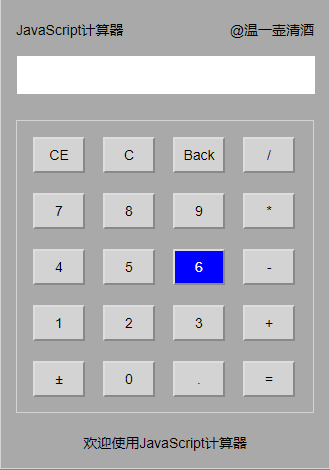
直接上代码
html文件代码:
 <html>

 <head>

 <meta charset="utf-8">

 <link href="计算器.css" rel="stylesheet">

 </head>

 <body>

 <div id="big">

 <div id="top">

     <span id="title">JavaScript计算器</span>

     <span id="author">@温一壶清酒</span>

 </div>

 <div id="import">

     <div id="data">

         <input type="text" id="dataname">

     </div>

 </div>

 <div id="key">

     <input type="button" id="CE" onclick="clearnum()" value="CE" class="buttons">

     <input type="button" id="C" onclick="clearnum()" value="C" class="buttons">

     <input type="button" id="Back" onclick="back()" value="Back" class="buttons">

     <input type="button" id="/" onclick="calc(this.id)" value="/" class="buttons" style="margin-right:0px">

     <input type="button" id="7" onclick="calc(this.id)" value="7" class="buttons">

     <input type="button" id="8" onclick="calc(this.id)" value="8" class="buttons">

     <input type="button" id="9" onclick="calc(this.id)" value="9" class="buttons">

     <input type="button" id="*" onclick="calc(this.id)" value="*" class="buttons" style="margin-right:0px">

     <input type="button" id="4" onclick="calc(this.id)" value="4" class="buttons">

     <input type="button" id="5" onclick="calc(this.id)" value="5" class="buttons">

     <input type="button" id="6" onclick="calc(this.id)" value="6" class="buttons">

     <input type="button" id="-" onclick="calc(this.id)" value="-" class="buttons" style="margin-right:0px">

     <input type="button" id="1" onclick="calc(this.id)" value="1" class="buttons">

     <input type="button" id="2" onclick="calc(this.id)" value="2" class="buttons">

     <input type="button" id="3" onclick="calc(this.id)" value="3" class="buttons">

     <input type="button" id="+" onclick="calc(this.id)" value="+" class="buttons" style="margin-right:0px">

     <input type="button" id="±" onclick="calc(this.id)" value="±" class="buttons">

     <input type="button" id="0" onclick="calc(this.id)" value="0" class="buttons">

     <input type="button" id="." onclick="calc(this.id)" value="." class="buttons">

     <input type="button" id="=" onclick="eva()" value="=" class="buttons" style="margin-right:0px">

 </div>

 <div id="bottom">

     <span id="welcome">欢迎使用JavaScript计算器</span>

 </div>

 </div>

 <script src="计算器.js"></script>

 </body>

 </html>
css样式代码:
 *{

     margin:;

     padding:;

     box-sizing: border-box;

     font:  14px Arial,sans-serif;

 }

 html{

     height:100%;

     background-color:lightslategrey;

 }

 #big{

     margin: 15px auto;

     width:330px;

     height:470px;

     background-color:darkgrey;

     border: 1px solid lightgray;

     padding:15px;

 }

 #top{

     height:20px;

 }

 #title{

     float:left;

     line-height:30px;

 }

 #author{

     float:right;

     line-height:30px;

 }

 #import{

     margin-top:15px;

 }

 #dataname{

     margin-top:5px;

     width:300px;

     height:40px;

     text-align:right;

     padding-right:10px;

     font-size:20px;

 }

 #key{

     border:1px solid lightgray;

     height:293px;

     margin-top:25px;

     padding:16px;

 }

 .buttons{

     float:left;

     width:52px;

     height:36px;

     text-align:center;

     background-color:lightgray;

     margin:0 18px 20px 0;

 }

 .buttons:hover{

     color:white;

     background-color:blue;

 }

 #bottom{

     margin-top:20px;

     height:20px;

     text-align:center;

 }
js代码:
 var number = 0;  // 定义第一个输入的数据

 function calc(number) {

     //获取当前输入

     if(number=="%"){

         document.getElementById('dataname').value=Math.round(document.getElementById('dataname').value)/100;

     }else{

         document.getElementById('dataname').value += document.getElementById(number).value;

     }

 }

 function eva() {

     //计算输入结果

     document.getElementById("dataname").value = eval(document.getElementById("dataname").value);

 }

 function clearnum() {

     //清零

     document.getElementById("dataname").value = null;

     document.getElementById("dataname").focus();

 }

 function back() {

     //退格

     var arr = document.getElementById("dataname");

     arr.value = arr.value.substring(0, arr.value.length - 1);

 }
JavaScript简易计算器的更多相关文章
- 自己做的javascript简易计算器
html <!DOCTYPE html> <html lang="zh"> <head> <meta charset="UTF- ...
- JavaScript之简易计算器
<head> <meta http-equiv="Content-Type" content="text/html; charset=utf-8&quo ...
- 前端 JavaScript 实现一个简易计算器
前端使用 JavaScript 实现一个简易计算器,没有难度,但是里面有些小知识还是需要注意的,算是一次基础知识回顾吧. 题目 实现一个简易版的计算器,需求如下: 1.除法操作时,如果被除数为0,则结 ...
- 剖析简易计算器带你入门微信小程序开发
写在前面,但是重点在后面 这是教程,也不是教程. 可以先看Demo的操作动图,看看是个什么玩意儿,GitHub地址(https://github.com/dunizb/wxapp-sCalc) 自从微 ...
- 使用HTML+CSS,jQuery编写的简易计算器
<%@ page language="java" contentType="text/html; charset=UTF-8" pageEncoding= ...
- 使用HTML+CSS,jQuery编写的简易计算器后续(添加了键盘监听)
之前发布了一款简易的计算器,今天做了一下修改,添加了键盘监听事件,不用再用鼠标点点点啦 JS代码: var yunSuan = 0;// 运算符号,0-无运算;1-加法;2-减法;3-乘法;4-除法 ...
- 使用html+css+js实现简易计算器
使用html+css+js实现简易计算器, 效果图如下: html代码如下: <!DOCTYPE html> <html lang="en"> <he ...
- 微信小程序-简易计算器
代码地址如下:http://www.demodashi.com/demo/14210.html 一.前期准备工作 软件环境:微信开发者工具 官方下载地址:https://mp.weixin.qq.co ...
- 用js制作简易计算器及猜随机数字游戏
<!doctype html><html><head> <meta charset="utf-8"> <title>JS ...
随机推荐
- 没有基础如何学习web渗透测试?
如果只是因为感兴趣玩玩的话,你可以不需要学习太多的脚本程序. 但是以下条件要具备 1.能看懂教程:能理解原理,例如解析漏洞,sql注入逻辑等 2.前端代码审计:html js css 3.主流工具的使 ...
- Kubernetes e2e test and test framework
前言 Kubernetes的成功少不了大量工程师的共同参与,而他们之间如何高效的协作,非常值得我们探究.最近研究和使用了他们的e2e测试和框架,还是挺有启发的. 怎样才是好的e2e测试? 不同的人写出 ...
- C# FTP上传与下载文件
public class UploadFile { string ftpServerIP; string ftpRemotePath; string ftpUserID; string ftpPass ...
- 运用jQuery写的验证表单
//运用jQuery写的验证表单 <!DOCTYPE html PUBLIC "-//W3C//DTD XHTML 1.0 Transitional//EN" "h ...
- iOS 微信支付流程详解
背景 自微信支付.支付宝支付入世以来,移动端的支付日渐火热.虚拟货币有取代实体货币的趋向(这句纯属扯淡,不用管),支付在app开发中是一项基本的功能,有必要去掌握.从难易程度上讲,不管是微信支付还是支 ...
- chrome开发工具指南(三)
Security 面板 使用 Security Overview 可以立即查看当前页面是否安全. 检查各个源以查看连接和证书详情(安全源)或找出具体哪些请求未受保护(非安全源). Security O ...
- ORACLE ROWNUM解析
详见:http://blog.yemou.net/article/query/info/tytfjhfascvhzxcytp53 [align=middle;" align="le ...
- CloseableHttpClient 源码
public abstract class CloseableHttpClient implements HttpClient, Closeable { private final Log log = ...
- CCIE-MPLS VPN-实验手册(上卷)
看完了看完了看完了,豪爽豪爽豪爽,一个月了,写得挺棒.总共14个mpls vpn的实验,为留下学习的痕迹,原封不动献出. CCIE实验手册 (路由部分-MPLSVPN基础篇) [CCIE] JUST ...
- 转:【Java集合源码剖析】ArrayList源码剖析
转载请注明出处:http://blog.csdn.net/ns_code/article/details/35568011 本篇博文参加了CSDN博文大赛,如果您觉得这篇博文不错,希望您能帮我投一 ...