
JavaScript简易计算器
JavaScript一种直译式脚本语言,是一种动态类型、弱类型、基于原型的语言,内置支持类型。它的解释器被称为JavaScript引擎,为浏览器的一部分,广泛用于客户端的脚本语言,最早是在HTML(标准通用标记语言下的一个应用)网页上使用,用来给HTML网页增加动态功能。
ECMAScript,描述了该语言的语法和基本对象。
- 是一种解释性脚本语言(代码不进行预编译)。
- 主要用来向HTML(标准通用标记语言下的一个应用)页面添加交互行为。
- 可以直接嵌入HTML页面,但写成单独的js文件有利于结构和行为的分离。
- 跨平台特性,在绝大多数浏览器的支持下,可以在多种平台下运行(如Windows、Linux、Mac、Android、iOS等)。
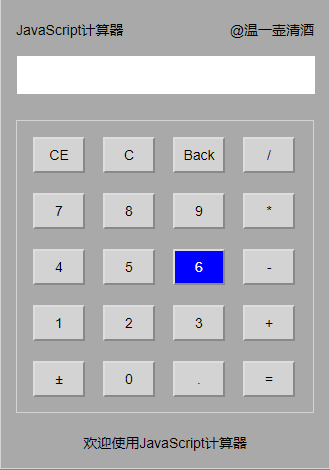
直接上代码
html文件代码:
 <html>

 <head>

 <meta charset="utf-8">

 <link href="计算器.css" rel="stylesheet">

 </head>

 <body>

 <div id="big">

 <div id="top">

     <span id="title">JavaScript计算器</span>

     <span id="author">@温一壶清酒</span>

 </div>

 <div id="import">

     <div id="data">

         <input type="text" id="dataname">

     </div>

 </div>

 <div id="key">

     <input type="button" id="CE" onclick="clearnum()" value="CE" class="buttons">

     <input type="button" id="C" onclick="clearnum()" value="C" class="buttons">

     <input type="button" id="Back" onclick="back()" value="Back" class="buttons">

     <input type="button" id="/" onclick="calc(this.id)" value="/" class="buttons" style="margin-right:0px">

     <input type="button" id="7" onclick="calc(this.id)" value="7" class="buttons">

     <input type="button" id="8" onclick="calc(this.id)" value="8" class="buttons">

     <input type="button" id="9" onclick="calc(this.id)" value="9" class="buttons">

     <input type="button" id="*" onclick="calc(this.id)" value="*" class="buttons" style="margin-right:0px">

     <input type="button" id="4" onclick="calc(this.id)" value="4" class="buttons">

     <input type="button" id="5" onclick="calc(this.id)" value="5" class="buttons">

     <input type="button" id="6" onclick="calc(this.id)" value="6" class="buttons">

     <input type="button" id="-" onclick="calc(this.id)" value="-" class="buttons" style="margin-right:0px">

     <input type="button" id="1" onclick="calc(this.id)" value="1" class="buttons">

     <input type="button" id="2" onclick="calc(this.id)" value="2" class="buttons">

     <input type="button" id="3" onclick="calc(this.id)" value="3" class="buttons">

     <input type="button" id="+" onclick="calc(this.id)" value="+" class="buttons" style="margin-right:0px">

     <input type="button" id="±" onclick="calc(this.id)" value="±" class="buttons">

     <input type="button" id="0" onclick="calc(this.id)" value="0" class="buttons">

     <input type="button" id="." onclick="calc(this.id)" value="." class="buttons">

     <input type="button" id="=" onclick="eva()" value="=" class="buttons" style="margin-right:0px">

 </div>

 <div id="bottom">

     <span id="welcome">欢迎使用JavaScript计算器</span>

 </div>

 </div>

 <script src="计算器.js"></script>

 </body>

 </html>
css样式代码:
 *{

     margin:;

     padding:;

     box-sizing: border-box;

     font:  14px Arial,sans-serif;

 }

 html{

     height:100%;

     background-color:lightslategrey;

 }

 #big{

     margin: 15px auto;

     width:330px;

     height:470px;

     background-color:darkgrey;

     border: 1px solid lightgray;

     padding:15px;

 }

 #top{

     height:20px;

 }

 #title{

     float:left;

     line-height:30px;

 }

 #author{

     float:right;

     line-height:30px;

 }

 #import{

     margin-top:15px;

 }

 #dataname{

     margin-top:5px;

     width:300px;

     height:40px;

     text-align:right;

     padding-right:10px;

     font-size:20px;

 }

 #key{

     border:1px solid lightgray;

     height:293px;

     margin-top:25px;

     padding:16px;

 }

 .buttons{

     float:left;

     width:52px;

     height:36px;

     text-align:center;

     background-color:lightgray;

     margin:0 18px 20px 0;

 }

 .buttons:hover{

     color:white;

     background-color:blue;

 }

 #bottom{

     margin-top:20px;

     height:20px;

     text-align:center;

 }
js代码:
 var number = 0;  // 定义第一个输入的数据

 function calc(number) {

     //获取当前输入

     if(number=="%"){

         document.getElementById('dataname').value=Math.round(document.getElementById('dataname').value)/100;

     }else{

         document.getElementById('dataname').value += document.getElementById(number).value;

     }

 }

 function eva() {

     //计算输入结果

     document.getElementById("dataname").value = eval(document.getElementById("dataname").value);

 }

 function clearnum() {

     //清零

     document.getElementById("dataname").value = null;

     document.getElementById("dataname").focus();

 }

 function back() {

     //退格

     var arr = document.getElementById("dataname");

     arr.value = arr.value.substring(0, arr.value.length - 1);

 }
JavaScript简易计算器的更多相关文章
- 自己做的javascript简易计算器
html <!DOCTYPE html> <html lang="zh"> <head> <meta charset="UTF- ...
- JavaScript之简易计算器
<head> <meta http-equiv="Content-Type" content="text/html; charset=utf-8&quo ...
- 前端 JavaScript 实现一个简易计算器
前端使用 JavaScript 实现一个简易计算器,没有难度,但是里面有些小知识还是需要注意的,算是一次基础知识回顾吧. 题目 实现一个简易版的计算器,需求如下: 1.除法操作时,如果被除数为0,则结 ...
- 剖析简易计算器带你入门微信小程序开发
写在前面,但是重点在后面 这是教程,也不是教程. 可以先看Demo的操作动图,看看是个什么玩意儿,GitHub地址(https://github.com/dunizb/wxapp-sCalc) 自从微 ...
- 使用HTML+CSS,jQuery编写的简易计算器
<%@ page language="java" contentType="text/html; charset=UTF-8" pageEncoding= ...
- 使用HTML+CSS,jQuery编写的简易计算器后续(添加了键盘监听)
之前发布了一款简易的计算器,今天做了一下修改,添加了键盘监听事件,不用再用鼠标点点点啦 JS代码: var yunSuan = 0;// 运算符号,0-无运算;1-加法;2-减法;3-乘法;4-除法 ...
- 使用html+css+js实现简易计算器
使用html+css+js实现简易计算器, 效果图如下: html代码如下: <!DOCTYPE html> <html lang="en"> <he ...
- 微信小程序-简易计算器
代码地址如下:http://www.demodashi.com/demo/14210.html 一.前期准备工作 软件环境:微信开发者工具 官方下载地址:https://mp.weixin.qq.co ...
- 用js制作简易计算器及猜随机数字游戏
<!doctype html><html><head> <meta charset="utf-8"> <title>JS ...
随机推荐
- python+selenium自动化软件测试(第6章):selenium phantomjs页面解析使用
我们都知道Selenium是一个Web的自动化测试工具,可以在多平台下操作多种浏览器进行各种动作,比如运行浏览器,访问页面,点击按钮,提交表单,浏览器窗口调整,鼠标右键和拖放动作,下拉框和对话框处理等 ...
- sublime text3开发python并设置快捷键
Package Control 安装方法 1.通过快捷键 ctrl+` 或者 View > Show Console 打开控制台,然后粘贴相应的 Python 安装代码: 2.Sublime T ...
- 题目1522:包含min函数的栈
#include <iostream> #include <cstdio> #include <stack> using namespace std; int ma ...
- XWPFDocument创建和读取Office Word文档基础篇(一)
注:有不正确的地方还望大神能够指出,抱拳了 老铁! 参考API:http://poi.apache.org/apidocs/org/apache/poi/xwpf/usermodel/XWPFDo ...
- python程序之profile分析
操作系统 : CentOS7.3.1611_x64 python版本:2.7.5 问题描述 1.Python开发的程序在使用过程中很慢,想确定下是哪段代码比较慢: 2.Python开发的程序在使用过程 ...
- 多线程编程学习四(Lock 的使用).
一.前言 本文要介绍使用Java5中 Lock 对象,同样也能实现同步的效果,而且在使用上更加方便.灵活,主要包括 ReentrantLock 类的使用和ReentrantReadWriteLock ...
- 线性表之何时使用ArrayList、LinkedList?
前言 线性表不仅可以存储重复的元素,而且可以指定元素存储的位置并根据下表访问元素. List接口的两个具体实现:数组线性表类ArrayList.链表类LinkedList. ArrayList Arr ...
- 软工+C(2017第7期) 野生程序员
// 上一篇:最近发展区/脚手架 // 下一篇:提问和回复 怎样做足够好的软件?我们就差一个程序员! 没有什么软件工程的理论的时候,程序员们凭借自己对编程的热爱,凭借着:"这是一个可以自动化 ...
- 201521123084 《Java程序设计》第11周学习总结
1. 本周学习总结 1.1 以你喜欢的方式(思维导图或其他)归纳总结多线程相关内容. 2. 书面作业 本次PTA作业题集多线程 1. 互斥访问与同步访问 完成题集4-4(互斥访问)与4-5(同步访问) ...
- 团队作业2--需求分析&原型设计
一.需求分析 1.用户采访 a.采访对象: 分别对本学院同学.其他专业同学.部分老师等总计15人进行了采访调研: b.采访截图: c.采访总结: (1).功能需求 能够将所提供的四个数进 ...