
Android 代码库(自定义一套 Dialog通用提示框 )
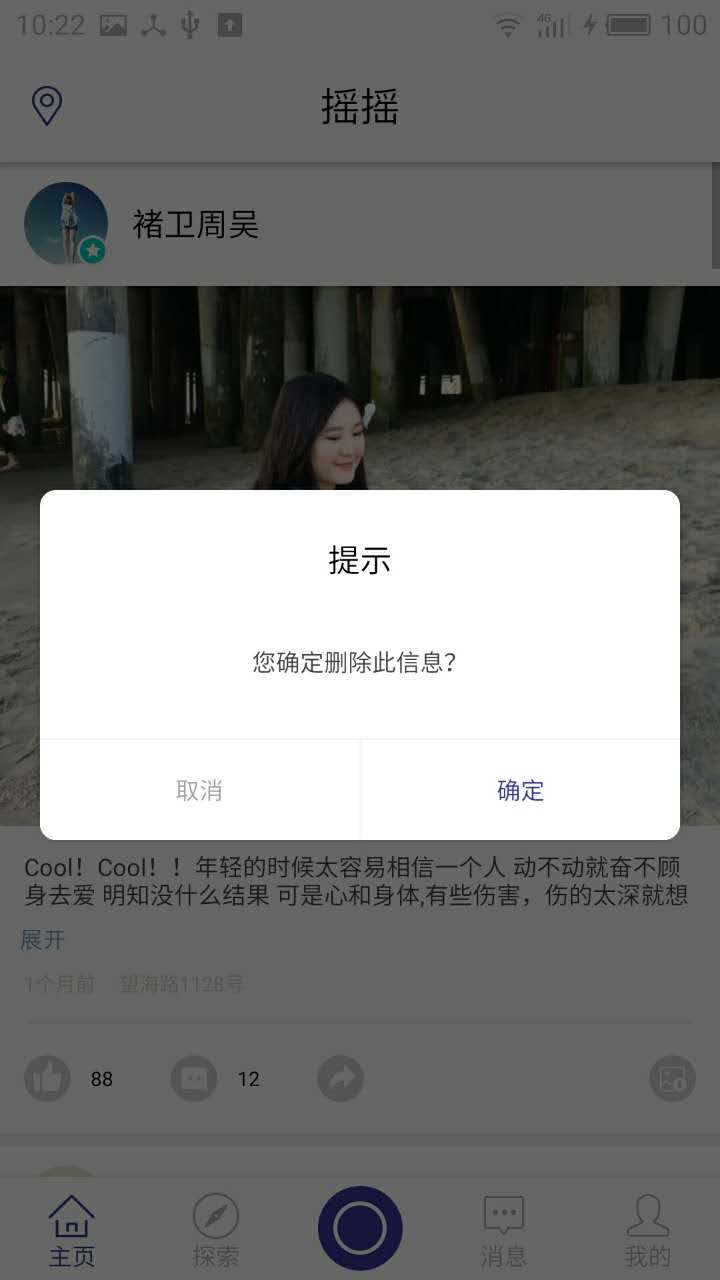
new CommomDialog(mContext, R.style.dialog, "您确定删除此信息?", new CommomDialog.OnCloseListener() {

    @Override

    public void onClick(boolean confirm) {

        if(confirm){

               Toast.makeText(this,"点击确定", Toast.LENGTH_SHORT).show();

               dialog.dismiss();

         }

    }

})

        .setTitle("提示").show();
public class CommomDialog extends Dialog implements View.OnClickListener{

    private TextView contentTxt;

    private TextView titleTxt;

    private TextView submitTxt;

    private TextView cancelTxt;

    private Context mContext;

    private String content;

    private OnCloseListener listener;

    private String positiveName;

    private String negativeName;

    private String title;

    public CommomDialog(Context context) {

        super(context);

        this.mContext = context;

    }

    public CommomDialog(Context context, int themeResId, String content) {

        super(context, themeResId);

        this.mContext = context;

        this.content = content;

    }

    public CommomDialog(Context context, int themeResId, String content, OnCloseListener listener) {

        super(context, themeResId);

        this.mContext = context;

        this.content = content;

        this.listener = listener;

    }

    protected CommomDialog(Context context, boolean cancelable, OnCancelListener cancelListener) {

        super(context, cancelable, cancelListener);

        this.mContext = context;

    }

    public CommomDialog setTitle(String title){

        this.title = title;

        return this;

    }

    public CommomDialog setPositiveButton(String name){

        this.positiveName = name;

        return this;

    }

    public CommomDialog setNegativeButton(String name){

        this.negativeName = name;

        return this;

    }

    @Override

    protected void onCreate(Bundle savedInstanceState) {

        super.onCreate(savedInstanceState);

        setContentView(R.layout.dialog_commom);

        setCanceledOnTouchOutside(false);

        initView();

    }

    private void initView(){

        contentTxt = (TextView)findViewById(R.id.content);

        titleTxt = (TextView)findViewById(R.id.title);

        submitTxt = (TextView)findViewById(R.id.submit);

        submitTxt.setOnClickListener(this);

        cancelTxt = (TextView)findViewById(R.id.cancel);

        cancelTxt.setOnClickListener(this);

        contentTxt.setText(content);

        if(!TextUtils.isEmpty(positiveName)){

            submitTxt.setText(positiveName);

        }

        if(!TextUtils.isEmpty(negativeName)){

            cancelTxt.setText(negativeName);

        }

        if(!TextUtils.isEmpty(title)){

            titleTxt.setText(title);

        }

    }

    @Override

    public void onClick(View v) {

        switch (v.getId()){

            case R.id.cancel:

                if(listener != null){

                    listener.onClick(this, false);

                }

                this.dismiss();

                break;

            case R.id.submit:

                if(listener != null){

                    listener.onClick(this, true);

                }

                break;

        }

    }

    public interface OnCloseListener{

        void onClick(Dialog dialog, boolean confirm);

    }

}
<?xml version="1.0" encoding="utf-8"?>

<LinearLayout xmlns:android="http://schemas.android.com/apk/res/android"

    android:layout_width="match_parent"

    android:layout_height="match_parent"

    android:background="@drawable/bg_round_white"

    android:orientation="vertical" >

        <TextView

            android:id="@+id/title"

            android:layout_width="match_parent"

            android:layout_height="wrap_content"

            android:gravity="center_horizontal"

            android:padding="12dp"

            android:layout_marginTop="12dp"

            android:text="提示"

            android:textSize="16sp"

            android:textColor="@color/black"/>

    <TextView

        android:id="@+id/content"

        android:layout_width="match_parent"

        android:layout_height="wrap_content"

        android:gravity="center"

        android:layout_gravity="center_horizontal"

        android:lineSpacingExtra="3dp"

        android:layout_marginLeft="40dp"

        android:layout_marginTop="20dp"

        android:layout_marginRight="40dp"

        android:layout_marginBottom="30dp"

        android:text="签到成功,获得200积分"

        android:textSize="12sp"

        android:textColor="@color/font_common_1"/>

    <View

        android:layout_width="match_parent"

        android:layout_height="1dp"

        android:background="@color/commom_background"/>

    <LinearLayout

        android:layout_width="match_parent"

        android:layout_height="50dp"

        android:orientation="horizontal">

        <TextView

            android:id="@+id/cancel"

            android:layout_width="match_parent"

            android:layout_height="match_parent"

            android:background="@drawable/bg_dialog_left_white"

            android:layout_weight="1.0"

            android:gravity="center"

            android:text="@string/cancel"

            android:textSize="12sp"

            android:textColor="@color/font_common_2"/>

        <View

            android:layout_width="1dp"

            android:layout_height="match_parent"

            android:background="@color/commom_background"/>

        <TextView

            android:id="@+id/submit"

            android:layout_width="match_parent"

            android:layout_height="match_parent"

            android:background="@drawable/bg_dialog_right_white"

            android:gravity="center"

            android:layout_weight="1.0"

            android:text="@string/submit"

            android:textSize="12sp"

            android:textColor="@color/font_blue"/>

    </LinearLayout>

</LinearLayout>
<?xml version="1.0" encoding="utf-8"?>

<shape xmlns:android="http://schemas.android.com/apk/res/android" android:shape="rectangle">

    <solid android:color="@color/white" />

    <corners android:radius="8dp" />

</shape>
<?xml version="1.0" encoding="utf-8"?>

<shape xmlns:android="http://schemas.android.com/apk/res/android" android:shape="rectangle">

    <solid android:color="@color/white" />

    <corners android:bottomLeftRadius="8dp" />

</shape>
<?xml version="1.0" encoding="utf-8"?>

<shape xmlns:android="http://schemas.android.com/apk/res/android" android:shape="rectangle">

    <solid android:color="@color/white" />

    <corners android:bottomRightRadius="8dp" />

</shape>
<style name="dialog" parent="@android:style/Theme.Dialog">

    <item name="android:windowFrame">@null</item>

    <!--边框-->

    <item name="android:windowIsFloating">true</item>

    <!--是否浮现在activity之上-->

    <item name="android:windowIsTranslucent">false</item>

    <!--半透明-->

    <item name="android:windowNoTitle">true</item>

    <!--无标题-->

    <item name="android:windowBackground">@android:color/transparent</item>

    <!--背景透明-->

    <item name="android:backgroundDimEnabled">true</item>

    <!--模糊-->

</style>
Android 代码库(自定义一套 Dialog通用提示框 )的更多相关文章
- 自定义 Material Design风格的提示框
关闭 自定义 Material Design风格的提示框 2016-04-24 10:55 152人阅读 评论(0) 收藏 举报 版权声明:本文为博主原创文章,未经博主允许不得转载. 其实在14年谷歌 ...
- Android开发 ---构建对话框Builder对象,消息提示框、列表对话框、单选提示框、多选提示框、日期/时间对话框、进度条对话框、自定义对话框、投影
效果图: 1.activity_main.xml 描述: a.定义了一个消息提示框按钮 点击按钮弹出消息 b.定义了一个选择城市的输入框 点击按钮选择城市 c.定义了一个单选提示框按钮 点击按钮选择某 ...
- 自定义iOS 中推送消息 提示框
看到标题你可能会觉得奇怪 推送消息提示框不是系统自己弹出来的吗? 为什么还要自己自定义呢? 因为项目需求是这样的:最近需要做 远程推送通知 和一个客服系统 包括店铺客服和官方客服两个模块 如果有新的消 ...
- android代码中自定义布局
转载地址:http://blog.csdn.net/luckyjda/article/details/8760214RelativeLayout rl = new RelativeLayout(thi ...
- 安卓 自定义AlertDialog对话框(加载提示框)
AlertDialog有以下六种使用方法: 一.简单的AlertDialog(只显示一段简单的信息) 二.带按钮的AlertDialog(显示提示信息,让用户操作) 三.类似ListView的Aler ...
- Android的一个自定义的动态添加Dialog类
android里面会有自己内置的Dialog的提示框,也算是比较方便的了,但是为了省点时间,我们在项目里面添加了一个自己的Dialog类,这个类实现了能够动态的添加按钮和一些提示语句或者其他的显示效果 ...
- 【js+jquery】通用、简单的JS 提示框
1.该插件不需要依赖 jquery,仅仅使用了原生js 2.简单.通用.可自定义修改样式.支持等待N秒消失.支持消失后跳转其他url , 功能还是比较完善的. 3.不废话,上代码: (我存放的位置在 ...
- Android中制作自定义dialog对话框的实例
http://www.jb51.net/article/83319.htm 这篇文章主要介绍了Android中制作自定义dialog对话框的实例分享,安卓自带的Dialog显然不够用,因而我们要继 ...
- Android单个按钮自定义Dialog
代码改变世界 Android单个按钮自定义Dialog dialog_layout.xml <?xml version="1.0" encoding="utf-8& ...
随机推荐
- h5标签基础 table表格标签
一.表格的定义:用于有规范的显示数据. 二.基本组成: 行<tr>/列<td>/表头<caption>/表标题<th> eg: <table> ...
- 瞎谈CNN:通过优化求解输入图像
本文同步自我的知乎专栏: From Beijing with Love 机器学习和优化问题 很多机器学习方法可以归结为优化问题,对于一个参数模型,比如神经网络,用来表示的话,训练模型其实就是下面的参数 ...
- 1638: [Usaco2007 Mar]Cow Traffic 奶牛交通
1638: [Usaco2007 Mar]Cow Traffic 奶牛交通 Time Limit: 5 Sec Memory Limit: 64 MBSubmit: 618 Solved: 217 ...
- oracle xe 数据库用户操作
在system账号登录获得system权限,然后对用户进行操作 --创建表空间create tablespace tablespace_name datafile 'D:\tablespace_nam ...
- 复杂SQL代码实例
DECLARE @begin DATETIME,@end DATETIME,@shanghutype INT, @beginshanghuarea BIGINT ,@endshanghuarea bi ...
- vue学习笔记(一)关于事件冒泡和键盘事件 以及与Angular的区别
一.事件冒泡 方法一.使用event.cancelBubble = true来组织冒泡 <div @click="show2()"> <input type=&q ...
- multiSelect 下拉多选插件
multiSelect是一款很好用的下拉多选插件,可以在下拉框中实现多选框,全选及取消全选等方法.使用方法:1.引用 multiSelect.css及 multiSelect.js.下载地址 http ...
- 动态规划略有所得 数字三角形(POJ1163)
在上面的数字三角形中寻找一条从顶部到底边的路径,使得路径上所经过的数字之和最大.路径上的每一步都只能往左下或 右下走.只需要求出这个最大和即可,不必给出具体路径. 三角形的行数大于1小于等于100,数 ...
- JAVA基础知识(2)--关键字final的使用
/***Final关键字的使用*@author lihaiming*Email:912547587@qq.com*关键字Final可以修饰属性,方法,类*修饰属性的时候,final修饰的变量是一个常量 ...
- .Net轻量级ORM-NPoco的使用方法-摘自NPoco国外官方Wiki
文章引用自NPoco官方Wiki,地址:https://github.com/schotime/NPoco/wiki,因公司网络不稳定,有时无法访问,特将其摘抄. Home Adam Schroder ...