
Spring Boot1.5.4 AOP实例
原文:https://github.com/x113773/testall/issues/12
1. 还是首先添加依赖(使用当前springboot的默认版本)
```
<dependency>
<groupId>org.springframework.boot</groupId>
<artifactId>spring-boot-starter-aop</artifactId>
</dependency>
```
- 参考下面[官方文档](http://docs.spring.io/spring-boot/docs/1.5.4.RELEASE/reference/htmlsingle/)的部分配置说明,可见aop是默认开启的,自动添加了@EnableAspectJAutoProxy注解
```
# AOP
spring.aop.auto=true # Add @EnableAspectJAutoProxy.
spring.aop.proxy-target-class=false # Whether subclass-based (CGLIB) proxies are to be created (true) as opposed to standard Java interface-based proxies (false).
```
2. 编写一个切面类,[AspectAdviceConfig.java](https://github.com/x113773/testall/blob/master/src/main/java/com/ansel/testall/aop/AspectAdviceConfig.java),里面定义了一个切点指示器和各种通知(Advice,也译作 增强)
```
package com.ansel.testall.aop;
import java.lang.reflect.Method;
import java.util.Arrays;
import javax.servlet.http.HttpServletRequest;
import org.aspectj.lang.JoinPoint;
import org.aspectj.lang.ProceedingJoinPoint;
import org.aspectj.lang.annotation.After;
import org.aspectj.lang.annotation.AfterReturning;
import org.aspectj.lang.annotation.AfterThrowing;
import org.aspectj.lang.annotation.Around;
import org.aspectj.lang.annotation.Aspect;
import org.aspectj.lang.annotation.Before;
import org.aspectj.lang.annotation.DeclareParents;
import org.aspectj.lang.annotation.Pointcut;
import org.aspectj.lang.reflect.MethodSignature;
import org.slf4j.Logger;
import org.slf4j.LoggerFactory;
import org.springframework.stereotype.Component;
import org.springframework.web.context.request.RequestContextHolder;
import org.springframework.web.context.request.ServletRequestAttributes;
@Aspect
@Component
public class AspectAdviceConfig {
private Logger logger = LoggerFactory.getLogger(this.getClass());
/**
* 定义切点指示器:com.ansel.testall.aop包下,带@RestController注解的类。
*/
@Pointcut("execution(* com.ansel.testall.aop..*(..)) and @annotation(org.springframework.web.bind.annotation.RestController)")
public void myPointcut() {
}
/**
* 前置通知,在目标方法完成之后调用通知,此时不会关 心方法的输出是什么
*/
@Before("myPointcut()")
public void beforeAdvice() {
System.out.println("Before--通知方法会在目标方法调用之前执行");
}
/**
* 后置通知,在目标方法完成之后调用通知,此时不会关 心方法的输出是什么
*/
@After("myPointcut()")
public void afterAdvice() {
System.out.println("After--通知方法会在目标方法返回或抛出异常后调用");
}
/**
* 返回通知,在目标方法成功执行之后调用,可以获得目标方法的返回值,但不能修改(修改也不影响方法的返回值)
*
* @param jp
* JoinPoint接口,可以获得连接点的一些信息
*
* @param retVal
* 目标方法返回值,和jp一样会由spring自动传入
*/
@AfterReturning(returning = "retVal", pointcut = "myPointcut()")
public void afterReturningAdvice(JoinPoint jp, Object retVal) {
retVal = retVal + " (@AfterReturning can read the return value, but it can't change the value!)";
System.out.println("AfterReturning--通知方法会在目标方法返回后调用; retVal = " + retVal);
System.out.println(jp.toLongString());
}
/**
* 异常通知,在目标方法抛出异常后调用通知
*/
@AfterThrowing("myPointcut()")
public void afterThrowingAdvice() {
System.out.println("AfterThrowing--通知方法会在目标方法抛出异常后调用");
}
/**
* 环绕通知,可以在目标方法调用前后,自定义执行内容。可以修改目标方法的返回值
*
* @param pjp
*/
@Around("myPointcut()")
public Object aroundAdvice(ProceedingJoinPoint pjp) {
Object retVal = null;
try {
System.out.println("Around--目标方法调用之前执行");
ServletRequestAttributes attributes = (ServletRequestAttributes) RequestContextHolder.getRequestAttributes();
HttpServletRequest request = attributes.getRequest();
MethodSignature signature = (MethodSignature) pjp.getSignature();
Method method = signature.getMethod(); // 获取被拦截的方法
String methodName = method.getName(); // 获取被拦截的方法名
logger.info("requset method name is: " + methodName);
logger.info("request URL is: " + request.getRequestURL().toString());
logger.info("request http method: " + request.getMethod());
logger.info("request arguments are: " + Arrays.toString(pjp.getArgs()));
retVal = pjp.proceed();
retVal = retVal + " (@Around can change the return value!)";
System.out.println("Around--目标方法返回后调用");
} catch (Throwable e) {
System.out.println("Around--目标方法抛出异常后调用");
}
return retVal;
}
}
```
3. 通过Advice可以某些方法增加一些功能,若要为某个对象增加新的方法,则要用到Introduction,编写另外一个切面AspectIntroductionConfig.java
```
package com.ansel.testall.aop;
import org.aspectj.lang.annotation.Aspect;
import org.aspectj.lang.annotation.DeclareParents;
import org.springframework.stereotype.Component;
@Aspect
@Component
public class AspectIntroductionConfig {
/**
* DeclareParents注解所标注的静态属性指明了要引入的接口;
* value属性指定了哪种类型的bean要引入该接口;
* defaultImpl属性指定了为引入功能提供实现的类。
*/
@DeclareParents(value = "com.ansel.testall.aop.AopService+", defaultImpl = IntroductionServiceImpl.class)
public static IntroductionService introductionService;
}
```
4. 编写两个接口AopService、IntroductionService,和2个实现AopServiceImpl、IntroductionServiceImpl
```
package com.ansel.testall.aop;
public interface AopService {
String myOwnMethod();
}
/***********************************/
package com.ansel.testall.aop;
public interface IntroductionService {
String IntroductionMethod();
}
/***********************************/
package com.ansel.testall.aop;
import org.springframework.stereotype.Service;
@Service
public class AopServiceImpl implements AopService {
@Override
public String myOwnMethod() {
return "this method is from AopService";
}
}
/***********************************/
package com.ansel.testall.aop;
import org.springframework.stereotype.Service;
@Service
public class IntroductionServiceImpl implements IntroductionService {
@Override
public String IntroductionMethod() {
return "this method from Introduction.";
}
}
```
5. 编写一个切点实例[AopController.java](https://github.com/x113773/testall/blob/master/src/main/java/com/ansel/testall/aop/AopController.java) (其实就是个普通的controller)
```
package com.ansel.testall.aop;
import org.springframework.beans.factory.annotation.Autowired;
import org.springframework.web.bind.annotation.RequestMapping;
import org.springframework.web.bind.annotation.RequestMethod;
import org.springframework.web.bind.annotation.RestController;
@RestController
public class AopController {
/**
* 只注入AopService
*/
@Autowired
AopService aopService;
/**
* 测试AOP通知(Advice,也译作 增强)
*
* @return
*/
@RequestMapping(value = "/aop", method = RequestMethod.GET)
public String testAop() {
return "this is a AOP Advice test.";
}
/**
* 测试AOP引入(Introduction)
*
* @return
*/
@RequestMapping(value = "/aop/introdution", method = RequestMethod.GET)
public String testAopIntroduction() {
System.out.println(aopService.myOwnMethod());
//接口类型转换
IntroductionService introductionService = (IntroductionService) aopService;
System.out.println(introductionService.IntroductionMethod());
return "this is a AOP Introduction test.";
}
}
```
4. 启动项目,触发 localhost:8080/aop 请求,控制台输出结果如下:
```
Around--目标方法调用之前执行
2017-07-03 17:33:15.494 INFO 8548 --- [nio-8443-exec-7] tConfig$$EnhancerBySpringCGLIB$$5f4562fb : requset method name is: testAOP
2017-07-03 17:33:15.495 INFO 8548 --- [nio-8443-exec-7] tConfig$$EnhancerBySpringCGLIB$$5f4562fb : request URL is: https://localhost:8443/aop
2017-07-03 17:33:15.495 INFO 8548 --- [nio-8443-exec-7] tConfig$$EnhancerBySpringCGLIB$$5f4562fb : request http method: GET
2017-07-03 17:33:15.495 INFO 8548 --- [nio-8443-exec-7] tConfig$$EnhancerBySpringCGLIB$$5f4562fb : request arguments are: []
Before--通知方法会在目标方法调用之前执行
Around--目标方法返回后调用
After--通知方法会在目标方法返回或抛出异常后调用
AfterReturning--通知方法会在目标方法返回后调用; retVal = this is a AOP test. (@Around can change the return value!) (@AfterReturning can read the return value, but it can't change the value!)
execution(public java.lang.String com.ansel.testall.aop.AOPController.testAOP())
```
页面返回结果如下:
`this is a AOP test. (@Around can change the return value!)`
触发 localhost:8080/aop/introdution 请求,控制台输出结果如下:
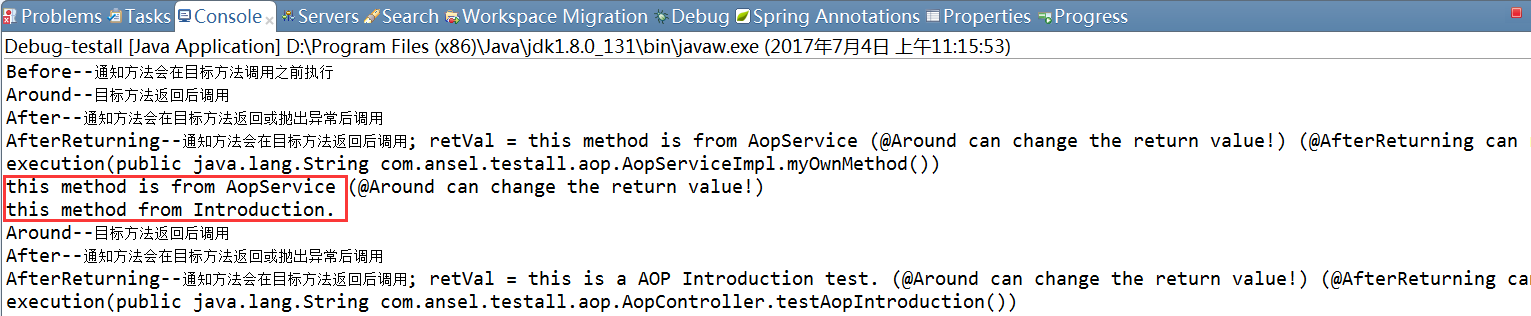
---
注:
`@Pointcut("execution(* com.ansel.testall.aop..*(..)) and @annotation(org.springframework.web.bind.annotation.RestController)")`
当我使用and操作符连接上面两个切点指示器,没有任何问题(把注解RestController换成RequestMapping也没问题)
然而,当我使用&&操作符连接上面两个切点指示器时,完全没有触发AspectJ,切面没有织入任何连接点(把注解RestController换成RequestMapping就没问题)
```
/**
* OK
*/
@Pointcut("execution(* com.ansel.testall.aop..*(..)) and @annotation(org.springframework.web.bind.annotation.RestController)")
/**
* not OK
*/
@Pointcut("execution(* com.ansel.testall.aop..*(..)) && @annotation(org.springframework.web.bind.annotation.RestController)")
/**
* OK
*/
@Pointcut("execution(* com.ansel.testall.aop..*(..)) and @annotation(org.springframework.web.bind.annotation.RequestMapping)")
/**
* OK
*/
@Pointcut("execution(* com.ansel.testall.aop..*(..)) && @annotation(org.springframework.web.bind.annotation.RequestMapping)")
```
Spring Boot1.5.4 AOP实例的更多相关文章
- Spring学习笔记IOC与AOP实例
Spring框架核心由两部分组成: 第一部分是反向控制(IOC),也叫依赖注入(DI); 控制反转(依赖注入)的主要内容是指:只描述程序中对象的被创建方式但不显示的创建对象.在以XML语言描述的配置文 ...
- Java框架spring 学习笔记(十二):aop实例操作
使用aop需要在网上下载两个jar包: aopalliance.jar aspectjweaver.jar 为idea添加jar包,快捷键ctrl+shift+alt+s,打开添加jar包的对话框,将 ...
- Spring Aop实例@Aspect、@Before、@AfterReturning@Around 注解方式配置
用过spring框架进行开发的人,多多少少会使用过它的AOP功能,都知道有@Before.@Around和@After等advice.最近,为了实现项目中的输出日志和权限控制这两个需求,我也使用到了A ...
- Spring.Net AOP实例
Spring.Net和Log4net.NUnit.NHibernate一样,也是先从Java中流行开来,然后移植到了.NET当中,形成了.NET版的Spring框架.其官方网站为:http://www ...
- Spring Aop实例@Aspect、@Before、@AfterReturning@Around 注解方式配置(转)
用过spring框架进行开发的人,多多少少会使用过它的AOP功能,都知道有@Before.@Around和@After等advice.最近,为了实现项目中的输出日志和权限控制这两个需求,我也使用到了A ...
- Spring的IOC和AOP之深剖
今天,既然讲到了Spring 的IOC和AOP,我们就必须要知道 Spring主要是两件事: 1.开发Bean:2.配置Bean.对于Spring框架来说,它要做的,就是根据配置文件来创建bean实例 ...
- Spring(6)—— AOP
AOP(Aspect-OrientedProgramming)面向切面编程,与OOP完全不同,使用AOP编程系统被分为切面或关注点,而不是OOP中的对象. AOP的引入 在OOP面向对象的使用中,无可 ...
- 转-Spring Framework中的AOP之around通知
Spring Framework中的AOP之around通知 http://blog.csdn.net/xiaoliang_xie/article/details/7049183 标签: spring ...
- spring之初识Ioc&Aop
Spring框架的作用 spring是一个轻量级的企业级框架,提供了ioc容器.Aop实现.dao/orm支持.web集成等功能,目标是使现有的java EE技术更易用,并促进良好的编程习惯. Spr ...
随机推荐
- 【图解HTTP】笔记摘要
第1章 了解Web及网络基础 根据Web浏览器(Web客户端)地址栏中指定的URL,Web浏览器从Web服务器端获取文件资源(resource)等信息,从而显示出Web页面. CERN(欧洲核子研究组 ...
- TensorFlowSharp入门使用C#编写TensorFlow人工智能应用
TensorFlowSharp入门使用C#编写TensorFlow人工智能应用学习. TensorFlow简单介绍 TensorFlow 是谷歌的第二代机器学习系统,按照谷歌所说,在某些基准测试中,T ...
- html或者php中 input框限制只能输入正整数,逻辑与和或运算
有时需要限制文本框输入内容的类型,本节分享下正则表达式限制文本框只能输入数字.小数点.英文字母.汉字等代码. 例如,输入大于0的正整数 代码如下: <input onkeyup="if ...
- netty基础--基本收发
使用maven构建一个基本的netty收发应用,作为其他应用的基础.客户端使用packet sender工具. 1 添加netty依赖 1 maven netty依赖 <dependency ...
- JavaSE教程-03Java中分支语句与四种进制转换-练习
练习1: 老师如果带100或以上则请客吃饭 import java.util.Scanner; public class Test2{ public static void main(String[] ...
- Docker示例
运行一个Hello world zane@zane-V:~$ docker run ubuntu /bin/echo 'Hello world' Unable to find image 'ubu ...
- 你真的知道组件中的v-model吗?
v-model的神奇 html <div id="app"> <input v-model="poin"> {{ poin }} < ...
- 推荐五款Android 应用的自动化测试工具
如今自动化测试已经应用到每天的测试中.这不足为奇,因为自动化测试在测试过程中节约了时间,还能避免包括人为因素造成的测试错误和遗漏. 自动化测试工具选择很多.一些是开源的,一些非常贵.一些自动化工具是几 ...
- 使用SQL Server 发送邮件
在很多数据分析和集成的场景下,我们需要了解数据库中关键的脚本或者job的执行情况.这个时候邮件提醒是一种比较不错的通知方式.本文从零开始,一步一步的介绍如何使用SQL Server来发送邮件. 环境: ...
- 使用类似于中介者模式实现不同VC之间的跳转
在2013年的时候,我们就已经实现了类似于http地址进行页面跳转, 那个时候,主要是用继承ViewController和给 UIViewController和UINavigationControll ...