
Linux CentOS7 安装 Mysql5.7.19
第二次安装会安装失败
1.先停止mysql服务 service mysql stop
2.检查是否卸载干净 find / -name mysql 多用几个命令检查,不要删到其他组件的
3.检查mysql进程是否结束 ps -aux | grep mysql
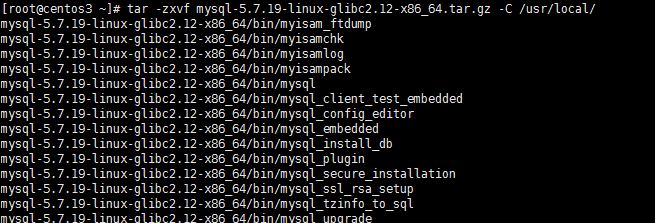
1.解压文件
[root@centos3 ~]# tar -zxvf mysql-5.7.19-linux-glibc2.12-x86_64.tar.gz -C /usr/local/
2.重命名
[root@centos3 ~]# cd /usr/local/
[root@centos3 local]# mv mysql-5.7.19-linux-glibc2.12-x86_64/ mysql

3.配置环境变量
[root@centos3 local]# vi + /etc/profile
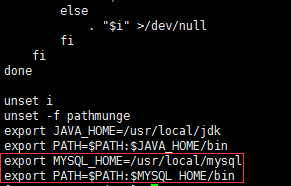
[root@centos3 local]# source /etc/profile
4.创建组和用户并授权
[root@centos3 local]# groupadd mysql
[root@centos3 local]# useradd -r -g mysql -s /bin/false mysql
[root@centos3 local]# chown -R mysql mysql/
[root@centos3 local]# chgrp -R mysql mysql/

5.初始化并记住最后的12位密码
[root@centos3 local]# /usr/local/mysql/bin/mysqld --initialize --user=mysql --basedir=/usr/local/mysql/ --datadir=/usr/local/mysql/data/ --lc_messages_dir=/usr/local/mysql/share --lc_messages=zh_CN

6.修改mysql.server.文件并复制到 /etc/init.d/目录下
[root@centos3 local]# cd /usr/local/mysql/support-files/
[root@centos3 support-files]# vi mysql.server
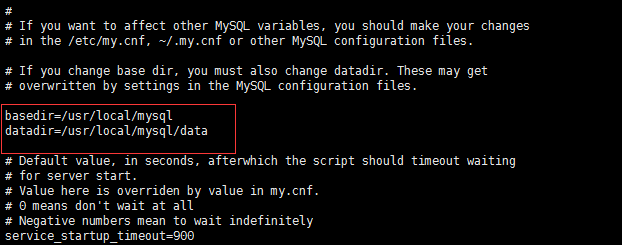
[root@centos3 support-files]# cp mysql.server /etc/init.d/mysqld
7.重命名my.cnf
[root@centos3 support-files]# mv /etc/my.cnf /etc/my_default.cnf
8.设置开机启动
[root@centos3 support-files]# chmod +x /etc/init.d/mysqld
[root@centos3 support-files]# chkconfig --add mysqld
[root@centos3 support-files]# chkconfig mysqld on
//查看开机启动是否成功
[root@centos3 support-files]# chkconfig --list mysqld

9.启动服务
[root@centos3 support-files]# /etc/init.d/mysqld start
[root@centos3 support-files]# service mysql start

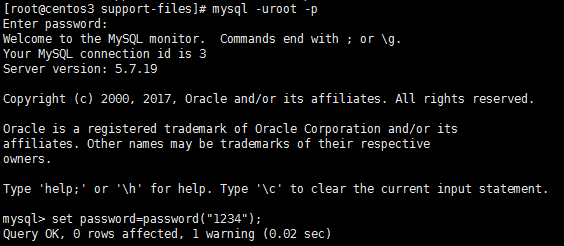
10.登录修改密码,密码就是第5步系统生成的
[root@centos3 support-files]# mysql -uroot -p
mysql> set password=password("1234");
Linux CentOS7 安装 Mysql5.7.19的更多相关文章
- centos7安装mysql5.7.19及配置远程连接
centos7安装mysql5.7.19及配置远程连接------https://blog.csdn.net/Lh19931122/article/details/77996213
- linux centos7 安装mysql-5.7.17教程(图解)
1系统约定安装文件下载目录:/data/softwareMysql目录安装位置:/usr/local/mysql数据库保存位置:/data/mysql日志保存位置:/data/log/mysql 2下 ...
- window和linux(centos7)安装mysql5.7
window mysql 安装步骤 社区版本下载地址: https://dev.mysql.com/downloads/file/?id=474802 下载完成后,得到mysql-installer- ...
- Centos7安装mysql-5.7.19
Centos7安装Mysql 一 mysql下载 地址: https://dev.mysql.com/downloads/mysql/#downloads 二 在centos7上创建安装文件存放.解压 ...
- 【环境部署】centos7安装mysql-5.7.19 group-replication
--mysql高可用官方文档: https://dev.mysql.com/doc/refman/5.7/en/group-replication.html mysql下载地址: https://ww ...
- Linux CentOS7安装Mysql5.7
一.下载mysql mkdir /home/install #创建install目录 在/home/install目录下下载mysql5.7 wget https://cdn.mysql.com//D ...
- CentOS7.2安装mysql-5.7.19多实例
安装多实例之前首先需要先安装mysql,这里就不介绍如何安装mysql了,参考前面的博客:https://www.cnblogs.com/hei-ma/p/9505509.html 安装多实例之前需要 ...
- 转:Linux 编译安装 Mysql5.7
http://broqiang.com/2017/04/18/Mysql-Install-5.7.18-Linux-Compile/ 原文 Linux 编译安装 Mysql5.7 Ubuntu 下快速 ...
- Centos7 安装 MySQL5.7
Centos7 安装 MySQL5.7 一.环境介绍 1.安装包版本介绍 MySQL 有三种安装方式:RPM安装.二进制包安装.源码包安装.我们这篇文章以二进制方式安装MySQL 软件名称 版本 系统 ...
随机推荐
- 201521123105 第10周Java学习总结
1. 本周学习总结 1.1 以你喜欢的方式(思维导图或其他)归纳总结异常与多线程相关内容. 2. 书面作业 本次PTA作业题集异常.多线程 1.finally 题目4-21.1 截图你的提交结果(出现 ...
- 201521123007《Java程序设计》第9周学习总结
1. 本周学习总结 1.1 以你喜欢的方式(思维导图或其他)归纳总结异常相关内容. 2. 书面作业 本次PTA作业题集异常 1. 常用异常 题目5-1 1.1 截图你的提交结果(出现学号) 1.2 自 ...
- 201521123055 《Java程序设计》第14周学习总结
1. 本章学习总结 2. 书面作业 1. MySQL数据库基本操作 建立数据库,将自己的姓名.学号作为一条记录插入.(截图,需出现自己的学号.姓名) 在自己建立的数据库上执行常见SQL语句(截图) 利 ...
- 201521123016《Java程序设计》第10周学习总结
1. 本周学习总结 2. 书面作业 本次PTA作业题集异常.多线程 1.finally 题目4-2 1.1 截图你的提交结果(出现学号) 1.2 4-2中finally中捕获异常需要注意什么? 只有执 ...
- sublime列显示控制
Shift+右键拖拽或者Ctrl+左键单击选择多个位置
- 参考:Python 调试方法
地址:http://www.ibm.com/developerworks/cn/linux/l-cn-pythondebugger/ 这是Python代码调试技巧,也是我今天从别的地方看到的,然后转载 ...
- Azure SQL Database (25) Azure SQL Database创建只读用户
<Windows Azure Platform 系列文章目录> 本文将介绍如何在Azure SQL Database创建只读用户. 请先按照笔者之前的文章:Azure SQL Databa ...
- 1.Bootstrap-简介
1.介绍 Bootstrap 是一个用于快速开发 Web 应用程序和网站的前端框架.Bootstrap 是基于 HTML.CSS.JAVASCRIPT 的. 2.HTML 模板 一个使用了 Boots ...
- hdu1698线段树的区间更新区间查询
Just a Hook Time Limit: 4000/2000 MS (Java/Others) Memory Limit: 32768/32768 K (Java/Others) Tota ...
- java中的finally用return也挡不住
今晚做了科达的题,有一题就是这个意思,我自以为return中断一切,然而事实摆在眼前: