
解决 Entity Framework 6.0 decimal 类型精度问题
Ø 前言
本文主要解决 EF 中对于 MSSQL 数据库的 decimal 类型经度问题,经实验该问题仅在 CodeFirst 模式的情况下发生,话不多说直接看代码。
1. 假设我们有一张 Customer 数据表,主要探究:Longitude、Latitude、LonLatSum 这三个字段。
1) 结构如下:
CREATE 的数据)
1) C# 代码如下:
using (MyTestingEntities context = new MyTestingEntities())
{
Customer entity = context.Customers.Attach(new Customer() { Id = 1 });
entity.Longitude = 123.1256789f; //123.125679
entity.Latitude = 456.1295678d; //456.1295678
entity.LonLatSum = (decimal)(entity.Longitude + entity.Latitude); //579.255246816113M
context.Configuration.ValidateOnSaveEnabled = false;
result = context.SaveChanges() > 0;
}
2) 生成SQL:
exec 位小数。
2. Latitude:float 类型(对应 C# 中的 double 类型),保留了7位小数。
3. LonLatSum:decimal 类型(对应 C# 中的 decimal 类型),也保留了7位小数。
4. OK 这是正常的。
3. 然后,我们再使用 Code Frirst 的方式对数据更新(更新 Id 为2的数据)
1) C# 代码如下:
using (MyTestingContext context = new MyTestingContext())
{
Customer entity = context.Customer.Attach(new Customer() { Id = 2 });
entity.Longitude = 123.1256789f; //123.125679
entity.Latitude = 456.1295678d; //456.1295678
entity.LonLatSum = (decimal)(entity.Longitude + entity.Latitude); //579.255246816113M
result = context.SaveChanges() > 0;
}
return result;
2) 生成SQL:
exec )和小数位数(2位)的方式生成了,结果 SQL 的类型声明是这样:decimal(18,2)。
3) 搞清楚了问题,下面我们就来解决这个问题吧。
5. 解决问题
1) 创建一个 DecimalPrecisionAttribute 特性类
/// <summary>
/// 用于指定 decimal 类型的精确度与小数保留位数。
/// </summary>
[AttributeUsage(AttributeTargets.Property, Inherited = false, AllowMultiple = false)]
public class DecimalPrecisionAttribute : Attribute
{
private byte _precision;
/// <summary>
/// 精确度。
/// </summary>
public byte Precision
{
get { return _precision; }
set { _precision = value; }
}
private byte _scale;
/// <summary>
/// 小数保留位数。
/// </summary>
public byte Scale
{
get { return _scale; }
set { _scale = value; }
}
/// <summary>
/// 根据指定的精确度与小数保留位数,初始化 DecimalPrecisionAttribute 的实例。
/// </summary>
/// <param name="precision">精确度。</param>
/// <param name="scale">小数保留位数。</param>
public DecimalPrecisionAttribute(byte precision, byte scale)
{
this.Precision = precision;
this.Scale = scale;
}
}
2) 再创建一个 DecimalPrecisionAttributeConvention 类(表示 DecimalPrecisionAttribute 的一种约定)
1. 该类继承于 System.Data.Entity.ModelConfiguration.Conventions.PrimitivePropertyAttributeConfigurationConvention 类。
2. 并实现 Apply 抽象方法,通俗点说:该方法在“生成 SQL”时被调用,对于打了 DecimalPrecisionAttribute 标记的实体属性,精度将根据 configuration.HasPrecision() 方法中的设置去生成。
/// <summary>
/// 表示 DecimalPrecisionAttribute 的一种约定。
/// </summary>
public class DecimalPrecisionAttributeConvention
: PrimitivePropertyAttributeConfigurationConvention<DecimalPrecisionAttribute>
{
public override void Apply(ConventionPrimitivePropertyConfiguration configuration, DecimalPrecisionAttribute attribute)
{
if (attribute.Precision < 1 || attribute.Precision > 38)
{
throw new InvalidOperationException("Precision must be between 1 and 38.");
}
if (attribute.Scale > attribute.Precision)
{
throw new InvalidOperationException("Scale must be between 0 and the Precision value.");
}
configuration.HasPrecision(attribute.Precision, attribute.Scale);
}
}
3) 在数据上下文的 OnModelCreating() 方法将该 DecimalPrecisionAttributeConvention(约定)加入数据约定集合中。
protected override void OnModelCreating(DbModelBuilder modelBuilder)
{
base.OnModelCreating(modelBuilder);
modelBuilder.Conventions.Add(new DecimalPrecisionAttributeConvention());
}
4) 最后一步,将需要设置小数位数的属性打上 DecimalPrecision 标记,例如:
[DecimalPrecision(18, 7)]
public decimal LonLatSum { get; set; }
5) 好了之后再次运行代码,生成 SQL 如下:
exec sp_executesql N'UPDATE [dbo].[Customer]
SET [Longitude] = @0, [Latitude] = @1, [LonLatSum] = @2
WHERE ([Id] = @3)
',N'@0 real,@1 float,@2 decimal(18,7),@3 int',@0=123.12567901611328,@1=456.12956780000002,@2=579.2552468,@3=2
6) 结果如下:
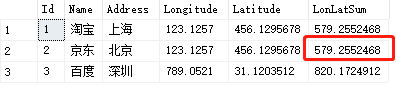
7) OK,这样就与 DB First 生成的 SQL 没什么区别了。
解决 Entity Framework 6.0 decimal 类型精度问题的更多相关文章
- 在Entity Framework 4.0中使用 Repository 和 Unit of Work 模式
[原文地址]Using Repository and Unit of Work patterns with Entity Framework 4.0 [原文发表日期] 16 June 09 04:08 ...
- Entity Framework 教程——Entity Framework中的实体类型
Entity Framework中的实体类型 : 在之前的章节中我们介绍过从已有的数据库中创建EDM,它包含数据库中每个表所对应的实体.在EF 5.0/6.0中,存在POCO 实体和动态代理实体两种. ...
- 开发 ASP.NET vNext 续篇:云优化的概念、Entity Framework 7.0、简单吞吐量压力测试
继续上一篇<开发 ASP.NET vNext 初步总结(使用Visual Studio 2014 CTP1)>之后, 关于云优化和版本控制: 我本想做一下MAC和LINUX的self-ho ...
- Entity Framework 5.0系列之Code First数据库迁移
我们知道无论是"Database First"还是"Model First"当模型发生改变了都可以通过Visual Studio设计视图进行更新,那么对于Cod ...
- Entity Framework 5.0
今天 VS2012 .net Framework 4.5 Entity Framework 5.0 三者共同发布了. ( EF5 Released ) 在介绍新特性之前,先与大家回顾一下EF版 ...
- 云优化的概念、Entity Framework 7.0、简单吞吐量压力测试
云优化的概念.Entity Framework 7.0.简单吞吐量压力测试 继续上一篇<开发 ASP.NET vNext 初步总结(使用Visual Studio 2014 CTP1)>之 ...
- [EF2]Sneak Preview: Persistence Ignorance and POCO in Entity Framework 4.0
http://blogs.msdn.com/b/adonet/archive/2009/05/11/sneak-preview-persistence-ignorance-and-poco-in-en ...
- 精进不休 .NET 4.5 (12) - ADO.NET Entity Framework 6.0 新特性, WCF Data Services 5.6 新特性
[索引页][源码下载] 精进不休 .NET 4.5 (12) - ADO.NET Entity Framework 6.0 新特性, WCF Data Services 5.6 新特性 作者:weba ...
- 浅析Entity Framework Core2.0的日志记录与动态查询条件
前言 Entity Framework Core 2.0更新也已经有一段时间了,园子里也有不少的文章.. 本文主要是浅析一下Entity Framework Core2.0的日志记录与动态查询条件 去 ...
随机推荐
- ZOJ 4062 Plants vs. Zombies(二分答案)
题目链接:Plants vs. Zombies 题意:从1到n每个位置一棵植物,植物每浇水一次,增加ai高度.人的初始位置为0,人每次能往左或往右走一步,走到哪个位置就浇水一次.求m步走完后最低高度的 ...
- Windows Update第三方工具概览
受方程式黑客组织0Day攻击影响,所有的Windows服务器都要更新补丁. 方程式0day漏洞攻击介绍:https://zhuanlan.zhihu.com/p/26375989 腾讯云的解决方案:h ...
- 我们如何用Go来处理每分钟100万复杂请求的场景
在Malwarebytes我们经历了显著的增长,自从我一年前加入了硅谷的公司,一个主要的职责成了设计架构和开发一些系统来支持一个快速增长的信息安全公司和所有需要的设施来支持一个每天百万用户使用的产品. ...
- CF1080F Katya and Segments Sets
题意:给定n个区间,每个区间有颜色.m次询问,每次询问:这n个区间中所有被包含在[x, y]这一区间中的区间,它们的颜色是否取遍了[l, r]中的所有颜色. 强制在线. 解:第一步是大家都熟悉的套路⑧ ...
- C regex.h
C也是存在正则表达式的 Linux下regex.h知识点和使用样例 上文中有一个样例代码,进行了测试 总结一下有些注意点: 1.上述代码的匹配子串很奇怪,为什么会出现 cnt= a very cnt= ...
- Android Eclipse 安装教程 hosts替换
http://www.cnblogs.com/Potato-lover/p/5582542.html 第一步,也是最为关键的一步——修改hosts文件 为什么说是最关键的一步呢?因为接下来的操作,我们 ...
- (最小生成树) codeVs 1231 最优布线问题
题目描述 Description 学校需要将n台计算机连接起来,不同的2台计算机之间的连接费用可能是不同的.为了节省费用,我们考虑采用间接数据传输结束,就是一台计算机可以间接地通过其他计算机实现和另外 ...
- VirtualBox安装linux
VBox相较于VMware要小巧,虚拟机该有的都有了.搭建记录下,学习... centos版本:CentOS-6.6-i386-bin-DVD1 VBox版本:6.0.4-128413-Win 之后可 ...
- CentOS6.9快速安装配置svn
CentOS6.9快速安装配置svn 环境介绍: 操作系统:CentOS release 6.9 (Final)192.168.65.130 (svn服务器)192.168.65.129 (svn客户 ...
- Java抽象类、接口整理
抽象类 5.1抽象类产生(上标为A) 编写一个类时,会给该类定义一些方法,这些方法是用来描述功能和具体实现的方式,这些方法都有方法体 例如:一个图形类应该有周长的方法,但是不同的图形求周长方法不一样. ...