
Java发送手机短信(附代码和解析,亲测有效,简便易操作)
这个方法用的是中国网建SMS短信通相关依赖进行操作的~~
很简单,仅需要三步,第二部代码直接复制,不需要修改,第三部中的用户名和密钥修改成自己的即可
<1>
首先需要导入三个jar包
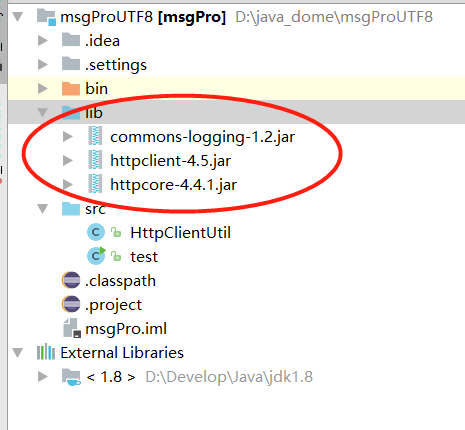
<2>
import java.io.IOException;
import java.net.URL;
import java.util.ArrayList;
import java.util.HashMap;
import java.util.List;
import java.util.Map;

import org.apache.http.HttpEntity;
import org.apache.http.NameValuePair;
import org.apache.http.client.config.RequestConfig;
import org.apache.http.client.entity.UrlEncodedFormEntity;
import org.apache.http.client.methods.CloseableHttpResponse;
import org.apache.http.client.methods.HttpGet;
import org.apache.http.client.methods.HttpPost;
import org.apache.http.conn.ssl.DefaultHostnameVerifier;
import org.apache.http.conn.util.PublicSuffixMatcher;
import org.apache.http.conn.util.PublicSuffixMatcherLoader;
import org.apache.http.impl.client.CloseableHttpClient;
import org.apache.http.impl.client.HttpClients;
import org.apache.http.message.BasicNameValuePair;
import org.apache.http.util.EntityUtils;

public class HttpClientUtil {
    private RequestConfig requestConfig = RequestConfig.custom()
            .setSocketTimeout(15000)
            .setConnectTimeout(15000)
            .setConnectionRequestTimeout(15000)
            .build();

    private static HttpClientUtil instance = null;
    private HttpClientUtil(){}
    public static HttpClientUtil getInstance(){
        if (instance == null) {
            instance = new HttpClientUtil();
        }
        return instance;
    }

    /**
     * 发送 post请求
     * @param httpUrl 地址
     */
    public String sendHttpPost(String httpUrl) {
        HttpPost httpPost = new HttpPost(httpUrl);// 创建httpPost
        return sendHttpPost(httpPost,"utf-8");
    }

    /**
     * 发送 post请求
     * @param httpUrl 地址
     * @param maps 参数
     *  @param type 字符编码格式
     */
    public String sendHttpPost(String httpUrl, Map<String, String> maps,String type) {
        HttpPost httpPost = new HttpPost(httpUrl);// 创建httpPost
        // 创建参数队列
        List<NameValuePair> nameValuePairs = new ArrayList<NameValuePair>();
        for (String key : maps.keySet()) {
            nameValuePairs.add(new BasicNameValuePair(key, maps.get(key)));
        }
        try {
            httpPost.setEntity(new UrlEncodedFormEntity(nameValuePairs, type));
        } catch (Exception e) {
            e.printStackTrace();
        }
        return sendHttpPost(httpPost,type);
    }

    /**
     * 发送Post请求
     * @param httpPost
     * @return
     */
    private String sendHttpPost(HttpPost httpPost,String reponseType) {
        CloseableHttpClient httpClient = null;
        CloseableHttpResponse response = null;
        HttpEntity entity = null;
        String responseContent = null;
        try {
            // 创建默认的httpClient实例.
            httpClient = HttpClients.createDefault();
            httpPost.setConfig(requestConfig);
            // 执行请求
            response = httpClient.execute(httpPost);
            entity = response.getEntity();
            responseContent = EntityUtils.toString(entity, reponseType);
        } catch (Exception e) {
            e.printStackTrace();
        } finally {
            try {
                // 关闭连接,释放资源
                if (response != null) {
                    response.close();
                }
                if (httpClient != null) {
                    httpClient.close();
                }
            } catch (IOException e) {
                e.printStackTrace();
            }
        }
        return responseContent;
    }

    /**
     * 发送 get请求
     * @param httpUrl
     */
    public String sendHttpGet(String httpUrl) {
        HttpGet httpGet = new HttpGet(httpUrl);// 创建get请求
        return sendHttpGet(httpGet);
    }

    /**
     * 发送 get请求Https
     * @param httpUrl
     */
    public String sendHttpsGet(String httpUrl) {
        HttpGet httpGet = new HttpGet(httpUrl);// 创建get请求
        return sendHttpsGet(httpGet);
    }

    /**
     * @Title: sendMsgUtf8
     * @Description: TODO(发送utf8)
     * @param: @param Uid
     * @param: @param Key
     * @param: @param content
     * @param: @param mobiles
     * @param: @return
     * @date: 2017-3-22 下午5:58:07
     * @throws
     */
    @SuppressWarnings({ "rawtypes", "unchecked" })
    public int sendMsgUtf8(String Uid,String Key,String content,String mobiles){
       Map maps = new HashMap();
      maps.put("Uid", Uid);
      maps.put("Key", Key);
      maps.put("smsMob", mobiles);
      maps.put("smsText", content);
      String result = sendHttpPost("http://utf8.sms.webchinese.cn", maps, "utf-8");
      return Integer.parseInt(result);
    }

    /**
     * @Title: sendMsgUtf8
     * @Description: TODO(发送utf8)
     * @param: @param Uid
     * @param: @param Key
     * @param: @param content
     * @param: @param mobiles
     * @param: @return
     * @return: int
     * @author:  ly
     * @date: 2017-3-22 下午5:58:07
     * @throws
     */
    @SuppressWarnings({ "rawtypes", "unchecked" })
   public int sendMsgGbk(String Uid,String Key,String content,String mobiles){
       Map maps = new HashMap();
      maps.put("Uid", Uid);
      maps.put("Key", Key);
      maps.put("smsMob", mobiles);
      maps.put("smsText", content);
      String result = sendHttpPost("http://gbk.sms.webchinese.cn", maps, "gbk");
      return Integer.parseInt(result);
    }

    /**
     * 发送Get请求
     * @param httpPost
     * @return
     */
    private String sendHttpGet(HttpGet httpGet) {
        CloseableHttpClient httpClient = null;
        CloseableHttpResponse response = null;
        HttpEntity entity = null;
        String responseContent = null;
        try {
            // 创建默认的httpClient实例.
            httpClient = HttpClients.createDefault();
            httpGet.setConfig(requestConfig);
            // 执行请求
            response = httpClient.execute(httpGet);
            entity = response.getEntity();
            responseContent = EntityUtils.toString(entity, "UTF-8");
        } catch (Exception e) {
            e.printStackTrace();
        } finally {
            try {
                // 关闭连接,释放资源
                if (response != null) {
                    response.close();
                }
                if (httpClient != null) {
                    httpClient.close();
                }
            } catch (IOException e) {
                e.printStackTrace();
            }
        }
        return responseContent;
    }

    /**
     * 发送Get请求Https
     * @param httpPost
     * @return
     */
    private String sendHttpsGet(HttpGet httpGet) {
        CloseableHttpClient httpClient = null;
        CloseableHttpResponse response = null;
        HttpEntity entity = null;
        String responseContent = null;
        try {
            // 创建默认的httpClient实例.
            PublicSuffixMatcher publicSuffixMatcher = PublicSuffixMatcherLoader.load(new URL(httpGet.getURI().toString()));
            DefaultHostnameVerifier hostnameVerifier = new DefaultHostnameVerifier(publicSuffixMatcher);
            httpClient = HttpClients.custom().setSSLHostnameVerifier(hostnameVerifier).build();
            httpGet.setConfig(requestConfig);
            // 执行请求
            response = httpClient.execute(httpGet);
            entity = response.getEntity();
            responseContent = EntityUtils.toString(entity, "UTF-8");
        } catch (Exception e) {
            e.printStackTrace();
        } finally {
            try {
                // 关闭连接,释放资源
                if (response != null) {
                    response.close();
                }
                if (httpClient != null) {
                    httpClient.close();
                }
            } catch (IOException e) {
                e.printStackTrace();
            }
        }
        return responseContent;
    }

    /**
    * @Title: getErrorMsg
    * @Description: TODO(返回异常原因)
    * @param: @param errorCode
    */
   public String getErrorMsg(int errorCode){
      if(errorCode==-1){
         return "没有该用户账户";
      }else if(errorCode==-2){
         return "接口密钥不正确";
      }else if(errorCode==-3){
         return "短信数量不足";
      }else if(errorCode==-4){
         return "手机号格式不正确";
      }else if(errorCode==-21){
         return "MD5接口密钥加密不正确";
      }else if(errorCode==-11){
         return "该用户被禁用";
      }else if(errorCode==-14){
         return "短信内容出现非法字符";
      }else if(errorCode==-41){
         return "手机号码为空";
      }else if(errorCode==-42){
         return "短信内容为空";
      }else if(errorCode==-51){
         return "短信签名格式不正确";
      }else if(errorCode==-6){
         return "IP限制";
      }else{
         return "未知错误码:"+errorCode;
      }
   }
}
<3>
import java.util.HashMap;
import java.util.Map;

/**
 * @Title: http://www.smschinese.cn/api.shtml
 * @date 2011-3-22
 * @version V1.2
 */
public class test {

   //用户名
   private static String Uid = "自己的用户名";

   //接口安全秘钥
   private static String Key = "自己的秘钥";

   //手机号码,多个号码如13800000000,13800000001,13800000002
   private static String smsMob = "15321362396,15764266860";

   //短信内容
   private static String smsText = "验证码:8888";

   public static void main(String[] args) {

      HttpClientUtil client = HttpClientUtil.getInstance();

      //UTF发送
      int result = client.sendMsgUtf8(Uid, Key, smsText, smsMob);
      if(result>0){
         System.out.println("UTF8成功发送条数=="+result);
      }else{
         System.out.println(client.getErrorMsg(result));
      }
   }
}
Java发送手机短信(附代码和解析,亲测有效,简便易操作)的更多相关文章
- JAVA发送手机短信
<p><span>JAVA发送手机短信,流传有几种方法:(1)使用webservice接口发送手机短信,这个可以使用sina提供的webservice进行发送,但是需要进行注册 ...
- 利用java实现的一个发送手机短信的小例子
今天闲来无事,在微博上看到一个关于用java实现的一个发送手机短信的程序,看了看,写的不太相信,闲的没事,把他整理下来,以后可能用得着 JAVA发送手机短信,流传有几种方法:(1)使用webservi ...
- C#简单实现发送手机短信
偶然想起,像编写一个从电脑向手机发送短信的程序,从网上查找到有三种方式:(1)使用webservice接口发送手机短信,这个可以使用sina提供的webservice进行发送,但是需要进行注册;(2) ...
- 装饰者模式的学习(c#) EF SaveChanges() 报错(转载) C# 四舍五入 保留两位小数(转载) DataGridView样式生成器使用说明 MSSQL如何将查询结果拼接成字符串 快递查询 C# 通过smtp直接发送邮件 C# 带参访问接口,WebClient方式 C# 发送手机短信 文件 日志 写入 与读取
装饰者模式的学习(c#) 案例转自https://www.cnblogs.com/stonefeng/p/5679638.html //主体基类 using System;using System.C ...
- SNF开发平台WinForm之十二-发送手机短信功能调用-金笛-SNF快速开发平台3.3-Spring.Net.Framework
1.调用前组装参数 2.调用发送信息服务脚本 .调用前组装参数: BaseSendTaskEntity entity = new BaseSendTaskEntity(); entity.Mess ...
- 用Java通过串口发送手机短信
用Java通过串口发短信其实很简单,因为有现成的类库供我们使用.有底层的类库,也有封装好一点的类库,下面我介绍一下在 Win32 平台下发送短信的方法. 如果你想用更底层的类库开发功能更强大的应用程序 ...
- 四:java调接口实现发送手机短信验证码功能
1.点击获取验证码之前的样式: 2.输入正确的手机号后点击获取验证码之后的样式: 3.如果手机号已经被注册的样式: 4.如果一个手机号一天发送超过3次就提示不能发送: 二:前台的注册页面的代码:reg ...
- Java调用WebService接口实现发送手机短信验证码功能,java 手机验证码,WebService接口调用
近来由于项目需要,需要用到手机短信验证码的功能,其中最主要的是用到了第三方提供的短信平台接口WebService客户端接口,下面我把我在项目中用到的记录一下,以便给大家提供个思路,由于本人的文采有限, ...
- java后台通过Servlet给用户发送手机短信验证码,第一次写勿喷,欢迎转载
短信验证码跟自己在Servlet画的验证码不一样,我们不用管短信验证码是怎么产生的,我们只需要关注如何调用短信验证码,在短信验证码里面添加 自己需要的随机数或者其他的内容. 现在直接上流程 第一步找一 ...
随机推荐
- wdk1703+vs2015编译的诡异问题
最近将wdk升级到1703(10.0.15063.0)版本,编译一个新建的minifiter项目居然出现了失败 提示错误为 WindowsDriver.common.targets(460,5): e ...
- nginx stream module on mt7621(newifi3 d2) with openwrt 18.06.2
因为需要使用nginx的stream模块,专门编译了一个nginx安装包,适用于openwrt 18.06.2版本,mt7621平台 顺便记录一下编译的笔记: 1.修改feeds/packages/n ...
- 关于js-angularJS的路由传参
使用angular进行网页跳转传参 app.controller('payController', function ($scope, $location, payService) { 注明$loca ...
- Sql Server数据库之触发器
阅读目录 一:触发器的优点 二:触发器的作用 三:触发器的分类 四:触发器的工作原理 五:创建触发器 六:管理触发器 概念: 触发器(trigger)是SQL server 提供给程序员和数据分析 ...
- js中this的绑定规则及优先级
一. this绑定规则 函数调用位置决定了this的绑定对象,必须找到正确的调用位置判断需要应用下面四条规则中的哪一条. 1.1 默认绑定 看下面代码: function foo() { cons ...
- 【转】BFG Repo-Cleaner: Removes large or troublesome blobs like git-filter-branch does, but faster.
https://rtyley.github.io/bfg-repo-cleaner/ an alternative to git-filter-branch The BFG is a simpler, ...
- Spring再接触 整合Hibernate
首先更改配置文件 <?xml version="1.0" encoding="UTF-8"?> <beans xmlns="http ...
- 项目(九) 企业级Memcached服务应用实践
一, Memcached介绍 1.1 Memcached与常见同类软件对比 (1)Memcached是什么? Memcached是一个开源的,支持高性能,高并发的分布式内存缓存系统,由C语言编写, ...
- CNN中feature map、卷积核、卷积核个数、filter、channel的概念解释,以及CNN 学习过程中卷积核更新的理解
具体可以看这篇文章,写的很详细.https://blog.csdn.net/xys430381_1/article/details/82529397
- 阿里云单机快速部署K8S
网上有很多关于K8S部署测试环境的文章,但是有些部署比较繁琐.这里推荐使用 https://github.com/gjmzj/kubeasz地址文章.文章介绍很详细,记录一下方便自己日后学习使用. # ...