
Vue2.x源码学习笔记-Vue构造函数
我们知道使用vue.js开发应用时,都是new Vue({}/*options*/)
那Vue构造函数上有哪些静态属性和方法呢?其原型上又有哪些方法呢?
一般我都会在浏览器中输入Vue来look see see
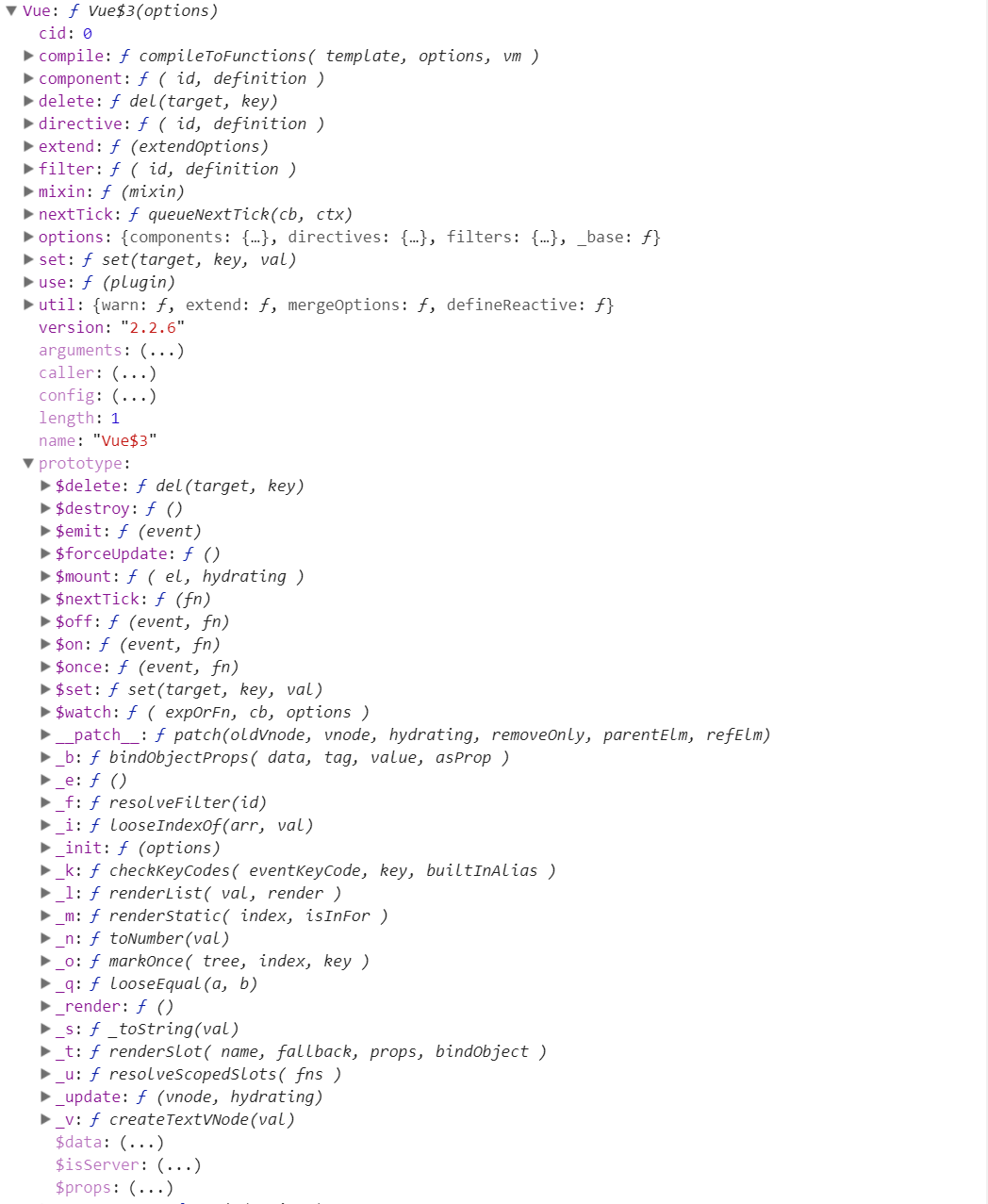
可以看到Vue构造函数上挂载了这么多属性和方法,so这么nb。
可以看到有很多的全局的api,以及实例的方法(其实就是Vue.prototype上的方法)。
那么问题来了,尤大是如何把这么多方法和属性挂载上去的。那么带着问题,进入vue源码 look see see去
现在写项目可能都使用es6+的语法,用webpack打包或者其他工具打包了。
先进入项目中,找到package.json文件,这里面有项目的依赖,有开发环境、生产环境等编译的启动脚本,有项目的许可信息等。
然而我们使用npm run dev时,其实就是package.json文件中scripts属性中dev属性,它是这么写的
"dev": "rollup -w -c build/config.js --environment TARGET:web-full-dev"
它执行了build/config.js文件(一个打包配置的文件),且带了个web-full-dev参数过去了,先这么理解这,我们去build/config.js文件中去看看,且搜下web-full-dev,会发现
// Runtime+compiler development build (Browser)

  'web-full-dev': {

    entry: path.resolve(__dirname, '../src/entries/web-runtime-with-compiler.js'),

    dest: path.resolve(__dirname, '../dist/vue.js'),

    format: 'umd',

    env: 'development',

    alias: { he: './entity-decoder' },

    banner

  },
我们可以发现入口文件是'../src/entries/web-runtime-with-compiler.js',然而src目录下的那么文件夹和文件都会编译成dist目录下的vue.js。
我们分别打开相关目录下的文件
/src/entries/web-runtime-with-compiler.js

--> /src/entries/web-runtime.js

--> /src/core/index.js

--> /src/core/instance/index.js
通过package.json文件,依次打开相关文件终于找到Vue构造函数了
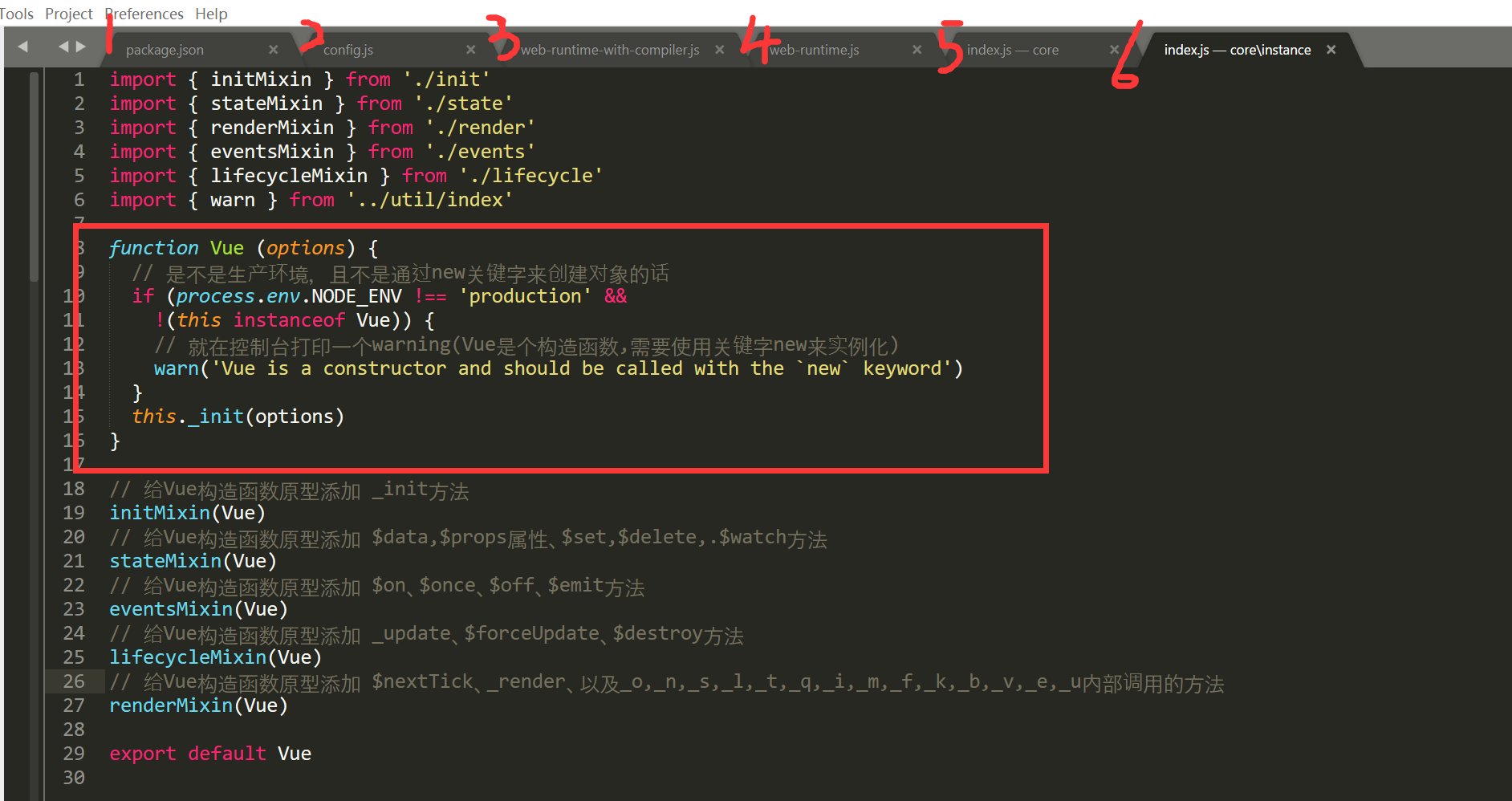
可以看到Vue构造函数是如此简单,一个if分支加上一个原型上的_init方法。那么怎么往这个构造函数上混入原型方法和静态属性和静态方法呢?
我们可以看到通过
// 给Vue构造函数原型添加 _init方法
initMixin(Vue)
// 给Vue构造函数原型添加 $data,$props属性、$set,$delete,.$watch方法
stateMixin(Vue)
// 给Vue构造函数原型添加 $on、$once、$off、$emit方法
eventsMixin(Vue)
// 给Vue构造函数原型添加 _update、$forceUpdate、$destroy方法
lifecycleMixin(Vue)
// 给Vue构造函数原型添加 $nextTick、_render、以及_o,_n,_s,_l,_t,_q,_i,_m,_f,_k,_b,_v,_e,_u内部调用的方法
renderMixin(Vue)
这几个方法就给Vue.prototype添加了这么多方法了。
接着沿刚才所提到的文件引入顺序一步步来看。/src/core/instance/index.js执行之后,是/src/core/index.js文件来看下源码
import Vue from './instance/index'

import { initGlobalAPI } from './global-api/index'

import { isServerRendering } from 'core/util/env'

initGlobalAPI(Vue) // 给Vue构造函数添加了一些静态方法和属性(属性: config, util, options, cid;

                   // 方法: set, delete, nextTick, use, mixin, extend, component, directive, filter方法)

// 给Vue构造函数的原型添加 $isServer 属性

Object.defineProperty(Vue.prototype, '$isServer', {

  get: isServerRendering

})

// 给Vue构造函数添加 version 属性

Vue.version = '__VERSION__'

export default Vue
可以看到initGlobalAPI方法给Vue构造函数添加了好多静态属性和方法(也就是官网api提到的全局api)。
我们可以先看下其源码
export function initGlobalAPI (Vue: GlobalAPI) {

  // config

  const configDef = {}

  configDef.get = () => config

  if (process.env.NODE_ENV !== 'production') {

    configDef.set = () => {

      warn(

        'Do not replace the Vue.config object, set individual fields instead.'

      )

    }

  }

  Object.defineProperty(Vue, 'config', configDef)

  // exposed util methods.

  // NOTE: these are not considered part of the public API - avoid relying on

  // them unless you are aware of the risk.

  Vue.util = {

    warn,

    extend,

    mergeOptions,

    defineReactive

  }

  Vue.set = set

  Vue.delete = del

  Vue.nextTick = nextTick

  Vue.options = Object.create(null)

  config._assetTypes.forEach(type => {

    Vue.options[type + 's'] = Object.create(null)

  })

  // this is used to identify the "base" constructor to extend all plain-object

  // components with in Weex's multi-instance scenarios.

  Vue.options._base = Vue

  extend(Vue.options.components, builtInComponents)

  initUse(Vue) // 给Vue构造函数添加 use方法

  initMixin(Vue) // 给Vue构造函数添加 mixin方法

  initExtend(Vue) // 给Vue构造函数添加 extend方法

  initAssetRegisters(Vue) // 给Vue构造函数添加 component, directive, filter方法

}
然后又给Vue.prototype原型添加了$isServer属性
再然后给Vue添加了version静态属性。
接着再看下/src/entries/web-runtime.js文件中的代码
// install platform specific utils 安装平台相对应的方法

Vue.config.mustUseProp = mustUseProp

Vue.config.isReservedTag = isReservedTag

Vue.config.getTagNamespace = getTagNamespace

Vue.config.isUnknownElement = isUnknownElement

// install platform runtime directives & components 安装平台相对应的指令和组件

extend(Vue.options.directives, platformDirectives)

extend(Vue.options.components, platformComponents)

// install platform patch function 如果是环境是浏览器的话, 给Vue构造函数添加__patch__函数

Vue.prototype.__patch__ = inBrowser ? patch : noop

// public mount method 给Vue构造函数添加 $mount 函数

Vue.prototype.$mount = function (

  el?: string | Element,

  hydrating?: boolean

): Component {

  el = el && inBrowser ? query(el) : undefined

  return mountComponent(this, el, hydrating)

}
可以看到
1. 根据不同的平台重写config对象中mustUseProp, isReservedTag, getTagNamespace, isUnknowElement属性的值。
2. 通过exend方法,扩展指令对象和组件对象
先不关心extend方法的具体实现,看看他把我们的Vue.options.directives和Vue.options.components变成了什么鸟样
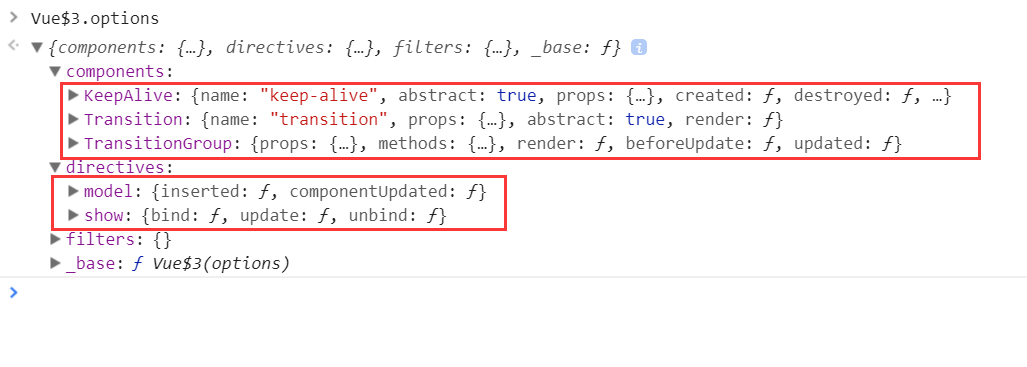
内置指令和组件就是这么来的啊,很好,继续往下see see
3. 然后给Vue.prototype添加__patch__(虚拟dom相关) 和 $mount(挂载元素)方法
接着看下/src/entries/web-runtime-with-compiler.js 文件的代码:
const mount = Vue.prototype.$mount

// 重写Vue构造函数原型上的$mount方法

Vue.prototype.$mount = function (

  el?: string | Element,

  hydrating?: boolean

): Component {

  el = el && query(el)

  /* istanbul ignore if */

  if (el === document.body || el === document.documentElement) {

    process.env.NODE_ENV !== 'production' && warn(

      `Do not mount Vue to <html> or <body> - mount to normal elements instead.`

    )

    return this

  }

  const options = this.$options

  // resolve template/el and convert to render function

  if (!options.render) {

    let template = options.template

    if (template) {

      if (typeof template === 'string') {

        if (template.charAt(0) === '#') {

          template = idToTemplate(template)

          /* istanbul ignore if */

          if (process.env.NODE_ENV !== 'production' && !template) {

            warn(

              `Template element not found or is empty: ${options.template}`,

              this

            )

          }

        }

      } else if (template.nodeType) {

        template = template.innerHTML

      } else {

        if (process.env.NODE_ENV !== 'production') {

          warn('invalid template option:' + template, this)

        }

        return this

      }

    } else if (el) {

      template = getOuterHTML(el)

    }

    if (template) {

      /* istanbul ignore if */

      if (process.env.NODE_ENV !== 'production' && config.performance && mark) {

        mark('compile')

      }

      const { render, staticRenderFns } = compileToFunctions(template, {

        shouldDecodeNewlines,

        delimiters: options.delimiters

      }, this)

      options.render = render

      options.staticRenderFns = staticRenderFns

      /* istanbul ignore if */

      if (process.env.NODE_ENV !== 'production' && config.performance && mark) {

        mark('compile end')

        measure(`${this._name} compile`, 'compile', 'compile end')

      }

    }

  }

  return mount.call(this, el, hydrating)

}

/**

 * Get outerHTML of elements, taking care

 * of SVG elements in IE as well.

 */

function getOuterHTML (el: Element): string {

  if (el.outerHTML) {

    return el.outerHTML

  } else {

    const container = document.createElement('div')

    container.appendChild(el.cloneNode(true))

    return container.innerHTML

  }

}

Vue.compile = compileToFunctions // 给Vue构造函数添加 compile方法
该文件中重写Vue构造函数原型上的$mount方法,且给vue添加了compile属性
至此Vue上的静态属性和方法,还有原型上的方法怎么来的就这么看完了。
一个构造函数有了,那怎么玩它呢,必然new它,得到的实例,究竟它有哪些属性,属性怎么一步一步挂载到实例上去的,下篇帖子用个小例子说明。
总结: 该笔记主要记录Vue构造函数上的静态属性和方法还有原型方法是如何一步一步添加到Vue构造函数上的。并没有解读属性或者方法的源码。
Vue2.x源码学习笔记-Vue构造函数的更多相关文章
- Vue2.x源码学习笔记-Vue源码调试
如果我们不用单文件组件开发,一般直接<script src="dist/vue.js">引入开发版vue.js这种情况下debug也是很方便的,只不过vue.js文件代 ...
- Vue2.x源码学习笔记-Vue实例的属性和方法整理
还是先从浏览器直观的感受下实例属性和方法. 实例属性: 对应解释如下: vm._uid // 自增的id vm._isVue // 标示是vue对象,避免被observe vm._renderProx ...
- Vue2.x源码学习笔记-Vue静态方法和静态属性整理
Vue静态方法和静态属性,其实直接在浏览器中可以查看到的,如下 圈起来的是其静态属性,但是有的属性对象中的属性的值又是函数.未圈起来的则是函数. 其实它来自如下各个目录下的js文件 // src/co ...
- Vue源码学习1——Vue构造函数
Vue源码学习1--Vue构造函数 这是我第一次正式阅读大型框架源码,刚开始的时候完全不知道该如何入手.Vue源码clone下来之后这么多文件夹,Vue的这么多方法和概念都在哪,完全没有头绪.现在也只 ...
- Vue2.x源码学习笔记-从一个小例子查看vm实例生命周期
学习任何一门框架,都不可能一股脑儿的从入口代码从上到下,把代码看完, 这样其实是很枯燥的,我想也很少有人这么干,或者这么干着干着可能干不下去了. 因为肯定很无聊. 我们先从一个最最简单的小例子,来查看 ...
- Vue源码学习三 ———— Vue构造函数包装
Vue源码学习二 是对Vue的原型对象的包装,最后从Vue的出生文件导出了 Vue这个构造函数 来到 src/core/index.js 代码是: import Vue from './instanc ...
- Vue2.x源码学习笔记-源码目录结构整理
先从github上下载或者clone一个vue分支项目 https://github.com/vuejs/vue 查看下目录结果 先列出一些目录 Vue |— build 打包相关的配置文件,其中最重 ...
- Vue源码学习二 ———— Vue原型对象包装
Vue原型对象的包装 在Vue官网直接通过 script 标签导入的 Vue包是 umd模块的形式.在使用前都通过 new Vue({}).记录一下 Vue构造函数的包装. 在 src/core/in ...
- 最新 Vue 源码学习笔记
最新 Vue 源码学习笔记 v2.x.x & v3.x.x 框架架构 核心算法 设计模式 编码风格 项目结构 为什么出现 解决了什么问题 有哪些应用场景 v2.x.x & v3.x.x ...
随机推荐
- Dynamics 365-部分用户访问环境缓慢
链接来自MS MVP 罗勇大神的Dynamics 365中部分账号使用系统明显缓慢怎么办?先这么干! 之前项目中也遇到过客户部分账户访问环境缓慢的问题,在此做个记录,等再碰到了,以此思路进行尝试
- Jedis 简单案例
POM 依赖 <!-- https://mvnrepository.com/artifact/redis.clients/jedis --> <dependency> < ...
- Android项目实战(四十一):游戏和视频类型应用 状态栏沉浸式效果
需求: 手机app ,当打游戏或者全屏看视频的时候会发现这时候手机顶部的状态栏是不显示的,当我们从手机顶端向下进行滑动或手机底端向上滑动的时候,状态栏会显示出来,如果短暂的几秒时间没有操作的话,状态 ...
- Kotlin入门(28)Application单例化
Application是Android的又一大组件,在App运行过程中,有且仅有一个Application对象贯穿应用的整个生命周期,所以适合在Application中保存应用运行时的全局变量.而开展 ...
- Android IPC机制(三)使用AIDL实现跨进程方法调用
上一篇文章中我们介绍了使用Messenger来进行进程间通信的方法,但是我们能发现Messenger是以串行的方式来处理客户端发来的信息,如果有大量的消息发到服务端,服务端仍然一个一个的处理再响应客户 ...
- Django 配置MySQL数据库
在settings.py中配置 DATABASES = { 'default': { 'ENGINE': 'django.db.backends.mysql', # 数据库引擎 'NAME': 'my ...
- VMware虚拟机安装CentOS系统图文教程
上一篇:VMware虚拟机安装教程详解图文 上一篇文章给大家介绍了虚拟机的安装,本文为大家详细介绍一下如何在虚拟机安装CentOS系统: 一:VMware虚拟机创建: 1:打开 ...
- SQL Server 2012还原一直卡在ASYNC_IO_COMPLETION浅析
在SQL Server 2012(11.0.7001.0)下面在还原一个数据库(备份文件40多G大小,实际数据库大小300G),在还原过程中,出现一直等待ASYNC_IO_COMPLETION,如下测 ...
- mssql sqlserver 优化注意事项:
摘要: 下文整理sqlserver优化中的常用知识点和注意事项 1.表上未建立合理的索引 2.服务器内存过小,导致缓存过少,数据库频繁的交互数据 3.统计信息不准确,导致索引乱用 4.网络异常,数据交 ...
- c/c++ 深拷贝
解决上一篇浅拷贝的问题 浅拷贝的问题根源是,类里有指针类型的成员变量,所以需要自己编写拷贝构造函数和重载=函数 #include <iostream> #include <strin ...