
docker容器的常用操作

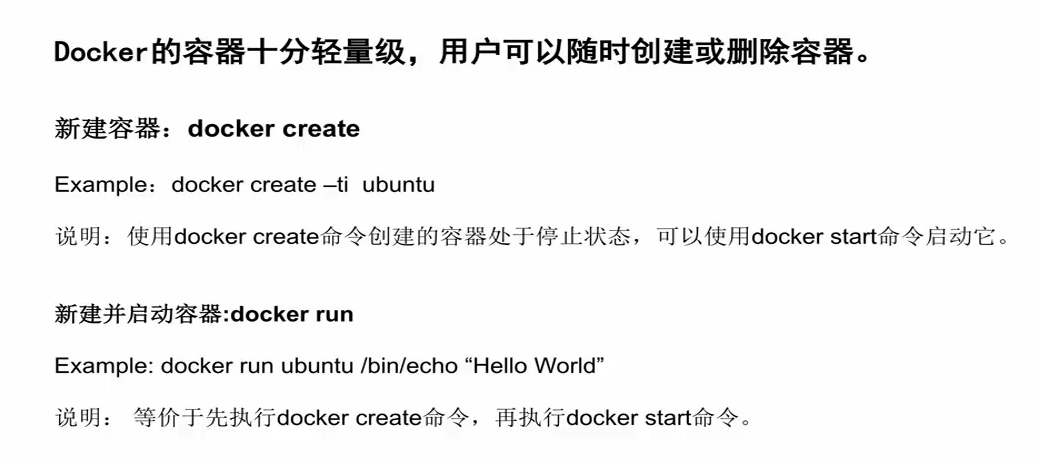
创建容器
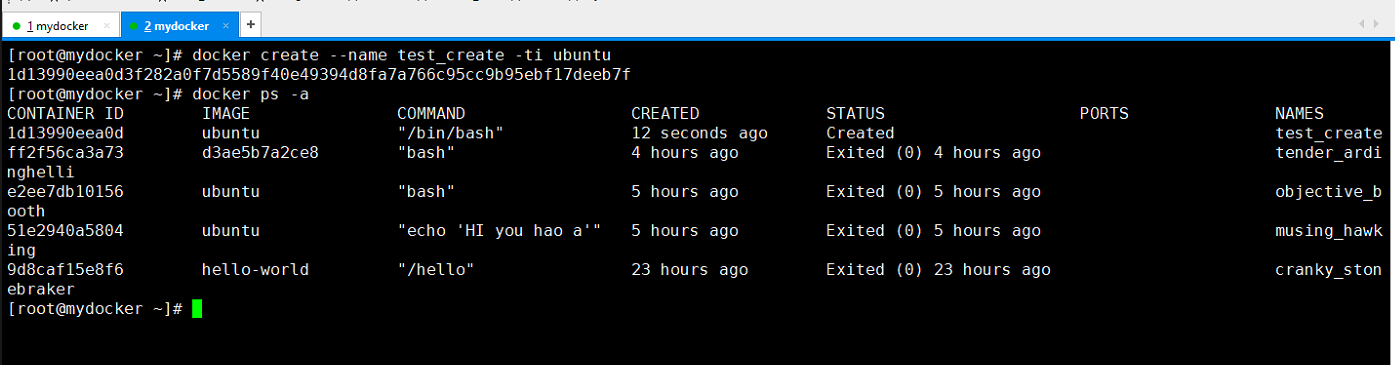
[root@mydocker ~]# docker create --name test_create -ti ubuntu

1d13990eea0d3f282a0f7d5589f40e49394d8fa7a766c95cc9b95ebf17deeb7f

[root@mydocker ~]# docker ps -a

CONTAINER ID        IMAGE               COMMAND                 CREATED             STATUS                    PORTS               NAMES

1d13990eea0d        ubuntu              "/bin/bash"              seconds ago      Created                                       test_create

ff2f56ca3a73        d3ae5b7a2ce8        "bash"                   hours ago         Exited ()  hours ago                        tender_ardinghelli

e2ee7db10156        ubuntu              "bash"                   hours ago         Exited ()  hours ago                        objective_booth

51e2940a5804        ubuntu              "echo 'HI you hao a'"    hours ago         Exited ()  hours ago                        musing_hawking

9d8caf15e8f6        hello-world         "/hello"                 hours ago        Exited ()  hours ago                       cranky_stonebraker

[root@mydocker ~]#

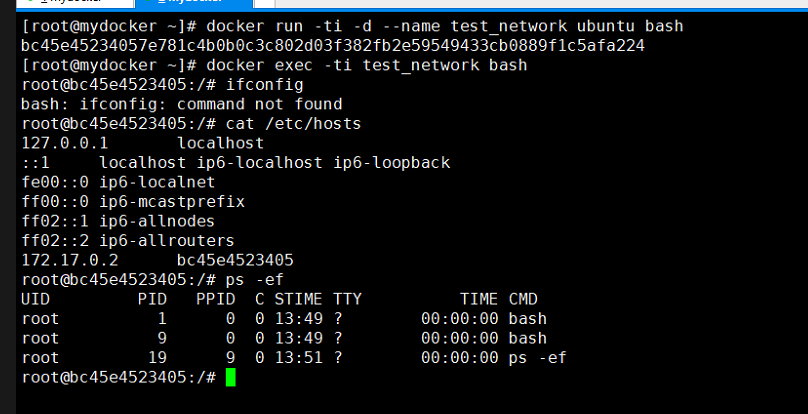
[root@mydocker ~]# docker run -ti -d --name test_network ubuntu bash

bc45e45234057e781c4b0b0c3c802d03f382fb2e59549433cb0889f1c5afa224

[root@mydocker ~]# docker exec -ti test_network bash

root@bc45e4523405:/# ifconfig

bash: ifconfig: command not found

root@bc45e4523405:/# cat /etc/hosts

127.0.0.1    localhost

::    localhost ip6-localhost ip6-loopback

fe00::    ip6-localnet

ff00::    ip6-mcastprefix

ff02::    ip6-allnodes

ff02::    ip6-allrouters

172.17.0.2    bc45e4523405

root@bc45e4523405:/# ps -ef

UID         PID   PPID  C STIME TTY          TIME CMD

root                   : ?        :: bash

root                   : ?        :: bash

root                  : ?        :: ps -ef

root@bc45e4523405:/#
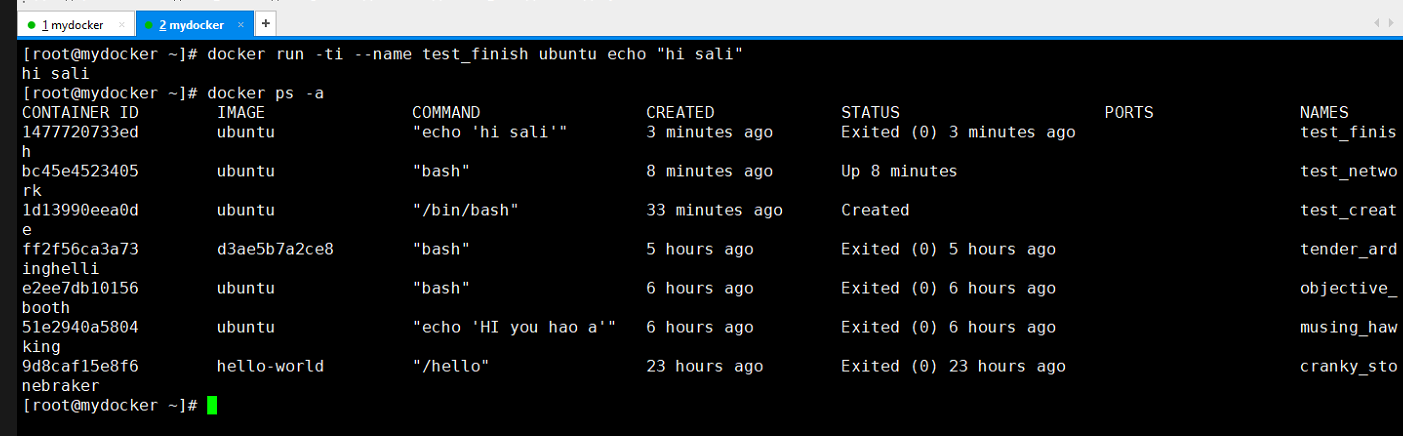
[root@mydocker ~]# docker run -ti --name test_finish ubuntu echo "hi sali"

hi sali

[root@mydocker ~]# docker ps -a

CONTAINER ID        IMAGE               COMMAND                 CREATED             STATUS                     PORTS               NAMES

1477720733ed        ubuntu              "echo 'hi sali'"         minutes ago       Exited ()  minutes ago                       test_finish

bc45e4523405        ubuntu              "bash"                   minutes ago       Up  minutes                                   test_network

1d13990eea0d        ubuntu              "/bin/bash"              minutes ago      Created                                        test_create

ff2f56ca3a73        d3ae5b7a2ce8        "bash"                   hours ago         Exited ()  hours ago                         tender_ardinghelli

e2ee7db10156        ubuntu              "bash"                   hours ago         Exited ()  hours ago                         objective_booth

51e2940a5804        ubuntu              "echo 'HI you hao a'"    hours ago         Exited ()  hours ago                         musing_hawking

9d8caf15e8f6        hello-world         "/hello"                 hours ago        Exited ()  hours ago                        cranky_stonebraker

[root@mydocker ~]#

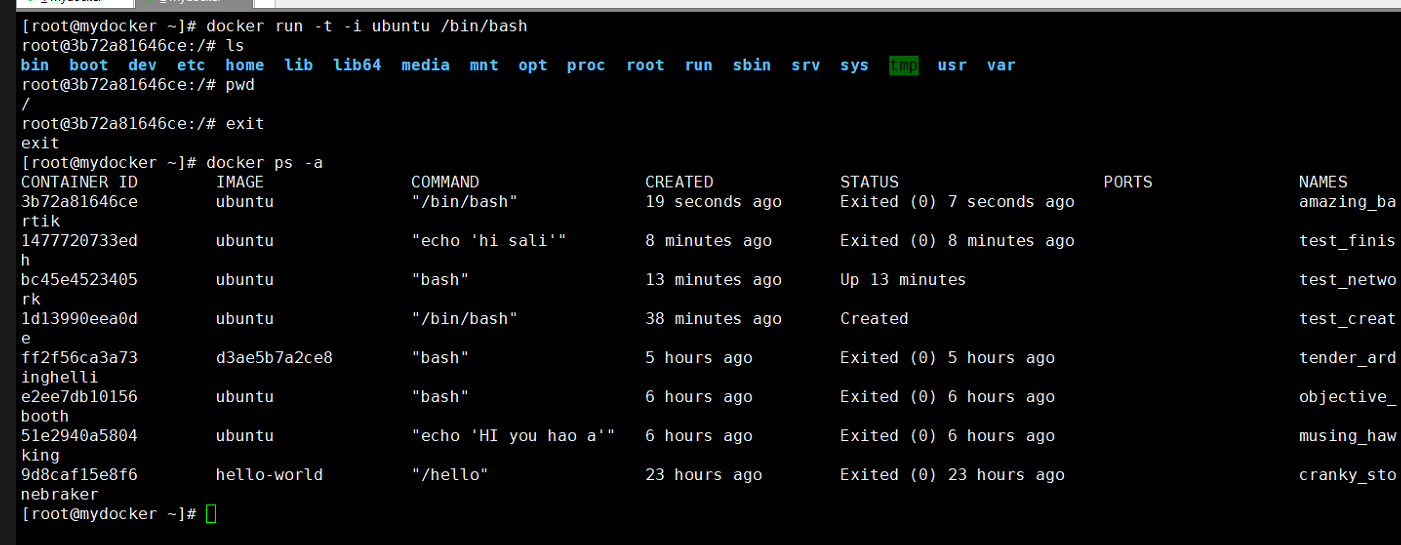
[root@mydocker ~]# docker run -t -i ubuntu /bin/bash

root@3b72a81646ce:/# ls

bin  boot  dev  etc  home  lib  lib64  media  mnt  opt  proc  root  run  sbin  srv  sys  tmp  usr  var

root@3b72a81646ce:/# pwd

/

root@3b72a81646ce:/# exit

exit

[root@mydocker ~]# docker ps -a

CONTAINER ID        IMAGE               COMMAND                 CREATED             STATUS                     PORTS               NAMES

3b72a81646ce        ubuntu              "/bin/bash"             19 seconds ago      Exited (0) 7 seconds ago                       amazing_bartik

1477720733ed        ubuntu              "echo 'hi sali'"        8 minutes ago       Exited (0) 8 minutes ago                       test_finish

bc45e4523405        ubuntu              "bash"                  13 minutes ago      Up 13 minutes                                  test_network

1d13990eea0d        ubuntu              "/bin/bash"             38 minutes ago      Created                                        test_create

ff2f56ca3a73        d3ae5b7a2ce8        "bash"                  5 hours ago         Exited (0) 5 hours ago                         tender_ardinghelli

e2ee7db10156        ubuntu              "bash"                  6 hours ago         Exited (0) 6 hours ago                         objective_booth

51e2940a5804        ubuntu              "echo 'HI you hao a'"   6 hours ago         Exited (0) 6 hours ago                         musing_hawking

9d8caf15e8f6        hello-world         "/hello"                23 hours ago        Exited (0) 23 hours ago                        cranky_stonebraker

[root@mydocker ~]#


[root@mydocker ~]# docker run -d --name test_daemon ubuntu /bin/sh -c "while true;do echo hello guet;sleep 1;done"

866ce2b92ac56730ba7625da5bd47a21f8b4f4341c105654a42ef56a09e36c0a

[root@mydocker ~]# docker ps

CONTAINER ID        IMAGE               COMMAND                  CREATED             STATUS              PORTS               NAMES

866ce2b92ac5        ubuntu              "/bin/sh -c 'while..."    seconds ago       Up  seconds                            test_daemon

bc45e4523405        ubuntu              "bash"                    minutes ago      Up  minutes                           test_network
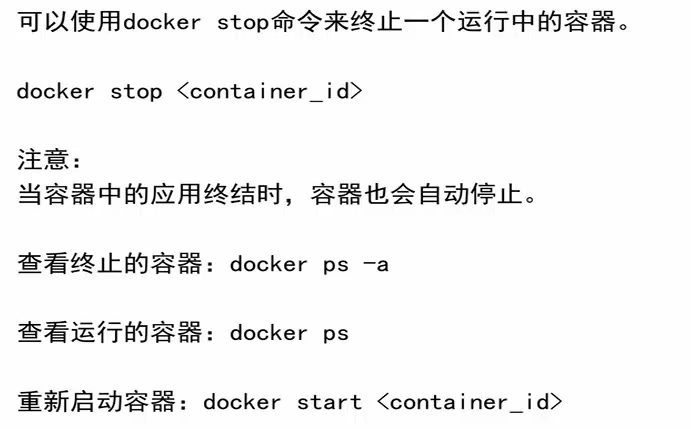
终止容器
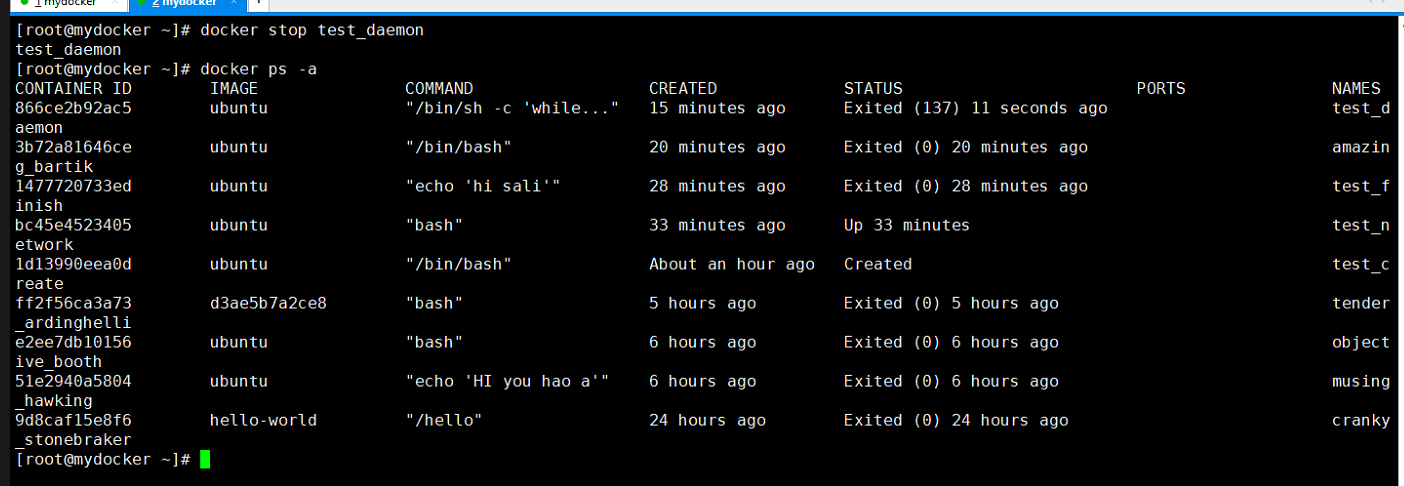
[root@mydocker ~]# docker stop test_daemon

test_daemon

[root@mydocker ~]# docker ps -a

CONTAINER ID        IMAGE               COMMAND                  CREATED             STATUS                        PORTS               NAMES

866ce2b92ac5        ubuntu              "/bin/sh -c 'while..."    minutes ago      Exited ()  seconds ago                       test_daemon

3b72a81646ce        ubuntu              "/bin/bash"               minutes ago      Exited ()  minutes ago                         amazing_bartik

1477720733ed        ubuntu              "echo 'hi sali'"          minutes ago      Exited ()  minutes ago                         test_finish

bc45e4523405        ubuntu              "bash"                    minutes ago      Up  minutes                                     test_network

1d13990eea0d        ubuntu              "/bin/bash"              About an hour ago   Created                                           test_create

ff2f56ca3a73        d3ae5b7a2ce8        "bash"                    hours ago         Exited ()  hours ago                            tender_ardinghelli

e2ee7db10156        ubuntu              "bash"                    hours ago         Exited ()  hours ago                            objective_booth

51e2940a5804        ubuntu              "echo 'HI you hao a'"     hours ago         Exited ()  hours ago                            musing_hawking

9d8caf15e8f6        hello-world         "/hello"                  hours ago        Exited ()  hours ago                           cranky_stonebraker
进入容器

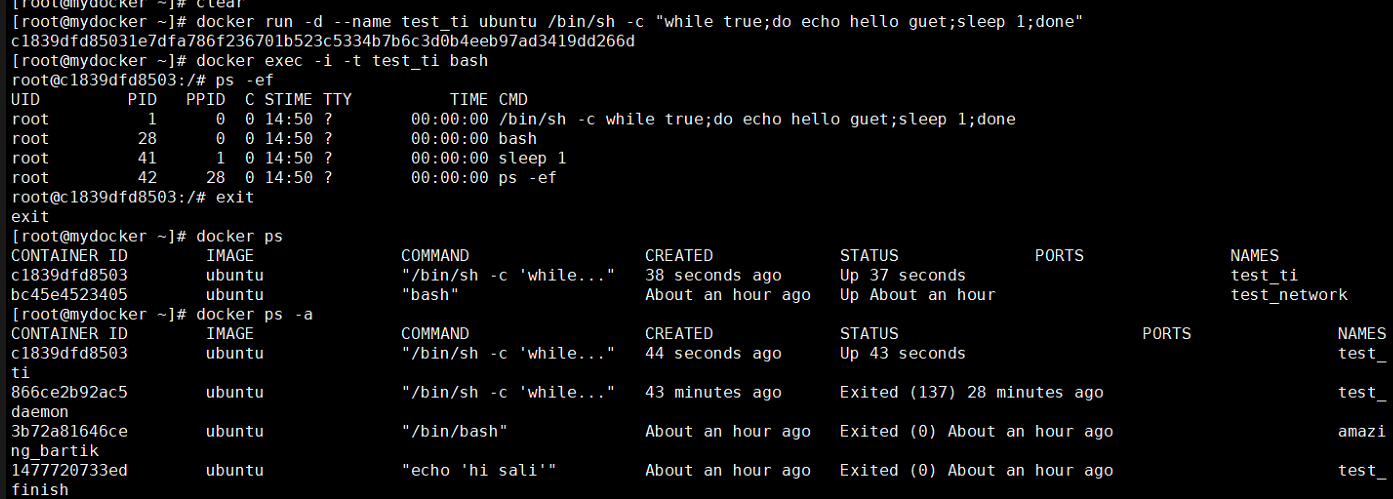
[root@mydocker ~]# docker run -d --name test_ti ubuntu /bin/sh -c "while true;do echo hello guet;sleep 1;done"

c1839dfd85031e7dfa786f236701b523c5334b7b6c3d0b4eeb97ad3419dd266d

[root@mydocker ~]# docker exec -i -t test_ti bash

root@c1839dfd8503:/# ps -ef

UID         PID   PPID  C STIME TTY          TIME CMD

root                   : ?        :: /bin/sh -c while true;do echo hello guet;sleep ;done

root                  : ?        :: bash

root                  : ?        :: sleep

root                 : ?        :: ps -ef

root@c1839dfd8503:/# exit

exit

[root@mydocker ~]# docker ps

CONTAINER ID        IMAGE               COMMAND                  CREATED             STATUS              PORTS               NAMES

c1839dfd8503        ubuntu              "/bin/sh -c 'while..."    seconds ago      Up  seconds                           test_ti

bc45e4523405        ubuntu              "bash"                   About an hour ago   Up About an hour                        test_network

[root@mydocker ~]# docker ps -a

CONTAINER ID        IMAGE               COMMAND                  CREATED             STATUS                         PORTS               NAMES

c1839dfd8503        ubuntu              "/bin/sh -c 'while..."    seconds ago      Up  seconds                                      test_ti

866ce2b92ac5        ubuntu              "/bin/sh -c 'while..."    minutes ago      Exited ()  minutes ago                        test_daemon

3b72a81646ce        ubuntu              "/bin/bash"              About an hour ago   Exited () About an hour ago                       amazing_bartik

1477720733ed        ubuntu              "echo 'hi sali'"         About an hour ago   Exited () About an hour ago                       test_finish

bc45e4523405        ubuntu              "bash"                   About an hour ago   Up About an hour                                   test_network

1d13990eea0d        ubuntu              "/bin/bash"              About an hour ago   Created                                            test_create

ff2f56ca3a73        d3ae5b7a2ce8        "bash"                    hours ago         Exited ()  hours ago                             tender_ardinghelli

e2ee7db10156        ubuntu              "bash"                    hours ago         Exited ()  hours ago                             objective_booth

51e2940a5804        ubuntu              "echo 'HI you hao a'"     hours ago         Exited ()  hours ago                             musing_hawking

9d8caf15e8f6        hello-world         "/hello"                  hours ago        Exited ()  hours ago                            cranky_stonebraker

[root@mydocker ~]#
删除容器


[root@mydocker ~]# docker rm test_ti

Error response from daemon: You cannot remove a running container c1839dfd85031e7dfa786f236701b523c5334b7b6c3d0b4eeb97ad3419dd266d.
Stop the container before attempting removal or force remove

[root@mydocker ~]# docker stop test_ti

test_ti

[root@mydocker ~]# docker rm test_ti

test_ti

[root@mydocker ~]# docker ps -a

CONTAINER ID        IMAGE               COMMAND                  CREATED             STATUS                         PORTS               NAMES

866ce2b92ac5        ubuntu              "/bin/sh -c 'while..."   About an hour ago   Exited ()  minutes ago                        test_daemon

3b72a81646ce        ubuntu              "/bin/bash"              About an hour ago   Exited () About an hour ago                       amazing_bartik

1477720733ed        ubuntu              "echo 'hi sali'"         About an hour ago   Exited () About an hour ago                       test_finish

bc45e4523405        ubuntu              "bash"                   About an hour ago   Up About an hour                                   test_network

1d13990eea0d        ubuntu              "/bin/bash"               hours ago         Created                                            test_create

ff2f56ca3a73        d3ae5b7a2ce8        "bash"                    hours ago         Exited ()  hours ago                             tender_ardinghelli

e2ee7db10156        ubuntu              "bash"                    hours ago         Exited ()  hours ago                             objective_booth

51e2940a5804        ubuntu              "echo 'HI you hao a'"     hours ago         Exited ()  hours ago                             musing_hawking

9d8caf15e8f6        hello-world         "/hello"                  hours ago        Exited ()  hours ago                            cranky_stonebraker

[root@mydocker ~]#

root@mydocker ~]# docker ps

CONTAINER ID        IMAGE               COMMAND             CREATED             STATUS              PORTS               NAMES

bc45e4523405        ubuntu              "bash"              About an hour ago   Up About an hour                        test_network

[root@mydocker ~]# docker rm -f test_network

test_network

[root@mydocker ~]# docker ps

CONTAINER ID        IMAGE               COMMAND             CREATED             STATUS              PORTS               NAMES

[root@mydocker ~]#
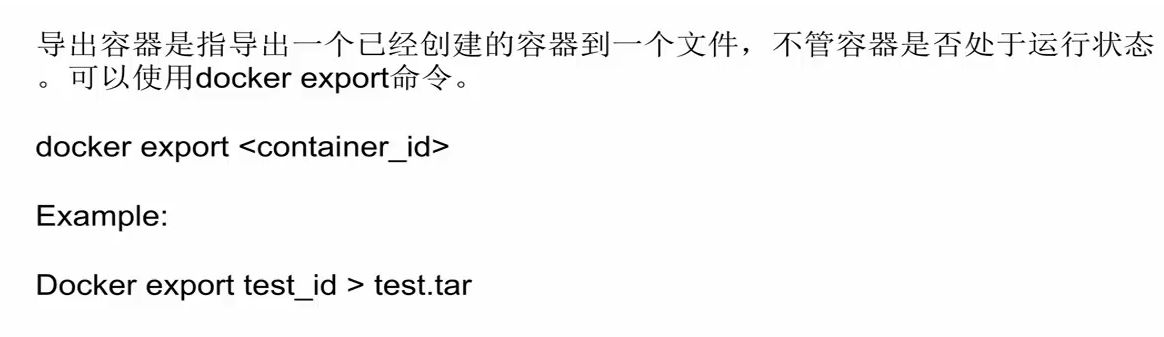
导入和导出容器
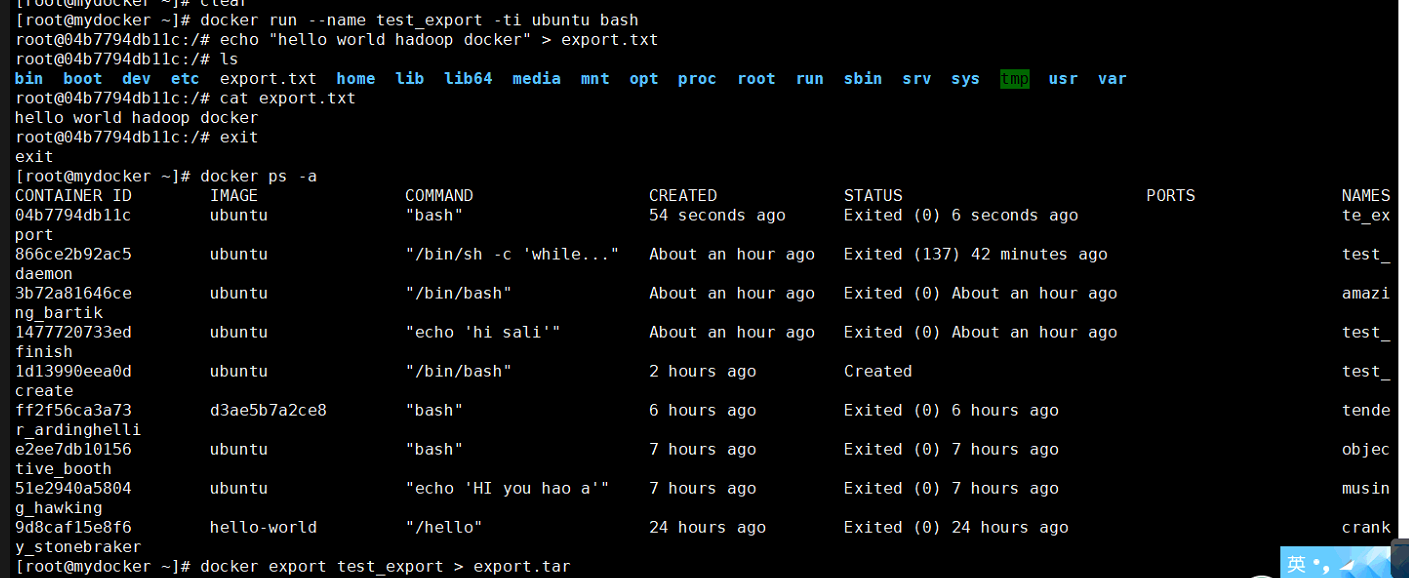

[root@mydocker ~]# docker run --name test_export -ti ubuntu bash

root@04b7794db11c:/# echo "hello world hadoop docker" > export.txt

root@04b7794db11c:/# ls

bin  boot  dev  etc  export.txt  home  lib  lib64  media  mnt  opt  proc  root  run  sbin  srv  sys  tmp  usr  var

root@04b7794db11c:/# cat export.txt

hello world hadoop docker

root@04b7794db11c:/# exit

exit

[root@mydocker ~]# docker ps -a

CONTAINER ID        IMAGE               COMMAND                  CREATED             STATUS                         PORTS               NAMES

04b7794db11c        ubuntu              "bash"                    seconds ago      Exited ()  seconds ago                           te_export

866ce2b92ac5        ubuntu              "/bin/sh -c 'while..."   About an hour ago   Exited ()  minutes ago                        test_daemon

3b72a81646ce        ubuntu              "/bin/bash"              About an hour ago   Exited () About an hour ago                       amazing_bartik

1477720733ed        ubuntu              "echo 'hi sali'"         About an hour ago   Exited () About an hour ago                       test_finish

1d13990eea0d        ubuntu              "/bin/bash"               hours ago         Created                                            test_create

ff2f56ca3a73        d3ae5b7a2ce8        "bash"                    hours ago         Exited ()  hours ago                             tender_ardinghelli

e2ee7db10156        ubuntu              "bash"                    hours ago         Exited ()  hours ago                             objective_booth

51e2940a5804        ubuntu              "echo 'HI you hao a'"     hours ago         Exited ()  hours ago                             musing_hawking

9d8caf15e8f6        hello-world         "/hello"                  hours ago        Exited ()  hours ago                            cranky_stonebraker

[root@mydocker ~]# docker export test_export > export.tar

Error response from daemon: No such container: test_export

[root@mydocker ~]# docker export te_export > export.tar

[root@mydocker ~]# ls

anaconda-ks.cfg  export.tar  initial-setup-ks.cfg  test.tar

[root@mydocker ~]#

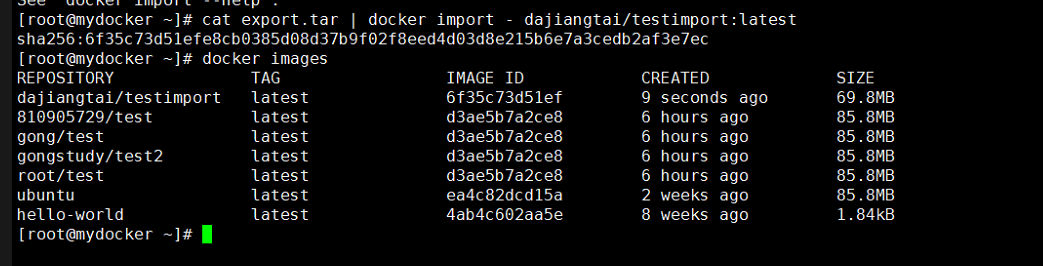
[root@mydocker ~]# cat export.tar | docker import - dajiangtai/testimport:latest

sha256:6f35c73d51efe8cb0385d08d37b9f02f8eed4d03d8e215b6e7a3cedb2af3e7ec

[root@mydocker ~]# docker images

REPOSITORY              TAG                 IMAGE ID            CREATED             SIZE

dajiangtai/testimport   latest              6f35c73d51ef         seconds ago       .8MB

/test          latest              d3ae5b7a2ce8         hours ago         .8MB

gong/test               latest              d3ae5b7a2ce8         hours ago         .8MB

gongstudy/test2         latest              d3ae5b7a2ce8         hours ago         .8MB

root/test               latest              d3ae5b7a2ce8         hours ago         .8MB

ubuntu                  latest              ea4c82dcd15a         weeks ago         .8MB

hello-world             latest              4ab4c602aa5e         weeks ago         .84kB

[root@mydocker ~]#

[root@mydocker ~]# docker run -ti dajiangtai/testimport bash

root@891713e46dec:/# ls

bin  boot  dev  etc  export.txt  home  lib  lib64  media  mnt  opt  proc  root  run  sbin  srv  sys  tmp  usr  var

root@891713e46dec:/# cat export.txt

hello world hadoop docker

root@891713e46dec:/# exit

exit

[root@mydocker ~]#
docker容器的常用操作的更多相关文章
- 一文了解Docker容器技术的操作
一文了解Docker容器技术的操作 前言一.Docker是什么二.Docker的安装及测试Docker的安装Docker的Hello world测试三.Docker的常见操作镜像的基本操作容器的基本操 ...
- Docker镜像与容器的常用操作
Docker镜像加速配置:Docker镜像常用操作:Dcoker容器常用操作. 镜像加速器 国内从 Docker Hub 拉取镜像有时会遇到困难,此时可以配置镜像加速器.国内很多云服务商都提供了国内加 ...
- centos7下安装docker(8.3容器的常用操作)
yu我们之前已经学习了如何运行容器docker run,也学习了如何进入容器docker attach和docker exec,下面我们来学习容器的其他操作: stop/start/restart 1 ...
- Docker安装及常用操作
Docker简介: Docker是一个轻量级容器技术,类似于虚拟机技术,但性能远远高于虚拟机,Docker支持将软件编译成一个镜像(image),在这个镜像中做好对软件的各种配置,然后可以运行这个镜像 ...
- docker 容器管理常用命令
Docker 容器管理: docker create -it centos //这样可以创建一个容器,但该容器并没有启动: create Create a new container 创建一个容器: ...
- Docker介绍及常用操作演示(一)--技术流ken
Docker简介 Docker 是一个开源的应用容器引擎,让开发者可以打包他们的应用以及依赖包到一个可移植的容器中,然后发布到任何流行的Linux机器上,也可以实现虚拟化.容器是完全使用沙箱机制,相互 ...
- docker的一些常用操作
镜像:一个打包好的应用,还有应用运行的系统.资源.配置等容器:镜像的实例,一个镜像可以有一个或多个实例(容器)对docker容器的变更时写到容器的文件系统的,而不是写到docker镜像中的,可以用一个 ...
- Docker介绍及常用操作演示(一)
Docker简介 Docker 是一个开源的应用容器引擎,让开发者可以打包他们的应用以及依赖包到一个可移植的容器中,然后发布到任何流行的Linux机器上,也可以实现虚拟化.容器是完全使用沙箱机制,相互 ...
- Docker 镜像的常用操作
镜像作为 Docker 三大核心概念中,最重要的一个关键词,它有很多操作,是您想学习容器技术不得不掌握的.本文将带您一步一步,图文并重,上手操作来学习它. 目录 一 Docker 下载镜像 1.1 下 ...
随机推荐
- 安装Feflow遇取的问题
http://www.feflowjs.org/zh-cn/docs/ 在安装 npm install -g feflow-cli 是遇到这要一个问题 i C:\Program Files (x86) ...
- 论文笔记——An online EEG-based brain-computer interface for controlling hand grasp using an adaptive probabilistic neural network(10年被引用66次)
题目:利用自适应概率网络设计一种在线脑机接口楼方法控制手部抓握 概要:这篇文章提出了一种新的脑机接口方法,控制手部,系列手部抓握动作和张开在虚拟现实环境中.这篇文章希望在现实生活中利用脑机接口技术控制 ...
- JVM 性能调优 -Xmx、-Xms、-Xss
1. -Xmx 设置应用程序(不是JVM)内存可用大小 ( 如果程序要花很大内存的话,可以修改缺省配置,但是不能超过机器的内存),即最大可用Heap的大小. 2. -Xms 设置初始Heap的大小 ...
- UVA10562(看图写树,dfs)
这个题过的好艰难,不过真的学到好多. 关于fgets的用法真的是精髓.!isspace(c)和c!=' '是有区别的. 其它的看代码吧 #include <iostream> #inclu ...
- python基础(六)
一.内置函数 # input()# type()# len()# print()# enumerate()# list()# dict()# tuple()# set()# str()# int()# ...
- QC3.0充电标准
- web爬虫,requests请求
requests请求,就是用yhthon的requests模块模拟浏览器请求,返回html源码 模拟浏览器请求有两种,一种是不需要用户登录或者验证的请求,一种是需要用户登录或者验证的请求 一.不需要用 ...
- centos 终端字体错位个别字母中间有间隔的解决
问题描述: linux系统:centos 终端:图形界面终端,通过startx启动 现象:通过终端输入的字体有重叠,字母之间的间隔也很大.由于字体安装不正确导致. 解决方法:通过下面字体的安装命令可以 ...
- jQuery事件合成
<!DOCTYPE html><html xmlns="http://www.w3.org/1999/xhtml"><head><meta ...
- Oracle—通过操作系统进程查看数据库sql语句
工作中遇到一个问题,某报表运行时间特别长,通过操作系统可以看到一个oracle进程消耗资源比较大,如何能够通过该操作系统进程找到具体SQL呢.记录如下: 1.查看Linux系统进程号 可以通过top动 ...