
Up-to-date cache with EclipseLink and Oracle
Up-to-date cache with EclipseLink and Oracle
One of the most useful feature provided by ORM libraries is a second-level cache, usually called L2. L2 object cache reduces database access for entities and their relationships. It is enabled by default in the most popular JPA implementations like Hibernate or EclipseLink. That won’t be a problem, unless a table inside a database is not modified directly by third-party applications, or by the other instance of the same application in a clustered environment. One of the available solutions to this problem is in-memory data grid, which stores all data in a memory, and is distributed across many nodes inside a cluster. Such a tools like Hazelcast or Apache Ignite has been described several times in my blog. If you are interested in one of that tools I recommend you read one of my previous article bout it: Hazelcast Hot Cache with Striim.
However, we won’t discuss about it in this article. Today, I would like to talk about Continuous Query Notification feature provided by Oracle Database. It solves a problem with updating or invalidating a cache when the data changes in the database. Oracle JDBC drivers provide support for it since 11g Release 1. This functionality is based on receiving invalidation events from the JDBC drivers. Fortunately, EclipseLink extends that feature in their solution called EclipseLink Database Change Notification. In this article I’m going to show you how to implement it using Spring Data JPA together with EclipseLink library.
How it works
The most useful functionality provided by the Oracle Database Continuous Query Notification is an ability to raise database events when rows in a table were modified. It enables client applications to register queries with the database and receive notifications in response to DML or DDL changes on the objects associated with the queries. To detect modifications, EclipseLink DCN uses Oracle ROWID to intercept changes in the table. ROWID is included to all queries for a DCN-enabled class. EclipseLink also retrieves ROWID of saved entity after an insert operation, and maintains a cache index on that ROWID. It also selects the database transaction ID once for each transaction to avoid invalidating the cache during the processing of transaction.
When a database sends a notification it usually contains the followoing information:
- Names of the modifying objects, for example a name of changed table
- Type of change. The possible values are INSERT, UPDATE,DELETE, ALTER TABLE, or DROP TABLE
- Oracle’s ROWID of changed record
Running Oracle database locally
Before starting working on our sample application we need to have Oracle database installed. Fortunately, there are some Docker images with Oracle Standard Edition 12c. The command visible below starts Oracle XE version and exposes it on default 1521 port. It is also possible to use web console available under port 9080.
|
1
|
$ docker run -d --name oracle -p 9080:8080 -p 1521:1521 sath89/oracle-12c |
We need to have sysdba role in order to be able to grant privilege CHANGE NOTIFICATION to our database. The default password for user system is oracle.
|
1
|
GRANT CHANGE NOTIFICATION TO PIOMIN; |
You may use any Oracle client like Oracle SQL Developer to connect with database or just login to a web console. Since I run Docker on Windows it is available on my laptop under address http://192.168.99.100:9080/em. Of course it is Oracle, so you need to settle in for a long haul, and wait until it starts. You can observer a progress of an installation by running command docker logs -f oracle. When you finally see a “100% complete” log entry you may grant the required privileges to the existing user or create a new one with a set of needed privileges, and proceed to the next step.
Sample application
The sample application source code is available on GitHub under address https://github.com/piomin/sample-eclipselink-jpa.git. It is Spring Boot application that uses Spring Data JPA as a data access layer implementation. Because the default JPA provider used in that project is EclipseLink, we should remember about excluding Hibernate libraries from starters spring-boot-starter-data-jpa andspring-boot-starter-web. Besides a standard EclipseLink library for JPA, we also have to include EclipseLink implementation for Oracle database (org.eclipse.persistence.oracle) and Oracle JDBC driver.
|
1
2
3
4
5
6
7
8
9
10
11
12
13
14
15
|
<dependency> <groupId>org.eclipse.persistence</groupId> <artifactId>org.eclipse.persistence.jpa</artifactId> <version>2.7.1</version></dependency><dependency> <groupId>org.eclipse.persistence</groupId> <artifactId>org.eclipse.persistence.oracle</artifactId> <version>2.7.1</version></dependency><dependency> <groupId>com.oracle</groupId> <artifactId>ojdbc7</artifactId> <version>12.1.0.1</version></dependency> |
The next step is to provide connection settings to Oracle database launched as a Docker container. Do not try to do it through application.yml properties, because Spring Boot by default uses HikariCP for connection pooling. This in turn causes a conflict with Oracle datasource during application bootstrap. The following datasource declaration would work succesfully.
|
1
2
3
4
5
6
7
8
9
|
@Beanpublic DataSource dataSource() { final DriverManagerDataSource dataSource = new DriverManagerDataSource(); dataSource.setDriverClassName("oracle.jdbc.driver.OracleDriver"); dataSource.setUrl("jdbc:oracle:thin:@192.168.99.100:1521:xe"); dataSource.setUsername("piomin"); dataSource.setPassword("Piot_123"); return dataSource;} |
EclipseLink with Database Change Notification
EclipseLink needs some specific configuration settings to succesfully work with Spring Boot and Spring Data JPA. These settings may be provided inside @Configuration class that extends JpaBaseConfiguration class. First, we should setEclipseLinkJpaVendorAdapter as default JPA vendor adapter. Then, we may configure some additional JPA settings like detailed logging level or automatic creation of database objects during application startup. However, the most important thing for us in the fragment of source code visible below is Oracle Continuous Query Notification settings.
EclipseLink CQN support is enabled by theOracleChangeNotificationListener listener which integrates with Oracle JDBC in order to received database change notifications. The full class name of the listener should be passed as a value of eclipselink.cache.database-event-listener property. EclipseLink by default enabled L2 cache for all entities, and respectively all tables in the persistence unit are registered for a change notification. You may exclude some of them by using the databaseChangeNotificationTypeattribute of the @Cache annotation on the selected entity.
|
1
2
3
4
5
6
7
8
9
10
11
12
13
14
15
16
17
18
19
20
21
22
23
24
|
@Configuration@EnableAutoConfigurationpublic class JpaConfiguration extends JpaBaseConfiguration { protected JpaConfiguration(DataSource dataSource, JpaProperties properties, ObjectProvider jtaTransactionManager, ObjectProvider transactionManagerCustomizers) { super(dataSource, properties, jtaTransactionManager, transactionManagerCustomizers); } @Override protected AbstractJpaVendorAdapter createJpaVendorAdapter() { return new EclipseLinkJpaVendorAdapter(); } @Override protected Map getVendorProperties() { HashMap map = new HashMap(); map.put(PersistenceUnitProperties.WEAVING, InstrumentationLoadTimeWeaver.isInstrumentationAvailable() ? "true" : "static"); map.put(PersistenceUnitProperties.DDL_GENERATION, "create-or-extend-tables"); map.put(PersistenceUnitProperties.LOGGING_LEVEL, SessionLog.FINEST_LABEL); map.put(PersistenceUnitProperties.DATABASE_EVENT_LISTENER, "org.eclipse.persistence.platform.database.oracle.dcn.OracleChangeNotificationListener"); return map; }} |
What is worth mentioning EclipseLink’s CQN integration has some important limitations:
- Changes to an object’s secondary tables will not trigger it to be invalidate unless a version is used and updated in the primary table
- Changes to an object’s
OneToMany,ManyToMany, andElementCollectionrelationships will not trigger it to be invalidate unless a version is used and updated in the primary table
The conclusion from these limitations is obvious. We should enable optimistic locking by including an @Version in our entities. The column with @Version in the primary table will always be updated, and the object will always be invalidated. There are three entities implemented. Entity Order is in many-to-one relationship with Product and Customerentities. All these classes has @Version feature enabled.
|
1
2
3
4
5
6
7
8
9
10
11
12
13
14
15
16
17
18
19
20
21
22
23
24
25
26
27
28
29
30
31
32
33
34
35
36
37
38
39
40
41
42
43
44
45
46
47
48
49
50
51
52
53
54
55
56
57
58
59
60
61
62
63
64
65
66
67
68
69
70
71
72
73
|
@Entity@Table(name = "JPA_ORDER")public class Order { @Id @SequenceGenerator(sequenceName = "SEQ_ORDER", allocationSize = 1, initialValue = 1, name = "orderSequence") @GeneratedValue(generator = "orderSequence", strategy = GenerationType.SEQUENCE) private Long id; @ManyToOne private Customer customer; @ManyToOne private Product product; @Enumerated private OrderStatus status; private int count; @Version private long version; public Long getId() { return id; } public void setId(Long id) { this.id = id; } public Customer getCustomer() { return customer; } public void setCustomer(Customer customer) { this.customer = customer; } public Product getProduct() { return product; } public void setProduct(Product product) { this.product = product; } public OrderStatus getStatus() { return status; } public void setStatus(OrderStatus status) { this.status = status; } public int getCount() { return count; } public void setCount(int count) { this.count = count; } public long getVersion() { return version; } public void setVersion(long version) { this.version = version; } @Override public String toString() { return "Order [id=" + id + ", product=" + product + ", status=" + status + ", count=" + count + "]"; }} |
Testing
After launching your application you see the following logs generated with Finest level.
|
1
2
3
|
[EL Finest]: connection: 2018-03-23 15:45:50.591--ServerSession(465621833)--Thread(Thread[main,5,main])--Registering table [JPA_PRODUCT] for database change event notification.[EL Finest]: connection: 2018-03-23 15:45:50.608--ServerSession(465621833)--Thread(Thread[main,5,main])--Registering table [JPA_CUSTOMER] for database change event notification.[EL Finest]: connection: 2018-03-23 15:45:50.616--ServerSession(465621833)--Thread(Thread[main,5,main])--Registering table [JPA_ORDER] for database change event notification. |
The registration are stored in tableuser_change_notification_regs, which is available for your application’s user (PIOMIN).
|
1
2
3
4
5
6
|
$ SELECT regid, table_name FROM user_change_notification_regs; REGID TABLE_NAME---------- --------------------------------------------------------------- 326 PIOMIN.JPA_PRODUCT 326 PIOMIN.JPA_CUSTOMER 326 PIOMIN.JPA_ORDER |
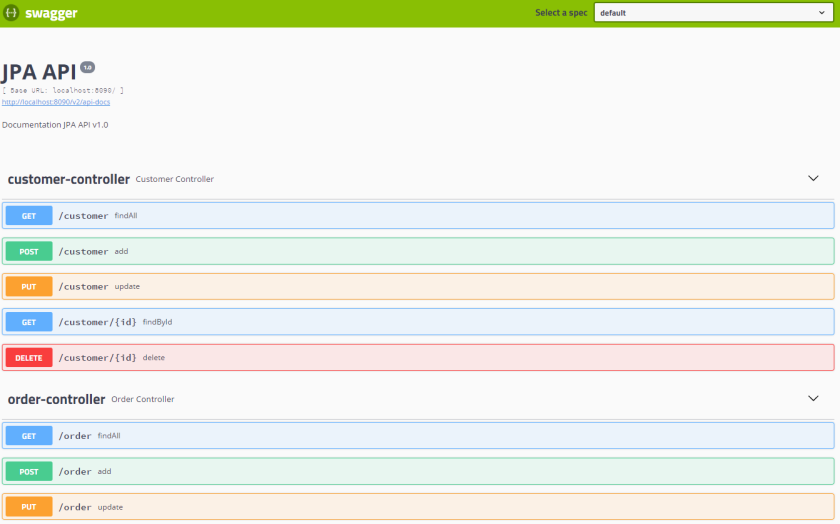
Our sample application exposes Swagger documentation of API, which may be accessed under addresshttp://localhost:8090/swagger-ui.html. You can create or find some entities using it. If try to find the same entity several times you would see that the only first invoke generates SQL query in logs, while all others are taken from a cache. Now, try to change that record using any Oracle’s client like Oracle SQL Developer, and verify if cache has been succesfully refreshed.
Summary
When I first heard about Oracle Database Change Notification supported by EclipseLink JPA vendor, my expectations were really high. It is very interesting solution, which guarantees automatic cache refresh after changes performed on database tables by third-party application avoiding your cache. However, I had some problems with that solution during tests. In some cases it just doesn’t work, and the detection of errors was really troublesome. It would be fine if such a solution could be also available for other databases than Oracle and JPA vendors like Hibernate.
Up-to-date cache with EclipseLink and Oracle的更多相关文章
- Oracle buffer cache
Buffer Cache buffer cache 结构图 HASH链 ORACLE使用HASH算法,把buffer cache中每个buffer的buffer header串联起来,组成多条hash ...
- Date Picker Calendar For Oracle Forms 6i
Giving date picker calendar option to user for date type fields in Oracle Forms. I am providing you ...
- Oracle内存详解之 Library cache 库缓冲
Oracle内存详解之 Library cache 库缓冲 2017年11月09日 11:38:39 阅读数:410更多 个人分类: 体系结构 Library cache是Shared pool的一部 ...
- oracle 12cR2 smart flash cache实测
最近一直在处理新系统的性能优化问题,这两天特地测试了下oracle 11gR2开始引入的smart flash cache. 其介绍参考MOS文档,How To Size the Database S ...
- Oracle内存详解之二 Library cache 库缓冲-转载
Library cache是Shared pool的一部分,它几乎是Oracle内存结构中最复杂的一部分,主要存放shared curosr(SQL)和PLSQL对象(function,procedu ...
- 【转】oracle数据库开发的一些经验积累
1.不安装Oracle客户连接Oracle 8的方法 请将以下文件拷贝到运行文件所在目录 一.ODBC动态库 : ctl3d32.dll msvcrt40.dll odbc16gt.dll odbc ...
- Oracle Database 11g express edition
commands : show sys connect sys as sysdba or connect system as sysdba logout or disc clear screen or ...
- Oracle调优总结(经典实践 重要)
转载:http://langgufu.iteye.com/blog/1974211 Problem Description:1.每个表的结构及主键索引情况2.每个表的count(*)记录是多少3.对于 ...
- 部分常见ORACLE面试题以及SQL注意事项
部分常见ORACLE面试题以及SQL注意事项 一.表的创建: 一个通过单列外键联系起父表和子表的简单例子如下: CREATE TABLE parent(id INT NOT NULL, PRIMARY ...
随机推荐
- Oracle 不小心删除undo数据文件以及磁盘空间不足导致不能登录的解决办法
在一次测试中,由于导入的数据量过大导致事务一直提交失败因为磁盘空间不够用了,一检查发现是undo表空间不够用,于是重新创建了一个表空间,准备把之前的undo表空间删除,删除时却发现一直删不掉,因为它一 ...
- linux 安装 SVN server
安装 使用yum安装非常简单: yum install subversion 配置 2.1. 创建仓库 我们这里在/home下建立一个名为svn的仓库(repository),以后所有代码都放在这个下 ...
- servlet ServletContext
一.Servlet简介 1.什么是Servlet Servlet 运行在服务端的Java小程序,是sun公司提供一套规范(接口),用来处理客户端请求.响应给浏览器的动态资源.但servlet的实质就是 ...
- elasticsearch的映射
一.简介: 映射:在创建索引时,可以预先定义字段的类型(映射类型,也就是type,一个索引可以有一个或多个类型)及相关属性. Elasticsearch会根据JSON源数据的基础类型猜测你想要的字段映 ...
- Java多线程2:线程的使用及其生命周期
一.线程的使用方式 1.继承Thread类,重写父类的run()方法 优点:实现简单,只需实例化继承类的实例,即可使用线程 缺点:扩展性不足,Java是单继承的语言,如果一个类已经继承了其他类,就无法 ...
- 如何调用layer.open打开的的iframe窗口中的JS
- 在js文件中通过jquery定位到某个dom时候设置事件时候 相当于直接在dom里面添加事件
在js文件中通过jquery定位到某个dom时候设置事件时候 相当于直接在dom里面添加事件 当触发事件时候 会把当前的dom传给该方法
- default配置页面一级菜单用于进入二级菜单
- codeforces104A
Blackjack CodeForces - 104A Tensor特别喜欢玩扑克,还总是爱发明一些关于扑克牌的游戏,有天他突然脑洞大开想到了这样的一个游戏: 现在有一副52张的扑克牌(没有大小王), ...
- 11/5/2018模拟 Problem C
题面 题解 我有特殊的哈希技巧 以到下一个相同字符的距离为值哈希, 如果不存在或在串外, 就是 \(|T| + 1\). 加入一个新字符 \(S_i\) 时, 同时修改它上一次出现时的值, 由 \(| ...