
js历史记录
 history.pushState({

             num: 1

         }, 'title-history', '?num=1');

         history.pushState({

             num:2

         }, 'title-history', '?num=2');

         history.pushState({

             num: 3

         }, 'title-history', '?num=3');

         history.replaceState({

             num: 4

         }, 'title-history', '?num=4');

                 window.addEventListener('popstate', function (e) {

         //打印当前页面的数据(状态信息)

             console.log(e.state);

             console.log(history.state)

         }, false)

         // 当前页面地址为 http://localhost/index.html?num=4 以下代码均在浏览器控制台里面触发

        // history.back() // 当前页面地址为 http://localhost/index.html?num=2

        // history.forward()  // 当前页面地址为 http://localhost/index.html?num=4'

         // history.go(-2) // 当前页面地址为 http://localhost/index.html?num=1
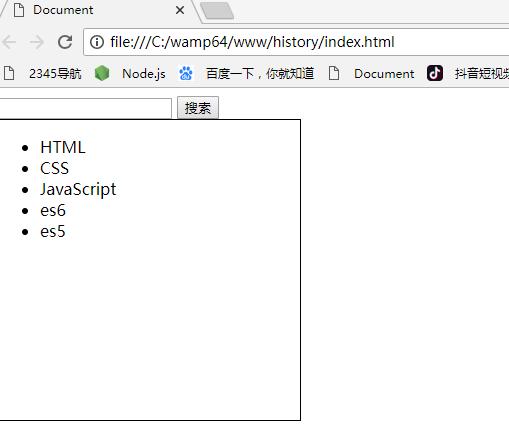
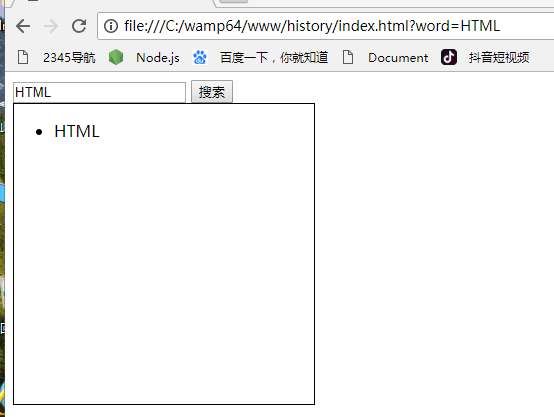
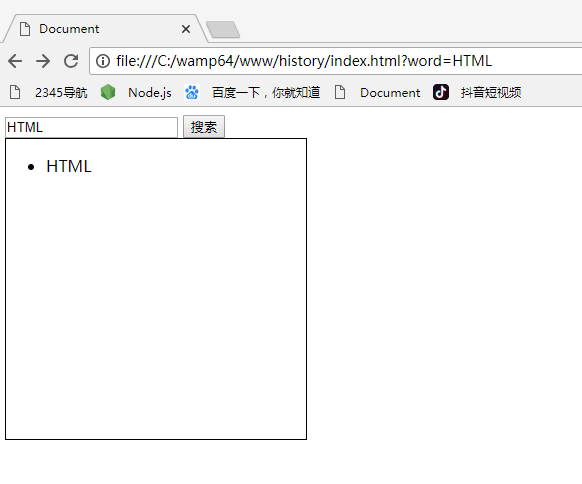
 代码:

 <!DOCTYPE html>

 <html lang="en">

 <head>

 <meta charset="UTF-8">

 <meta name="viewport" content="width=device-width, initial-scale=1.0">

 <meta http-equiv="X-UA-Compatible" content="ie=edge">

 <title>Document</title>

 <style>

 .content {

 width: 300px;

 height: 300px;

 border: 1px solid #000;

 }

 </style>

 </head>

 <body>

 <input type="text" id="words">

 <input type="button" value="搜索" id="btn">

 <div class="content">

 <ul id="showData">

 </ul>

 </div>

 <script>

 var words = document.getElementById('words');

 var data = [{

 name: 'HTML',

 id: 'html'

 }, {

 name: 'CSS',

 id: 'css'

 }, {

 name: 'JavaScript',

 id: 'js'

 }, {

 name: 'es6',

 id: 'es6'

 }, {

 name: 'es5',

 id: 'es5',

 }];

 function renderDom(data) {

 var str = '';

 data.forEach(function (item, index) {

 str += '<li>' + item.name + '</li>';

 });

 showData.innerHTML = str;

 }

 renderDom(data);

 btn.onclick = function (e) {

 var filterData = data.filter(function (item, index) {

 return item.name.indexOf(words.value) > -1;

 });

 history.pushState({

 word: words.value

 }, null, '?word=' + words.value);

 renderDom(filterData);

 }

 window.onpopstate = function (e) {

 console.log(e);

 var key = e.state ? e.state.word : '';

 var filterData = data.filter(function (item, index) {

 return item.name.indexOf(key) > -1;

 });

 renderDom(filterData);

 words.value = key;

 }

 </script>

 </body>

 </html>
欢迎加入web前端冲击顶级高薪大厂学习群,群聊号码:820269529
js历史记录的更多相关文章
- 用HTML/JS/PHP方式实现页面延时跳转
WEB开发中经常会遇到页面跳转或延时跳转的需求,掌握各种页面跳转方式非常必要. 以下是我总结有用HTML/JS/PHP三类方式实现跳转的方法,例子皆为三秒后跳转到index.php 页面. 1,HTM ...
- js实现前端的搜索历史记录
最近在对接前台页面(WEB端)时,产品要求需记录下客户的搜索记录,我们是前后台完全分离的项目,根本不能保存的session域中,没办法,虽然作为后台开发,遇到需求就自己研究了一通,先看一下最终效果图, ...
- js之添加浏览器历史记录
如何生成一条历史记录 简单粗暴的方法,直接在当前页面的地址栏中输入地址 点击页面中有a标签的href 执行location.href = ‘xxx’(location.replace(‘xxx’)生成 ...
- fabric.js 翻转,复制粘贴,隐藏, 删除,历史记录,撤销, 剪切, 图层,组合打散,锁定等功能
用vue写的 显示,隐藏 hide(){ this.canvas.getActiveObject().set('opacity', 0).setCoords(); this.canvas.reques ...
- js点击历史记录
<!DOCTYPE html><html lang="en"><head> <meta charset="UTF-8" ...
- 利用js实现 禁用浏览器后退| 去除上一个历史记录链接
也是查找了好多资料才找到的,这种方式,可以消除 后退的所有动作.包括 键盘.鼠标手势等产生的后退动作. <script language="javascript"> / ...
- js修改window对象中的url历史记录
//页面地址:http://localhost/11/account.html//访问页面后,地址变为:http://localhost/11/account.html?type=banana con ...
- 在文本框输入数据后,因为有历史记录,鼠标点或者敲回车这个历史记录时,请问会触发什么JS事件
非ie触发 oninput事件,ie触发>onpropertychange事件 jquery写法 $("#input").bind("input propertyc ...
- JS实现页面进入、返回定位到具体位置
最为一个刚入职不久的小白...慢慢磨练吧... JS实现页面返回定位到具体位置 其实浏览器也自带了返回的功能,也就是说,自带了返回定位的功能.正常的跳转,返回确实可以定位,但是有些特殊场景就不适用了. ...
随机推荐
- linux下查找命令总结
查找命令总结,which,whereis,find,locate,type http://blog.csdn.net/jessica1201/article/details/8139249 1.f ...
- 继承Runnable 实现Synchronized 同步锁
在java编程中,经常需要用到同步,而用得最多的也许是synchronized关键字了,下面看看这个关键字的用法. 因为synchronized关键字涉及到锁的概念,所以先来了解一些相关的锁知识. j ...
- python2与python3 的pip的安装
python2的pip安装 $ sudo apt-get install python-pip python2安装第三方包 $ sudo pip install packagename python3 ...
- WC2019退役记
sb题不会,暴力写不完,被全场吊着打,AFO
- (转)MySQL高可用架构之MHA
MySQL高可用架构之MHA 原文:http://www.cnblogs.com/gomysql/p/3675429.html 简介: MHA(Master High Availability)目前 ...
- Could not find a version that satisfies.... No matching distribution found for .....
原文作者:aircraft 原文链接:https://www.cnblogs.com/DOMLX/p/10227403.html 今天在安装mysql-python的时候报了很多的错误,其中一条就是这 ...
- 10种jquery选择器操作详解(转)
jquery选择器大体上可分为4 类: 1.基本选择器2.层次选择器3.过滤选择器4.表单选择器 其中过滤选择器可以分为:1.简单过滤选择器2.内容过滤选择器3.可见性过滤选择器4.属性过滤选择器5. ...
- 每天一道leetcode234-回文链表
考试结束,班级平均分只拿到了年级第二,班主任于是问道:大家都知道世界第一高峰珠穆朗玛峰,有人知道世界第二高峰是什么吗?正当班主任要继续发话,只听到角落默默想起来一个声音:”乔戈里峰” 前言 2018. ...
- python模块学习第 0000 题
将你的 QQ 头像(或者微博头像)右上角加上红色的数字,类似于微信未读信息数量那种提示效果. 类似于图中效果: 好可爱>%<! 题目来源:https://github.com/Yixiao ...
- Python——第一个python程序helloworld
安装了Python的环境之后,就是编写Python的代码了. 首先,我们来写一个简单的“hello world” 新建一个空白的txt文本,将后缀改为.py 改了后缀之后即变为Python程序的图标 ...