
css3-巧用选择器 “:target”
今天(昨天)又发现一个知识盲区
css3的:target标签,之前学习的时候就是一眼扫过,说是认识了,但其实也就记了三分钟,合上书就全忘光了。
直到昨天,遇到一个有意思的题目,用css3新特性做一个类似tab标签的小效果,才让我又重新认识了 :target 选择器
w3c上对于target选择器的解释是:

试一下他的效果就能对target的作用明白了:http://www.w3school.com.cn/tiy/t.asp?f=css_sel_target
原理: 也就是给一个元素A设定id,另一个元素B指定跳转到这个id,然后就向 a:hover 那样,在css中设定 “元素:target”并改变样式,那么点击B元素,就会根据你的设定改变A的样式。
以下就是我根据原理做出来的一个样式
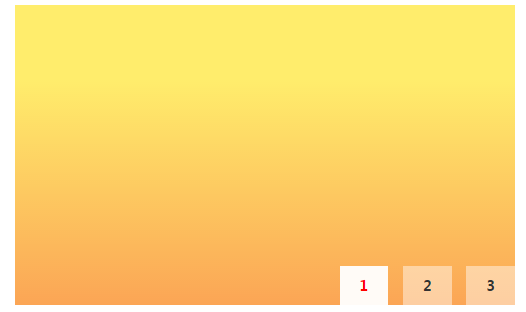
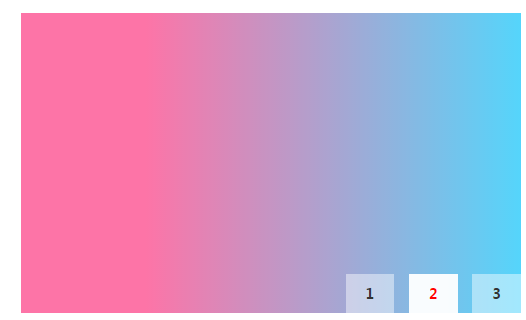

很明显,就是一个tab切换效果,css制作。
代码如下:
html
     <div class="swiper-box">

         <div class="swiper-cont">

             <div class="swiper1" id="swiper1">

             </div>

             <div class="swiper2" id="swiper2">

             </div>

             <div class="swiper3" id="swiper3">

             </div>

         </div>

         <div class="swiper-num">

             <a href="#swiper1">1</a>

             <a href="#swiper2">2</a>

             <a href="#swiper3">3</a>

         </div>

     </div>
css
 .swiper-box{

     position: relative;

     width: 500px;

     height: 300px;

     margin: 20px auto;

     background: #f1f1f1;

 }

 .swiper-cont div,.swiper1,.swiper2,.swiper3{

     width: 0%;

     height: 300px;

     position: absolute;

     top:;

     left:;

     -webkit-transition: width .5s linear;

     -moz-transition: width .5s linear;

     -ms-transition: width .5s linear;

     -o-transition: width .5s linear;

     transition: width .5s linear;

 }

 .swiper1{

   background: -webkit-linear-gradient(bottom, #fba555, #ffed6c 75%);

   background: -moz-linear-gradient(bottom, #fba555, #ffed6c 75%);

   background: -ms-linear-gradient(bottom, #fba555, #ffed6c 75%);

   background: -o-linear-gradient(bottom, #fba555, #ffed6c 75%);

   background: linear-gradient(to top, #fba555, #ffed6c 75%);

 }

 .swiper2{

   background: -webkit-linear-gradient(right, #55d5fb, #fd74a7 75%);

   background: -moz-linear-gradient(right, #55d5fb, #fd74a7 75%);

   background: -ms-linear-gradient(right, #55d5fb, #fd74a7 75%);

   background: -o-linear-gradient(right, #55d5fb, #fd74a7 75%);

   background: linear-gradient(to left, #55d5fb, #fd74a7 75%);

 }

 .swiper3{

   background: -webkit-linear-gradient(bottom right, #55fb69, #6cfff1  75%);

   background: -moz-linear-gradient(bottom right, #55fb69, #6cfff1  75%);

   background: -ms-linear-gradient(bottom right, #55fb69, #6cfff1  75%);

   background: -o-linear-gradient(bottom right, #55fb69, #6cfff1  75%);

   background: linear-gradient(to top left, #55fb69, #6cfff1  75%);

 }

 .swiper-num{

     position: absolute;

     bottom:;

     right:;

     display: inline-block;

     z-index:;

 }

 .swiper-num a{

     display: inline-block;

     margin-left: 10px;

     padding: 10px 20px;

     color: #333;

     font-size: 14px;

     text-decoration: none;

     font-weight: bold;

     background: rgba(255,255,255,.45);

 }

 .swiper-num a:hover,.swiper-num a:active{

     color: red;

     cursor: pointer;

     background: rgba(255,255,255,.95);

 }

 .swiper-box :target{

     width: 100%;

     -webkit-transition: width .5s linear;

     -moz-transition: width .5s linear;

     -ms-transition: width .5s linear;

     -o-transition: width .5s linear;

     transition: width .5s linear;

 }

 .in-cont{

     height: 60px;

 }
核心关键点我觉得除了第63行的:target选择器以外,还有就是,所谓的指定target目标id的元素,也就是使用了(href=“#xxx”)属性的元素,一定要是a链接,(比如我div.swiper-num里边的a链接就是zhongdian!!!)
曾经我用span,然后捣鼓到了晚上八点最后明白需要a后才下班。。。
难道href是a的御用吗
更多的技巧这篇文章做的很仔细:http://www.css88.com/archives/6256
css3-巧用选择器 “:target”的更多相关文章
- css3巧用选择器配合伪元素
一 . 前言 有时我们在写底部导航栏时,会有很多超链接,每个链接间用“|”分割,如下图: 可能刚入门的朋友会想到这样完成,再单独设置span的样式, 今天主要介绍怎么样用css3简单快速的完成这个效果 ...
- 极客技术专题【008期】:CSS3核心技术:选择器
日期:2013-8-19 来源:GBin1.com 技术专题介绍 技术专题:CSS3核心技术:选择器 专题演讲稿:CSS3选择器 分享人:知名前端技术博客 - w3cplus.com 博主 - 大漠 ...
- jQ not()选择器 与 css3 :not( selector )选择器
1.jQ not() 2.css3 not w3c在线演示地址 http://www.w3school.com.cn/tiy/t.asp?f=css_sel_not 总结: 注意两者还是有区别的 ...
- css3的nth-child选择器的具体探讨
css3的nth-child选择器的具体探讨 前言 在十年前開始的div+css布局兴起之时,我就開始了CSS的学习和实践.在当年,对于CSS选择器,基本上是没有什么选择性的,仅仅有ID选择器,CLA ...
- CSS3 伪类选择器 nth-child() 的用法
伪类选择器 nth-child() 在IE6-8和FF3.0-浏览器不支持,CSS3中nth-of-type(n)(比如nth-of-type(1))这个特殊的类选择符可以样式更加个性的标题和段落等, ...
- CSS3的属性选择器
CSS3中新增了许多选择器,今天零度给大家说说CSS3的属性选择器. 与CSS2相比,CSS3新增了3种属性选择器:[attr^=value].[attr$=value].[attr*=value]: ...
- IT兄弟连 HTML5教程 CSS3揭秘 CSS选择器1
要使用CSS对HTML页面中的元素实现一对一.一对多或者多对一的控制,就需要用到CSS选择器.选择器是CSS3中一个重要的内容,使用它可以大幅度地提高开发人员书写或修改样式表的效率.在大型网站中,样式 ...
- CSS3的nth-child() 选择器
CSS3的nth-child() 选择器,表格奇偶行变色 nth-child() 应用背景 CSS3的nth-child() 选择器,我之前很少用,在做表格偶数行变色的时候,我通常在绑定的时候,做一个 ...
- CSS3 nth-of-type(n)选择器 last-of-type选择器 nth-last-of-type(n)选择器 CSS3 only-child选择器 only-of-type选择器
CSS3 nth-of-type(n)选择器 “:nth-of-type(n)”选择器和“:nth-child(n)”选择器非常类似,不同的是它只计算父元素中指定的某种类型的子元素.当某个元素中的子元 ...
- JQ表单选择器和CSS3表单选择器
JQ表单选择器和CSS3表单选择器 JQ表单选择器 为了使用户能够更加灵活地操作表单,jQuery中加入了表单选择器,利用这个选择器能极其方便的获取到表单的某个或者某类型的元素.表单选择器的介绍如图: ...
随机推荐
- contiki rpl
Linking target: udp-client-temperature.stk3700arm-none-eabi-gcc -Xlinker -Map=udp-client-temperature ...
- [JS] selector 背景选择器
用于listview和button改变android原来控件的背景 android的selector是在drawable/xxx.xml中配置的 1.定义xml 把下面的XML文件保存成你自己命名的. ...
- 深度可分离卷积结构(depthwise separable convolution)计算复杂度分析
https://zhuanlan.zhihu.com/p/28186857 这个例子说明了什么叫做空间可分离卷积,这种方法并不应用在深度学习中,只是用来帮你理解这种结构. 在神经网络中,我们通常会使用 ...
- 编写一个Filter,除继承HttpServlet类外还需要( )。
A.继承Filter 类 B.实现Filter 接口 C.继承HttpFilter 类 D.实现HttpFilter接口 解答:B
- e643. 以匿名类处理事件
If an event handler is specific to a component (that is, not shared by other components), there is n ...
- const 与#define 的比较
const 与#define 的比较 C++ 语言可以用 const 来定义常量,也可以用 #define 来定义常量.但是前者比后 者有更多的优点: (1) const 常量有数据类型,而宏常量没有 ...
- 使用ffmpeg实现合并多个音频为一个音频的方法
使用ffmpeg实现合并多个音频为一个音频的方法可以使用ffmpeg的filter功能来进行这个操作,而且效果很好amerge也可以实 使用ffmpeg实现合并多个音频为一个音频的方法 可以使用ffm ...
- php -- 取日期
1.获取当前时间方法date()很简单,这就是获取时间的方法, 格式为:date($format, $timestamp), format为格式 - 必需 timestamp为时间戳–可填参数. 比如 ...
- Labview按钮的机械动作
LabVIEW 对于按钮控件的机械动作提供了六个不同的选择,它们可以通过右键按钮并选择机械动作来找到.这些不同的选项导致按钮输出的值的行为不同.下里将这六个选项做一个简短的总结: 单击时转换当用鼠标将 ...
- centos 6.5配置samba
Samba简介 Samba是一个能让Linux系统应用Microsoft网络通讯协议的软件,而SMB是Server Message Block的缩写,即为服务器消息块 ,SMB主要是作为Microso ...