
WPF中Expander与ListBox(ItemsControl)嵌套中的问题
1. 当ListBox放在Expander中时,为了要实现实时更新数据的效果,这里使用了
ObservableCollection类型来作为数据源,
初始的简单例子如下:只有一个ListBox
xaml文件
 <Window x:Class="ObservableCollectionAddRemoveDemo.MainWindow"

         xmlns="http://schemas.microsoft.com/winfx/2006/xaml/presentation"

         xmlns:x="http://schemas.microsoft.com/winfx/2006/xaml"

         Title="MainWindow" Height="350" Width="525">

     <Grid>

         <ListBox BorderBrush="Red" BorderThickness="2" HorizontalAlignment="Left" Height="Auto" Margin="37,32,0,0" VerticalAlignment="Top" Width="157" ItemsSource="{Binding}">

             <ListBox.ItemContainerStyle>

                 <Style TargetType="ListBoxItem" >

                     <Setter Property="Opacity" Value="0.5" />

                     <Setter Property="Opacity" Value="0.5" />

                     <Setter Property="MaxHeight" Value="75" />

                     <Setter Property="Background" Value="Green"/>

                     <Style.Triggers>

                         <Trigger Property="IsSelected" Value="True">

                             <Setter Property="Opacity" Value="1.0" />

                         </Trigger>

                     </Style.Triggers>

                 </Style>

             </ListBox.ItemContainerStyle>

         </ListBox>

         <ItemsControl HorizontalAlignment="Left" Height="auto" Margin="210,32,0,0" VerticalAlignment="Top" Width="157" ItemsSource="{Binding}">

             <ItemsControl.ItemContainerStyle>

                 <Style TargetType="ContentPresenter">

                     <Setter Property="Opacity" Value="0.5" />

                     <Setter Property="Opacity" Value="0.5" />

                     <Setter Property="MaxHeight" Value="75" />

                 </Style>

             </ItemsControl.ItemContainerStyle>

         </ItemsControl>

         <Button Content="Add" HorizontalAlignment="Left" Margin="398,65,0,0" VerticalAlignment="Top" Width="75" Click="Button_Click"/>

         <Button Content="Remove" HorizontalAlignment="Left" Margin="398,160,0,0" VerticalAlignment="Top" Width="75" Click="Button_Click_Remove"/>

     </Grid>

 </Window>
后台文件
 using System;

 using System.Collections.Generic;

 using System.Collections.ObjectModel;

 using System.Linq;

 using System.Text;

 using System.Threading.Tasks;

 using System.Windows;

 using System.Windows.Controls;

 using System.Windows.Data;

 using System.Windows.Documents;

 using System.Windows.Input;

 using System.Windows.Media;

 using System.Windows.Media.Imaging;

 using System.Windows.Navigation;

 using System.Windows.Shapes;

 namespace ObservableCollectionAddRemoveDemo

 {

     /// <summary>

     /// Interaction logic for MainWindow.xaml

     /// </summary>

     public partial class MainWindow : Window

     {

         public ObservableCollection<String> list;

         //public List<String> list;

         public MainWindow()

         {

             InitializeComponent();

             list = new ObservableCollection<string>() { "asda","12asdas","a22321","asda112323","xcvcvcxv","aasda","","asdasdasd"};

             this.DataContext = list;

         }

         private void Button_Click(object sender, RoutedEventArgs e)

         {

             int addNumber = new Random().Next();

             list.Add(addNumber.ToString());

         }

         private void Button_Click_Remove(object sender, RoutedEventArgs e)

         {

             if (list.Count > )

                 list.RemoveAt();

         }

     }

 }
发现代码实现的很顺畅,无论是增删都能实时响应到界面中
2. 但当在ListBox外面套一个Expander时,问题就出现了,如下图:
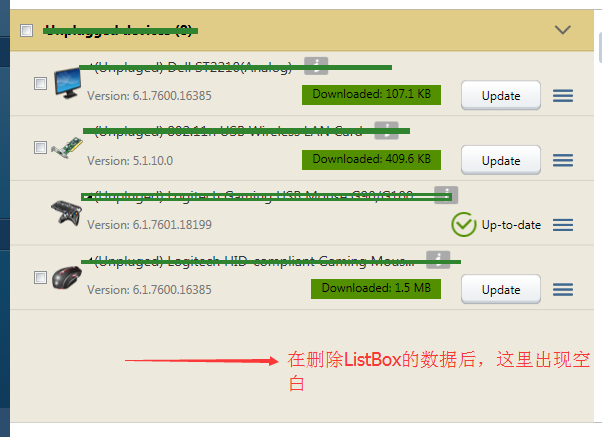
在删除数据时,内容明显变少了,但属于删掉内容的位置确仍然保留在界面上!!!
解决的办法是:在Expander的 ContentPresenter外面套一个StackPanel,如下:
  <StackPanel>

          <ContentPresenter x:Name="ExpanderContent" ContentSource="Content"/>

 </StackPanel>
===========================================
当将Expander放在ListBox中时也有可能会出现类似的问题:https://www.dotblogs.com.tw/ouch1978/archive/2011/03/11/wpf-expander-in-listbox.aspx
WPF中Expander与ListBox(ItemsControl)嵌套中的问题的更多相关文章
- WPF中Expander控件样式,ListBox的样式(带checkbox)恢复
Expander控件样式: <ControlTemplate x:Key="ExpanderToggleButton" TargetType="ToggleButt ...
- 异步方式向WPF ListBox控件中一条一条添加记录
向ListBox绑定数据源时,如果数据量过大,可能会使得程序卡死,这是就需要一条一条的向ListBox的数据源中添加记录了,下面是个小Demo: 1.前台代码,就是一个ListBox控件 <Wi ...
- 精通 WPF UI Virtualization (提升 OEA 框架中 TreeGrid 控件的性能)
原文:精通 WPF UI Virtualization (提升 OEA 框架中 TreeGrid 控件的性能) 本篇博客主要说明如何使用 UI Virtualization(以下简称为 UIV) 来提 ...
- 关于ListBox在Grid中无法充满的问题
WPF布局的时候发现一个问题,ListBox放在Grid中的时候,老是无法充满整个Grid,但是查看代码也没有设置相关的属性,原来在设置ListBox之前首先要让ListBox的容器充满,然后List ...
- html5 webDatabase 存储中sql语句执行可嵌套使用
html5 webDatabase 存储中sql语句执行可嵌套使用,代码如下: *); data.transaction(function(tx){ tx.executeSql("creat ...
- WPF:使用Json.NET在TreeView中树形显示JSON数据
原文 WPF:使用Json.NET在TreeView中树形显示JSON数据 据 读者可以参考这个开源的可以树形显示XML和JSON的工具: Mgen Object 603:XML/JSON树形显示小工 ...
- JavascriptS中的各结构的嵌套和函数
各位朋友大家好,上周更新给大家分享了JavaScript的入门知识及各种常用结构的用法,那么,本次更新博主就跟大家更深入的聊一聊JS各结构的嵌套用法,及JS中及其常用的一种结构--函数.以下为函数和循 ...
- MFC中listbox控件中各种属性的详解
ListBox控件是Windows 窗体的一个空间,ListBox 控件显示一个项列表,用户可从中选择一项或多项. 如果项总数超出可以显示的项数,则自动向 ListBox 控件添加滚动条. ...
- Javascript中的各结构的嵌套和函数
各位朋友大家好,上周更新给大家分享了JavaScript的入门知识及各种常用结构的用法,那么,本次更新博主就跟大家更深入的聊一聊JS各结构的嵌套用法,及JS中及其常用的一种结构——函数.以下为函数和循 ...
随机推荐
- css 颜色渐变 兼容性
参考文献:http://caibaojian.com/css3-background-gradient.html https://www.cnblogs.com/xzzzys/p/7495725 ...
- Android应用安全解决方案
Apk安全解决方案 背景 公司为政府做的App开发完了,需要上一些手段保证安全.这样客户才放心嘛. 防止第三方反编译篡改应用,防止数据隐私泄露,防止二次打包欺骗用户. 目录 Apk安全解决方案 背景 ...
- 简易网页 html
<!DOCTYPE html> <html> <head> <meta charset="utf-8"> <title> ...
- django drf 权限permission
https://www.django-rest-framework.org/api-guide/permissions/#custom-permissions from django.shortcut ...
- sharepoint 2013 补丁升级步骤
1. 安装过程合理: A. 可以同时在管理中心.两台前端.搜索服务器上安装重新发布的SP1补丁包(所提供的链接) B. 等待所有SP1补丁包安装完成,依次在管理中心.两台前端.搜索服务器上运行配置向导 ...
- pyppeteer初尝滋味
最近在爬几个电商平台网站用的selenium一登录就会有验证,目前这些网站对selenium检测很严格 因为不少大网站有对selenium的js监测机制.比如navigator.webdriver,n ...
- 2018-2019 20165219 网络对抗 Exp5 MSF基础
实验内容 本实践目标是掌握metasploit的基本应用方式,重点常用的三种攻击方式的思路.具体需要完成: 1.1一个主动攻击实践,如ms08_067; (1分) 1.2 一个针对浏览器的攻击,如ms ...
- 如何获取token值
登录的时候需要拿到token值,需要跟后端配合才能拿到 官方说明: https://developers.weixin.qq.com/miniprogram/dev/api/api-login.htm ...
- Java找那个io类-File获取功能
package com.hxzy.IOSer;import java.io.*; /* * File 的获取功能 * */public class Demo04 { public static voi ...
- java使用Redis4--主从复制
redis主从复制配置和使用都非常简单.通过主从复制可以允许多个slave server拥有和master server相同的数据库副本.下面是关于redis主从复制的一些特点: 1.ma ...