
Service学习笔记
一 什么是Service
Service作为安卓四大组件之一,拥有重要的地位。Service和Activity级别相同,只是没有界面,是运行于后台的服务。这个运行“后台”是指不可见,不是指在后台线程中,事实上四大组件都是运行在UI线程中,都不能在各自的生命周期方法中执行耗时操作或者网络请求。
二 如何使用Service
Service主要可以分为两类:Local Service、Remote Service。这里以比较常用的Local Service为例,介绍Service的两种使用方法。
(1)通过Context.startService()启动Service,通过Context.stopService()结束服务。
新建一个MyService类继承Service,重写onCreate()、onStartCommand()、onDestroy()方法,然后在MainActivity中设置两个按钮,增加其各自点击事件用于启动和停止MyService。
package com.example.haisun.myapplication3;

import android.app.Service;

import android.content.Intent;

import android.os.Binder;

import android.os.IBinder;

import android.support.annotation.Nullable;

import android.util.Log;

/**

 * Created by HaiSun on 2015/10/10.

 */

public class MyService extends Service {

    @Nullable

    @Override

    public IBinder onBind(Intent intent) {

        return null;

    }

    @Override

    public void onCreate() {

        super.onCreate();

        Log.d("MyService","onCreate executed");

    }

    @Override

    public int onStartCommand(Intent intent, int flags, int startId) {

        Log.d("MyService","onStartCommand executed");

//        new Thread(new Runnable() {

//            @Override

//            public void run() {

//                //具体逻辑

//                stopSelf();

//            }

//        }).start();

        return super.onStartCommand(intent, flags, startId);

    }

    @Override

    public void onDestroy() {

        Log.d("MyService","onDestroy executed");

        super.onDestroy();

    }

}
package com.example.haisun.myapplication3;

import android.app.Activity;

import android.content.ComponentName;

import android.content.Intent;

import android.content.ServiceConnection;

import android.os.Bundle;

import android.os.IBinder;

import android.view.View;

import android.widget.Button;

public class MainActivity extends Activity implements View.OnClickListener{

    @Override

    protected void onCreate(Bundle savedInstanceState) {

        super.onCreate(savedInstanceState);

        setContentView(R.layout.activity_main);

        Button start = (Button)findViewById(R.id.start_service);

        Button stop = (Button)findViewById(R.id.stop_service);

        start.setOnClickListener(this);

        stop.setOnClickListener(this);

    }

    @Override

    public void onClick(View v) {

        switch (v.getId()){

            case R.id.start_service:

                Intent intent = new Intent(this,MyService.class);

                startService(intent);

                break;

            case R.id.stop_service:

                Intent stopIntent = new Intent(this,MyService.class);

                stopService(stopIntent);

                break;

            default:

                break;

        }

    }

}
(2)通过Context.bindService()来绑定一个service,通过Context.unbindService()解绑。
这里只是在上面的例子上增加了一些内容即可。
1.在MyService里面新建一个内部类DownBinder继承Binder
class DownLoadBinder extends Binder {

    public void startDownLoad(){

        Log.d("MyService","startDownLoad executed");

    }

    public int getProgress(){

        Log.d("MyService","getProgress executed");

        return 0;

    }
2.通过MyService中的onBind方法返回DownBinder的实例,供Activity绑定成功后的回调
private DownLoadBinder mBinder = new DownLoadBinder();

    @Override

    public IBinder onBind(Intent intent) {

        return mBinder;

    }
3.Activity中绑定,需要新建一个ServiceConnection对象,获得回调的Binder,进而得到DownBinder实例
private MyService.DownLoadBinder downLoadBinder;

    private ServiceConnection connection = new ServiceConnection() {

        @Override

        public void onServiceConnected(ComponentName name, IBinder service) {

            downLoadBinder = (MyService.DownLoadBinder)service;

            downLoadBinder.startDownLoad();

            downLoadBinder.getProgress();

        }

        @Override

        public void onServiceDisconnected(ComponentName name) {

        }

    };
4.类似的,设置两个按钮,增加绑定和解绑的点击事件
    case R.id.bind_service:

                Intent bindIntent = new Intent(this,MyService.class);

                bindService(bindIntent,connection,BIND_AUTO_CREATE);

                break;

    case R.id.unbind_service:

                unbindService(connection);

                break;
三 Service的生命周期
下图为Google官方提供的配图
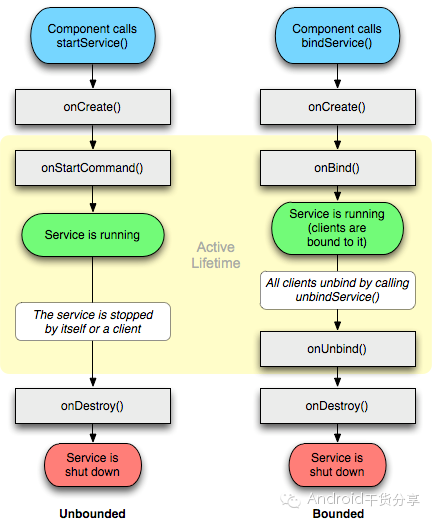
附:完整的Demo地址:https://github.com/sunhai1992/ServiceTest
Service学习笔记的更多相关文章
- Web Service学习笔记:动态调用WebService
原文:Web Service学习笔记:动态调用WebService 多数时候我们通过 "添加 Web 引用..." 创建客户端代理类的方式调用WebService,但在某些情况下我 ...
- Web Service学习笔记(webservice、soap、wsdl、jws详细分析)
Web Service概述 Web Service的定义 W3C组织对其的定义如下,它是一个软件系统,为了支持跨网络的机器间相互操作交互而设计.Web Service服务通常被定义为一组模块化的API ...
- Web Service学习笔记
Web Service概述 Web Service的定义 W3C组织对其的定义如下,它是一个软件系统,为了支持跨网络的机器间相互操作交互而设计.Web Service服务通常被定义为一组模块化的API ...
- Web Service学习笔记(webservice、soap、wsdl、jws详细分析) (转)
Web Service概述 Web Service的定义 W3C组织对其的定义如下,它是一个软件系统,为了支持跨网络的机器间相互操作交互而设计.Web Service服务通常被定义为一组模块化的API ...
- Linux daemon与service 学习笔记
service 常驻在内存中的进程,且可以提供一些系统或网络功能,就是服务. daemon service的提供需要进程的运行,所以实现service的程序我们称为daemon. eg: 实现 ...
- Java Web Service 学习笔记
一.服务端 1. 创建Java工程 2. 创建接口HostipalServiceInterface package ws_server; import javax.jws.WebMethod; imp ...
- Dynamic CRM 2013学习笔记(二十五)JS调用web service 实现多条记录复制(克隆)功能
前面介绍过如何克隆一条当前的记录: Dynamic CRM 2013学习笔记(十四)复制/克隆记录 , 主要是通过界面上加一个字段,单击form上的clone 按钮时,改变这个字段的值以触发插件来实现 ...
- Dynamic CRM 2013学习笔记(二十九)报表设计:reporting service 报表开发常见问题
在报表开发过程中,经常会遇到各种各样的问题,比如The report cannot be displayed. (rsProcessingAborted),一点有意义的提示都没有:再就是分页问题,经常 ...
- Android(java)学习笔记227:服务(service)之服务的生命周期 与 两种启动服务的区别
1.之前我们在Android(java)学习笔记171:Service生命周期 (2015-08-18 10:56)说明过,可以回头看看: 2.Service 的两种启动方法和区别: (1)Servi ...
随机推荐
- 关于Cocos2d-x中自己定义的类的名字和Cocos2d-x引擎库中的类的名字重复的解决方法
方法一: 修改自己定义的类的名字,VS2013中可以用Ctrl+H来替换某个特定的单词,Ctrl+F是用来查询某个单词所在的位置或者有没有存在. 方法二: 1.给自己定义的类的.h和.cpp文件的整体 ...
- 【转】【Linux】Linux 命令行快捷键
Linux 命令行快捷键 涉及在linux命令行下进行快速移动光标.命令编辑.编辑后执行历史命令.Bang(!)命令.控制命令等.让basher更有效率. 常用 ctrl+左右键:在单词之间跳转 ct ...
- PHP 初学
虚拟目录和虚拟主机的关系?虚拟主机可以设置多个,虚拟目录呢? 以为phpstorm和Intellij一样,结果不是!它直接将所有内容上传(部署)到服务器即可,不像Intellij那样还调用服务器?? ...
- MFC HTTP GET 请求
//HTTP GET 下载文件 CInternetSession *pInetSession = new CInternetSession(AfxGetAppName(),1,PRE_CONFIG_I ...
- JS中document对象详解
转自:http://www.cnblogs.com/andycai/archive/2010/06/29/1767351.html 对象属性 document.title //设置文档标题等价于HTM ...
- CSS导入使用及引用的两种方法
方法一<link rel="stylesheet" type="text/css" href="test.css"> 方法二&l ...
- java web接口controller测试控制台输出乱码
接口上配置:
- Spring-处理自动装配的歧义性
自动装配可以对依赖注入提供很大帮助,因为它会减少装配应用程序组件时所需的显式装配的数量. 不过,仅有一个bean匹配所需的结果时,自动装配才是有效的.如果不仅有一个bean能够匹配的话,这种歧义性会阻 ...
- 【scrapy】相关
http://www.cnblogs.com/mophee/archive/2009/03/12/1409562.html css选择器中的空格 http://www.crummy.com/softw ...
- Ubuntu 12.04/13.04 安装 Oracle11gR2:该笔记已经陈旧!请参考后续的笔记
注意点: 在 ubuntu的 /bin 下建立以下几个基本命令的链接: basename awk sh->bash | sh -> ksh 安装以下几个必须的包: binutils bui ...