
初识redux走向redux-react
废话不多说,先上一张图
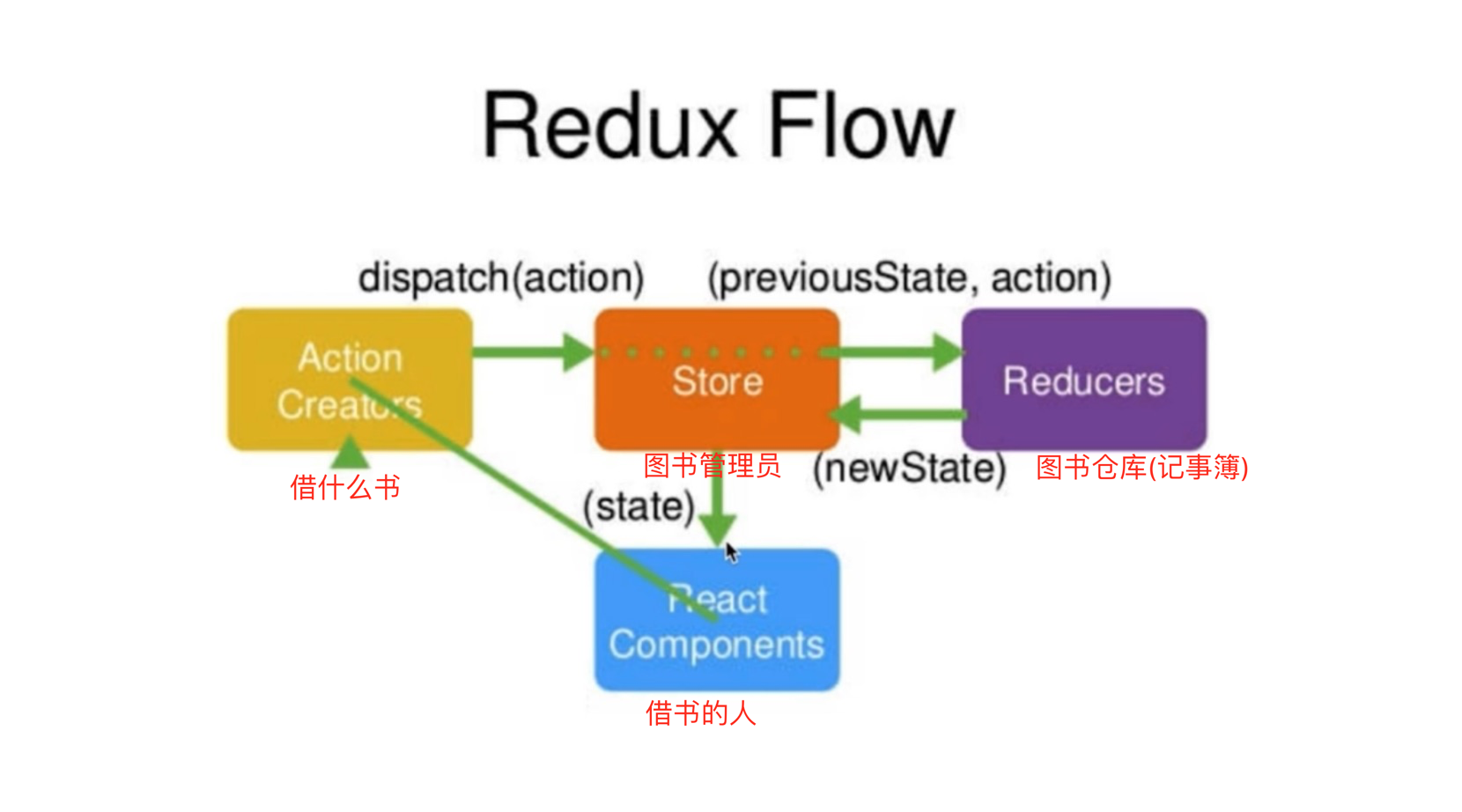
首先记住redux设计思想
Web应用是一个转态机,视图与转态是一一对应的
所有的转态,保存在一个对象里
1.store
存储数据的容器,整个应用只有一个state,Redux提供createStore这个函数生成Store,Redux store保存了根reducer返回的完整state树
 const { createStore } = require('redux')

 //创建store的时候就要把reducer放进去,reducer改state,state写在reducer里

 //store提供三个方法

 /*

 store.getState() 获取state

 store.dispatch(action) 更新state

 store.subscribe(listener) 注册监听器

 */

 const store = createStore(reducer)

 console.log(store)

 // subscript是个订阅函数,他在状态发生变化的时候,自动调用

 store.subscribe(() => {

   console.log(store.getState())

 })

 // 调用store.dispatch, 会再次执行reducer

 setInterval(() => {

   store.dispatch({

     type: 'increment',

     //负载,载荷

     payload: 4

   })

 }, 1000)
2.State
Store对象包含所有数据。如果想的得到某个时点的数据,就要对Store生成快照。这种时点的数据集合,就叫State。当前时刻的State,可以通过store.getState()拿到。
一个State对应一个View,只要State相同,View就相同。
3.Action
View通过Action导致State发生变化
store.dispatch()是View发出Action的唯一方法。携带一个Action对象作为参数,将它发送出去。
Action是一个对象。其中的type属性是必须的,表示Action的名称。payload是它携带的信息。
可以这样理解,Action描述当前发生的事情。改变State的唯一办法,就是使用Action。他会运送数据到Store。
Action Creator: view要发送多少种消息,就会有多少种Action。通过Action Creator函数来生成Action
4.reducer
reducer就是实现(state,action)=> newState的纯函数--正真处理state的地方。不修改原来的state,而是通过返回新的state的方式去修改。
纯函数 同样的输入一定会有同样的输出
const reducer = (state = defaultState, action) => {

  // redux会在开始的时候执行一次reducer, action.type = @@redux/INITc.v.p.a.u.f

  if (action.type === 'increment') {

    return {

      //state = 1  直接修改state不允许  state + 1 可以

      //state定义对象,在这里返回的时候也要返回对象

      count: state.count + action.payload

    }

  }

  return state

}
撸到这里是不是有点云里雾里,
下面来看一个redux实现的加减栗子
Counter.js
import React, { Component } from 'react'

import store from './store'

class Counter extends Component {

  constructor (props) {

    super(props)

    this.increment = this.increment.bind(this)

    this.decrement = this.decrement.bind(this)

    this.state = {

      count: store.getState()

    }

    store.subscribe(this.changeCount.bind(this))

  }

  render () {

    return (

      <div>

        <button onClick={this.decrement}>-</button>

        { this.state.count }

        <button onClick={this.increment}>+</button>

      </div>

    )

  }

  increment () {

    store.dispatch({

      type: 'increment'

    })

  }

  decrement () {

    store.dispatch({

      type: 'decrement'

    })

  }

  changeCount () {

    this.setState({

      count: store.getState()

    })

  }

}

export default Counter
store.js
import { createStore } from 'redux'

const defaultState = 1

const reducer = (state = defaultState, action) => {

  switch (action.type) {

    case 'increment' :

      return state + 1

    case 'decrement' :

      return state - 1

    default :

      return state

  }

}

const store = createStore(reducer)

export default store
初识redux走向redux-react的更多相关文章
- Redux:with React(一)
作者数次强调,redux和React没有关系(明明当初就是为了管理react的state才弄出来的吧),它可以和其他插件如 Angular, Ember, jQuery一起使用.好啦好啦知道啦.Red ...
- [转] What is the point of redux when using react?
As I am sure you have heard a bunch of times, by now, React is the V in MVC. I think you can think o ...
- [Redux] Filtering Redux State with React Router Params
We will learn how adding React Router shifts the balance of responsibilities, and how the components ...
- [Redux] Navigating with React Router <Link>
We will learn how to change the address bar using a component from React Router. In Root.js: We need ...
- 25.redux回顾,redux中的action函数异步
回顾:Redux: 类似于 Vuex 概念:store/reducer/action action:动作 {type,.....} 一定要有type 其他属性不做限制 reducer:通过计算产生st ...
- React-安装和配置redux调试工具Redux DevTools
chrome扩展程序里搜索Redux DevTools进行安装 新建store的时候,进行如下配置. import { createStore, applyMiddleware ,compose} f ...
- Redux 和 Redux thunk 理解
1: state 就像 model { todos: [{ text: 'Eat food', completed: true }, { text: 'Exercise', completed: fa ...
- [Redux] Understand Redux Higher Order Reducers
Higher Order Reducers are simple reducer factories, that take a reducer as an argument and return a ...
- 手把手教你撸一套Redux(Redux源码解读)
Redux 版本:3.7.2 Redux 是 JavaScript 状态容器,提供可预测化的状态管理. 说白了Redux就是一个数据存储工具,所以数据基础模型有get方法,set方法以及数据改变后通知 ...
随机推荐
- btcpool之GbtMaker
一.简介 GbtMaker全称getblocktemplate maker,它通过getblocktemplate rpc接口从bitcoind获得挖矿所需数据,然后把该数据发送到kafka消息队列. ...
- 【LeetCode每天一题】Rotate List(旋转链表)
Given a linked list, rotate the list to the right by k places, where k is non-negative. Example 1: I ...
- PeopleSoft底层表,闪存查找历史代码(不小心改)
Oracle 闪存查找历史代码 select * from (SELECT * FROM PSPCMTXT AS OF TIMESTAMP to_timestamp('20180725 1 ...
- python导入.py文件
1.from . import D # 导入A.B.D 2.from .. import E # 导入A.E 3.from ..F import G # 导入A.F.G,.. 和 F是连着的,中间没有 ...
- Sublime text 替换成对标签 首尾匹配的HTML 标签
按Cmd-Shift-K (Win: Ctrl-Shift-') 就能选中这组标签
- 字节转化为结构体BytesToStruct
//结构体转字节数组 public byte[] StructToBytes (object structObj) { int size = Marshal.SizeOf (structObj);// ...
- TypeScript之interface初探
TypeScript的核心原则之一是对值所具有的结构进行类型检查,在TypeScript里,接口的作用就是为这些类型命名和为你的代码或第三方代码定义契约. function printLabel(la ...
- 【数据结构】算法 LinkList (Insertion Sort List 链表插入排序)
将一个单链表进行处理后,所得结果为一有序链表 Solution: 将原始链表逐个查询,插入新链表,在插入的同时对链表进行排序.时间复杂度O(n*n) public ListNode insertion ...
- python selenium 百度登录
from selenium import webdriver import time driver = webdriver.Chrome() driver.get("https://www. ...
- Python 官方文档&教程
英文原版(3.6版): https://docs.python.org/3.6/index.html https://docs.python.org/3.6/tutorial/index.html 汉 ...