
windows下 go安装qt绑定
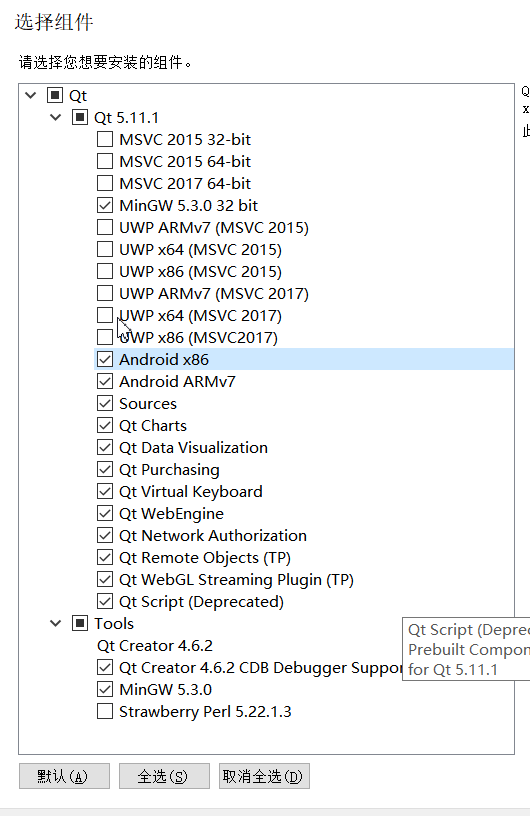
1.下载安装QT
离线版QT地址: https://download.qt.io/official_releases/qt/5.11/5.11.1/qt-opensource-windows-x86-5.11.1.exe
注意:
最好全部安装,否则在后续的安装过程中会提示相应的文件找不到
2. 在环境变量中指定QT_DIR
默认的QT_DIR为C:\Qt

如果不指定QT_DIR,在后续安装过程中会出现如下错误

3. 将g++所在路径加入环境变量PATH中
C:\Qt\Qt5.11.1\Tools\mingw530_32\bin

C:\Qt\Qt5.11.1\5.11.\mingw53_32\bin

C:\Qt\Qt5.11.1\Tools\mingw530_32\opt\bin

C:\Qt\Qt5.11.1\Tools\mingw530_32\bin 目录下包含了gcc、g++等编译链接工具
C:\Qt\Qt5.11.1\5.11.1\mingw53_32\bin 目录下包含了qmake.exe以及程序运行过程中需要的动态链接库(.dll)文件
4. 安装go
下载地址: https://golang.org/dl/
5. 下载安装therecipe/qt
# 下载

go get -v github.com/therecipe/qt/cmd/...

# 安装

%GOPATH%\bin\qtsetup.exe
安装过程中出现的硬链接失败可以忽略
生成的静态库所在路径为: %GOPATH%\pkg\windows_386\github.com\therecipe\qt
总共预计安装39个静态库文件(后缀名为.a)。其中安装成功38个,安装失败1个(winextras)。
安装记录如下:
F:\>qtsetup
[36mINFO[0m[] running: 'qtsetup prep'
[31mERRO[0m[] failed to run command [31mcmd[0m="cmd /C mklink /H C:\\Go\\bin\\qtrcc.exe F:\\Workspace\\go\\bin\\qtrcc.exe" [31mdir[0m= [31menv[0m= [31merror[0m="exit status 1" [31mfunc[0m=RunCmdOptional [31mname[0m="failed to create qtrcc symlink in your PATH (C:\\Go\\bin\\qtrcc.exe); please use F:\\Workspace\\go\\bin\\qtrcc.exe instead"
ϵͳ�����ļ��Ƶ���ͬ�Ĵ����������� [31mERRO[0m[] failed to run command [31mcmd[0m="cmd /C mklink /H C:\\Go\\bin\\qtmoc.exe F:\\Workspace\\go\\bin\\qtmoc.exe" [31mdir[0m= [31menv[0m= [31merror[0m="exit status 1" [31mfunc[0m=RunCmdOptional [31mname[0m="failed to create qtmoc symlink in your PATH (C:\\Go\\bin\\qtmoc.exe); please use F:\\Workspace\\go\\bin\\qtmoc.exe instead"
ϵͳ�����ļ��Ƶ���ͬ�Ĵ����������� [31mERRO[0m[] failed to run command [31mcmd[0m="cmd /C mklink /H C:\\Go\\bin\\qtminimal.exe F:\\Workspace\\go\\bin\\qtminimal.exe" [31mdir[0m= [31menv[0m= [31merror[0m="exit status 1" [31mfunc[0m=RunCmdOptional [31mname[0m="failed to create qtminimal symlink in your PATH (C:\\Go\\bin\\qtminimal.exe); please use F:\\Workspace\\go\\bin\\qtminimal.exe instead"
ϵͳ�����ļ��Ƶ���ͬ�Ĵ����������� [31mERRO[0m[] failed to run command [31mcmd[0m="cmd /C mklink /H C:\\Go\\bin\\qtdeploy.exe F:\\Workspace\\go\\bin\\qtdeploy.exe" [31mdir[0m= [31menv[0m= [31merror[0m="exit status 1" [31mfunc[0m=RunCmdOptional [31mname[0m="failed to create qtdeploy symlink in your PATH (C:\\Go\\bin\\qtdeploy.exe); please use F:\\Workspace\\go\\bin\\qtdeploy.exe instead"
ϵͳ�����ļ��Ƶ���ͬ�Ĵ����������� [36mINFO[0m[] running: 'qtsetup check windows' [docker=false] [vagrant=false]
[36mINFO[0m[] GOOS: 'windows'
[36mINFO[0m[] GOARCH: 'amd64'
[36mINFO[0m[] GOVERSION: 'go1.10.1'
[36mINFO[0m[] GOROOT: * 'C:\Go\'
[36mINFO[0m[] GOPATH: * 'F:\Workspace\go'
[36mINFO[0m[] GOBIN: 'F:\Workspace\go\bin'
[36mINFO[0m[] QT_HASH: 'd0f30a6e4c39e0989b1b00169b66abbca442becf'
[36mINFO[0m[] QT_VERSION: '5.11.1'
[36mINFO[0m[] QT_VERSION_MAJOR: '5.11.1'
[36mINFO[0m[] QT_DIR: * 'C:\Qt\Qt5.11.1'
[36mINFO[0m[] QT_STUB: 'false'
[36mINFO[0m[] QT_DEBUG: 'false'
[36mINFO[0m[] QT_QMAKE_DIR: ''
[36mINFO[0m[] QT_WEBKIT: 'false'
[36mINFO[0m[] QT_MSYS2: 'false'
[36mINFO[0m[] running: 'qtsetup generate windows' [docker=false] [vagrant=false]
[36mINFO[0m[] generating full qt/core
[36mINFO[0m[] generating full qt/androidextras
[36mINFO[0m[] generating full qt/gui
[36mINFO[0m[] generating full qt/network
[36mINFO[0m[] generating full qt/xml
[36mINFO[0m[] generating full qt/dbus
[36mINFO[0m[] generating full qt/nfc
[36mINFO[0m[] generating full qt/script
[36mINFO[0m[] generating full qt/sensors
[36mINFO[0m[] generating full qt/positioning
[36mINFO[0m[] generating full qt/widgets
[36mINFO[0m[] generating full qt/sql
[36mINFO[0m[] generating full qt/qml
[36mINFO[0m[] generating full qt/websockets
[36mINFO[0m[] generating full qt/xmlpatterns
[36mINFO[0m[] generating full qt/bluetooth
[36mINFO[0m[] generating full qt/webchannel
[36mINFO[0m[] generating full qt/svg
[36mINFO[0m[] generating full qt/multimedia
[36mINFO[0m[] generating full qt/quick
[36mINFO[0m[] generating full qt/help
[36mINFO[0m[] generating full qt/location
[36mINFO[0m[] generating full qt/scripttools
[36mINFO[0m[] generating full qt/uitools
[36mINFO[0m[] generating full qt/winextras
[36mINFO[0m[] generating full qt/testlib
[36mINFO[0m[] generating full qt/serialport
[36mINFO[0m[] generating full qt/serialbus
[36mINFO[0m[] generating full qt/printsupport
[36mINFO[0m[] generating full qt/designer
[36mINFO[0m[] generating full qt/scxml
[36mINFO[0m[] generating full qt/gamepad
[36mINFO[0m[] generating full qt/purchasing
[36mINFO[0m[] generating full qt/datavisualization
[36mINFO[0m[] generating full qt/charts
[36mINFO[0m[] generating full qt/speech
[36mINFO[0m[] generating full qt/quickcontrols2
[36mINFO[0m[] generating full qt/sailfish
[36mINFO[0m[] generating full qt/remoteobjects
[36mINFO[0m[] running: 'qtsetup install windows' [docker=false] [vagrant=false]
[36mINFO[0m[] installing full qt/core
[36mINFO[0m[] installing full qt/androidextras
[36mINFO[0m[] installing full qt/gui
[36mINFO[0m[] installing full qt/network
[36mINFO[0m[] installing full qt/xml
[36mINFO[0m[] installing full qt/dbus
[36mINFO[0m[] installing full qt/nfc
[36mINFO[0m[] installing full qt/script
[36mINFO[0m[] installing full qt/sensors
[36mINFO[0m[] installing full qt/positioning
[36mINFO[0m[] installing full qt/widgets
[36mINFO[0m[] installing full qt/sql
[36mINFO[0m[] installing full qt/qml
[36mINFO[0m[] installing full qt/websockets
[36mINFO[0m[] installing full qt/xmlpatterns
[36mINFO[0m[] installing full qt/bluetooth
[36mINFO[0m[] installing full qt/webchannel
[36mINFO[0m[] installing full qt/svg
[36mINFO[0m[] installing full qt/multimedia
[36mINFO[0m[] installing full qt/quick
[36mINFO[0m[] installing full qt/help
[36mINFO[0m[] installing full qt/location
[36mINFO[0m[] installing full qt/scripttools
[36mINFO[0m[] installing full qt/uitools
[36mINFO[0m[] installing full qt/winextras
github.com/therecipe/qt
github.com/therecipe/qt/winextras
# github.com/therecipe/qt/winextras
[36mINFO[0m[] installing full qt/testlib
[36mINFO[0m[] installing full qt/serialport
[36mINFO[0m[] installing full qt/serialbus
[36mINFO[0m[] installing full qt/printsupport
[36mINFO[0m[] installing full qt/designer
[36mINFO[0m[] installing full qt/scxml
[36mINFO[0m[] installing full qt/gamepad
[36mINFO[0m[] installing full qt/purchasing
[36mINFO[0m[] installing full qt/datavisualization
[36mINFO[0m[] installing full qt/charts
[36mINFO[0m[] installing full qt/speech
[36mINFO[0m[] installing full qt/quickcontrols2
[36mINFO[0m[] installing full qt/sailfish
[36mINFO[0m[] installing full qt/remoteobjects
[33mWARN[0m[0161] failed to install:
[33mWARN[0m[0161] winextras
[36mINFO [0m[] running: 'qtsetup test windows' [docker=false] [vagrant=false]
[36mINFO [0m[] testing widgets\line_edits
[36mINFO [0m[] testing widgets\pixel_editor
[36mINFO [0m[] testing widgets\textedit
[36mINFO [0m[] testing qml\application
[36mINFO [0m[] testing qml\drawer_nav_x
[36mINFO [0m[] testing qml\gallery
[36mINFO [0m[] testing quick\calc
运行的测试代码所在目录源码目录(therecipe\qt)下的的internal\examples目录下。
6. 简单的程序
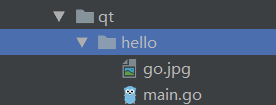
目录结构:
代码:
package main

import (

    "os"

    "github.com/therecipe/qt/widgets"

    "github.com/therecipe/qt/gui"

    "github.com/therecipe/qt/core"

)

func main() {

    // 创建应用程序

    app := widgets.NewQApplication(len(os.Args), os.Args)

    // 创建主窗口

    window := widgets.NewQWidget(nil, )

    // 设置窗口最小尺寸

    window.SetMinimumSize2(, )

    // 设置标题

    window.SetWindowTitle("hello QT, hello GO")

    mainLayout := widgets.NewQVBoxLayout()

    // 创建垂直布局

    window.SetLayout(mainLayout)

    lineEidt := widgets.NewQLineEdit(nil)

    //创建一个label,用于存放go logo

    icon := gui.NewQPixmap5("go.jpg", "", core.Qt__AutoColor)

    iconLabel := widgets.NewQLabel(nil, )

    iconLabel.SetPixmap(icon)

    btn := widgets.NewQPushButton2("点我", nil)

    btn.ConnectClicked(func(bool) {

        widgets.QMessageBox_Information(nil, "我是对话框", "hello go,hello qt", widgets.QMessageBox__Ok, widgets.QMessageBox__Ok)

    })

    // !!!! 注意是AddWidget 不是AddChildWidget

    mainLayout.AddWidget(lineEidt, , )

    mainLayout.AddWidget(iconLabel, , )

    window.Layout().AddWidget(btn)

    // 显示窗口

    window.Show()

    // 进入消息循环

    app.Exec()

}
main.go
生成目标exe文件
F:\Workspace\go\src\gui\qt>qtdeploy build desktop hello
需要将go.jpg拷贝至hello\deploy\windows\目录下(与hello.exe处于一个目录下)方可正常运行。
运行效果:

遇到的问题:
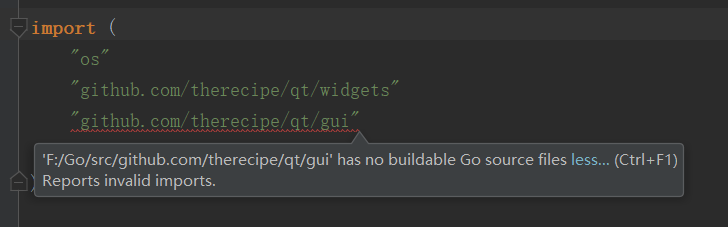
1) "xxx/src/github.com/therecipe/qt/gui" has no buildable Go source files
解决方法:
点击 Help > Edit Custom Properties

#添加如下内容

idea.max.intellisense.filesize=

由于静态库gui.a很大,因此需要提高goland智能补全所允许的 单个文件大小上限
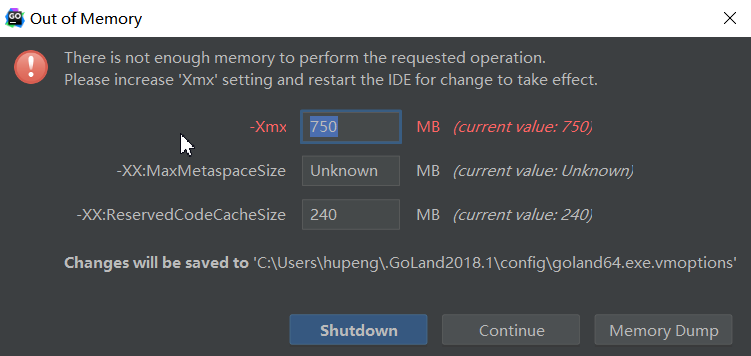
2) 运行时内存不足
解决方法:
点击Goland 的开始菜单 Help > Edit Custom VM Options
根据配置 修改-Xmx选项,例如:
-Xms512m

-Xmx4096m

-XX:ReservedCodeCacheSize=480m

-XX:+UseConcMarkSweepGC

-XX:SoftRefLRUPolicyMSPerMB=

-ea

-Dsun.io.useCanonCaches=false

-Djava.net.preferIPv4Stack=true

-XX:+HeapDumpOnOutOfMemoryError

-XX:-OmitStackTraceInFastThrow
-Xmx value limits the maximum heap memory size that the JVM can allocate.
参考:
https://github.com/therecipe/qt/wiki/Getting-Started
https://github.com/therecipe/qt/wiki/Installation-on-Windows
https://github.com/therecipe/qt/issues/90
windows下 go安装qt绑定的更多相关文章
- QT在windows下的安装与配置
先了解Qt: Qt一直以来,分为商业.开源两个版本,商业版本为用户提供了二级制的动态库,直接安装既可以使用,但是需要花钱购买license,而开源版本则遵守GPL协议,提供了源码,用户需要自行编译,才 ...
- mediawiki在windows下的安装
mediawiki在windows下的安装 对于刚接触wiki的朋友们来说,配置一个服务器环境,安装并运行mediawiki是一件很麻烦的事情,在这里,我尽量用通俗易懂的语言,介绍mw(mediawi ...
- Windows下GIT安装与使用(上传远程端)
Windows下GIT安装与使用(上传远程服务器) 1. 登陆http://msysgit.github.io/并下载Git 2. 打开下载的exe文件,一路默认(路径可以去修改).有可能电脑需要 ...
- flume 1.7在windows下的安装与运行
flume 1.7在windows下的安装与运行 一.安装 安装java,配置环境变量. 安装flume,flume的官网http://flume.apache.org/,下载地址,下载后直接解压即可 ...
- 关于在windows下部署发布QT程序的总结
原文请看:http://www.cnblogs.com/javaexam2/archive/2011/05/18/2632916.html 关于在windows下部署发布QT程序的总结 2008-06 ...
- windows下python安装Numpy、Scipy、matplotlib模块(转载)
python下载链接 Numpy下载链接 python中Numpy包的安装及使用 Numpy包的安装 准备工作 Python安装 pip安装 将pip所在的文件夹添加到环境变量path路径中 ...
- memcache的windows下的安装和简单使用
原文:memcache的windows下的安装和简单使用 memcache是为了解决网站访问量大,数据库压力倍增的解决方案之一,由于其简单实用,很多站点现在都在使用memcache,但是memcach ...
- Windows下pry安装和配置
Windows下pry安装和配置 pry是一个增强型的交互式命令行工具,比irb强大. 有自动完成功能,自动缩进,有颜色.有更强大的调试功能. pry 安装很简单. 在终端输入: gem instal ...
- Windows下虚拟机安装Mac OS X ----- VM12安装Mac OS X 10.11
Windows下虚拟机安装Mac OS X -– VM12安装Mac OS X 10.11 随着Iphone在国内大行其道,越来越多的开发者涌入iOS开发大军 中,但都苦于没有苹果机,本文即将介绍WI ...
随机推荐
- python day33 ,socketserver多线程传输,ftp作业
一.一个服务端连多个客户端的方法 1.服务端 import socketserver class MyServer(socketserver.BaseRequestHandler): def hand ...
- echarts绘制k线图为什么写candlestick类型就报错
错误提示:echarts-en.common.js:11713 Uncaught Error: Component series.candlestick not exists. Load it fir ...
- 自动删除Android工程中无用的资源
开发时间久了, 几个版本迭代之后, 工程中难免留下很多垃圾资源, 造成apk的包很大, 这里介绍一个工具, 可以自动扫描工程中, 没有使用的资源, 然后自动删除: 包括图片, xml, 文本等. 采用 ...
- C语言权威指南和书单 - 适用于所有级别
注:点击标题免费下载电子书 所有级别 1. The C Programming Language (2nd Edition) 2. C: A Reference Manual (5th Edition ...
- 关于memset赋值问题
学习借鉴自:https://blog.csdn.net/yexiaohhjk/article/details/52717934 memset是C语言头文件<string.h>中的一个函数, ...
- nginx uwsgi django 配置
用django框架,uwsgi服务器作为动态服务器,nginx作为静态资源服务器 配置uWSGI,在项目目录下创建uwsgi.ini文件: [uwsgi] #使用nginx连接时使用 socket=1 ...
- eclipse通过maven进行打编译
对maven项目中pom.xml右键-->Run As-->Maven build... Goals里面添加assembly:assembly 点击run,编译成功后jar包在target ...
- Android 异步请求通用类
package com.example.demo1; import java.util.EventListener; public interface MyAsyncTaskListener exte ...
- C++中的内部类
1.内部类的概念 如果一个类定义在另一个类的内部,这个内部类就叫做内部类.注意此时这个内部类是一个独立的类,它不属于外部类,更不能通过外部类的对象去调用内部类.外部类对内部类没有任何优越的访问权限. ...
- Java 内部类的作用
1.内部类可以很好的实现隐藏 一般的非内部类,是不允许有 private 与protected权限的,但内部类可以 2.内部类拥有外围类的所有元素的访问权限 3.可是实现多重继承 4.可以避免修改接口 ...