
【ShaderToy】基本操作——旋转
*继续:ShaderToy基础学习中d(`・∀・)b
对每个像素点进行旋转,其实加个公式就ok了啊。
对网格进行旋转:
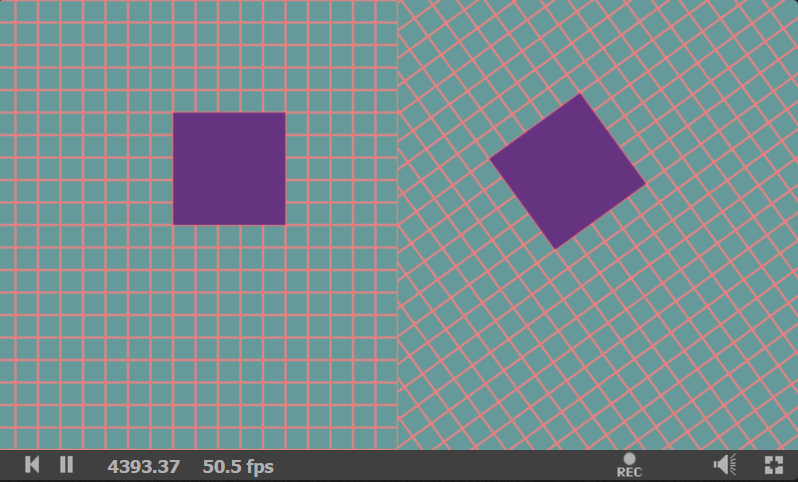
代码如下:
#define TUTORIAL 2

#define PI 3.14159265359

#if TUTORIAL == 1

float linearstep(float edge0, float edge1, float x) {

    float t = (x - edge0)/(edge1 - edge0);

    return clamp(t, 0.0, 1.0);

}

float smootherstep(float edge0, float edge1, float x) {

    float t = (x - edge0)/(edge1 - edge0);

    float t1 = t*t*t*(t*(t*. - .) + .);

    return clamp(t1, 0.0, 1.0);

}

void mainImage( out vec4 fragColor, in vec2 fragCoord )

{

    vec2 r =  2.0*vec2(fragCoord.xy - 0.5*iResolution.xy)/iResolution.y;

    vec3 bgcol = vec3(1.0,0.3,0.5);//bg color

    vec3 col1 = vec3(0.4,0.2,0.5);//circle

    vec2 center1 = vec2(-1.35,);

    vec2 center2 = vec2(-0.45,);

    vec2 center3 = vec2(0.45,);

    vec2 center4 = vec2(1.35,);

    vec3 pixel = bgcol;

    float m=0.4;

    pixel = bgcol;

    //circle 0

    //未经任何处理

    /*

    if(r.x<-0.9){

        if(length(r-center1)<m){

            pixel = col1;

        }

    }

    */

    //circle 1

    //step处理,等同于未经任何处理的circle 0

    if(r.x<-0.9){

        m =  step(m,length(r-center1));

        pixel = mix(col1,bgcol,m);

    }

    //circle 2

    //linearstep处理

    else if(r.x<-0.0){

        m =  linearstep(m-0.005,m+0.005,length(r-center2));

        pixel = mix(col1,bgcol,m);

    }

    //circle 3

    //smoothstep处理

    else if(r.x<0.9){

           m =  smoothstep(m-0.005,m+0.005,length(r-center3));

        pixel = mix(col1,bgcol,m);

    }

    //circle 4

    //自定义smootherstep处理

    else if(r.x<1.8){

           m =  smootherstep(m-0.005,m+0.005,length(r-center4));

        pixel = mix(col1,bgcol,m);

    }

    //区域分解线

    for(float i=-0.9;i<2.0;i += 0.9){

        if(r.x<i&&r.x>i-0.005)

            pixel = vec3(1.0);

    }

    fragColor = vec4(pixel,1.0);

}

#elif TUTORIAL == 2

//绘制网格

float coordinateGrid(vec2 r) {

    float ret = 0.0;

    const float tickWidth = 0.1;

    for(float i=-2.0; i<2.0; i+=tickWidth) {

        // "i" is the line coordinate.

        ret += .-smoothstep(0.0, 0.008, abs(r.x-i));

        ret += .-smoothstep(0.0, 0.008, abs(r.y-i));

    }

    return ret;

}

//绘制长方形

float rectangle(vec2 r, vec2 topLeft, vec2 bottomRight) {

    float ret;

    float d = 0.005;

    ret = smoothstep(topLeft.x-d, topLeft.x+d, r.x);

    ret *= smoothstep(topLeft.y-d, topLeft.y+d, r.y);

    ret *= 1.0 - smoothstep(bottomRight.y-d, bottomRight.y+d, r.y);

    ret *= 1.0 - smoothstep(bottomRight.x-d, bottomRight.x+d, r.x);

    return ret;

}

//旋转函数

vec2 rotate(vec2 r, float angle){

    vec2 q;

    q.x =   cos(angle)*r.x + sin(angle)*r.y;

    q.y = - sin(angle)*r.x + cos(angle)*r.y;

    return q;

}

void mainImage( out vec4 fragColor, in vec2 fragCoord )

{

    vec2 r =  2.0*vec2(fragCoord.xy - 0.5*iResolution.xy)/iResolution.y;

    vec3 bgcol = vec3(1.0,0.5,0.5);//bg color

    vec3 col1 = vec3(0.4,0.6,0.6);//circle1

    vec3 col2 = vec3(0.4,0.2,0.5);//circle2

    vec3 pixel;

    vec2 q;

    float angle;

    angle = 0.2*PI;//旋转角度

    //左半边正常,右半边旋转

    if(r.x>0.0)

        pixel = mix(col1,bgcol,coordinateGrid(rotate(r,angle)));

    else

        pixel = mix(col1,bgcol,coordinateGrid(r));

    //绘制长方形

    pixel = mix(pixel, col2, rectangle(r, vec2(-., 0.0), vec2(-0.5, 0.5)) );

    //用rotate函数旋转方块

    pixel = mix(pixel, col2, rectangle(rotate(r,angle), vec2(0.5, -0.5), vec2(., .)) );

    fragColor = vec4(pixel,1.0);

}

#endif
【ShaderToy】基本操作——旋转的更多相关文章
- 伸展树的基本操作——以【NOI2004】郁闷的出纳员为例
前两天老师讲了伸展树……虽然一个月以前自己就一直在看平衡树这一部分的书籍,也仔细地研读过伸展树地操作代码,但是就是没写过程序……(大概也是在平衡树的复杂操作和长代码面前望而生畏了)但是今天借着老师布置 ...
- Shadertoy 教程 Part 3 - 矩形和旋转
Note: This series blog was translated from Nathan Vaughn's Shaders Language Tutorial and has been au ...
- 三、Redis基本操作——List
小喵的唠叨话:前面我们介绍了Redis的string的数据结构的原理和操作.当时我们提到Redis的键值对不仅仅是字符串.而这次我们就要介绍Redis的第二个数据结构了,List(链表).由于List ...
- Qt中图像的显示与基本操作
Qt可显示基本的图像类型,利用QImage.QPxmap类可以实现图像的显示,并且利用类中的方法可以实现图像的基本操作(缩放.旋转). 1. Qt可显示的图像类型 参考Qt的帮助文档,可支持的类型,即 ...
- CCF真题之图像旋转
201503-1 问题描述 旋转是图像处理的基本操作,在这个问题中,你需要将一个图像逆时针旋转90度. 计算机中的图像表示可以用一个矩阵来表示,为了旋转一个图像,只需要将对应的矩阵旋转即可. 输入格式 ...
- 01-CALayer的基本操作
*:first-child { margin-top: 0 !important; } body > *:last-child { margin-bottom: 0 !important; } ...
- Avl树的基本操作(c语言实现)
#include<stdio.h> #include<stdlib.h> typedef struct AvlNode *Position; typedef struct Av ...
- H5JS二维动画制作!two.js的基本操作class1
今天介绍一个网络上并不常用的插件two.js,刚开始学习的过程中,发现网上并没有合适的教程,在此发表基本操作 two.js是一款网页二维绘图软件,可以在指定区域内产生自设的各种动画效果 下载网址如下: ...
- 使用SVG基本操作API
前面的话 本文将详细介绍SVG基本操作API,并使用这些API操作实例效果 基础API 在javascript中,可以使用一些基本的API来对SVG进行操作 [NS地址] 因为SVG定义在其自身的命令 ...
随机推荐
- extjs 中比较常见且好用的监听事件
ComboBox listeners:{ expand:function(){ //此函数是,点击下拉框展开的时候事件 }, select:function(com, record, index){ ...
- [已解决]报错:Required request body is missing
问题代码: res = requests.post(getXxxxList_url, headers=headers, data={}) 对象网站: angular4 apache 通过验证 (coo ...
- egg.js与mysql的结合使用,以及部署事项
最近使用egg.js写了一个小项目练手,主要用来封装接口以及代理接口.进入正题: egg搭建以及各项配置 可以详见官方文档:https://eggjs.org,这里简单描述一下: 1.直接使用脚手架快 ...
- Pytorch实现UNet例子学习
参考:https://github.com/milesial/Pytorch-UNet 实现的是二值汽车图像语义分割,包括 dense CRF 后处理. 使用python3,我的环境是python3. ...
- 关于SSH的那些事
SSH: Secure Shell Protocol (安全外壳协议) Secure Shell,又可记为安全外壳协议(SSH) Secure Shell,又可记为安全外壳协议(SSH),最初是UN ...
- easyUI的常见属性
datagrid (数据表格) $("#tg").datagrid({url:"TaskList",//请求的地址fit: false, //当true时设置他 ...
- Django Rest Framework(二)
•基于Django 先创建一个django项目,在项目中创建一些表,用来测试rest framework的各种组件 models.py class UserInfo(models.Model): &q ...
- Windows API方式直接调用C#的DLL,支持多音字转拼音、Gzip解压缩、公式计算(VBA、C++、VB、Delphi甚至java都可以)
原始链接 https://www.cnblogs.com/Charltsing/p/DllExport.html 这两年,我在VBA应用方面一直有几大痛点:1.多音字转拼音:2.64位下的GZIP解压 ...
- 心智与认知(1): 反馈循环(Feedback loop)
目录: ** 0x01 反馈循环(Feedback loop) | How to see System in everyday life ** 0x02 如何像视频游戏一样剖析你的人生?| 打怪升级这 ...
- 编译安装MySQL5.6失败的相关问题解决方案
Q0:需要安装git 解决方案: #CentOS yum install git #ubuntu apt-get install git Q1:CMAKE_CXX_COMPILER could be ...