
Python的使用方法
1 安装turtle
Python2安装命令:
pip install turtule
Python3安装命令:
pip3 install turtle
因为turtle库主要是在Python2中使用的,所以安装的时候可能会提示错误:
Command "python setup.py egg_info" failed with error code 1
2 基础概念
2.1 画布(canvas)
画布就是turtle为我们展开用于绘图区域, 我们可以设置它的大小和初始位置。
常用的画布方法有两个:screensize()和setup()。
(1)turtle.screensize(canvwidth=None, canvheight=None, bg=None)
参数分别为画布的宽(单位像素), 高, 背景颜色
如:
turtle.screensize(800, 600, "green")

turtle.screensize() #返回默认大小(400, 300)
(2)turtle.setup(width=0.5, height=0.75, startx=None, starty=None)
参数:
- width, height: 输入宽和高为整数时, 表示像素; 为小数时, 表示占据电脑屏幕的比例
- (startx, starty): 这一坐标表示 矩形窗口左上角顶点的位置, 如果为空,则窗口位于屏幕中心
如:
turtle.setup(width=0.6, height=0.6)

turtle.setup(width=800, height=800, startx=100, starty=100)
2.2 画笔
在画布上,默认有一个坐标原点为画布中心的坐标轴, 坐标原点上有一只面朝x轴正方向小乌龟。
这里我们描述小乌龟时使用了两个词语:标原点(位置),面朝x轴正方向(方向),turtle绘图中, 就是使用位置方向描述小乌龟(画笔)的状态
(1)画笔的属性
画笔有颜色、画线的宽度等属性。
1) turtle.pensize() :设置画笔的宽度;
2) turtle.pencolor() :没有参数传入返回当前画笔颜色;传入参数设置画笔颜色,可以是字符串如"green", "red",也可以是RGB 3元组。
    >>> pencolor('brown')

    >>> tup = (0.2, 0.8, 0.55)

    >>> pencolor(tup)

    >>> pencolor()

    '#33cc8c'
3) turtle.speed(speed) :设置画笔移动速度,画笔绘制的速度范围[0,10]整数, 数字越大越快
(2)绘图命令
操纵海龟绘图有着许多的命令,这些命令可以划分为3种:运动命令,画笔控制命令和全局控制命令
画笔运动命令:
| 命令 | 说明 |
|---|---|
| turtle.forward(distance) | 向当前画笔方向移动distance像素长 |
| turtle.backward(distance) | 向当前画笔相反方向移动distance像素长度 |
| turtle.right(degree) | 顺时针移动degree° |
| turtle.left(degree) | 逆时针移动degree° |
| turtle.pendown() | 移动时绘制图形,缺省时也为绘制 |
| turtle.goto(x,y) | 将画笔移动到坐标为x,y的位置 |
| turtle.penup() | 移动时不绘制图形,提起笔,用于另起一个地方绘制时用 |
| turtle.speed(speed) | 画笔绘制的速度范围[0,10]整数 |
| turtle.circle() | 画圆,半径为正(负),表示圆心在画笔的左边(右边)画圆 |
画笔控制命令:
| 命令 | 说明 |
|---|---|
| turtle.pensize(width) | 绘制图形时的宽度 |
| turtle.pencolor() | 画笔颜色 |
| turtle.fillcolor(colorstring) | 绘制图形的填充颜色 |
| turtle.color(color1, color2) | 同时设置pencolor=color1, fillcolor=color2 |
| turtle.filling() | 返回当前是否在填充状态 |
| turtle.begin_fill() | 准备开始填充图形 |
| turtle.end_fill() | 填充完成; |
| turtle.hideturtle() | 隐藏箭头显示; |
| turtle.showturtle() | 与hideturtle()函数对应 |
全局控制命令
| 命令 | 说明 |
|---|---|
| turtle.clear() | 清空turtle窗口,但是turtle的位置和状态不会改变 |
| turtle.reset() | 清空窗口,重置turtle状态为起始状态 |
| turtle.undo() | 撤销上一个turtle动作 |
| turtle.isvisible() | 返回当前turtle是否可见 |
| stamp() | 复制当前图形 |
| turtle.write(s[,font=("font-name",font_size,"font_type")]) | 写文本,s为文本内容,font是字体的参数,里面分别为字体名称,大小和类型;font为可选项, font的参数也是可选项 |
3 绘图举例
3.1 太阳花
 


import turtle as t

import time

t.color("red", "yellow")

t.speed(10)

t.begin_fill()

for _ in range(50):

    t.forward(200)

    t.left(170)

end_fill()

time.sleep(1)
3.2 绘制小蟒蛇
 

import turtle

def drawSnake(rad, angle, len, neckrad):

    for _ in range(len):

        turtle.circle(rad, angle)

        turtle.circle(-rad, angle)

    turtle.circle(rad, angle/2)

    turtle.forward(rad/2)  # 直线前进

    turtle.circle(neckrad, 180)

    turtle.forward(rad/4)

if __name__ == "__main__":

   turtle.setup(1500, 1400, 0, 0)

   turtle.pensize(30)  # 画笔尺寸

   turtle.pencolor("green")

   turtle.seth(-40)    # 前进的方向

   drawSnake(70, 80, 2, 15)
3.3 绘制五角星
 

import turtle

import time

turtle.pensize(5)

turtle.pencolor("yellow")

turtle.fillcolor("red")

turtle.begin_fill()

for _ in range(5):

    turtle.forward(200)

    turtle.right(144)

turtle.end_fill()

time.sleep(2)

turtle.penup()

turtle.goto(-150,-120)

turtle.color("violet")

turtle.write("Done", font=('Arial', 40, 'normal'))

time.sleep(1)
3.4 绘制谢尔宾斯基三角形
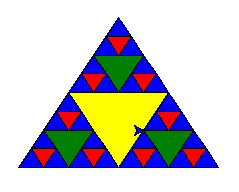
# coding: utf-8

import turtle

def draw_triangle(points, color, t):

    t.fillcolor(color)

    t.up()

    t.goto(points[0][0], points[0][1])

    t.down()

    t.begin_fill()

    t.goto(points[1][0], points[1][1])

    t.goto(points[2][0], points[2][1])

    t.goto(points[0][0], points[0][1])

    t.end_fill()

def get_mid(point1, point2):

    return (point1[0] + point2[0]) / 2, (point1[1] + point2[1]) / 2

def sierpinski(points, degree, t):

    color_map = ['blue', 'red', 'green', 'yellow', 'violet', 'orange', 'white',]

    draw_triangle(points, color_map[degree], t)

    if degree > 0:

        sierpinski([points[0], get_mid(points[0], points[1]), get_mid(points[0], points[2])], degree - 1, t)

        sierpinski([points[1], get_mid(points[0], points[1]), get_mid(points[1], points[2])], degree - 1, t)

        sierpinski([points[2], get_mid(points[0], points[2]), get_mid(points[1], points[2])], degree - 1, t)

if __name__ == "__main__"

    t = turtle.Turtle()

    t.speed(5)

    win = turtle.Screen()

    points = [[-100, -50], [0, 100], [100, -50]]

    sierpinski(points, 3, t)

    win.exitonclick()
Python的使用方法的更多相关文章
- Python测试函数的方法之一
Python测试函数的方法之一 首先介绍简单的try......except尝试运行的放例如下面的图和代码来简单介绍下: 注释:提醒以下代码环境为2.7.x 请3.x以上的同学们老规矩print(把打 ...
- 使用python原生的方法实现发送email
使用python原生的方法实现发送email import smtplib from email.mime.text import MIMEText from email.mime.multipart ...
- Python中sorted()方法
Python中sorted()方法的用法 1.先说一下iterable,中文意思是迭代器. Python的帮助文档中对iterable的解释是:iteralbe指的是能够一次返回它的一个成员的对象.i ...
- python类及其方法
python类及其方法 一.介绍 在 Python 中,面向对象编程主要有两个主题,就是类和类实例类与实例:类与实例相互关联着:类是对象的定义,而实例是"真正的实物",它存放了类中 ...
- Python内置方法的时间复杂度(转)
原文:http://www.orangecube.net/python-time-complexity 本文翻译自Python Wiki本文基于GPL v2协议,转载请保留此协议. 本页面涵盖了Pyt ...
- Python LOGGING使用方法
Python LOGGING使用方法 1. 简介 使用场景 场景 适合使用的方法 在终端输出程序或脚本的使用方法 print 报告一个事件的发生(例如状态的修改) logging.info()或log ...
- [Python]读写文件方法
http://www.cnblogs.com/lovebread/archive/2009/12/24/1631108.html [Python]读写文件方法 http://www.cnblogs.c ...
- 转最简便安装python+selenium-webdriver环境方法
最简便安装python+selenium-webdriver环境方法 from:http://www.easonhan.info/python/2013/12/07/active-python-ins ...
- python字符串replace()方法
python字符串replace()方法 >>> help(str.replace)Help on method_descriptor:replace(...) S.repla ...
- Python中__init__方法介绍
本文介绍Python中__init__方法的意义. __init__方法在类的一个对象被建立时,马上运行.这个方法可以用来对你的对象做一些你希望的 初始化 .注意,这个名称的开始和结尾 ...
随机推荐
- python中opencv的安装
1.得到opencv的安装包: 2.把安装包中的cv.py, cv2.pd放到一个文件夹中,并把这个文件夹放到D:\Anaconda2\Lib\site-packages中: 3.添加新的变量,变量名 ...
- 全排列递归算法(元素有重复与无重复,C++实现)
元素无重复: 如:2,5,8,9. 思路:用递归的方法解决,对于2589,先输出所有以2开头的排列,然后输出5开头的排列.....(此处称为递归操作A).以2开头的排列中,第一位是2,后面的是589, ...
- will not be managed by Spring/ [managed: 15; max: 15]
检查事务配置 检查 mybatis 配置文件扫描路径是否正确 <!-- 自动扫描 --> <context:component-scan base-package="com ...
- mock.js使用总结
基本使用: 1 引入mock.js 2 var data = Mock.mock({ // 属性 list 的值是一个数组,其中含有 1 到 10 个元素 'list|1-10': [{ // 属性 ...
- C语言中 if 和 else if 的区别
先看代码:我们本意是对i不同的值有不同的判断. #include<stdio.h> int main(void) { ; ) { i++; printf("%d\n", ...
- Java基础——Instanceof 运算符
Instanceof 运算符 java 中的instanceof 运算符是用来在运行时指出对象是否为特定类的一个实例 instanceof运算返回值:boolean类型 用法 boolean resu ...
- .Net core----使用容联云短信推送
一直在忙于写接口,也没有时间去好好的整理的一片文档,写一篇经常的用到的短信推送案例 还是比较喜欢干货 作为有个程序员 有时候复制粘贴习惯了 实在的还是比较实在 比如能用复制解决的为什么不用复制 ...
- (原创)lua日期、时间、时间戳的计算和转换
----------------------------------------------日期与时间 print("当前时间戳:") local nowTime = os.tim ...
- margin:auto你真的理解么?
含义 margin:auto是具有强烈计算意味的关键字,用来计算元素对应方向应该获得的剩余空间大小 填充规则 (1) 如果一侧定值,一侧auto,则auto为剩余空间大小 (2) 如果两侧均是auto ...
- eclipse下properties文件中文乱码的解决方案
今天在工程下编辑.properties文件时输入了中文然后就保存出错,弄了好久才搞定!大家瞄瞄 在中文操作系统下,Eclipse中的Java类型文件的编码的默认设置是GBK,但是对Properties ...