
Arcgis api for javascript学习笔记 - 不改变默认端口(6080)情况下,外网访问Arcgis Server 发布的接口
Arcgis Server发布的地图服务地址默认端口号是6080,假设本机上只对80端口做了外网映射,在IIS中部署了一个网站绑定了80端口,那么网站中某个页面通过arcgis api for js 加载Arcgis Server发布的地图服务就无法加载出来了。
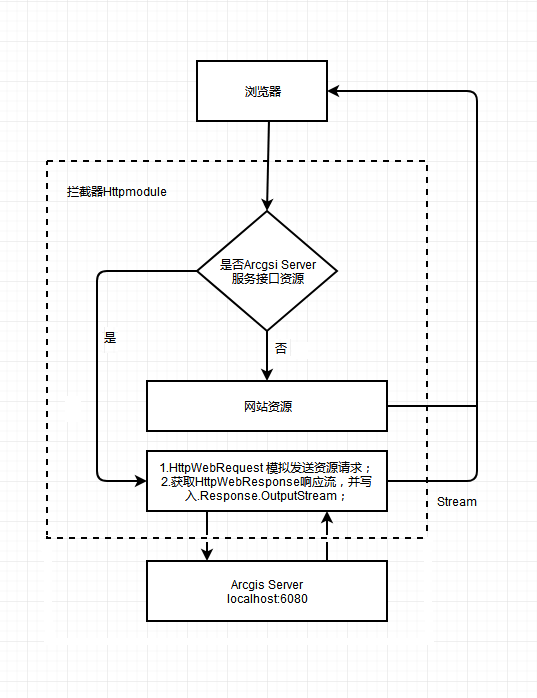
在此情况下,可以将Arcgis Server发布的地图服务地址Url设为网站的特定地址,然后通过拦截器拦截特定地址,在拦截器中用HttpWebRequest访问localhost:6080,将HttpWebResponse响应流写入Response.OutputStream中。
(其实就是类似于反向代理,将地图服务接口的请求转发到Arcgis Server 的Web服务器)
例:
服务器局域网地址为:192.168.1.100
服务器80端口映射外网地址为:61.135.169.125
服务器在IIS中部署网站绑定的端口为:80
服务器Arcgis Server发布的地图服务地址端口为:6080
现在如果想通过arcgis js api 加载 服务接口 192.168.1.100:6080/arcgis/rest/services/test/service1/FeatureServer/0;
如果在内网中访问,下面的代码地图加载出来没问题。
var myFeatureLayer0 = new FeatureLayer("http://192.168.1.100:6080/arcgis/rest/services/test/service1/FeatureServer/0", { "id": "myFeatureLayer0", "opacity": 0.5, "outFields": ["*"], "mode": FeatureLayer.MODE_ONDEMAND });
但是如果在外网访问因为无法访问6080端口,所以必须通过80端口的网站通过模拟HttpWebRequest模拟请求 192.168.1.100:6080/arcgis/rest/services/test/service1/FeatureServer/0 ,然后返回客户端
html页面代码:
var myFeatureLayer0 = new FeatureLayer("http://61.135.169.125/arcgis/rest/services/test/service1/FeatureServer/0", { "id": "myFeatureLayer0", "opacity": 0.5, "outFields": ["*"], "mode": FeatureLayer.MODE_ONDEMAND });
HttpModule拦截器代码:
    public class ArcgsiServerUrlMappingModule : IHttpModule

    {

        public void Init(HttpApplication application)

        {

            application.BeginRequest += this.Application_BeginRequest; //注册事件

        }

        private void Application_BeginRequest(Object source, EventArgs e)

        {

            HttpApplication application = (HttpApplication)source;

            string url = application.Context.Request.RawUrl;

            if (url.StartsWith("/arcgis/rest/services"))

            {

                url = "http://192.168.1.100:6080" + url;

                HttpWebRequest hwRequest = (HttpWebRequest)WebRequest.Create(url);

                hwRequest.UserAgent = "User-Agent:Mozilla/4.0 (compatible; MSIE 6.0; Windows NT 5.2; .NET CLR 1.0.3705";

                hwRequest.Accept = "*/*";

                hwRequest.KeepAlive = true;

                hwRequest.Headers.Add("Accept-Language", "zh-cn,en-us;q=0.5");

                using (HttpWebResponse hwResponse = (HttpWebResponse)hwRequest.GetResponse())

                {

                    Stream hwStream = hwResponse.GetResponseStream();

                    byte[] buffer = new byte[];

                    int count = ;

                    while ((count = hwStream.Read(buffer, , buffer.Length)) > )

                    {

                        application.Context.Response.OutputStream.Write(buffer, , count);

                    }

                    application.Context.Response.ContentType = hwResponse.ContentType;

                    application.Context.Response.End();

                }

            }

        }

        public void Dispose() { }

    }
HttpModule需要在Web.config中的<system.webServer>节点配置相关节点才能起到拦截请求的作用,在次不做说明。
附设计流程图
Arcgis api for javascript学习笔记 - 不改变默认端口(6080)情况下,外网访问Arcgis Server 发布的接口的更多相关文章
- Arcgis api for javascript学习笔记(4.5版本) - 获取FeatureLayer中的graphics集合
在Arcgis api for javascript 3.x 版本中,我们可以直接通过某个FeatureLayer对象中的graphics属性获取要素集合. graphics属性 但是在4.x版本中, ...
- Arcgis api for javascript学习笔记(4.5版本) - 本地部署及代理配置
在开发过程中,由于api的文件比较多,没必要每个项目都将api加入到解决方案中.况且在VS中如果将api加入解决方案,在编写css或js代码时,由于智能提示需要扫描脚本等文件,会导致VS很卡.所以个人 ...
- Arcgis api for javascript学习笔记(3.2X版本)-初步尝试
Arcgis api for javascript(3.22版本)官方地址 :https://developers.arcgis.com/javascript/3/ 1. 根据官方示例实现一个简单地图 ...
- Arcgis api for javascript学习笔记(4.5版本) - 点击多边形(Polygon)并高亮显示
在现在的 arcgis_js_v45_api 版本中并没有直接提供点击Polygon对象高亮显示.需要实现如下几个步骤: 1.点击地图时,获取Polygon的Graphic对象: 2.对获取到的Gra ...
- Arcgis api for javascript学习笔记(4.6版本) - 二维MapView中的FeatureLayer显示标注
4.6版本api的FeatureLayer中有提供 labelsVisible 和 labelingInfo 两个属性,设置这两个属性可以实现显示将属性中某个字段作为标注.但是这两个属性只针对三维Sc ...
- Arcgis api for javascript学习笔记-控制地图缩放比例尺范围(3.2X版本与4.6版本)
Ⅰ. 在3.X版本中,设置Map对象的 "maxScale" 和 "minScale" 属性 <!DOCTYPE html> <html> ...
- Arcgis api for javascript学习笔记(4.5版本)-三维地图实现弹窗功能
1. 对于Graphic对象,在初始化Graphic对象时设置popupTemplate属性,即可实现点击Graphic时显示弹窗. <!DOCTYPE html> <html> ...
- Arcgis api for javascript学习笔记(4.5版本)-三维地图的飞行效果
其实就只是用到了 view.goTo() 函数,再利用 window.setInterval() 函数(定时器)定时执行goTo().代码如下: <!DOCTYPE html> < ...
- Arcgis api for javascript学习笔记(4.5版本)-三维地图并叠加天地图标注
1.三维地图实现 在官网的demo中就有三维地图的实现,如下图所示 <!DOCTYPE html> <html> <head> <meta charset=& ...
随机推荐
- x264代码剖析(十五):核心算法之宏块编码中的变换编码
x264代码剖析(十五):核心算法之宏块编码中的变换编码 为了进一步节省图像的传输码率.须要对图像进行压缩,通常採用变换编码及量化来消除图像中的相关性以降低图像编码的动态范围.本文主要介绍变换编码的相 ...
- windows下, nginx 提示错误 "No input file specified"
https://blog.csdn.net/m_nanle_xiaobudiu/article/details/80386035
- jquery实现ajax提交form表单的方法总结(转)
方法一: 复制代码 代码如下: function AddHandlingFeeToRefund() { var AjaxURL= "../OrderManagement ...
- Java反射学习总结四(动态代理使用实例和内部原理解析)
通过上一篇文章介绍的静态代理Java反射学习总结三(静态代理)中,大家可以发现在静态代理中每一个代理类只能为一个接口服务,这样一来必然会产生过多的代理,而且对于每个实例,如果需要添加不同代理就要去添加 ...
- JAVA初始开发环境搭建
上午想在一台新电脑上搭建java开发环境,在没有之前备份的情况下,单靠网络还真有点麻烦.最主要的原因是貌似在我当前的网络环境下jdk无法下载,官网这个链接半天打不开,http://www.oracle ...
- poj1564 Sum It Up (zoj 1711 hdu 1258) DFS
POJhttp://poj.org/problem?id=1564 ZOJhttp://acm.zju.edu.cn/onlinejudge/showProblem.do?problemId=711 ...
- 如何调试Javascript代码
转自原文如何调试Javascript代码 目前,常用的浏览器IE.Chrome.Firefox都有相应的脚本调试功能.作为我们.NET 阵营,学会如何在IE中调试JS就足够了,在掌握了IE中的调试方法 ...
- spark安装与调试
I---- 1---jdk and scala install ****zyp@ubuntu:~/Desktop/software$ tar xvf jdk-7u67-linux-i586.tar.g ...
- ng-cli搭建angular项目框架
原文地址 https://www.jianshu.com/p/0a8f4b0f29b3 环境准备 以下步骤都不需要事先创建文件夹,只是环境的准备过程,只有到需要搭建项目的时候才需要创建文件夹用来存放项 ...
- 【u108】取数游戏
Time Limit: 1 second Memory Limit: 128 MB [问题描述] 一个N×M的由非负整数构成的数字矩阵,你需要在其中取出若干个数字,使得取出的任意两个数字不相邻(若一个 ...