
C# 导出excel的压缩包到浏览器页面
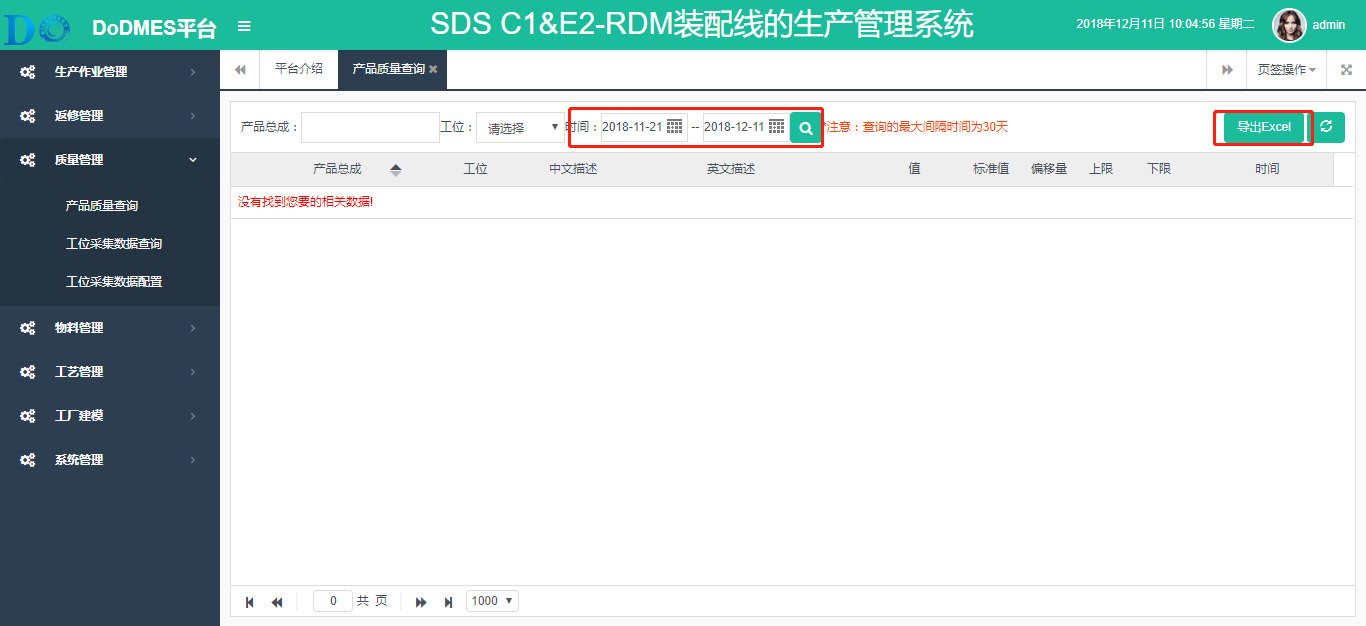
需求背景:TCX_1710项目产品质量导出功能,客户希望每个总成导出到一个Excel表中
实现分析:客户选择时间段,点击导出按钮,默认导出开始时间当天的数据,每个总成一个Excel,将各个Excel打包压缩,返回压缩包到浏览器页面供客户下载
控制器类:
     /// <summary>

        /// 导出产品质量信息(每个总成一个Excel)

        /// </summary>

        /// <param name="keyword"></param>

        /// <returns></returns>

        public void exportExcel(string keyword)

        {

            string SNum = Request.QueryString["SNum"];

            string PSCode = Request.QueryString["PSCode"];

            string StartTime = Request.QueryString["StartTime"];

            string EndTime = Request.QueryString["EndTime"];

            //dictionary根据以上查询条件查询的数据字典

            Dictionary<string, Dictionary<string, List<PR_Product>>> dictionary = new Dictionary<string, Dictionary<string, List<PR_Product>>>();

            if (keyword == "TimeAndSnum")

            {

                dictionary = this.CreateService<IProductInfoAppServices>().GetDictionary("TimeAndSnum", SNum, PSCode, StartTime, EndTime);

            }

            else

            {

                dictionary = this.CreateService<IProductInfoAppServices>().GetDictionary("NoTimeNoSnum", SNum, PSCode, StartTime, EndTime);

            }

            //初始化需要导出字段

            List<ExportFieldInfo> fieldInfo10 = new List<ExportFieldInfo>();

            var tableInfo10 = this.CreateService<IProductInfoAppServices>().getFiledByTable();

            for (var i = ; i < tableInfo10.Count; i++)

            {

                fieldInfo10.Add(new ExportFieldInfo()

                {

                    FieldName = tableInfo10[i].filedName,

                    DisplayName = tableInfo10[i].filedExplain,

                    DataType = DataTypeEnum.String

                });

            }

            string filePath = ConfigurationManager.AppSettings["filePath"];//配置写在E:\MyProject\1710\02_代码\DoMes.Web\Configs\system.config

            //string filePath = "F:\\exporfolder";

            FileStream stream = ExcelHelper<PR_Product>.ToExcel(filePath, dictionary, fieldInfo10, Response);

            Response.Flush();

            Response.End();//关闭响应

            stream.Close();//关闭zip流,否则无法删除zip文件

            //获取指定路径下所有文件夹

            //string[] folderPaths = Directory.GetDirectories(filePath);

            //获取指定路径下所有文件

            var filePaths = Directory.GetFiles(filePath);

            foreach (string filePath_2 in filePaths)

            {

                //删除所有文件

                System.IO.File.Delete(filePath_2);

            }

            //foreach (string folderPath in folderPaths)

            //{

            //    Directory.Delete(folderPath, true);

            //}

            //删除最外面的文件夹

            Directory.Delete(filePath, true);

        }
获取数据的方法:
     /// <summary>

        /// 根据查询条件获取数据,并将数据转换为数据字典

        /// </summary>

        /// <param name="type">查询类型(暂时不用)</param>

        /// <param name="sNum">产品总成</param>

        /// <param name="pSCode">工位</param>

        /// <param name="startTime">开始时间</param>

        /// <param name="endTime">结束时间</param>

        /// <returns></returns>

        public Dictionary<string, Dictionary<string, List<PR_Product>>> GetDictionary(string type, string sNum, string pSCode, string startTime, string endTime)

        {

            //第一层key为日期(年/月/日),value为该日所有总成的数据字典集合

            //第二层key为总成,value为该总成所有的质量数据

            Dictionary<string, Dictionary<string, List<PR_Product>>> dictionary = new Dictionary<string, Dictionary<string, List<PR_Product>>>();

            Expression<Func<PR_Product, bool>> exp = (a =>  == );

            if (!string.IsNullOrEmpty(pSCode))

            {

                exp = exp.And(a => a.PSCode == pSCode);

            }

            if (!string.IsNullOrEmpty(startTime))

            {

                DateTime ctStart = Convert.ToDateTime(startTime);

                exp = exp.And(a => a.CreationTime >= ctStart);

            }

            if (!string.IsNullOrEmpty(endTime))

            {

                DateTime ctEnd = Convert.ToDateTime(endTime);

                exp = exp.And(a => a.CreationTime < ctEnd.AddDays());

            }

            if (!string.IsNullOrEmpty(sNum))

            {

                exp = exp.And(a => a.SNum.Contains(sNum));

            }

            //根据查询条件获得的产品质量数据

            List<PR_Product> product = this.DbContext.Query<PR_Product>().Where(exp).OrderBy(a => a.SNum).ThenBy(it => it.PSCode).ToList();

            //产品总成不为空则只有一个总成

            if (!string.IsNullOrEmpty(sNum))

            {

                Dictionary<string, List<PR_Product>> dictionary2 = new Dictionary<string, List<PR_Product>>();

                dictionary2.Add(sNum, product);

                dictionary.Add(startTime, dictionary2);

            }

            else//产品总成为空

            {

                Dictionary<string, List<PR_Product>> dictionary2 = new Dictionary<string, List<PR_Product>>();

                //从查询的数据集合中查询出所有的总成

                List<PR_Product> snumDistinct = product.Where((x, firstId) => product.FindIndex(z => z.SNum == x.SNum) == firstId).ToList();

                foreach(PR_Product item in snumDistinct)

                {

                    //从大数据集合中查找该总成的数据集合

                    List<PR_Product> snumList = product.Where(x => x.SNum == item.SNum).ToList();

                    dictionary2.Add(item.SNum, snumList);

                }

                dictionary.Add(startTime, dictionary2);

            }

            return dictionary;

        }
Excel文件帮助类方法:
      /// <summary>

        /// 导出产品质量数据,每个总成一个Excel

        /// </summary>

        /// <param name="filePath">导出文件路径</param>

        /// <param name="dictionary">导出数据字典</param>

        /// <param name="fieldInfies">导出数据表头</param>

        /// <param name="Response">页面响应</param>

        /// <returns></returns>

        public static FileStream ToExcel(String filePath, Dictionary<string, Dictionary<string, List<T>>> dictionary, List<ExportFieldInfo> fieldInfies, HttpResponseBase Response)

        {

            //导出文件路径(这里也可以写成固定路径"F:\\exporfolder")

            //String filePath = "F:\\exporfolder";

            //创建此路径(配置文件中的地址一定要保证磁盘存在)

            Directory.CreateDirectory(filePath);

            //导出压缩文件的全路径(zipFilePath)

            DateTime dateTimeZip = DateTime.Now;

            string zipFilePath = filePath + Path.DirectorySeparatorChar + "QM_" + dateTimeZip.ToString("yyyyMMdd") + "_" + dateTimeZip.ToString("HHmmss") + "_" + dateTimeZip.ToString("fff") + ".zip";

            //导出Excel文件路径

            string fullFilePath = "";

            //保存Excel文件名

            string fileName = "";

            //用于存放生成的Excel文件名称集合

            List<string> fileNames = new List<string>();

            //excel文件流

            FileStream excel = null;

            foreach (Dictionary<string, List<T>> items in dictionary.Values)

            {

                foreach (var item in items)

                {

                    DateTime dateTimeExcel = DateTime.Now;

                    //Excel文件名

                    fileName = item.Key + "_" + dateTimeExcel.ToString("yyyyMMdd") + "_" + dateTimeExcel.ToString("HHmmss") + "_" + dateTimeExcel.ToString("fff") + ".xlsx";

                    //Excel文件路径

                    fullFilePath = filePath + Path.DirectorySeparatorChar + fileName;

                    //存放到Excel文件名称集合

                    fileNames.Add(fullFilePath);

                    excel = File.Create(fullFilePath);

                    HSSFWorkbook book = createColumnHSSF(item.Key, item.Value, fieldInfies);

                    // 写文件

                    book.Write(excel);

                    excel.Close();

                }

            }

            FileStream stream = ZipFiles(fileNames, zipFilePath, Response);

            return stream;

        }
     /// <summary>

        /// 压缩多个文件

        /// </summary>

        /// <param name="filesToZip">要进行压缩的文件名集合</param>

        /// <param name="zipedFile">压缩后生成的压缩文件名</param>

        public static FileStream ZipFiles(List<string> filesToZip, string zipedFile, HttpResponseBase Response)

        {

            Response.AddHeader("content-disposition", "attachment;filename=" + zipedFile.Substring(zipedFile.LastIndexOf("\\", StringComparison.Ordinal) + ) );

            //Zip文件流

            FileStream zipFile = File.Create(zipedFile);

            //将zipStream写到响应输出流中

            ZipOutputStream zipStream = new ZipOutputStream(Response.OutputStream);

            //遍历所有的Excel文件

            foreach (string fileToZip in filesToZip)

            {

                if (string.IsNullOrEmpty(fileToZip))

                {

                    throw new ArgumentException(fileToZip);

                }

                if (string.IsNullOrEmpty(zipedFile))

                {

                    throw new ArgumentException(zipedFile);

                }

                if (!File.Exists(fileToZip))

                {

                    throw new FileNotFoundException("指定要压缩的文件: " + fileToZip + " 不存在!");

                }

                try

                {

                    //读取Excel文件到文件流中

                    using (var fs = File.OpenRead(fileToZip))

                    {

                        var buffer = new byte[fs.Length];

                        fs.Read(buffer, , buffer.Length);

                        fs.Close();

                        //从Excel文件路径中读取Excel文件名

                        var fileName = fileToZip.Substring(fileToZip.LastIndexOf("\\", StringComparison.Ordinal) + );

                        //根据文件名创建ZipEntry

                        var zipEntry = new ZipEntry(fileName);

                        //将ZipEntry放入zipStream流中

                        zipStream.PutNextEntry(zipEntry);

                        zipStream.SetLevel();

                        zipStream.Write(buffer, , buffer.Length);

                    }

                }

                catch (IOException ioex)

                {

                    throw new IOException(ioex.Message);

                }

                catch (Exception ex)

                {

                    throw new Exception(ex.Message);

                }

            }

            //zipStream完成后返回

            zipStream.Finish();

            return zipFile;

        }
C# 导出excel的压缩包到浏览器页面的更多相关文章
- 关于使用ajax导出excel问题
最近有个需求是在页面导入文件,后端进行处理后返回处理结果的excel,前端使用的是ajax.我最开始的做法是:在原有代码后加一段导出excel的代码,结果代码能正常运行,但页面始终没有返回我需要的ex ...
- 导出excel 的方法及示例
一.基本知识 1.Apache POI是Apache软件基金会的开放源码函式库,POI提供API给Java程序对Microsoft Office格式档案读和写的功能. 2. HSSF 是Horribl ...
- Java POI导出Excel不弹框选择下载路径(下载文件不选择下载路径,默认) Chrome
在Chrome浏览器中,Java导出Excel文件时,浏览器弹出提示框,需要选择下载路径 在Chrome中的高级设置中,把“下载前询问每个文件的保存位置”去掉就解决了 DEEPLOVE(LC)
- HTML导出Excel文件(兼容IE及所有浏览器)
注意:IE浏览器需要以下设置: 打开IE,在常用工具栏中选择“工具”--->Internet选项---->选择"安全"标签页--->选择"自定义级别&q ...
- JavaScript 上万条数据 导出Excel文件 页面卡死
最近项目要js实现将数据导出excel文件,网上很多插件实现~~那个开心呀,谁知道后面数据量达到上万条时出问题:浏览器不仅卡死,导出的excel文件一直提示网络失败.... debug调试发现var ...
- jsp 页面导出excel时字符串数字变成科学计数法的解决方法
web导出excel数据格式化 原文地址:http://www.cnblogs.com/myaspnet/archive/2011/05/06/2038490.html 当我们把web页面上的数据 ...
- 浏览器端JS导出EXCEL
浏览器端JS导出EXCEL FileSaver.js 实现了在本身不支持 HTML5 W3C saveAs() FileSaver 接口的浏览器支持文件保存.FileSaver.js 在客户端保存文件 ...
- 360浏览器导出Excel闪退BUG
最近这半个月在疯狂的修改各种BUG,所以比较少更新博客. 现在谈谈这个360浏览器导出Excel的BUG的解决方法. 该BUG常出现在win7系统与xp系统导出Excel的瞬间关闭导出弹窗. 目前互联 ...
- 分享一个导出Excel时页面不跳转的小技巧
今天在点击客户档案导出的时候,发现先是打开了一个新标签,然后新标签自动关掉,弹出一个文件下载确认的窗口,点击确认后开始下载导出的Excel文件.这样的过程感觉窗口闪来闪去,而且可能会给用户带来困惑,是 ...
随机推荐
- 淘宝druid报错:javax.management.InstanceNotFoundException: com.alibaba.druid:type=DruidDataSourceStat
问题: 启动tomcat报错: Tomat报出一下异常:ERROR [com.alibaba.druid.stat.DruidDataSourceStatManager] – unregister m ...
- 关于TCP的三次握手和四次分手 专题
客户端TCP状态迁移:CLOSED->SYN_SENT->ESTABLISHED->FIN_WAIT_1->FIN_WAIT_2->TIME_WAIT->CLOSE ...
- 使用jquery获取ul中当前正在点击的li的索引
<ul class="list"> <li>哈哈</li> <li>呵呵</li> <li>嘻嘻</l ...
- Spinner默认选择问题
1.需求中使用Spinner,不允许有默认选中,在网上查了好多,有设置 spinner.setSelection(-1,true); 也有设置如下: spinner.setOnItemSelected ...
- HDU 1052 Tian Ji -- The Horse Racing【贪心在动态规划中的运用】
算法分析: 这个问题很显然可以转化成一个二分图最佳匹配的问题.把田忌的马放左边,把齐王的马放右边.田忌的马A和齐王的B之间,如果田忌的马胜,则连一条权为200的边:如果平局,则连一条权为0的边:如果输 ...
- SQL基本语句:2.基本表
SQL基本表的增删改
- jsp基本内置标签
<jsp:foward page="url"> <jsp:param value=" " name=" "/> &l ...
- 算法22-----托普利茨矩阵leetcode766
1.题目 如果一个矩阵的每一方向由左上到右下的对角线上具有相同元素,那么这个矩阵是托普利茨矩阵. 给定一个 M x N 的矩阵,当且仅当它是托普利茨矩阵时返回 True. 示例 1: 输入: matr ...
- sdoi2013 spring(hash+容斥)
大体思路是先求出来\(f[i]\)代表有至少\(i\)个位置相同的点对数. 然后就已经没什么好害怕的了(跟BZOJ3622一样) 然后这个\(f[i\)]怎么求呢? 最无脑的方法就是枚举位置,然后\( ...
- frp(升级版)教程
注:之前的教程是按照官网文档亲自实践操作汇总而成的,所需的软件也是从官网下载的. 但是有一个问题,若是运行在有公网IP的frps程序被其他人所知道,他们就可以直接在他们电脑上运行frpc客户端, 简而 ...