
C#+AE实现类似IDentify功能及对高亮显示相关接口的总结
kenika 原文C#+AE实现类似IDentify功能及对高亮显示相关接口的总结
ArcMap中的Identify功能是有目的查看要素(Feature)属性信息经常使用的工具。ArcMap中的Identify功能有以下几个特征:
第一, 鼠标点击具有“穿透力”,可以同时对多个图层的要素实现选择;
第二, 同一图层可以选择多个要素;
第三, 被选中要素并不高亮显示,而是以绿色闪烁一次;
第四, 所有选中要素列于弹出的信息窗口中。
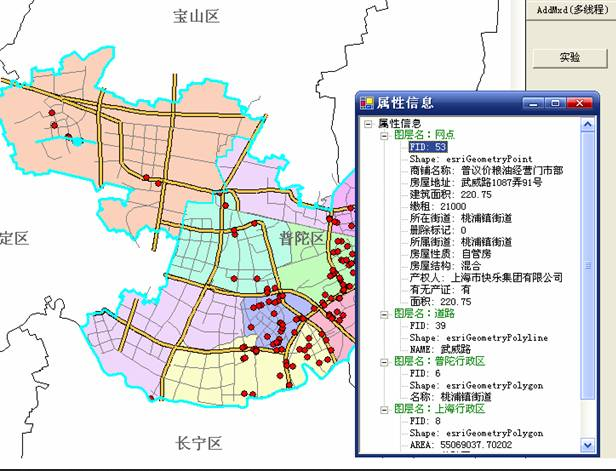
今天用C#和AE也试着写了一个类似于Identify功能的工具,有如下要求:
第一, 鼠标具有“穿透力”,可以同时对多个图层进行选择(点选);
第二, 每一图层最多只能选中一个要素,这与ArcMap中不同;
第三, 被选中要素需要高亮显示,而不是闪烁一次,也与ArcMap不同;
第四, 按下工具后,在地图上单击弹出属性信息窗口,再次单击,仍有该窗口显示属性信息,即不可打开多个属性信息窗口。
private void axMapControl1_OnMouseDown(object sender, ESRI.ArcGIS.MapControl.IMapControlEvents2_OnMouseDownEvent e)

{

if(this.blnIsIdentifyEnable)

     {

         //如果查询比较频繁,此类变量可以设置成类级别

         IFeatureLayer pFL;

         IFeatureSelection pFeatureSelection;

         IEnvelope pEnv;

         IGeometry pGeometry;

         ISpatialFilter pSpatialFilter;

         ISelectionSet pSelectionSet;

         IEnumIDs pEnumIDs;

         IFeature pFeature;

//                ImageList imageList = new ImageList();

//                imageList.

         //用于查询的矩形(相当于点的缓冲区,这样比生成缓冲区节省资源),

         //envelope的大小根据实际情况设定,以方便使用为准

         pEnv = new EnvelopeClass();

         pEnv.PutCoords(e.mapX-,e.mapY-,e.mapX+,e.mapY+);

         pGeometry = pEnv as IGeometry;

         pSpatialFilter = new SpatialFilterClass();

         pSpatialFilter.Geometry = pGeometry;

         pSpatialFilter.SpatialRel = esriSpatialRelEnum.esriSpatialRelIntersects;

         //运用singleton模式设计窗体,只允许存在一个ShowAttributeTable实例

         ShowAttributeTable frmShowAttribute = ShowAttributeTable.CreateForm();

         frmShowAttribute.Show();

         frmShowAttribute.AttributeTreeView.Nodes.Clear();//首先清除上次结果

         frmShowAttribute.AttributeTreeView.ShowLines = true;

         frmShowAttribute.AttributeTreeView.ShowPlusMinus = true;

         TreeNode rootNode = new TreeNode();

         rootNode.Text = "属性信息";

//                rootNode.ImageIndex

         Font font = new Font("黑体",);

         rootNode.NodeFont = font;

         //添加根节点“属性信息”

         frmShowAttribute.AttributeTreeView.Nodes.Add(rootNode);

         //没有必要将地图上的高亮选择清除,因为下面对每个图层的选择都用esriSelectionResultNew,会自动清除上次的高亮显示,

         //而不同图层之间的高亮选择不会有任何影响,因为IFeatureSelection接口的一切属性和方法都是针对一个图层

//                this.axMapControl1.Map.ClearSelection();

         for(int i=;i<this.axMapControl1.LayerCount;i++)

         {

             pFL = this.axMapControl1.get_Layer(i) as IFeatureLayer;

             if(pFL.Visible && pFL.Selectable)

             {

                 pFeatureSelection = pFL as IFeatureSelection;

                 //选择之前先清除,这是个好习惯(除非是用Add方式)

                 pFeatureSelection.Clear();

                 pFeatureSelection.SelectFeatures(pSpatialFilter,esriSelectionResultEnum.esriSelectionResultNew,true);

                 pSelectionSet = pFeatureSelection.SelectionSet;

                 //如果选择集内有Feature

                 if(pSelectionSet.Count>)

                 {

                     //构建图层节点并添加到根节点

                     TreeNode layerNameNode = new TreeNode();

                     layerNameNode.ForeColor = Color.Green;

                     layerNameNode.Text = "图层名:" + pFL.Name;

                     rootNode.Nodes.Add(layerNameNode);

                     //通过pEnumIDs获得该SelectionSet中的Feature的id值,再用FeatureClass.GetFeature()方法获得该Feature对象

                     //这里为了学习新接口而使用了IEnumIDs,为了获得SelectionSet中的Feature,可以使用其Search()方法

                     //获得ICursor,再使用循环获得Feature,如下注释选定行

//                            pSelectionSet.Search(null,false,out pCursor);

//                            pRow = pCursor.NextRow();

//                            if(pRow!=null)

//                            {

//                            }

                     pEnumIDs = pSelectionSet.IDs;

                     long id = pEnumIDs.Next();

                     while(id!=-)

                     {

                         pFeature = pFL.FeatureClass.GetFeature((int)id);

                         for(int j=;j<pFeature.Fields.FieldCount;j++)

                         {

                             if(j!=)

                             {

                                 //构建字段值节点并添加到图层节点下

                                 TreeNode fieldInfoNode = new TreeNode();

                                 fieldInfoNode.Text = pFeature.Fields.get_Field(j).Name + ": " + pFeature.get_Value(j).ToString();

                                 layerNameNode.Nodes.Add(fieldInfoNode);

                             }

                             //如果是shape字段就显示GeometryType

                             else

                             {

                                 TreeNode fieldInfoNode = new TreeNode();

                                 fieldInfoNode.Text = pFeature.Fields.get_Field(j).Name + ": " + pFeature.Shape.GeometryType.ToString();

                                 layerNameNode.Nodes.Add(fieldInfoNode);

                             }

                             frmShowAttribute.AttributeTreeView.ExpandAll();

                         }

                         id = pEnumIDs.Next();

                     }

                 }

             }

 }

}
属性信息窗体ShowAttributeTable的设计的关键代码:
 public class ShowAttributeTable : System.Windows.Forms.Form

 {

  /// <summary>

  /// 必需的设计器变量。

  /// </summary>

  private System.ComponentModel.Container components = null;

  private System.Windows.Forms.TreeView treeView1;

  public TreeView AttributeTreeView//设置treeView1的属性

  {

   get{return this.treeView1;}

   set{this.treeView1 = value;}

  }

  private static ShowAttributeTable frm;

  public static ShowAttributeTable CreateForm()

  {

   if(frm==null)

    frm = new ShowAttributeTable();

   return frm;

  }

  private ShowAttributeTable()

  {

   //

   // Windows 窗体设计器支持所必需的

   //

   InitializeComponent();

   //

   // TODO: 在 InitializeComponent 调用后添加任何构造函数代码

   //

  }

  /// <summary>

  /// 清理所有正在使用的资源。

  /// </summary>

  protected override void Dispose( bool disposing )

  {

   if( disposing )

   {

    if(components != null)

    {

     components.Dispose();

    }

   }

   base.Dispose( disposing );

  }

  #region Windows 窗体设计器生成的代码

  /// <summary>

  /// 设计器支持所需的方法 - 不要使用代码编辑器修改

  /// 此方法的内容。

  /// </summary>

  private void InitializeComponent()

  {

   this.treeView1 = new System.Windows.Forms.TreeView();

   this.SuspendLayout();

   //

   // treeView1

   //

   this.treeView1.Dock = System.Windows.Forms.DockStyle.Fill;

   this.treeView1.ImageIndex = -;

   this.treeView1.Location = new System.Drawing.Point(, );

   this.treeView1.Name = "treeView1";

   this.treeView1.SelectedImageIndex = -;

   this.treeView1.Size = new System.Drawing.Size(, );

   this.treeView1.TabIndex = ;

   //

   // ShowAttributeTable

   //

   this.AutoScaleBaseSize = new System.Drawing.Size(, );

   this.ClientSize = new System.Drawing.Size(, );

   this.Controls.Add(this.treeView1);

   this.Name = "ShowAttributeTable";

   this.Text = "属性信息";

   this.TopMost = true;

   this.Closed += new System.EventHandler(this.ShowAttributeTable_Closed);

   this.ResumeLayout(false);

  }

  #endregion

  private void ShowAttributeTable_Closed(object sender, System.EventArgs e)

  {

   frm = null;

  }

 }
IEnumFeatureSetup pEnumFeatureSetup = this.axMapControl1.Map.FeatureSelection as IEnumFeatureSetup;

pEnumFeatureSetup.AllFields = true;

IEnumFeature pEnumFeature = pEnumFeatureSetup as IEnumFeature;

IFeature pFeature = pEnumFeature.Next();

while(pFeature!=null)

{

    MessageBox.Show(pFeature.get_value().toString());

    pFeature = pEnumFeature.Next();

}
C#+AE实现类似IDentify功能及对高亮显示相关接口的总结的更多相关文章
- 扩展 delphi 泛型 以实现类似lambda功能 , C#中的any count first last 等扩展方法
扩展 delphi 泛型 以实现类似lambda功能 , C#中的any count first last 等扩展方法 在C#中对泛型的扩展,输入参数是泛型本身的内容,返回值则是bool.基于这一点, ...
- 用setTimeout实现与setInteval类似的功能
用setTimeout实现与setInteval类似的功能,代码如下: (function(){ var self = arguments.callee; //获取函数本身 count++; if ( ...
- 【转载】ASP.NET以Post方式抓取远程网页内容类似爬虫功能
使用HttpWebRequest等Http相关类,可以在应用程序中或者网站中模拟浏览器发送Post请求,在请求带入相应的Post参数值,而后请求回远程网页信息.实现这一功能也很简单,主要是依靠Http ...
- 在vue项目中使用codemirror插件实现代码编辑器功能(代码高亮显示及自动提示
在vue项目中使用codemirror插件实现代码编辑器功能(代码高亮显示及自动提示) 1.使用npm安装依赖 npm install --save codemirror; 2.在页面中放入如下代码 ...
- NVR硬件录像机web无插件播放方案功能实现之相关接口注意事项说明
该篇博文主要用来说明EasyNVR硬件录像回放版本的相关接口说明和调用的demo: 方便用户的二次开发和集成. 软件根目录会包含接口文档的,因此,本文主要是对一些特定接口的说明和接口实现功能的讲解以及 ...
- 使用Typescript重构axios(二十一)——请求取消功能:添加axios.isCancel接口
0. 系列文章 1.使用Typescript重构axios(一)--写在最前面 2.使用Typescript重构axios(二)--项目起手,跑通流程 3.使用Typescript重构axios(三) ...
- asp.net + Jquery 实现类似Gridview功能 (一)
不知不觉2015年就过去一半了,由于过年前后公司人员陆续离职(这个...),项目忙不过来,从过年来上班就一直在忙,最近项目终于告一段落,开始步入正轨(不用天天赶项目了).所以最近才有时间写这个东西,可 ...
- Python不同电脑之间传输文件实现类似scp功能不输密码
SCP vs SFTP 通过paramiko还可以传输文件,如何通过paramiko在计算机之间传输文件,通过阅读官方文档,发现有如下两种方式: sftp = paramiko.SFTPClient. ...
- c++ 连接两个字符串实现代码 实现类似strcat功能(转)
想实现strcat功能,直接网上找一个. 第一种: #include "stdafx.h" #include<iostream> using namespace std ...
随机推荐
- Linux下的一个高速跳转到上N层文件夹的简单方法
编辑文件 vim .bashrc (使改动在当前用户下有效) 或者 vim /etc/profile (须要在root用户下运行,使改动在全部用户下有效) 在文件结尾加入别名 alias cd1=' ...
- [NOIP2013]车站分级 解题报告
妈蛋这道普及组水(神)题搞了我非常久. 一. 首先一个非常显然的事情就是每一个火车告诉了站与站之间的等级关系,所以拓扑求最长路. 可是发现暴力建边的话最坏能够达到500*500,所以时间复杂度有O(M ...
- Centos6.4安装opennebula
Centos6.4安装opennebula #安装163源 http://mirrors.163.com/.help/CentOS6-Base-163.repo #安装epel源 wget http: ...
- Office Open XML导出大数据
Office Open XML导出大量数据到 Excel .NET使用Office Open XML导出大量数据到 Excel我相信很多人在做项目的都碰到过Excel数据导出的需求,我从最开始使用最原 ...
- jQuery自定义插件规范
<ul class="list"> <li>导航列表 <ul class="nav"> <li>导航列表1< ...
- FZU 2205 据说题目很水
2205 据说题目很水 Accept: 199 Submit: 458Time Limit: 1000 mSec Memory Limit : 32768 KB Problem Descr ...
- BZOJ3926: [Zjoi2015]诸神眷顾的幻想乡(广义后缀自动机)
Description 幽香是全幻想乡里最受人欢迎的萌妹子,这天,是幽香的2600岁生日,无数幽香的粉丝到了幽香家门前的太阳花田上来为幽香庆祝生日. 粉丝们非常热情,自发组织表演了一系列节目给幽香看. ...
- ArcGIS小技巧——提取面要素的质心点
如下图,现在要做这样一件事,提取面图层中每一个图斑的质心点,然后使用质心点提取图层中的一个属性值,并在此基础上进行克里金插值,生成该属性的空间插值图.当然,今天这段文字主要简单说一下怎样提取面图层的质 ...
- CISP/CISA 每日一题 16
CISA 每日一题(答) 作业调度软件的优点: 1.作业信息仅需建立一次,减少错误发生概率: 2.可定义作业间的依赖关系,当某一项作业失败时,依赖于该作业的后续作业就不会被执行: 3.所有成功或失败的 ...
- swift -结构体
// // main.swift // Struct-Demo-05 // import Foundation println("结构体測试!") //结构体和C语言的结构体不同 ...