
[Angular] Change component default template (ng-content, ng-template, ngTemplateOutlet, TemplateRef)
Here is the defulat tab header template:
<ng-template #defaultTabHeader let-tabs="tabsX">

  <ul class="tab-panel-buttons" *ngIf="tabs">

    <li

      [ngClass]="{selected: tab.selected}"

      (click)="selectTab(tab)"

      *ngFor="let tab of tabs;">{{tab.title}}

    </li>

  </ul>

</ng-template>

<ng-content

  *ngTemplateOutlet="defaultTabHeader; context: tabsContext"></ng-content>

<ng-content></ng-content>
we have set up that we can switch the default template when we pass in another template.
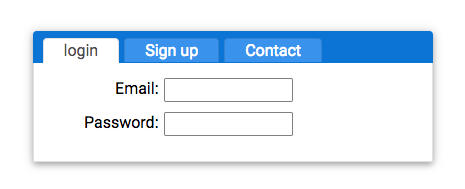
Now, what we want is able to pass in a custom template to replace the default header.
  <ng-template #headerButtons>

    <button>Login</button>

    <button>Sign up</button>

  </ng-template>
This is the new template, we want to replace the default header.
Now we pass this to the component:
  <ng-template #headerButtons>

    <button>Login</button>

    <button>Sign up</button>

  </ng-template>

    <au-tab-panel [headerTemplate]="headerButtons">
Create a 'headerTemplate' Input on the component, and pass in the template ref.
export class AuTabPanelComponent implements OnInit, AfterContentInit {

  @Input()

  headerTemplate: TemplateRef<any>;
Now we need to check whether the custom template passed in or not, if passed in then we use custom template, otherwise the default template.
<ng-template #defaultTabHeader let-tabs="tabsX">

  <ul class="tab-panel-buttons" *ngIf="tabs">

    <li

      [ngClass]="{selected: tab.selected}"

      (click)="selectTab(tab)"

      *ngFor="let tab of tabs;">{{tab.title}}

    </li>

  </ul>

</ng-template>

<ng-content

  *ngTemplateOutlet="headerTemplate ? headerTemplate :defaultTabHeader; context: tabsContext"></ng-content>
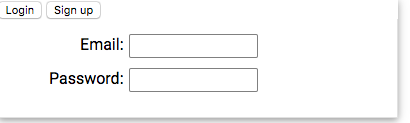
Now we need to export the 'au-tab-panel' component's method to the custom template, to do that we can use template ref:
  <ng-template #headerButtons>

    <button (click)="tabPanel.selectTab(loginTab)">Login</button>

    <button (click)="tabPanel.selectTab(signUpTab)">Sign up</button>

  </ng-template>

    <au-tab-panel #tabPanel [headerTemplate]="headerButtons">

      <au-tab title="login" #loginTab>

        <form>

          <div class="form-field">

            <label>Email:</label><input>

          </div>

          <div class="form-field">

            <label>Password:</label><input>

          </div>

        </form>

      </au-tab>

      <au-tab title="Sign up" #signUpTab>

        <form>

          <div class="form-field">

            <label>Email:</label><input>

          </div>

          <div class="form-field">

            <label>Password:</label><input>

          </div>

          <div class="form-field">

            <label>Confirm Password:</label><input>

          </div>

        </form>

      </au-tab>
[Angular] Change component default template (ng-content, ng-template, ngTemplateOutlet, TemplateRef)的更多相关文章
- [Angular] Test component template
Component: import { Component, Input, ChangeDetectionStrategy, EventEmitter, Output } from '@angular ...
- [Angular 2] Share Template Content In Another Template With Content Projection <ng-content>
Angular 1 provided a mechanism to place content from your template inside of another template called ...
- [Angular 2] Component relative paths
Oingial aritial --> Link Take away: import { Component, OnInit } from '@angular/core'; @Component ...
- Change the default MySQL data directory with SELinux enabled
转载:https://rmohan.com/?p=4605 Change the default MySQL data directory with SELinux enabled This is a ...
- angular 引入 component 报错
每天抽出一些时间学习 Angular2 ,并准备把手头上的项目移植为 Angular2 , 不过今天又遇到了一些小问题. 准备写一个导航类适于管理后台常见的右边导航,如博客园的这种: ! 使用 g g ...
- How to change from default to alternative Python version on Debian Linux
https://linuxconfig.org/how-to-change-from-default-to-alternative-python-version-on-debian-linux You ...
- [vue-router] Failed to resolve async component default: Error: Loading chunk 0 failed.
在整合laravel5.4 和vue2.1的时候遇到一个奇怪的问题 Uncaught SyntaxError: Unexpected token < Error: Loading chunk 0 ...
- Vue-cli3.x在开发环境中(router采用 history模式)出现Failed to resolve async component default: Error: Loading chunk {/d} failed.或者Uncaught SyntaxError: Unexpected token <错误
使用Vue-cli3.x开发环境中(router采用 history模式)出现Failed to resolve async component default: Error: Loading chu ...
- MATLAB/SIMULINK生成代码错误之change the default character encoding setting
SIMULINK点击生成C代码报错 错误提示: Error encountered while executing PostCodeGenCommand for model 'RTW_sc3': Cl ...
随机推荐
- 【UWP通用应用开发】控件、应用栏
控件的属性.事件与样式资源 怎样加入控件 加入控件的方式有多种,大家更喜欢以下哪一种呢? 1)使用诸如Blend for Visual Studio或Microsoft Visual Studio X ...
- Python实现的基于ADB的Android远程工具
本工具为原创,涉及知识: - Python编程 - Tkinter GUI编程 - ADB通信机制 代码已经开源: https://code.csdn.net/codehat/andev/tree/m ...
- 修改android的wifi客户端名称的两种方法
修改android的wifi客户端名称的两种方法 手机连接到无线路由时,在dhcp的客户端列表里面是这样的名称"android-89425253e5de3a2",这就是安卓 ...
- vue-cli(脚手架) 打包上线
http://www.cnblogs.com/xueweijie/p/6971146.html
- 72.挖掘CSDN密码到链表并统计密码出现次数生成密码库
list.h #define _CRT_SECURE_NO_WARNINGS #include <stdio.h> #include <stdlib.h> #include & ...
- 基于Linux系统的Nagios网络管理模块的实现
基于Linux 系统的Nagios网络管理模块的实现 1.引言 随着计算机网络的普及,网络管理已成为信息时代中最重要的问题之一.在现有的技术条件下,人们希望有一个更加稳定可靠的网络环境.计算机网络管理 ...
- Android Okhttp完美同步持久Cookie实现免登录
通过对Retrofit2.0的<Retrofit 2.0 超能实践,完美支持Https传输>基础入门和案例实践,掌握了怎么样使用Retrofit访问网络,加入自定义header,包括加入S ...
- SpringMVC 传递相同名称的参数的最佳方法
华为云4核8G,高性能云服务器,免费试用 >>> SpringMVC 多个对象的相同字段参数传递解决方案,在SpringMVC中,有时需要传递多个对象(除了Model和web元素 ...
- Java开源电商项目比較
这里比較的都是国外的开源项目,备选项目有: Smilehouse Workspace.Pulse.Shopizer.ofbiz.bigfish.broadleaf 1.Smilehouse Works ...
- Moodle 中文 API 之 文件管理API
File API 文件管理 文件夹 1. 概述 2. 文件域 2.1 命名文件域 3. 提供文件给用户 4. 从用户那获取文件 5. 样例 5.1 浏览文件 5.2 移动文件 5.3 文件列表 5. ...