
Scrapy Architecture overview--官方文档
原文地址:https://doc.scrapy.org/en/latest/topics/architecture.html
This document describes the architecture of Scrapy and how its components interact.
Overview
The following diagram shows an overview of the Scrapy architecture with its components and an outline of the data flow that takes place inside the system (shown by the red arrows). A brief description of the components is included below with links for more detailed information about them. The data flow is also described below.
Data flow
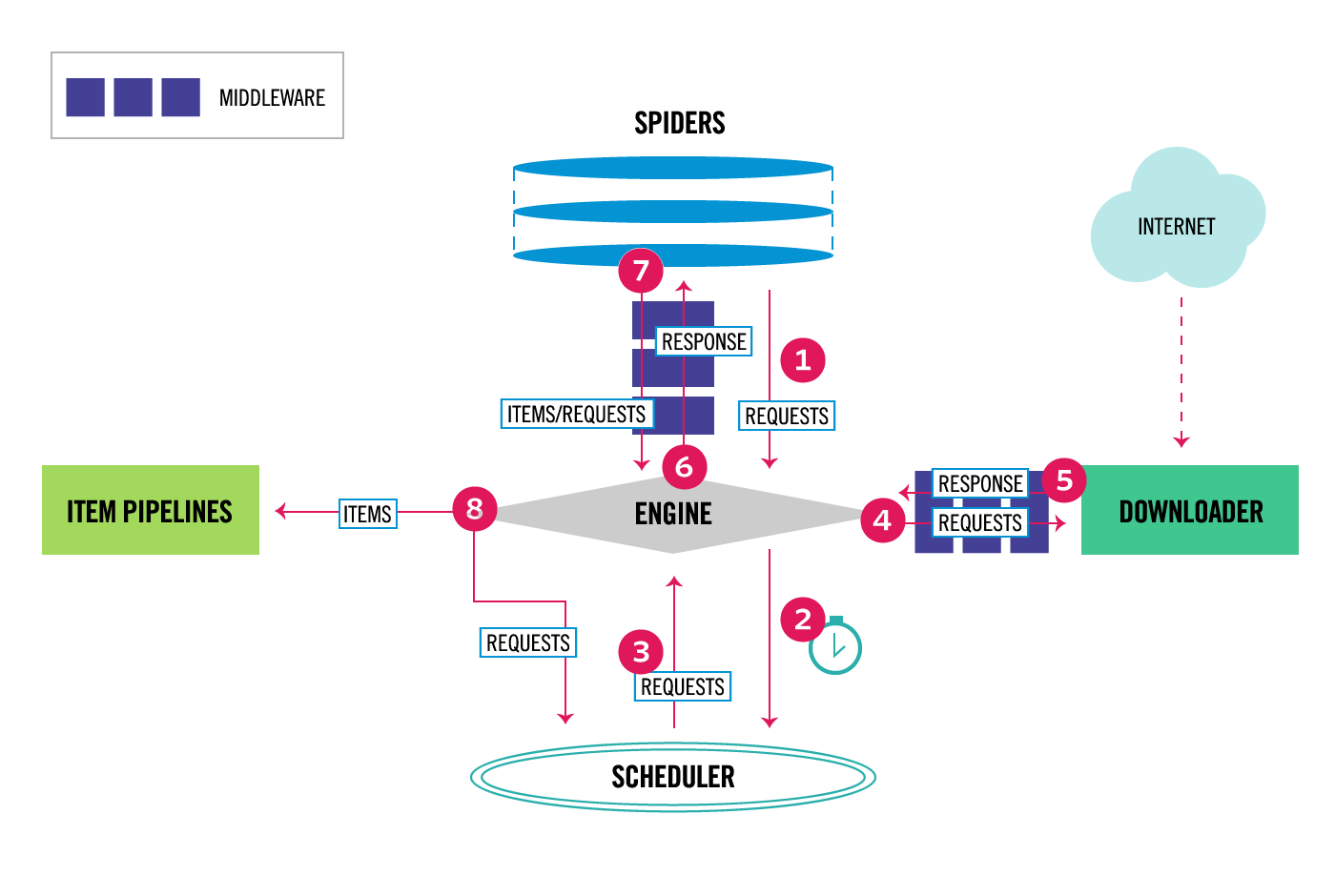
The data flow in Scrapy is controlled by the execution engine, and goes like this:
- The Engine gets the initial Requests to crawl from the Spider.
- The Engine schedules the Requests in the Scheduler and asks for the next Requests to crawl.
- The Scheduler returns the next Requests to the Engine.
- The Engine sends the Requests to the Downloader, passing through the Downloader Middlewares (see
process_request()). - Once the page finishes downloading the Downloader generates a Response (with that page) and sends it to the Engine, passing through the Downloader Middlewares (see
process_response()). - The Engine receives the Response from the Downloader and sends it to the Spider for processing, passing through the Spider Middleware (see
process_spider_input()). - The Spider processes the Response and returns scraped items and new Requests (to follow) to the Engine, passing through the Spider Middleware (see
process_spider_output()). - The Engine sends processed items to Item Pipelines, then send processed Requests to the Scheduler and asks for possible next Requests to crawl.
- The process repeats (from step 1) until there are no more requests from the Scheduler.
Components
Scrapy Engine
The engine is responsible for controlling the data flow between all components of the system, and triggering events when certain actions occur. See the Data Flow section above for more details.
Scheduler
The Scheduler receives requests from the engine and enqueues them for feeding them later (also to the engine) when the engine requests them.
Downloader
The Downloader is responsible for fetching web pages and feeding them to the engine which, in turn, feeds them to the spiders.
Spiders
Spiders are custom classes written by Scrapy users to parse responses and extract items (aka scraped items) from them or additional requests to follow. For more information see Spiders.
Item Pipeline
The Item Pipeline is responsible for processing the items once they have been extracted (or scraped) by the spiders. Typical tasks include cleansing, validation and persistence (like storing the item in a database). For more information see Item Pipeline.
Downloader middlewares
Downloader middlewares are specific hooks that sit between the Engine and the Downloader and process requests when they pass from the Engine to the Downloader, and responses that pass from Downloader to the Engine.
Use a Downloader middleware if you need to do one of the following:
- process a request just before it is sent to the Downloader (i.e. right before Scrapy sends the request to the website);
- change received response before passing it to a spider;
- send a new Request instead of passing received response to a spider;
- pass response to a spider without fetching a web page;
- silently drop some requests.
For more information see Downloader Middleware.
Spider middlewares
Spider middlewares are specific hooks that sit between the Engine and the Spiders and are able to process spider input (responses) and output (items and requests).
Use a Spider middleware if you need to
- post-process output of spider callbacks - change/add/remove requests or items;
- post-process start_requests;
- handle spider exceptions;
- call errback instead of callback for some of the requests based on response content.
For more information see Spider Middleware.
Event-driven networking
Scrapy is written with Twisted, a popular event-driven networking framework for Python. Thus, it’s implemented using a non-blocking (aka asynchronous) code for concurrency.
Scrapy Architecture overview--官方文档的更多相关文章
- hbase官方文档(转)
FROM:http://www.just4e.com/hbase.html Apache HBase™ 参考指南 HBase 官方文档中文版 Copyright © 2012 Apache Soft ...
- HBase官方文档
HBase官方文档 目录 序 1. 入门 1.1. 介绍 1.2. 快速开始 2. Apache HBase (TM)配置 2.1. 基础条件 2.2. HBase 运行模式: 独立和分布式 2.3. ...
- Spark官方文档 - 中文翻译
Spark官方文档 - 中文翻译 Spark版本:1.6.0 转载请注明出处:http://www.cnblogs.com/BYRans/ 1 概述(Overview) 2 引入Spark(Linki ...
- Spring 4 官方文档学习 Spring与Java EE技术的集成
本部分覆盖了以下内容: Chapter 28, Remoting and web services using Spring -- 使用Spring进行远程和web服务 Chapter 29, Ent ...
- Spark SQL 官方文档-中文翻译
Spark SQL 官方文档-中文翻译 Spark版本:Spark 1.5.2 转载请注明出处:http://www.cnblogs.com/BYRans/ 1 概述(Overview) 2 Data ...
- 人工智能系统Google开源的TensorFlow官方文档中文版
人工智能系统Google开源的TensorFlow官方文档中文版 2015年11月9日,Google发布人工智能系统TensorFlow并宣布开源,机器学习作为人工智能的一种类型,可以让软件根据大量的 ...
- Google Android官方文档进程与线程(Processes and Threads)翻译
android的多线程在开发中已经有使用过了,想再系统地学习一下,找到了android的官方文档,介绍进程与线程的介绍,试着翻译一下. 原文地址:http://developer.android.co ...
- OGR 官方文档
OGR 官方文档 http://www.gdal.org/ogr/index.html The OGR Simple Features Library is a C++ open source lib ...
- cassandra 3.x官方文档(5)---探测器
写在前面 cassandra3.x官方文档的非官方翻译.翻译内容水平全依赖本人英文水平和对cassandra的理解.所以强烈建议阅读英文版cassandra 3.x 官方文档.此文档一半是翻译,一半是 ...
- Cuda 9.2 CuDnn7.0 官方文档解读
目录 Cuda 9.2 CuDnn7.0 官方文档解读 准备工作(下载) 显卡驱动重装 CUDA安装 系统要求 处理之前安装的cuda文件 下载的deb安装过程 下载的runfile的安装过程 安装完 ...
随机推荐
- mac 下安装 mariadb
通过brew 安装: brew install mariadb 初始化数据库 cd /usr/local/Cellar/mariadb/10.0.10/scripts mysql_install_db ...
- css3的过滤效果
上面的图片就是css3新特性的滤镜效果,学会了这些那么我们这群爱美爱帅的大web是不是就可以完美的用代码实现照片美化了捏~~ 好,咱们先把照片后面的白框实现, <style> #div1{ ...
- map 解析
Observable.of(1, 2, 3) .map { $0 * $0 } .subscribe(onNext: { print($0) }) .disposed(by: disposeBag) ...
- 如何把数值或者对象添加到ArrayList集合
生成6个1~33之间的随机整数,添加到集合,并遍历 public class ArrayListDemo1 { public static void main(String[] args) { // ...
- Java中的自动转换
特点: 1. 系统自动完成的,不需要程序员手动修改代码 2.将 取值范围小的类型 自动提升为 取值范围大的类型 注意: 整数类型直接写会默认为int 小数类型直接写默认为double 类型的范围大小 ...
- 【转】Oracle 集群】ORACLE DATABASE 11G RAC 知识图文详细教程之ORACLE集群概念和原理(二)
阅读目录 目录 Oracle集群概念和原理 RAC概述 RAC 集成集群件管理 RAC 的体系结构 RAC 的结构组成和机制 RAC 后台进程 RAC 共享存储 RAC 数据库和单实例数据库的区别 ...
- VS Code中编写html(5) 标签的布局设置
1 <!--首先在div中添加四个span标签--> <div> <!--span*4+tab--> <!--span{span$}*4--> < ...
- python与php生成二维码对比
php生成二维码 include 引入的库单独下载 <?php header("Content-type:text/html;charset=utf-8"); error_r ...
- jQuery节点操作方法大全
1.append() 向每个匹配的元素内部追加内容 HTML代码: <p>我想说:</p> jQuery代码: $('p').append('<b>你好</b ...
- 最简单的tomcat安装部署
[安装环境] 适用于所有Linux操作系统,本人使用的是Centos 7.4 [安装] 浏览器登陆到tomcat官网 http://tomcat.apache.org/ 点击左侧需要下载的版本 右键图 ...