
ASP.NET Core集成微信登录
工具:
Visual Studio 2015 update 3
Asp.Net Core 1.0
1 准备工作
申请微信公众平台接口测试帐号,申请网址:(http://mp.weixin.qq.com/debug/cgi-bin/sandbox?t=sandbox/login)。申请接口测试号无需公众帐号,可以直接体验和测试公众平台所有高级接口。
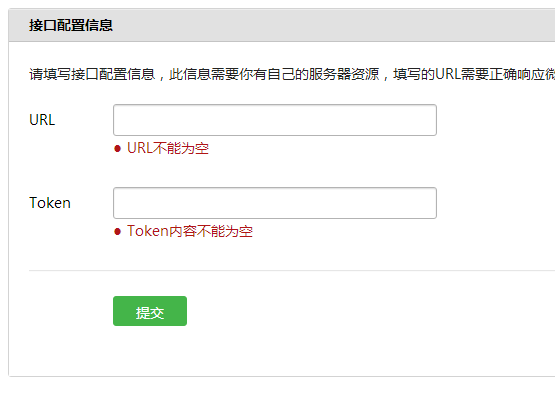
1.1 配置接口信息
1.2 修改网页授权信息
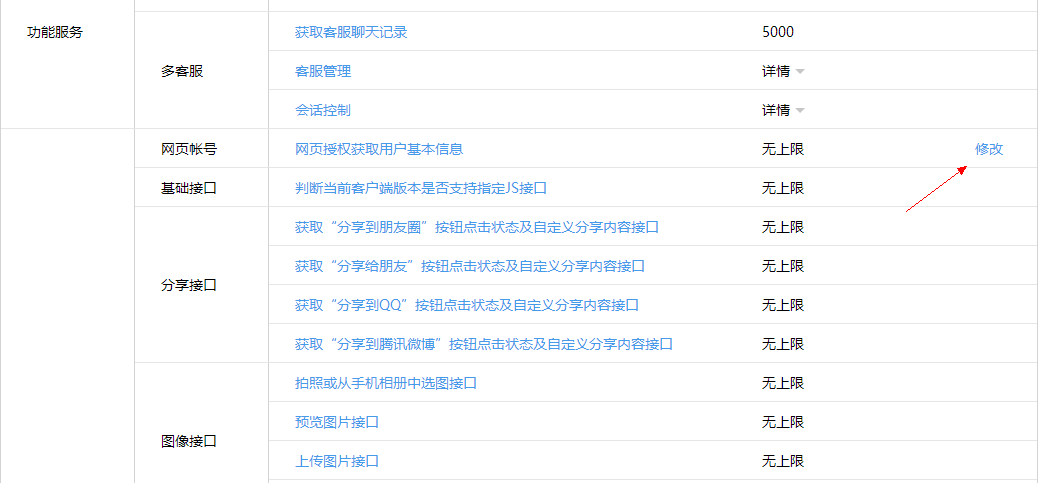
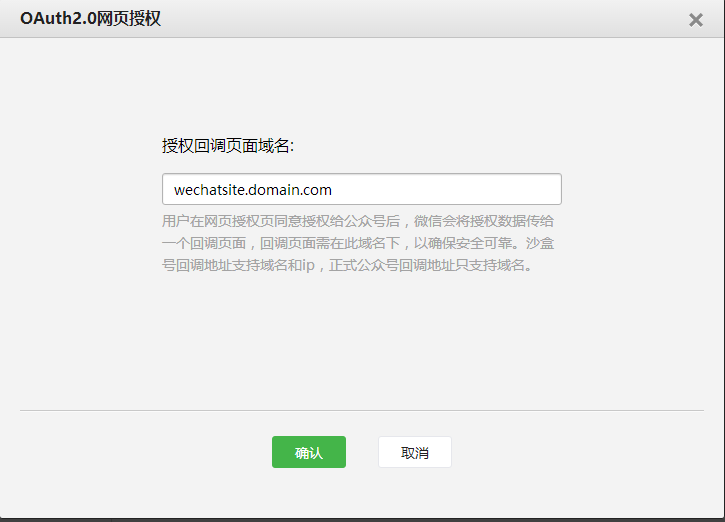
点击“修改”后在弹出页面填入你的网站域名:
2 新建网站项目
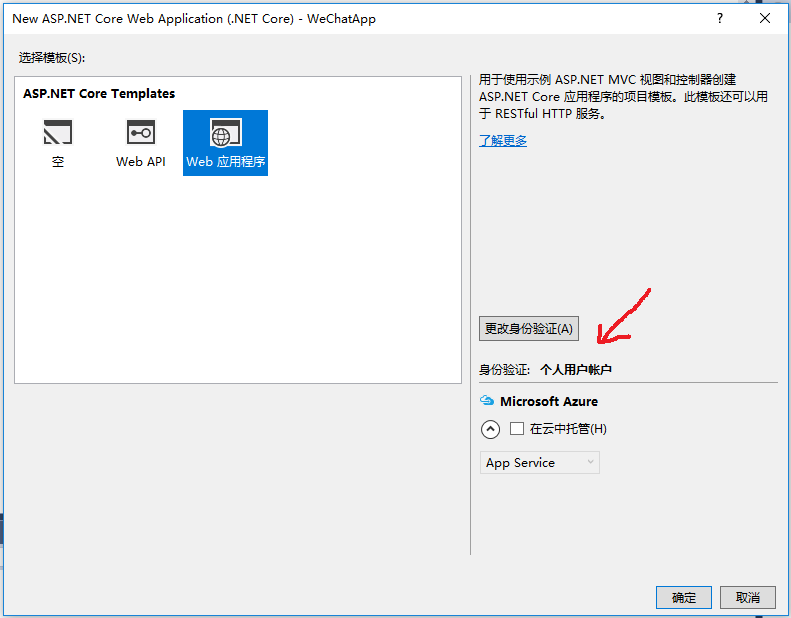
2.1 选择ASP.NET Core Web Application 模板

2.2 选择Web 应用程序,并更改身份验证为个人用户账户
3 集成微信登录功能
3.1添加引用
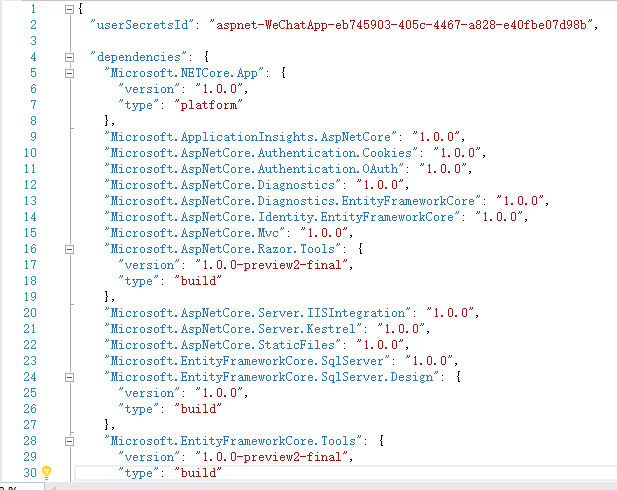
打开project.json文件,添加引用Microsoft.AspNetCore.Authentication.OAuth
3.2 添加代码文件
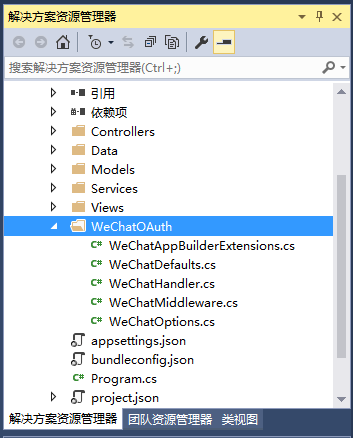
在项目中新建文件夹,命名为WeChatOAuth,并添加代码文件(本文最后附全部代码)。
3.3 注册微信登录中间件
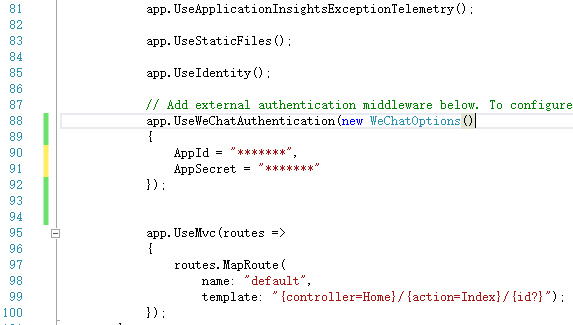
打开Startup.cs文件,在Configure中添加代码:
app.UseWeChatAuthentication(new WeChatOptions()

{

    AppId = "******",

    AppSecret = "******"

});
注意该代码的插入位置必须在app.UseIdentity()下方。
4 代码
 // Copyright (c) .NET Foundation. All rights reserved.

 // Licensed under the Apache License, Version 2.0. See License.txt in the project root for license information.

 using System;

 using Microsoft.AspNetCore.Authentication.WeChat;

 using Microsoft.Extensions.Options;

 namespace Microsoft.AspNetCore.Builder

 {

     /// <summary>

     /// Extension methods to add WeChat authentication capabilities to an HTTP application pipeline.

     /// </summary>

     public static class WeChatAppBuilderExtensions

     {

         /// <summary>

         /// Adds the <see cref="WeChatMiddleware"/> middleware to the specified <see cref="IApplicationBuilder"/>, which enables WeChat authentication capabilities.

         /// </summary>

         /// <param name="app">The <see cref="IApplicationBuilder"/> to add the middleware to.</param>

         /// <returns>A reference to this instance after the operation has completed.</returns>

         public static IApplicationBuilder UseWeChatAuthentication(this IApplicationBuilder app)

         {

             if (app == null)

             {

                 throw new ArgumentNullException(nameof(app));

             }

             return app.UseMiddleware<WeChatMiddleware>();

         }

         /// <summary>

         /// Adds the <see cref="WeChatMiddleware"/> middleware to the specified <see cref="IApplicationBuilder"/>, which enables WeChat authentication capabilities.

         /// </summary>

         /// <param name="app">The <see cref="IApplicationBuilder"/> to add the middleware to.</param>

         /// <param name="options">A <see cref="WeChatOptions"/> that specifies options for the middleware.</param>

         /// <returns>A reference to this instance after the operation has completed.</returns>

         public static IApplicationBuilder UseWeChatAuthentication(this IApplicationBuilder app, WeChatOptions options)

         {

             if (app == null)

             {

                 throw new ArgumentNullException(nameof(app));

             }

             if (options == null)

             {

                 throw new ArgumentNullException(nameof(options));

             }

             return app.UseMiddleware<WeChatMiddleware>(Options.Create(options));

         }

     }

 }
WeChatAppBuilderExtensions.cs
// Copyright (c) .NET Foundation. All rights reserved.

// Licensed under the Apache License, Version 2.0. See License.txt in the project root for license information.

namespace Microsoft.AspNetCore.Authentication.WeChat

{

    public static class WeChatDefaults

    {

        public const string AuthenticationScheme = "WeChat";

        public static readonly string AuthorizationEndpoint = "https://open.weixin.qq.com/connect/oauth2/authorize";

        public static readonly string TokenEndpoint = "https://api.weixin.qq.com/sns/oauth2/access_token";

        public static readonly string UserInformationEndpoint = "https://api.weixin.qq.com/sns/userinfo";

    }

}
WeChatDefaults.cs
// Copyright (c) .NET Foundation. All rights reserved.

// Licensed under the Apache License, Version 2.0. See License.txt in the project root for license information.

using Microsoft.AspNetCore.Authentication.OAuth;

using Microsoft.AspNetCore.Builder;

using Microsoft.AspNetCore.Http.Authentication;

using Microsoft.AspNetCore.Http.Extensions;

using Microsoft.Extensions.Primitives;

using Newtonsoft.Json.Linq;

using System;

using System.Collections.Generic;

using System.Net.Http;

using System.Net.Http.Headers;

using System.Security.Claims;

using System.Text;

using Microsoft.AspNetCore.Mvc;

using System.Threading.Tasks;

namespace Microsoft.AspNetCore.Authentication.WeChat

{

    internal class WeChatHandler : OAuthHandler<WeChatOptions>

    {

        public WeChatHandler(HttpClient httpClient)

            : base(httpClient)

        {

        }

        protected override async Task<AuthenticateResult> HandleRemoteAuthenticateAsync()

        {

            AuthenticationProperties properties = null;

            var query = Request.Query;

            var error = query["error"];

            if (!StringValues.IsNullOrEmpty(error))

            {

                var failureMessage = new StringBuilder();

                failureMessage.Append(error);

                var errorDescription = query["error_description"];

                if (!StringValues.IsNullOrEmpty(errorDescription))

                {

                    failureMessage.Append(";Description=").Append(errorDescription);

                }

                var errorUri = query["error_uri"];

                if (!StringValues.IsNullOrEmpty(errorUri))

                {

                    failureMessage.Append(";Uri=").Append(errorUri);

                }

                return AuthenticateResult.Fail(failureMessage.ToString());

            }

            var code = query["code"];

            var state = query["state"];

            var oauthState = query["oauthstate"];

            properties = Options.StateDataFormat.Unprotect(oauthState);

            if (state != Options.StateAddition || properties == null)

            {

                return AuthenticateResult.Fail("The oauth state was missing or invalid.");

            }

            // OAuth2 10.12 CSRF

            if (!ValidateCorrelationId(properties))

            {

                return AuthenticateResult.Fail("Correlation failed.");

            }

            if (StringValues.IsNullOrEmpty(code))

            {

                return AuthenticateResult.Fail("Code was not found.");

            }

            //获取tokens

            var tokens = await ExchangeCodeAsync(code, BuildRedirectUri(Options.CallbackPath));

            var identity = new ClaimsIdentity(Options.ClaimsIssuer);

            AuthenticationTicket ticket = null;

            if (Options.WeChatScope == Options.InfoScope)

            {

                //获取用户信息

                ticket = await CreateTicketAsync(identity, properties, tokens);

            }

            else

            {

                //不获取信息,只使用openid

                identity.AddClaim(new Claim(ClaimTypes.NameIdentifier, tokens.TokenType, ClaimValueTypes.String, Options.ClaimsIssuer));

                ticket = new AuthenticationTicket(new ClaimsPrincipal(identity), properties, Options.AuthenticationScheme);

            }

            if (ticket != null)

            {

                return AuthenticateResult.Success(ticket);

            }

            else

            {

                return AuthenticateResult.Fail("Failed to retrieve user information from remote server.");

            }

        }

        /// <summary>

        /// OAuth第一步,获取code

        /// </summary>

        /// <param name="properties"></param>

        /// <param name="redirectUri"></param>

        /// <returns></returns>

        protected override string BuildChallengeUrl(AuthenticationProperties properties, string redirectUri)

        {

            //加密OAuth状态

            var oauthstate = Options.StateDataFormat.Protect(properties);

            //

            redirectUri = $"{redirectUri}?{nameof(oauthstate)}={oauthstate}";

            var queryBuilder = new QueryBuilder()

            {

                { "appid", Options.ClientId },

                { "redirect_uri", redirectUri },

                { "response_type", "code" },

                { "scope", Options.WeChatScope },

                { "state",  Options.StateAddition },

            };

            return Options.AuthorizationEndpoint + queryBuilder.ToString();

        }

        /// <summary>

        /// OAuth第二步,获取token

        /// </summary>

        /// <param name="code"></param>

        /// <param name="redirectUri"></param>

        /// <returns></returns>

        protected override  async Task<OAuthTokenResponse> ExchangeCodeAsync(string code, string redirectUri)

        {

            var tokenRequestParameters = new Dictionary<string, string>()

            {

                { "appid", Options.ClientId },

                { "secret", Options.ClientSecret },

                { "code", code },

                { "grant_type", "authorization_code" },

            };

            var requestContent = new FormUrlEncodedContent(tokenRequestParameters);

            var requestMessage = new HttpRequestMessage(HttpMethod.Post, Options.TokenEndpoint);

            requestMessage.Headers.Accept.Add(new MediaTypeWithQualityHeaderValue("application/json"));

            requestMessage.Content = requestContent;

            var response = await Backchannel.SendAsync(requestMessage, Context.RequestAborted);

            if (response.IsSuccessStatusCode)

            {

                var payload = JObject.Parse(await response.Content.ReadAsStringAsync());

                string ErrCode = payload.Value<string>("errcode");

                string ErrMsg = payload.Value<string>("errmsg");

                if (!string.IsNullOrEmpty(ErrCode) | !string.IsNullOrEmpty(ErrMsg))

                {

                    return OAuthTokenResponse.Failed(new Exception($"ErrCode:{ErrCode},ErrMsg:{ErrMsg}"));

                }

                var tokens = OAuthTokenResponse.Success(payload);

                //借用TokenType属性保存openid

                tokens.TokenType = payload.Value<string>("openid");

                return tokens;

            }

            else

            {

                var error = "OAuth token endpoint failure";

                return OAuthTokenResponse.Failed(new Exception(error));

            }

        }

        /// <summary>

        /// OAuth第四步,获取用户信息

        /// </summary>

        /// <param name="identity"></param>

        /// <param name="properties"></param>

        /// <param name="tokens"></param>

        /// <returns></returns>

        protected override async Task<AuthenticationTicket> CreateTicketAsync(ClaimsIdentity identity, AuthenticationProperties properties, OAuthTokenResponse tokens)

        {

            var queryBuilder = new QueryBuilder()

            {

                { "access_token", tokens.AccessToken },

                { "openid",  tokens.TokenType },//在第二步中,openid被存入TokenType属性

                { "lang", "zh_CN" }

            };

            var infoRequest = Options.UserInformationEndpoint + queryBuilder.ToString();

            var response = await Backchannel.GetAsync(infoRequest, Context.RequestAborted);

            if (!response.IsSuccessStatusCode)

            {

                throw new HttpRequestException($"Failed to retrieve WeChat user information ({response.StatusCode}) Please check if the authentication information is correct and the corresponding WeChat Graph API is enabled.");

            }

            var user = JObject.Parse(await response.Content.ReadAsStringAsync());

            var ticket = new AuthenticationTicket(new ClaimsPrincipal(identity), properties, Options.AuthenticationScheme);

            var context = new OAuthCreatingTicketContext(ticket, Context, Options, Backchannel, tokens, user);

            var identifier = user.Value<string>("openid");

            if (!string.IsNullOrEmpty(identifier))

            {

                identity.AddClaim(new Claim(ClaimTypes.NameIdentifier, identifier, ClaimValueTypes.String, Options.ClaimsIssuer));

            }

            var nickname = user.Value<string>("nickname");

            if (!string.IsNullOrEmpty(nickname))

            {

                identity.AddClaim(new Claim(ClaimTypes.Name, nickname, ClaimValueTypes.String, Options.ClaimsIssuer));

            }

            var sex = user.Value<string>("sex");

            if (!string.IsNullOrEmpty(sex))

            {

                identity.AddClaim(new Claim("urn:WeChat:sex", sex, ClaimValueTypes.String, Options.ClaimsIssuer));

            }

            var country = user.Value<string>("country");

            if (!string.IsNullOrEmpty(country))

            {

                identity.AddClaim(new Claim(ClaimTypes.Country, country, ClaimValueTypes.String, Options.ClaimsIssuer));

            }

            var province = user.Value<string>("province");

            if (!string.IsNullOrEmpty(province))

            {

                identity.AddClaim(new Claim(ClaimTypes.StateOrProvince, province, ClaimValueTypes.String, Options.ClaimsIssuer));

            }

            var city = user.Value<string>("city");

            if (!string.IsNullOrEmpty(city))

            {

                identity.AddClaim(new Claim("urn:WeChat:city", city, ClaimValueTypes.String, Options.ClaimsIssuer));

            }

            var headimgurl = user.Value<string>("headimgurl");

            if (!string.IsNullOrEmpty(headimgurl))

            {

                identity.AddClaim(new Claim("urn:WeChat:headimgurl", headimgurl, ClaimValueTypes.String, Options.ClaimsIssuer));

            }

            var unionid = user.Value<string>("unionid");

            if (!string.IsNullOrEmpty(unionid))

            {

                identity.AddClaim(new Claim("urn:WeChat:unionid", unionid, ClaimValueTypes.String, Options.ClaimsIssuer));

            }

            await Options.Events.CreatingTicket(context);

            return context.Ticket;

        }

    }

}
WeChatHandler.cs
// Copyright (c) .NET Foundation. All rights reserved.

// Licensed under the Apache License, Version 2.0. See License.txt in the project root for license information.

using System;

using System.Globalization;

using System.Text.Encodings.Web;

using Microsoft.AspNetCore.Authentication.OAuth;

using Microsoft.AspNetCore.Builder;

using Microsoft.AspNetCore.DataProtection;

using Microsoft.AspNetCore.Http;

using Microsoft.Extensions.Logging;

using Microsoft.Extensions.Options;

namespace Microsoft.AspNetCore.Authentication.WeChat

{

    /// <summary>

    /// An ASP.NET Core middleware for authenticating users using WeChat.

    /// </summary>

    public class WeChatMiddleware : OAuthMiddleware<WeChatOptions>

    {

        /// <summary>

        /// Initializes a new <see cref="WeChatMiddleware"/>.

        /// </summary>

        /// <param name="next">The next middleware in the HTTP pipeline to invoke.</param>

        /// <param name="dataProtectionProvider"></param>

        /// <param name="loggerFactory"></param>

        /// <param name="encoder"></param>

        /// <param name="sharedOptions"></param>

        /// <param name="options">Configuration options for the middleware.</param>

        public WeChatMiddleware(

            RequestDelegate next,

            IDataProtectionProvider dataProtectionProvider,

            ILoggerFactory loggerFactory,

            UrlEncoder encoder,

            IOptions<SharedAuthenticationOptions> sharedOptions,

            IOptions<WeChatOptions> options)

            : base(next, dataProtectionProvider, loggerFactory, encoder, sharedOptions, options)

        {

            if (next == null)

            {

                throw new ArgumentNullException(nameof(next));

            }

            if (dataProtectionProvider == null)

            {

                throw new ArgumentNullException(nameof(dataProtectionProvider));

            }

            if (loggerFactory == null)

            {

                throw new ArgumentNullException(nameof(loggerFactory));

            }

            if (encoder == null)

            {

                throw new ArgumentNullException(nameof(encoder));

            }

            if (sharedOptions == null)

            {

                throw new ArgumentNullException(nameof(sharedOptions));

            }

            if (options == null)

            {

                throw new ArgumentNullException(nameof(options));

            }

            if (string.IsNullOrEmpty(Options.AppId))

            {

                throw new ArgumentException(string.Format(CultureInfo.CurrentCulture, nameof(Options.AppId)));

            }

            if (string.IsNullOrEmpty(Options.AppSecret))

            {

                throw new ArgumentException(string.Format(CultureInfo.CurrentCulture, nameof(Options.AppSecret)));

            }

        }

        /// <summary>

        /// Provides the <see cref="AuthenticationHandler{T}"/> object for processing authentication-related requests.

        /// </summary>

        /// <returns>An <see cref="AuthenticationHandler{T}"/> configured with the <see cref="WeChatOptions"/> supplied to the constructor.</returns>

        protected override AuthenticationHandler<WeChatOptions> CreateHandler()

        {

            return new WeChatHandler(Backchannel);

        }

    }

}
WeChatMiddleware.cs
// Copyright (c) .NET Foundation. All rights reserved.

// Licensed under the Apache License, Version 2.0. See License.txt in the project root for license information.

using System.Collections.Generic;

using Microsoft.AspNetCore.Authentication.WeChat;

using Microsoft.AspNetCore.Http;

using Microsoft.AspNetCore.Identity;

namespace Microsoft.AspNetCore.Builder

{

    /// <summary>

    /// Configuration options for <see cref="WeChatMiddleware"/>.

    /// </summary>

    public class WeChatOptions : OAuthOptions

    {

        /// <summary>

        /// Initializes a new <see cref="WeChatOptions"/>.

        /// </summary>

        public WeChatOptions()

        {

            AuthenticationScheme = WeChatDefaults.AuthenticationScheme;

            DisplayName = AuthenticationScheme;

            CallbackPath = new PathString("/signin-wechat");

            StateAddition = "#wechat_redirect";

            AuthorizationEndpoint = WeChatDefaults.AuthorizationEndpoint;

            TokenEndpoint = WeChatDefaults.TokenEndpoint;

            UserInformationEndpoint = WeChatDefaults.UserInformationEndpoint;

            //SaveTokens = true;

            //BaseScope (不弹出授权页面,直接跳转,只能获取用户openid),

            //InfoScope (弹出授权页面,可通过openid拿到昵称、性别、所在地。并且,即使在未关注的情况下,只要用户授权,也能获取其信息)

            WeChatScope = InfoScope;

        }

        // WeChat uses a non-standard term for this field.

        /// <summary>

        /// Gets or sets the WeChat-assigned appId.

        /// </summary>

        public string AppId

        {

            get { return ClientId; }

            set { ClientId = value; }

        }

        // WeChat uses a non-standard term for this field.

        /// <summary>

        /// Gets or sets the WeChat-assigned app secret.

        /// </summary>

        public string AppSecret

        {

            get { return ClientSecret; }

            set { ClientSecret = value; }

        }

        public string StateAddition { get; set; }

        public string WeChatScope { get; set; }

        public string BaseScope = "snsapi_base";

        public string InfoScope = "snsapi_userinfo";

    }

}
WeChatOptions.cs
ASP.NET Core集成微信登录的更多相关文章
- [转]ASP.NET Core集成微信登录
本文转自:http://www.cnblogs.com/early-moon/p/5819760.html 工具: Visual Studio 2015 update 3 Asp.Net Core 1 ...
- asp.net core集成MongoDB
0.目录 整体架构目录:ASP.NET Core分布式项目实战-目录 一.前言及MongoDB的介绍 最近在整合自己的框架,顺便把MongoDBD的最简单CRUD重构一下作为组件化集成到asp.net ...
- asp.net core集成CAP(分布式事务总线)
一.前言 感谢杨晓东大佬为社区贡献的CAP开源项目,传送门在此:.NET Core 事件总线,分布式事务解决方案:CAP 以及 如何在你的项目中集成 CAP[手把手视频教程],之前也在工作中遇到分布式 ...
- asp.net core 集成JWT(一)
[什么是JWT] JSON Web Token(JWT)是目前最流行的跨域身份验证解决方案. JWT的官网地址:https://jwt.io/ 通俗地来讲,JWT是能代表用户身份的令牌,可以使用JWT ...
- asp.net core 集成JWT(二)token的强制失效,基于策略模式细化api权限
[前言] 上一篇我们介绍了什么是JWT,以及如何在asp.net core api项目中集成JWT权限认证.传送门:https://www.cnblogs.com/7tiny/p/11012035.h ...
- php的laravel框架快速集成微信登录
最终的解决方案是:https://github.com/liuyunzhuge/php_weixin_provider,详细的介绍请往下阅读. 本文面向的是php语言laravel框架的用户,介绍的是 ...
- ABP官方文档翻译 6.2.1 ASP.NET Core集成
ASP.NET Core 介绍 迁移到ASP.NET Core? 启动模板 配置 启动类 模块配置 控制器 应用服务作为控制器 过滤器 授权过滤器 审计Action过滤器 校验过滤器 工作单元Acti ...
- asp.net core 集成 log4net 日志框架
asp.net core 集成 log4net 日志框架 Intro 在 asp.net core 中有些日志我们可能想输出到数据库或文件或elasticsearch等,如果不自己去实现一个 Logg ...
- [Abp 源码分析]十七、ASP.NET Core 集成
0. 简介 整个 Abp 框架最为核心的除了 Abp 库之外,其次就是 Abp.AspNetCore 库了.虽然 Abp 本身是可以用于控制台程序的,不过那样的话 Abp 就基本没什么用,还是需要集合 ...
随机推荐
- CentOS 配置RDP
XRDP服务器 CentOS安装XRDP实现远程桌面访问: 由于安装的是远程桌面,因此需要安装桌面显示服务:# yum install vnc-server 下面开始配置XRDP服务 l 配置环境: ...
- VC6.0 工程转到VS2010一些问题的描述及解决方法
下列为VC6.0 工程转到VS2008一些问题的描述及解决方法 //////////////////////////////////////////////////////////////////// ...
- shell入门-grep过滤-1
正则表达式,就是一个字符串.有一定的规律.我们用指定的字符串匹配一个指定的行.指定的字符串就是正则表达式. 正则表达式有这几个工具:grep egrep sed awk 命令:gerep 说明:过滤出 ...
- tcpdump网络数据抓包
tcpdump,就是:dump the traffic on a network,根据使用者的定义对网络上的数据包进行截获的包分析工具. tcpdump可以将网络中传送的数据包的“头”完全截获下来提供 ...
- 树莓派 Learning 002 装机后的必要操作 --- 03 替换软件源
树莓派 装机后的必要操作 - 替换软件源 我的树莓派型号:Raspberry Pi 2 Model B V1.1 装机系统:NOOBS v1.9.2 树莓派的服务器实在太慢了!会导致你安装一个几M的东 ...
- hadoop-2.3.0-cdh5.1.0伪分布安装(基于centos)
一.环境 操作系统:CentOS 6.5 64位操作系统 注:Hadoop2.0以上采用的是jdk环境是1.7,Linux自带的jdk卸载掉,重新安装 下载地址:http://www.oracle. ...
- 阿里云OSS安装使用问题
最近一政府客户需要将系统部署到政务网(阿里云,不能连接外网),需要挂载OSSFS,通过官网文档,基本可以按流程完成安装,但是安装过程中遇到的几个问题需要了解一下. 服务器级OSS信息 系统:CentO ...
- 内核启动流程3--Busybox的init进程
Busybox是用来制作文件系统的一个工具集,可以用来替换GNU fileutils shellutils等工具集,它为各种小型的或者嵌入式系统提供了比较完全的工具集. 它提供的核心程序中包括了用户空 ...
- 3. 文件上传靶机实战(附靶机跟writeup)
upload-labs 一个帮你总结所有类型的上传漏洞的靶场 文件上传靶机下载地址:https://github.com/c0ny1/upload-labs 运行环境 操作系统:推荐windows ...
- php奇技淫巧之自动装载
知识储备: spl_autoload_register https://www.php.net/manual/zh/function.spl-autoload-register.php 测试目录结构 ...