
ironic baremetal node rescue/unrescue mode
环境ironic-api ironic-conductor,ironicclient均升级为Queens版本
官网说明API版本为1.38才支持rescue/unrescue,所以修改下openrc文件
export OS_PROJECT_DOMAIN_NAME=default

export OS_USER_DOMAIN_NAME=default

export OS_PROJECT_NAME=admin

export OS_USERNAME=admin

export OS_PASSWORD=ADMIN_PASS

export OS_AUTH_URL=http://172.18.211.69:10006/v3

export OS_IDENTITY_API_VERSION=

export OS_IMAGE_API_VERSION=

export IRONIC_API_VERSION=1.38
同时应该当前用的裸机镜像更新属性,加上ramdisk_id和kernel_id
[root@172e18e211e25 ~]# glance image-list

+--------------------------------------+----------------------------+

| ID                                   | Name                       |

+--------------------------------------+----------------------------+

| d65ebb0b-450c-42b4-b820-8acbd4dc61f5 | bm_cents72                 |

| 0c0d1bf2-cf15--b885-3df251c1206c | deploy-kernel-q            |

| 356c2be5--44a5-90fd-4250c829a3dc | deploy-ramdisk-q           |

+--------------------------------------+----------------------------+

[root@172e18e211e25 ~]#glance image-update d65ebb0b-450c-42b4-b820-8acbd4dc61f5 --ramdisk-id=356c2be5--44a5-90fd-4250c829a3dc --kernel-id=0c0d1bf2-cf15--b885-3df251c1206c

+------------------+----------------------------------------------------------------------------------+

| Property         | Value                                                                            |

+------------------+----------------------------------------------------------------------------------+

| checksum         | 0838e4a4cd54b4d9e59e4c60c8531baf                                                 |

| container_format | bare                                                                             |

| created_at       | --07T11::57Z                                                             |

| disk_format      | qcow2                                                                            |

| id               | d65ebb0b-450c-42b4-b820-8acbd4dc61f5                                             |

| img_hv_type      | baremetal                                                                        |

| kernel_id        | 0c0d1bf2-cf15--b885-3df251c1206c                                             |

| locations        | [{"url": "swift+http://GLANCE_USERNAME%3Aswift:STORE_KEY@172.18.211.25:7480/auth |

|                  | /1.0/glance/d65ebb0b-450c-42b4-b820-8acbd4dc61f5", "metadata": {}}]              |

| min_disk         |                                                                                 |

| min_ram          |                                                                                 |

| name             | bm_cents72                                                                       |

| owner            | f216a10d409d4fbb812222691216527d                                                 |

| protected        | False                                                                            |

| ramdisk_id       | 356c2be5--44a5-90fd-4250c829a3dc                                             |

| size             |                                                                        |

| status           | active                                                                           |

| tags             | ["store:swift"]                                                                  |

| updated_at       | --29T01::45Z                                                             |

| virtual_size     | None                                                                             |

| visibility       | public                                                                           |

+------------------+----------------------------------------------------------------------------------+
需要修改下ironic配置文件,增加resuce接口和rescuing_network
[DEFAULT]

default_network_interface = neutron

enabled_vendor_interfaces = ipmitool,no-vendor

enabled_storage_interfaces = cinder,noop

enabled_raid_interfaces = agent,no-raid

enabled_power_interfaces = ipmitool

enabled_network_interfaces = flat,noop,neutron

enabled_management_interfaces = ipmitool

enabled_inspect_interfaces = no-inspect

enabled_deploy_interfaces = iscsi,direct

enabled_console_interfaces = no-console

enabled_rescue_interfaces = agent

enabled_boot_interfaces = pxe

enabled_hardware_types = ipmi

enabled_drivers = pxe_ipmitool,agent_ipmitool,pxe_ipmitool_socat,agent_ipmitool_socat

[neutron]

provisioning_network = 7d614f0e-c778-4781-937e-832ed78d103d

cleaning_network = 7d614f0e-c778-4781-937e-832ed78d103d

rescuing_network = 7d614f0e-c778-4781-937e-832ed78d103d
ironic.conf
更新node的driver_info和driver
ironic node-update b2e71756-750c-47b9-b08a-9ae577d1098a add driver_info/rescue_kernel=0c0d1bf2-cf15-4754-b885-3df251c1206c driver_info/rescue_ramdisk=5bcf0917-429-42eb-b93b-3cdb50a8008e

ironic node-update b2e71756-750c-47b9-b08a-9ae577d1098a replace driver=ipmi
官网releasenotes说明Queens ipa版本支持rescue和unrescue,但是ironicclient 无法调取rescue command,且文档没更新
[root@172e18e211e25 ~]# ironic node-set-provision-state bm172e18e211e24 unrescue

The "ironic" CLI is deprecated and will be removed in the S* release. Please use the "openstack baremetal" CLI instead.

usage: ironic node-set-provision-state [--config-drive <config-drive>]

                                       [--clean-steps <clean-steps>]

                                       [--wait [WAIT_TIMEOUT]]

                                       <node> <provision-state>

ironic node-set-provision-state: error: argument <provision-state>: invalid choice: 'unrescue' (choose from 'deleted', 'provide', 'clean', 'manage', 'active', 'rebuild', 'inspect', 'abort', 'adopt')
试下用API调用
[root@172e18e211e25 tftpboot]# curl -g -i -X PUT http://172.18.211.69:10032/v1/nodes/b2e71756-750c-47b9-b08a-9ae577d1098a/states/provision -H "X-OpenStack-Ironic-API-Version: 1.38" -H "User-Agent: python-ironicclient" -H "Content-Type: application/json" -H "Accept: application/json" -H "X-Auth-Token:gAAAAABbB4EECkI1zAIEb5vSgoa0afZ5ZGi_zboGQn55HVvGXkSV6iJ2LK3IAG3e7ZXBFX4XRMl1HJbQmLkG2j6YhWHx48O4yWh_weagAE2jgqTw-BMskpFELpUeH0JDkjef-IRDwOcgl503Jf1kzW0d9mu6f3DClJ4MQXsAmC_YrMSziasP9sM" -d '{"target": "rescue", "rescue_password": "1234qwer"}'

HTTP/1.1 202 Accepted

Content-Length: 0

X-Openstack-Ironic-Api-Minimum-Version: 1.1

X-Openstack-Ironic-Api-Maximum-Version: 1.38

X-Openstack-Ironic-Api-Version: 1.38

Location: http://172.18.211.69:10032/v1/nodes/b2e71756-750c-47b9-b08a-9ae577d1098a/states

Openstack-Request-Id: req-ee486f13-d97b-4dfd-b394-905e518172c0

Date: Fri, 25 May 2018 03:21:23 GMT
返回202 Accepted,此刻看下裸机状态
[root@172e18e211e25 tftpboot]# ironic node-list

The "ironic" CLI is deprecated and will be removed in the S* release. Please use the "openstack baremetal" CLI instead.

+--------------------------------------+-----------------+--------------------------------------+-------------+--------------------+-------------+

| UUID                                 | Name            | Instance UUID                        | Power State | Provisioning State | Maintenance |

+--------------------------------------+-----------------+--------------------------------------+-------------+--------------------+-------------+

| b2e71756-750c-47b9-b08a-9ae577d1098a | bm172e18e211e24 | 876336b7-e7ae-4869-a242-8f9063947dfd | power off   | rescuing           | False       |

+--------------------------------------+-----------------+--------------------------------------+-------------+--------------------+-------------+

[root@172e18e211e25 tftpboot]# ironic node-list

The "ironic" CLI is deprecated and will be removed in the S* release. Please use the "openstack baremetal" CLI instead.

+--------------------------------------+-----------------+--------------------------------------+-------------+--------------------+-------------+

| UUID                                 | Name            | Instance UUID                        | Power State | Provisioning State | Maintenance |

+--------------------------------------+-----------------+--------------------------------------+-------------+--------------------+-------------+

| b2e71756-750c-47b9-b08a-9ae577d1098a | bm172e18e211e24 | 876336b7-e7ae-4869-a242-8f9063947dfd | power on   | rescue           | False       |

+--------------------------------------+-----------------+--------------------------------------+-------------+--------------------+-------------+
说明已进入到救援模式,此刻登陆下IMPI console看下裸机状态
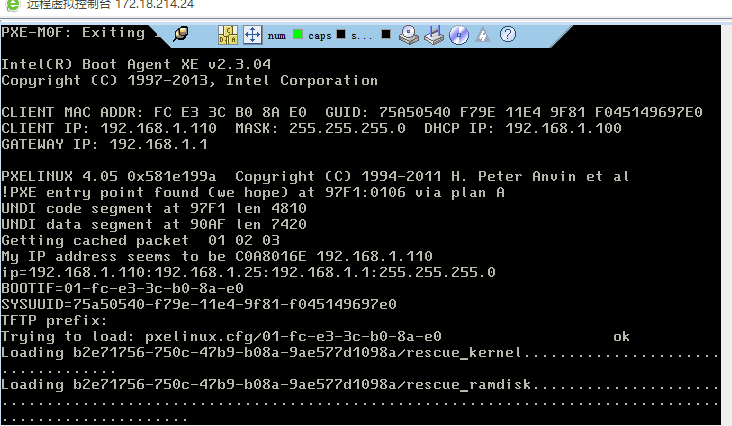
正在加载救援镜像
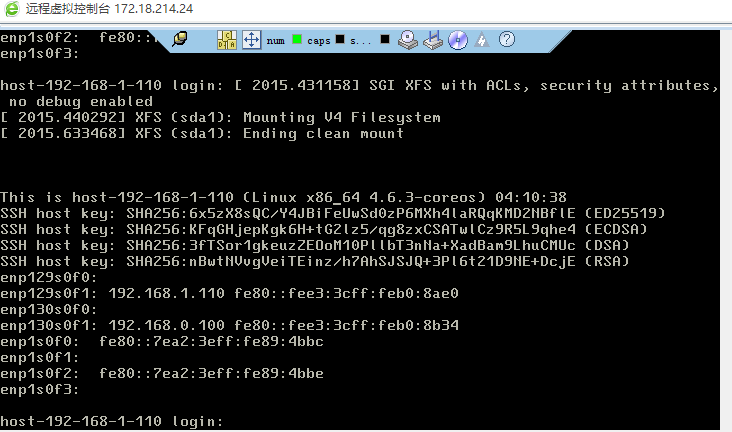
加载完成,进入到deploy ramdisk
ironic节点ssh登入系统,lsblk可查看到原系统磁盘,挂载后可chroot进入系统,进行一些修复操作等
[root@172e18e211e25 ironic]# ssh core@192.168.0.100

CoreOS stable (1068.10.0)

Last login: Fri May 25 04:20:52 2018 from 192.168.0.25

Update Strategy: No Reboots

Failed Units: 1

  update-engine-stub.timer

core@host-192-168-1-110 ~ $ sudo su - root

Update Strategy: No Reboots

Failed Units: 1

  update-engine-stub.timer

host-192-168-1-110 ~ #lsblk

NAME   MAJ:MIN RM   SIZE RO TYPE MOUNTPOINT

sda      8:0    0 465.8G  0 disk

`-sda1   8:1    0 465.8G  0 disk

sdb      8:16   0 465.8G  0 disk

sdc      8:32   0 465.8G  0 disk

sdd      8:48   0 465.8G  0 disk

sde      8:64   0 465.8G  0 disk

sdf      8:80   0 465.8G  0 disk

sdg      8:96   0 465.8G  0 disk

sdh      8:112  0 465.8G  0 disk

sdi      8:128  0 465.8G  0 disk

sdj      8:144  0 465.8G  0 disk

sdk      8:160  0 465.8G  0 disk

sdl      8:176  0 465.8G  0 disk

sdm      8:192  0 465.8G  0 disk

sdn      8:208  0 465.8G  0 disk

sdo      8:224  0 465.8G  0 disk

sdp      8:240  0 465.8G  0 disk

sdq     65:0    0 465.8G  0 disk

sdr     65:16   0 465.8G  0 disk

sds     65:32   0 465.8G  0 disk

sdt     65:48   0 465.8G  0 disk

sdu     65:64   0 465.8G  0 disk

sdv     65:80   0 465.8G  0 disk

sdw     65:96   0 465.8G  0 disk

sdx     65:112  0 465.8G  0 disk

sdy     65:128  0 465.8G  0 disk

sdz     65:144  0 465.8G  0 disk

loop0    7:0    0 225.8M  0 loop /usr

host-192-168-1-110 ~ # mount /dev/sda1 /mnt

host-192-168-1-110 ~ # chroot /mnt

[root@host-192-168-1-110 /]# ls

bin  boot  dev  etc  home  lib  lib64  media  mnt  opt  proc  root  run  sbin  srv  sys  tmp  usr  var

[root@host-192-168-1-110 /]#cat /etc/redhat-release

CentOS Linux release 7.2.1511 (Core)
且按照ipa代码rescue.py来看,ipa会将传入的rescue_password加密写入到/etc/ipa-rescue-config/ipa-rescue-password文件,并关闭API接口
host-192-168-1-110 ~ # cat /etc/ipa-rescue-config/ipa-rescue-password

EtaadfdlDFO7k
同时ipa会运行finalize_rescue.sh脚本,路径在/usr/share/oem/下
#!/bin/bash

create_rescue_user() {

    echo "Adding rescue user with root privileges..."

    crypted_pass=$(</etc/ipa-rescue-config/ipa-rescue-password)

    sudo useradd -m rescue -G sudo -p $crypted_pass

    sudo echo "rescue ALL=(ALL) NOPASSWD: ALL" > /etc/sudoers.d/rescue

}

setup_dhcp_network() {

    DHCP_CONFIG_TEMPLATE=/usr/share/oem/rescue-dhcp-config.network

    echo "Configuring DHCP networks on all interfaces..."

    echo "Removing all existing network configuration..."

    sudo rm /etc/systemd/network/*

    echo "Configuring all interfaces except loopback to DHCP..."

    for interface in $(ls /sys/class/net) ; do

        if [ $interface != "lo" ]; then

            sudo sed "s/RESCUE_NETWORK_INTERFACE/$interface/" $DHCP_CONFIG_TEMPLATE > /etc/systemd/network/50-$interface.network || true

        fi

    done

    sudo systemctl restart systemd-networkd

}

echo "Attempting to start rescue mode configuration..."

if [ -f /etc/ipa-rescue-config/ipa-rescue-password ]; then

    # NOTE(mariojv) An exit code of 0 is always forced here to avoid making IPA

    # restart after something fails. IPA should not restart when this script

    # executes to avoid exposing its API to a tenant network.

    create_rescue_user || exit 0

    setup_dhcp_network || exit 0

    # TODO(mariojv) Add support for configdrive and static networks

else

    echo "One or more of the files needed for rescue mode does not exist, not rescuing."

fi
finalize_rescue.sh
假设修复完文件系统后,需要恢复裸机状态,可以使用unrescue命令,此刻不需要rescue_password
[root@172e18e211e25 ~]# curl -g -i -X PUT http://172.18.211.69:10032/v1/nodes/b2e71756-750c-47b9-b08a-9ae577d1098a/states/provision -H "X-OpenStack-Ironic-API-Version: 1.38" -H "User-Agent: python-ironicclient" -H "Content-Type: application/json" -H "Accept: application/json" -H "X-Auth-Token:gAAAAABbB5IuLr8QrcszUNXewLSDHRRpK6VAz7JhWVK70_lv6THWoZtJAtHctsZvLJQIKIzvJnOPbqhTppD_w7AS-U5NEM5neT-Y0QJEI7Rg8K8aMaoGzOQKed5lC4trxx8E_124-FKafceqxHge8oG8i__gzyaipyYC7fSfbMgMg9-bTBt0XJE" -d '{"target": "unrescue"}'

HTTP/1.1 202 Accepted

Content-Length: 0

X-Openstack-Ironic-Api-Minimum-Version: 1.1

X-Openstack-Ironic-Api-Maximum-Version: 1.38

X-Openstack-Ironic-Api-Version: 1.38

Location: http://172.18.211.69:10032/v1/nodes/b2e71756-750c-47b9-b08a-9ae577d1098a/states

Openstack-Request-Id: req-8dbfb5c3-2440-4405-881a-5eef6841014e

Date: Fri, 25 May 2018 04:34:40 GMT
此时查看裸机状态,已恢复至active状态
[root@172e18e211e25 tftpboot]# ironic node-list

+--------------------------------------+-----------------+--------------------------------------+-------------+--------------------+-------------+

| UUID                                 | Name            | Instance UUID                        | Power State | Provisioning State | Maintenance |

+--------------------------------------+-----------------+--------------------------------------+-------------+--------------------+-------------+

| b2e71756-750c-47b9-b08a-9ae577d1098a | bm172e18e211e24 | 876336b7-e7ae-4869-a242-8f9063947dfd | power on    | unrescuing         | False       |

+--------------------------------------+-----------------+--------------------------------------+-------------+--------------------+-------------+

 [root@172e18e211e25 tftpboot]# ironic node-list

+--------------------------------------+-----------------+--------------------------------------+-------------+--------------------+-------------+

| UUID                                 | Name            | Instance UUID                        | Power State | Provisioning State | Maintenance |

+--------------------------------------+-----------------+--------------------------------------+-------------+--------------------+-------------+

| b2e71756-750c-47b9-b08a-9ae577d1098a | bm172e18e211e24 | 876336b7-e7ae-4869-a242-8f9063947dfd | power on    | active             | False       |

+--------------------------------------+-----------------+--------------------------------------+-------------+--------------------+-------------+
ironic baremetal node rescue/unrescue mode的更多相关文章
- ironic baremetal node status
参考: https://docs.openstack.org/ironic/latest/contributor/states.html https://docs.openstack.org/iron ...
- Node rescue/unrescue相关代码流程图
- ironic baremetal rescue process
1.用户调用Nova的rescue函数 nova/virt/ironic/driver.py class IronicDriver(virt_driver.ComputeDriver): ...... ...
- ironic rescue standard rescue and unrescue process
翻译官网救援/取消救援标准流程 1.用户在节点上调用Nova rescue 2.Nova ComputeManager调用virt驱动程序的rescue()方法,传入rescue_password作为 ...
- Ironic , Openstack Baremetal Hypervisor
Ironic , Openstack Baremetal Hypervisor,首发于UnitedStack Inc.. 转自: http://ju.outofmemory.cn/entry/4876 ...
- 注册 Ironic 裸金属节点并部署裸金属实例
目录 文章目录 目录 前文列表 注册(Enrollment)裸机 创建裸金属实例的 Flavor 部署裸金属实例 日志分析 问题:Failed to create neutron ports for ...
- 理解裸机部署过程ironic
部署物理机跟部署虚拟机的概念在nova来看是一样,都是nova通过创建虚拟机的方式来触发,只是底层nova-scheduler和nova-compute的驱动不一样.虚拟机的底层驱动采用的libvir ...
- ironic的自动化脚本
# -*- coding:utf-8 -*- import json import subprocess import os import time import random trunk_start ...
- ironic+nova详解
ironic+nova详解 说明: Openstack 的安装步骤省略,按照社区的文档即可搭建出一套相对稳定的使用环境.本文档基于Newton版本. 假设现在已经有一套可用的Newton环境, 以下的 ...
随机推荐
- 转:postMan 使用教程
转:https://www.cnblogs.com/alanjl/p/5490922.html 自从开始做API开发之后,我就在寻找合适的API测试工具.一开始不是很想用Chrome扩展,用的 Wiz ...
- 2017.11.20 基于JSP+Servlet+JavaBean实现复数运算(一)
(7)在Servlet中使用JavaBean Servlet和JavaBean都是类,在Servlet中使用JavaBean有两种方式: 1.在一个Servlet中单独使用JavaBean 一般完成的 ...
- 20145238-荆玉茗 《Java程序设计》第7周学习总结
20145238 <Java程序设计>第7周学习总结 教材学习内容总结 第13章时间与日期 13.1.1 ·即使标注为GMT(格林威治时间),实际上谈到的的是UTC(Unix时间)时间. ...
- Unable to launch the Java Virtual Machine
看看国内的回答,http://zhidao.baidu.com/question/119993351.html 再看看国外的,http://www.mkyong.com/oracle/oracle-s ...
- R 语言学习日志 1
1. CSV文件的的读取与写出 2. 数据集筛选 3. 简单随机抽样 sample函数 正文: 1. CSV文件的的读取与写出 文件读取: df2 <- read.table(" ...
- Python 初始—(多级字典)
字典中 嵌套字典 如同json 对象, data={ "msg":{ “xxx.com”:["a","b"] } } data.values ...
- lvs+ipvsadm负载均衡
使用LVS实现负载均衡原理及安装配置详解 负载均衡集群是 load balance 集群的简写,翻译成中文就是负载均衡集群.常用的负载均衡开源软件有nginx.lvs.haproxy,商业的硬件负载均 ...
- tcl之string操作-length/index/range/replace
- 微信小程序推广方案
拥有小程序只是基础,能玩转小程序运营才是关键.本文将会简单讲述十种最实用的小程序推广策略,结合具体案例阐述商家企业如何在拥有小程序后玩转小程序,快速实现小程序的推广. 一. 公众号+小程序 小程序可以 ...
- 编辑工具_vi
vi/vim平时经常会用到,但是一直没有时间系统的整理下,今天看到了一篇不错的介绍文章.引用下,就当做笔记了,但是不晓得该怎么填引用路径,如有侵权请告知,补上引用路径 01. vi 简介 1.1 学习 ...