
如何快速搜索SQL数据库数据和对象
Frequently, developers and DBAs need to search databases for objects or data. If you’d ever searched for a database function that contains a specific table column or a variable name, or for a table that contains specific data, you would have found out that there’s no one click solution, such as Ctrl+F
As there is no out-of-the-box solution in SQL Server management Studio, nor Visual Studio, here are a couple of options you can use:
Searching for data in tables and views
Using SQL to search for specific data in all tables and all columns of a database is far from an optimal solution. There are various SQL scripts with different approaches that can be used to obtain this information, what they have in common is that they all use cursors and system objects.
DECLARE

   @SearchText varchar(200),

   @Table varchar(100),

   @TableID int,

   @ColumnName varchar(100),

   @String varchar(1000);

--modify the variable, specify the text to search for SET @SearchText = 'John';

DECLARE CursorSearch CURSOR

    FOR SELECT name, object_id

        FROM sys.objects

      WHERE type = 'U';

--list of tables in the current database. Type = 'U' = tables(user-defined) OPEN CursorSearch;

FETCH NEXT FROM CursorSearch INTO @Table, @TableID;

WHILE

       @@FETCH_STATUS

       =

       0

    BEGIN

        DECLARE CursorColumns CURSOR

            FOR SELECT name

                  FROM sys.columns

                WHERE

                       object_id

                       =

                       @TableID AND system_type_id IN(167, 175, 231, 239);

        -- the columns that can contain textual data

--167 = varchar; 175 = char; 231 = nvarchar; 239 = nchar

OPEN CursorColumns;

        FETCH NEXT FROM CursorColumns INTO @ColumnName;

        WHILE

               @@FETCH_STATUS

               =

               0

            BEGIN

                SET @String = 'IF EXISTS (SELECT * FROM '

                            + @Table

                            + ' WHERE '

                            + @ColumnName

                            + ' LIKE ''%'

                            + @SearchText

                            + '%'') PRINT '''

                            + @Table

                            + ', '

                            + @ColumnName

                            + '''';

                EXECUTE (@String);

                FETCH NEXT FROM CursorColumns INTO @ColumnName;

            END;

        CLOSE CursorColumns;

        DEALLOCATE CursorColumns;

        FETCH NEXT FROM CursorSearch INTO @Table, @TableID;

    END;

CLOSE CursorSearch;

DEALLOCATE CursorSearch;
The drawbacks of this solution are: use of cursors, which are generally inefficient, high complexity, a lot of time needed for execution, even on small databases. Another disadvantage is that it can be used to search for text data only. To search for other data types, such as time and datetime, you must write new code
Searching for objects.
Searching for a database object name or object definition is a bit easier than searching for specific text. There are several methods you can use. However, all of these methods include querying system objects.
The following SQL examples search for the specified text – the @StartProductID variable – in stored procedures. When searching for objects in other database object types – functions, triggers, columns, etc., or in multiple database object types at the same time, the SQL shown above should be modified accordingly
INFORMATION_SCHEMA.ROUTINES
Use SQL that queries the INFORMATION_SCHEMA.ROUTINES view to search for a specific parameter in all procedures. The INFORMATION_SCHEMA.ROUTINES view contains information about all stored procedures and functions in a database. The ROUTINE_DEFINITION column contains the source statements that created the function or stored procedure.
SELECT ROUTINE_NAME, ROUTINE_DEFINITION

    FROM INFORMATION_SCHEMA.ROUTINES

    WHERE ROUTINE_DEFINITION LIKE '%@StartproductID%'

    AND ROUTINE_TYPE='PROCEDURE'
And the result is

It is not recommended to use INFORMATION_SCHEMA views to search for object schemas stored in the ROUTINE_SCHEMA column. Use the sys.objects catalog view instead
sys.syscomments view
Query the sys.syscomments view, which contains information about every stored procedure, view, rule, default, trigger, and CHECK and DEFAULT constraints in a database. The query checks for a specific text in the text column, which contains the object DDL
SELECT OBJECT_NAME( id )

  FROM SYSCOMMENTS

  WHERE text LIKE '%@StartProductID%' AND OBJECTPROPERTY(id , 'IsProcedure') = 1

  GROUP BY OBJECT_NAME( id );
The result is
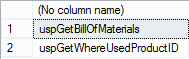
This method is not recommended because the sys.syscomments table will be removed in the future versions of SQL Server.
sys.sql_modules view
Query the sys.sql_modules view which contains the name, type and definition of every module in a database.
SELECT OBJECT_NAME( object_id )

  FROM sys.sql_modules

WHERE

       OBJECTPROPERTY(object_id , 'IsProcedure')

       =

       1 AND definition LIKE '%@StartProductID%';
The results are the same as for the previous method.
Other sys schemaviews
Query sys.syscomments, sys.schemas and sys.objects views. The sys.schemas view contains a row for every database schema. The sys.objects view contains a row every user-defined, schema-scoped object in a database. Note that it doesn’t contain the triggers information, so you have to use the sys.triggers view to search for object names or object definitions in triggers.
DECLARE

 @searchString nvarchar( 50 );

SET@searchString = '@StartProductID';

SELECT DISTINCT

    s.name AS Schema_Name , O.name AS Object_Name , C.text AS Object_Definition

FROM

     syscomments C INNER JOIN sys.objects O

                     ON

     C.id

     =

     O.object_id

                   INNER JOIN sys.schemas S

                   ON

     O.schema_id

     =

     S.schema_id

WHERE

    C.text LIKE

     '%'

   + @searchString

   + '%'

 OR O.name LIKE

     '%'

   + @searchString

   + '%'

ORDER BY

       Schema_name , Object_name;
The returned results are:

The main disadvantage of these methods is that for every change in object types searched, you need to change SQL. To be able to do that, you have to be familiar with the system object structure so you can modify them. Searching in multiple object types, and adding additional search criteria, such as including/excluding object names and bodies, or defining the escape character, brings even more complexity to SQL, which is prone to mistakes without proper and time-consuming testing.
If you’re not an experienced developer, you prefer a tested and error-free solution to searching SQL objects and data manually, and you’re not familiar with system objects that hold DDL information about database objects, use ApexSQL Search.
ApexSQL Search is a SQL search add-in for SSMS and Visual Studio. It can search for text within database objects (including object names), data stored in tables and views (even encrypted ones), and repeat previous searches in a single click.
To search for data in tables and views:
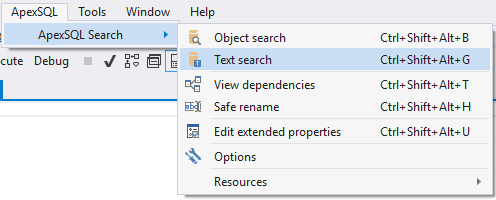
- In SQL Server Management Studio or Visual Studio’s Main menu, click ApexSQL Search
Select the Text search option:
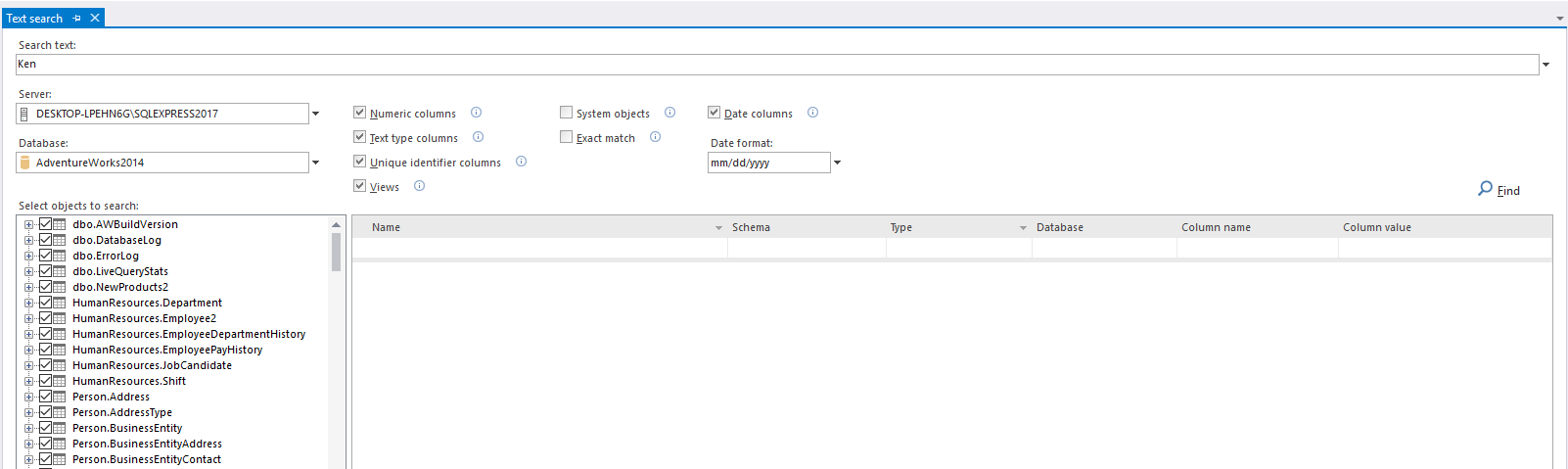
- In the Search text field, enter the data value you want to search for
- From the Database drop-down menu, select the database to search in
- In the Select objects to search tree, select the tables and views to search in, or leave them all checked
- Select whether to search in views, numeric, text type, uniqueidentifier and date columns, by selecting the corresponding check boxes, and whether to search for an exact match. If searching in date columns, specify the date format:
Click the Find option. The grid will be populated with the database tables and views that contain the entered value:
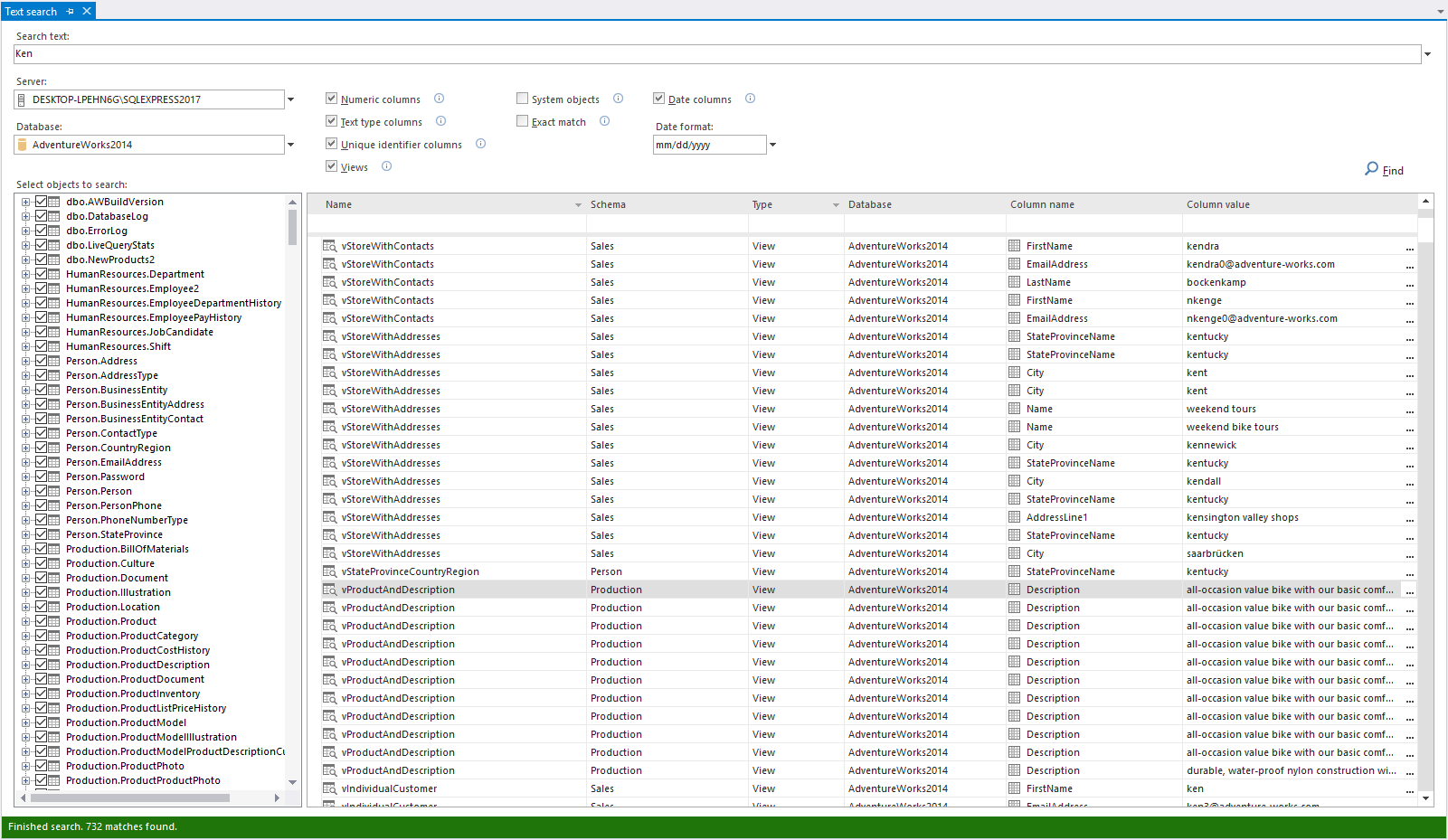
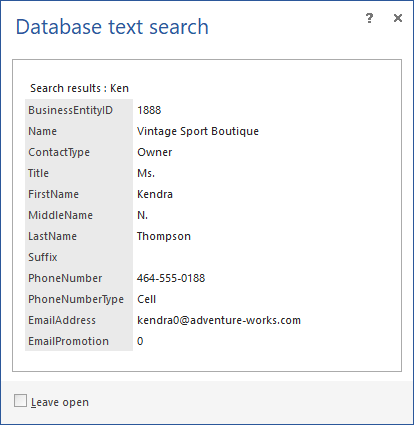
- Click the ellipsis button in the Column value to see the found object details:
To search for objects:
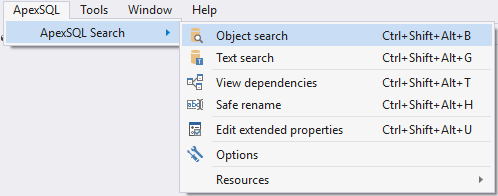
- In SQL Server Management Studio or Visual Studio’s Main menu,from the ApexSQL menu, click ApexSQL Search.
Select the Object search option:
- In the Search text field, enter the text you want to search for (e.g. a variable name)
- From the Database drop-down menu, select the database to search in
- In the Objects drop-down list, select the object types to search in, or leave them all checked
- Select whether to search in object, column, index names, object bodies, system objects, by selecting the corresponding check boxes, whether to search for an exact match and which escape character to use
- Click the Find option:
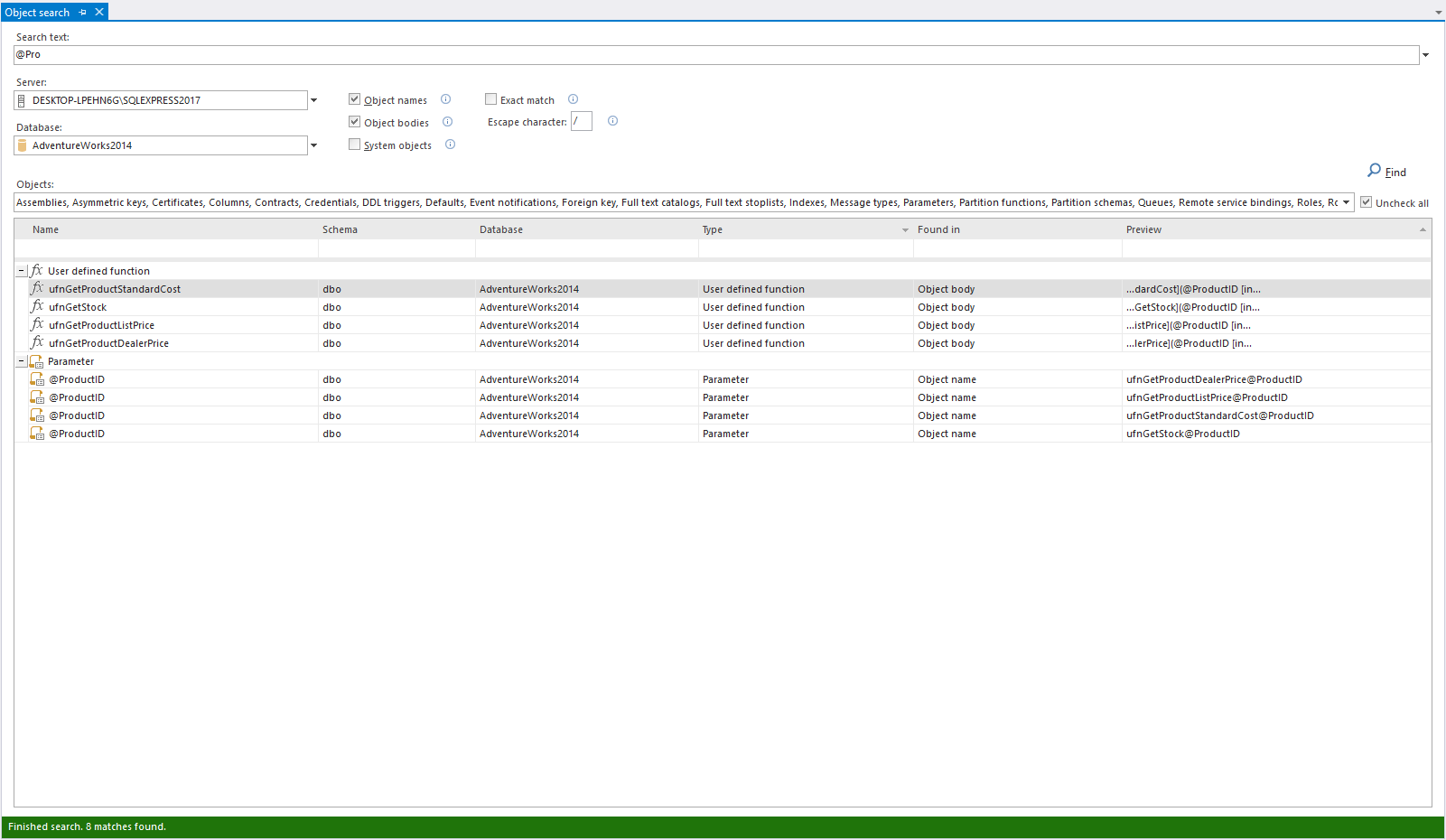
The grid will be populated with the database objects that contain the specified object.
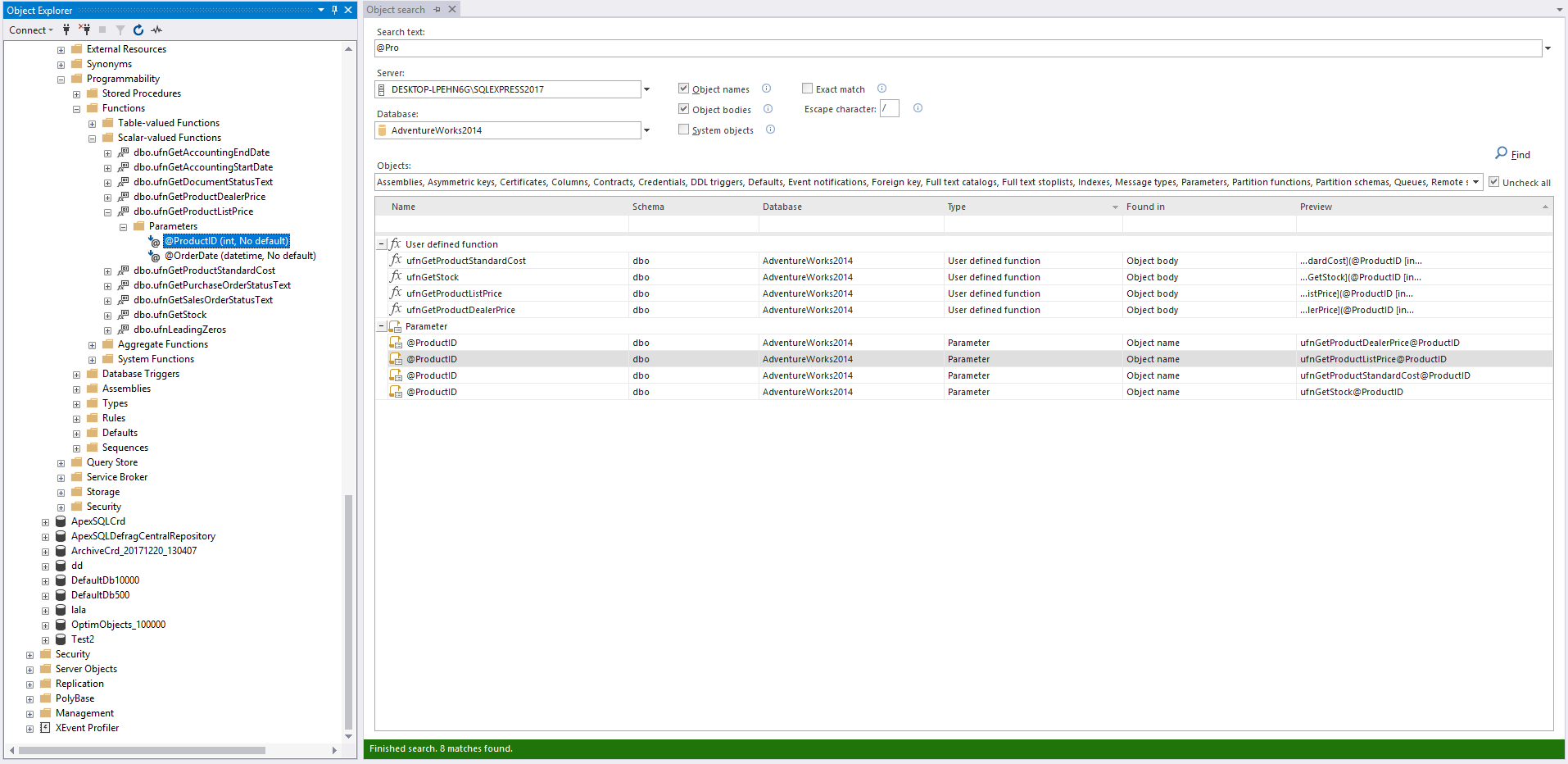
- Double click the object in the Object search grid, and it will be highlighted in the Object Explorer:
SQL Server Management Studio and Visual Studio don’t provide search options for a database object name, object definition and data. SQL queries that search for these are complex, slow and require knowledge of SQL Server system objects. Use ApexSQL Search to dig through your databases and find data and objects you need.
如何快速搜索SQL数据库数据和对象的更多相关文章
- SQL数据库--数据访问
数据访问: 对应命名空间:System.Data.SqlClient; SqlConnection:连接对象 SqlCommand:命令对象 SqlDataReader:读取器对象 //造连接字符串 ...
- MongoDB怎么快速的删除数据库数据?
我的mongodb里有10+数据库.现在需要重置这个环境,得到干净的没有数据的MongoDB.怎么快速安全的删除这些数据库数据呢? 记得首先备份你的数据库mongodump -o bakfolder ...
- sql 数据库数据 批量判断修改
A表B表相关联 更新B表中的VisitWeek字段值 CCD_PartnerVisit 此为B表 Dell_FiscalWeek 此为A表 UPDATE CCD_PartnerVisit SET ...
- C#学习笔记---C#操作SQL数据库
C#操作SQL数据库 Connection(连接)对象 连接字符串: 形式1.”server=;uid=;pwd=;database=” 形式2.”server=;Intergrated Securi ...
- 使用pentaho工具将数据库数据导入导出为Excel
写在前面:本篇博客讲述的是如何使用pentaho工具快速的将数据库数据导出为Excel文件,以及如何将Excel文件数据导入数据库. 补充:使用此工具并不需要任何一句代码并能快速便捷解决实际问题,此工 ...
- 【阿里云产品公测】大数据下精确快速搜索OpenSearch
[阿里云产品公测]大数据下精确快速搜索OpenSearch 作者:阿里云用户小柒2012 相信做过一两个项目的人都会遇到上级要求做一个类似百度或者谷歌的站内搜索功能.传统的sql查询只能使用like ...
- C# 动态创建SQL数据库(二) 在.net core web项目中生成二维码 后台Post/Get 请求接口 方式 WebForm 页面ajax 请求后台页面 方法 实现输入框小数多 自动进位展示,编辑时实际值不变 快速掌握Gif动态图实现代码 C#处理和对接HTTP接口请求
C# 动态创建SQL数据库(二) 使用Entity Framework 创建数据库与表 前面文章有说到使用SQL语句动态创建数据库与数据表,这次直接使用Entriy Framwork 的ORM对象关 ...
- SSM(SpringMVC+Spring+MyBatis)三大框架使用Maven快速搭建整合(实现数据库数据到页面进行展示)
本文介绍使用SpringMVC+Spring+MyBatis三大框架使用Maven快速搭建一个demo,实现数据从数据库中查询返回到页面进行展示的过程. 技术选型:SpringMVC+Spring+M ...
- B-树和B+树的应用:数据搜索和数据库索引
B-树和B+树的应用:数据搜索和数据库索引 B-树 1 .B-树定义 B-树是一种平衡的多路查找树,它在文件系统中很有用. 定义:一棵m 阶的B-树,或者为空树,或为满足下列特性的m 叉树:⑴树中每 ...
随机推荐
- django QuerySet 的常用API
为了加深对queryset对象api的了解,我们建立了以下示例模型: from django.db import models class Author(models.Model): "&q ...
- SVN基本介绍
SVN是一种项目合作开发的软件,参与项目的人员可以在不同的地方实现文件和目录的超时空共享. 两个重要的概念: 1.配置库(Repository) SVN的核心是配置库,储存所有的数据,配置库按照文件树 ...
- hdu 2899 Strange fuction (二分法)
Strange fuction Time Limit: 2000/1000 MS (Java/Others) Memory Limit: 32768/32768 K (Java/Others)T ...
- easyui中datagrid空数据集不刷新的解决方式
datagrid空间可以异步请求json数据,并将新数据覆盖原有数据,重绘数据表. 但是当回来空数据集的时候,js会产生这样一条错误: TypeError: rows is null for(var ...
- NGINX: 优化 use 参数
转自:http://blog.sina.com.cn/s/blog_5eaf88f10100gkrq.html Nginx use参数分析对比 下图对比了poll select epoll和kqueu ...
- c# tcplistener 与 client通信 服务端 今天写一下
using System; using System.Collections.Generic; using System.Data; using System.IO; using System.Lin ...
- OI 知识体系
OI Training 知识体系结构 初级 1.1 C语言基础 1.1.1 C语言程序结构(A+B Problem) 1.1.2 变量,常量,数据类型,输入与输出 1.1.3 条件语句 1.1.4 循 ...
- UVA 10910 Marks Distribution
题意 把数字T分成N个数的和,保证这N个数中最小的数大于P.求方案数目 另f[i][j]表示把i分成j个数的和的方案数 f[i][j]=f[i][j-1]+f[i-1][j-1]+f[i-2][j-1 ...
- 为什么js引入页面后不起作用?
为什么js引入页面后不起作用? 例如常见的报错:Uncaught ReferenceError: $ is not defined. 可能出现这种情况的原因如下: 原因一: 引入js的位置不对,应在使 ...
- 使用CSS3制作各种图形
1.正圆形 代码: HTML代码: <div class="circle"></div> CSS代码: .circle { width: 100px; he ...