
iOS collectionView添加类似tableView的tableHeaderView
我们都知道UITableview有一个tableHeaderFooterView,这样我们在布局页面的时候,如果顶部有轮播图,可以直接把轮播图设置为tableView的HeaderFooterView,用起来很好用,但是,当我们用上CollectionView的时候,发现collectionView并没有HeaderFooterView这个属性,可是此时我们页面的架构是以colletctionView来实现的,而且collectionViewHeaderView也是有用到,如果有这样的需求,这里提供2种解决方案把:
第一种方案:腾出一组作为collectionView的HeaderView,内容下移一组,也就是把section = 0这一组变相设置为headerView,内容依次下移,优势在于不需要添加任何视图,仅在原有colectionView的基础上操作,但是呢,由于第一组被强行占用,所有后面数据源在赋值的时候有可能要小心数组的访问不要越界。
第二种方案:这种方案也比较简单,跟第一组方案的优势在于,真的是给collectionView添加了一个头,collectionView访问期间,不需要考虑的其它任何因素。
我的思路是利用collectionView的contentInset和scrollViewInset属性,让collectionView的滚动区域和内容区域向下偏移一定的距离,这样,顶部就腾出空间,这个空间可以用来填补我们想要设置的header(可能是轮播图),创建一个自定义view,设置view的frame,然后让view的空间完全填充上面利用偏移腾出的空间,就可以完美解决上述问题了
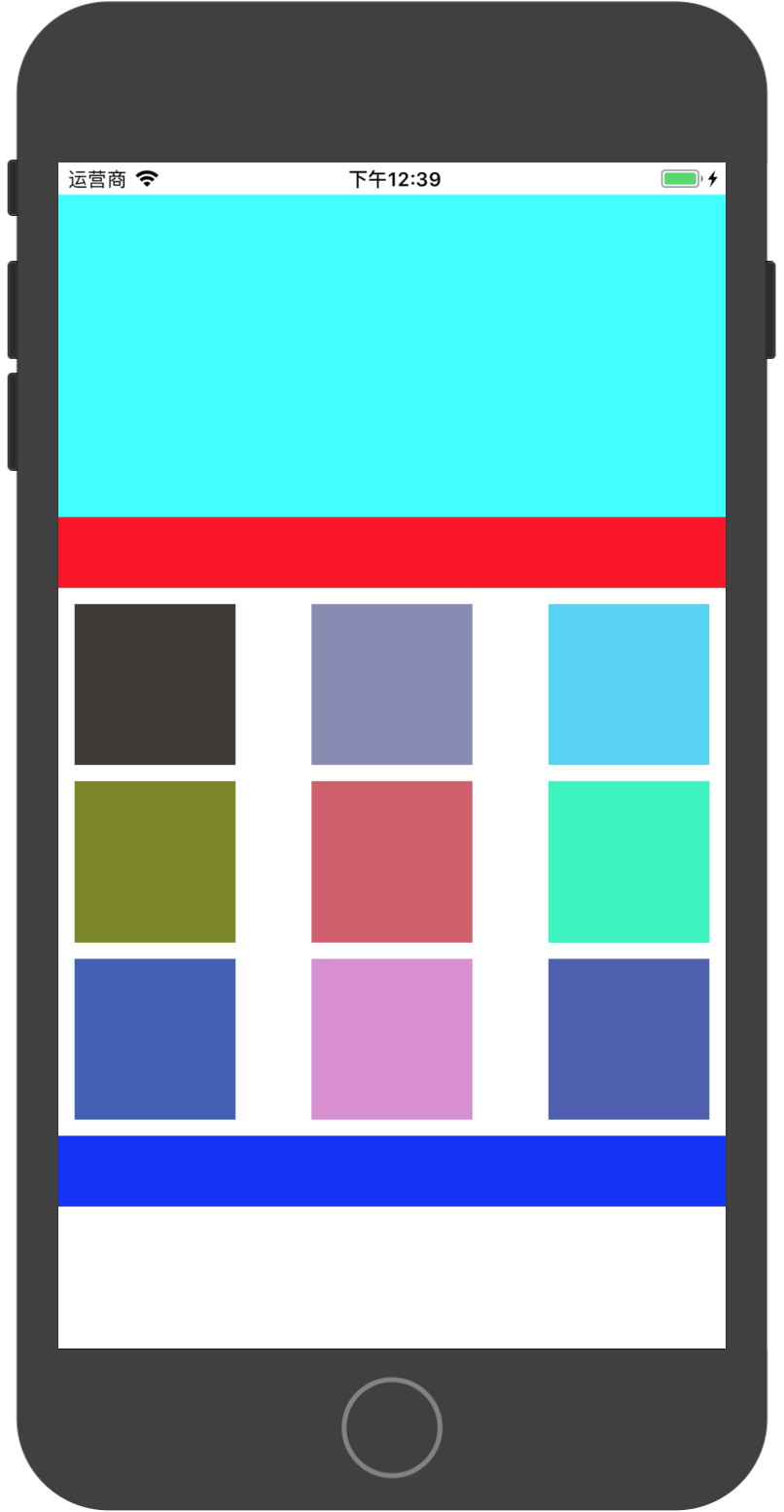
思路是这样的思路,具体部分代码实现如下:
```
#import "ViewController.h"
#import "TYCustomCell.h"
#import "TYHeaderFooterView.h"
define SCREEN_WIDTH [UIScreen mainScreen].bounds.size.width
@interface ViewController ()<UICollectionViewDelegate,UICollectionViewDataSource,UICollectionViewDelegateFlowLayout>
@property (nonatomic, strong) UICollectionView *collectionView;
@end
@implementation ViewController
-(UICollectionView *)collectionView{
if (!_collectionView) {
UICollectionViewFlowLayout *layout = [[UICollectionViewFlowLayout alloc] init];
layout.itemSize = CGSizeMake(100, 100);
layout.minimumInteritemSpacing = 10;
layout.minimumLineSpacing = 10;
layout.sectionInset = UIEdgeInsetsMake(10, 10, 10, 10);
_collectionView = [[UICollectionView alloc] initWithFrame:self.view.bounds collectionViewLayout:layout];
_collectionView.delegate = self;
_collectionView.dataSource = self;
_collectionView.backgroundColor = [UIColor whiteColor];
[_collectionView registerClass:[TYCustomCell class] forCellWithReuseIdentifier:@"TYCustomCell"];
[_collectionView registerClass:[TYHeaderFooterView class] forSupplementaryViewOfKind:UICollectionElementKindSectionFooter withReuseIdentifier:@"footer"];
[_collectionView registerClass:[TYHeaderFooterView class] forSupplementaryViewOfKind:UICollectionElementKindSectionHeader withReuseIdentifier:@"header"];
//设置滚动范围偏移200
_collectionView.scrollIndicatorInsets = UIEdgeInsetsMake(200, 0, 0, 0);
//设置内容范围偏移200
_collectionView.contentInset = UIEdgeInsetsMake(200, 0, 0, 0);
_collectionView.alwaysBounceVertical = YES;
}
return _collectionView;
}
(void)viewDidLoad {
[super viewDidLoad];
// Do any additional setup after loading the view, typically from a nib.[self setupUI];
}
-(void)setupUI{
//给collectionView添加子控件 这里是作为头部 记得设置y轴为负值

UIView *header = [[UIView alloc] initWithFrame:CGRectMake(0, -200, SCREEN_WIDTH, 200)];

header.backgroundColor = [UIColor cyanColor];

[self.collectionView addSubview:header];

//添加内容到视图上

[self.view addSubview:self.collectionView];
}
pragma mark - CollectonViewDataSource Delegate
-(NSInteger)collectionView:(UICollectionView *)collectionView numberOfItemsInSection:(NSInteger)section{
return 9;
}
-(UICollectionViewCell *)collectionView:(UICollectionView *)collectionView cellForItemAtIndexPath:(NSIndexPath *)indexPath{
TYCustomCell *cell = [collectionView dequeueReusableCellWithReuseIdentifier:@"TYCustomCell" forIndexPath:indexPath];
cell.backgroundColor = [UIColor colorWithRed:arc4random_uniform(256)/255.0 green:arc4random_uniform(256)/255.0 blue:arc4random_uniform(256)/255.0 alpha:1];
return cell;
}
//设置头部
-(UICollectionReusableView *)collectionView:(UICollectionView *)collectionView viewForSupplementaryElementOfKind:(NSString *)kind atIndexPath:(NSIndexPath *)indexPath{
if ([kind isEqualToString:UICollectionElementKindSectionHeader]) { //header
TYHeaderFooterView *header = [collectionView dequeueReusableSupplementaryViewOfKind:UICollectionElementKindSectionHeader withReuseIdentifier:@"header" forIndexPath:indexPath];
header.backgroundColor = [UIColor redColor];
return header;
}else if([kind isEqualToString:UICollectionElementKindSectionFooter]){ //footer
TYHeaderFooterView *footer = [collectionView dequeueReusableSupplementaryViewOfKind:UICollectionElementKindSectionFooter withReuseIdentifier:@"footer" forIndexPath:indexPath];
footer.backgroundColor = [UIColor blueColor];
return footer;
}
return [UICollectionReusableView new];
}
-(CGSize)collectionView:(UICollectionView *)collectionView layout:(UICollectionViewLayout *)collectionViewLayout referenceSizeForHeaderInSection:(NSInteger)section{
return CGSizeMake(SCREEN_WIDTH, 44);
}
-(CGSize)collectionView:(UICollectionView *)collectionView layout:(UICollectionViewLayout *)collectionViewLayout referenceSizeForFooterInSection:(NSInteger)section{
return CGSizeMake(SCREEN_WIDTH, 44);
}
iOS collectionView添加类似tableView的tableHeaderView的更多相关文章
- iOS Category 添加属性实现原理 - 关联对象
iOS Category 添加属性实现原理 - 关联对象 RunTime为Category动态关联对象 使用RunTime给系统的类添加属性,首先需要了解对象与属性的关系.对象一开始初始化的时候其属性 ...
- 为普通Object添加类似AttachedProperty的属性
为普通Object添加类似AttachedProperty的属性 周银辉 我们知道,在WPF中对应一个DependencyObject,我们很容易通过AttachedProperty来为类型附加一 ...
- DKNightVersion 的实现 --- 如何为 iOS 应用添加夜间模式
在很多重阅读或者需要在夜间观看的软件其实都会把夜间模式当做一个 App 所需要具备的特性. 而如何在不改变原有的架构, 甚至不改变原有的代码的基础上, 就能为应用优雅地添加夜间模式就成为一个在很多应用 ...
- iOS中关于动态Tableview中的cell数据传输的多线程问题解决之拙见
iOS中关于动态Tableview中的cell数据传输的多线程问题解决之拙见 (2015-12-05 12:48:20)[编辑][删除] 转载▼ 首先我们先明确一下问题: 1.因为UI是在主线 ...
- Xamarin SQLite教程Xamarin.iOS项目添加引用
Xamarin SQLite教程Xamarin.iOS项目添加引用 使用直接方式访问SQLite数据库,需要将System.Data和Mono.Data.SQlite库导入到创建的项目中.下面将分别讲 ...
- 添加类似navigationController自带的返回按钮
添加类似navigationController自带的返回按钮,效果如下: 一.UINavigationcontroller自带的navigationBar 是无法添加左箭头的返回按钮的 在网上搜索了 ...
- iOS mac添加证书 不能修改“System Roots”钥匙串错误
iOS mac添加证书 不能修改“System Roots”钥匙串错误 如图: 解决方式: 打开钥匙串---登录---,直接把证书拖过来 然后,查看--我的证书,里面,找到证书,即可
- 安卓&IOS 手机添加O365 邮箱账户
手机添加O365 邮件账户 一.Android手机添加O365邮件账户 1. 找到手机上“电子邮件” 2. 打开设置 3. 点击添加账户 4. 选择“Exchange” 5. 输入O365的邮箱账户和 ...
- 如何给TableView、CollectionView添加动效
// // ViewController.m // tableViewAnimation // // Created by 冯敏 on 2018/3/13. // Copyright © 2018年 ...
随机推荐
- C++ 二位数组做参数传递
指针的强大功能,,,,简直牛逼!!! #include<iostream> #include<cstdio> #include<map> using namespa ...
- [BZOJ 1567] Blue Mary的战役地图
Link: BZOJ 1567 传送门 Solution: 矩阵Hash/二维$Hash$模板题 涉及到需要快速查询.匹配的题目,考虑直接上$Hash$ 矩阵$Hash$其实就是每行先各$Hash$一 ...
- POJ 1274 The Perfect Stall (二分图匹配)
[题目链接] http://poj.org/problem?id=1274 [题目大意] 给出一些奶牛和他们喜欢的草棚,一个草棚只能待一只奶牛, 问最多可以满足几头奶牛 [题解] 奶牛和喜欢的草棚连线 ...
- 1.11(java学习笔记)封装
封装将内部细节封装起来,只暴露外部接口. 比如我们的电视就将复杂的内部线路用外壳封装起来,只留下外部按钮或遥控,用户只需要知道按钮或遥控的作用就可以,无需明白电视内部是如何工作. 而且封装也保障了安全 ...
- 删除VisualStudio 2013中的 "send Feedback" 按钮
在VisualStudio 2013中,在标题栏中增加了一个 "send Feedback" 按钮,用于给微软发送Bug和回馈(或者一个哭脸和笑脸).这个按钮对于开发来说基本上没用 ...
- 在React组件unmounted之后setState的报错处理
最近在做项目的时候遇到一个问题,在 react 组件 unmounted 之后 setState 会报错.我们先来看个例子, 重现一下问题: class Welcome extends Compone ...
- Go VUE --- vuejs在服务器部署?
感觉好多人把最基本的都忘了 还npm run dev 还守护进程,用守护进程也应该你自己用nodejs实现一个web静态服务器而不是去守护npm run dev 楼主问的既然是布署,哪默认就应该是生产 ...
- apache2.2 到 2.4后配置文件需要更改的部分
参考: http://www.dotblogs.com.tw/maple ... e24_httpd_conf.aspx 1. 访问控制2.2 的时候Order deny,allowDeny fro ...
- Mac eclipse安装SVN javaHL not available的解决方法
在Mac下安装Eclipse插件svnEclipse插件后,每次打开Eclipse都会弹出如下弹出框: 提示你本机缺少JavaHL Library. 选择Eclipse→偏好设置(preference ...
- 机器学习第2课:单变量线性回归(Linear Regression with One Variable)
2.1 模型表示 之前的房屋交易问题为例,假使我们回归问题的训练集(Training Set)如下表所示: 我们将要用来描述这个回归问题的标记如下: m 代表训练集中实 ...