
SoapUI Properties的使用
Link:http://testautomationnoob.blogspot.com/2012/10/soapui-properties-and-property-related.html
soapUI: Properties
Properties are available at multiple levels in soapUI, including the
environment, system, global, project, test suite, test case, and test
step levels. System properties are visible in the Help - System
Properties window. Global properties can be viewed or set in the File -
Preferences window. Properties for other levels are visible in the
Navigator panel when you click on the relevant node.
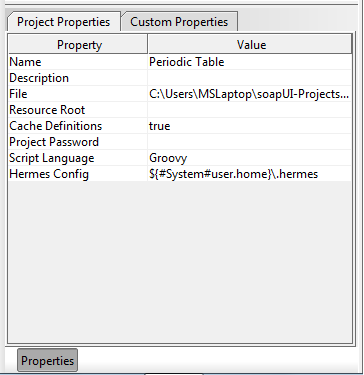
Project properties panel
In some cases, properties can also be loaded from or saved to external
files (see the screenshot below of a test suite Custom Properties tab;
the two rightmost icons at the top of the dialog are for loading and
saving from external files). Properties are saved in the file in propertyname=propertyvalue pairs; e.g.:
ElName=Mercury

ExpectedVal=80
Properties can be referenced (soapUI documentation calls this property expansion) from
almost anywhere in soapUI-- in Contains assertions as the string to
match, within a request, etc. To reference a property, the general
syntax is "${[#PropertyScope#]PropertyName[#XPathExpression]}". PropertyScope can
be "Env", "System", "Global", "Project", "TestSuite", and "TestCase"
(in the screenshot above, the Hermes Config property references the
user.home System property). To reference properties from a preceding
test step, the syntax is "${TestStepName#PropertyName[#XPathExpression]}--
note that the leading hash mark (#) before the scope is omitted when
referencing a test step. The test step where you're putting your
reference and the test step being referenced must be within the same
test case. XPath expressions are optional and only valid where the
property being referenced is valid XML (for test requests, the request
and response are both made available as properties).
Let's go back to the test suite created in the last post for
our Periodic Table web service. Note that three of the four operations
provided by the web service take an element name as their input
parameter: GetAtomicNumber, GetAtomicWeight, GetElementSymbol. Suppose
we wanted to use the same element to test all three. Instead of
hard-coding an element into our requests, we can define a test suite
level property and then use that property in all three of our test
requests.
Let's try that now. In the Navigator panel, click on the test suite
node. In the Properties panel (click the Properties button at the
bottom of the Navigator panel if you don't see it), click on the "Custom
Properties" tab, and add a new property called ElNameProp (via the
left-most button at the top), giving it "Silver" as its value.
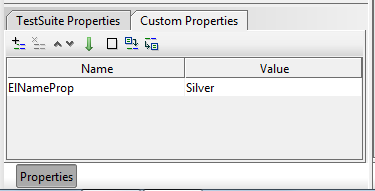
ElNameProp created at the test suite level
Now go into the GetAtomicNumber, GetAtomicWeight, and GetElementSymbol
test requests and modify each to use our test suite's ElNameProp where
an element name is required. Our reference expression is
"${#TestSuite#ElNameProp}". Here's the reference in the GetAtomicNumber
test request:
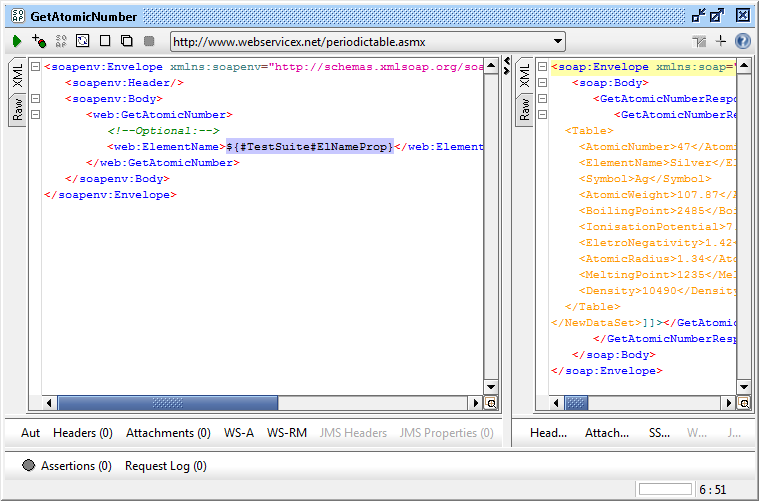
ElNameProp used in the GetAtomicNumber test request
Now try running each of the modified test requests-- the value "Silver"
is plugged into each of the requests where we reference our ElNameProp
property (you can see some of the appropriate response data for the
GetAtomicNumber request in the screenshot above).
SoapUI Properties的使用的更多相关文章
- soapUI参数中文乱码问题解决方法 (groovy脚本中文乱码)
soapUI参数中文乱码问题解决方法 可能方案1: 字体不支持中文,将字体修改即可: file-preferences-editor settings-select font 修改字体,改成能显示中文 ...
- 使用 soapUI 测试 REST 服务
REST 服务介绍 REST(Representational State Transfer)是 Roy Fielding 博士在 2000 年提出的一种新的软件架构风格,它以资源(resource) ...
- soapUI参数中文乱码问题解决方法&soap UI工具进行web接口测试
soapUI参数中文乱码问题解决方法 可能方案1: 字体不支持中文,将字体修改即可: file-preferences-editor settings-select font 修改字体,改成能显示中文 ...
- How To Fix soapUI JVM Maximum Heap Size (-Xmx) Error [Solution]
http://quicksoftwaretesting.com/soapui-jvm-heap-size-xmx-error/ -Xms128m -Xmx1000m -Dsoapui.properti ...
- SoapUI乱码问题处理方法
前言 每个工具都会有一些意想不到的“坑”,SoapUI也不例外.无论是参数或者响应报文,大家可能都遇到过乱码问题,这里记录一下几种解决乱码的方法. 一.修改显示字体 在File>>> ...
- [SoapUI] 配置默认环境的properties
<Envs> <Env id="Live,Default environment"> <Project> <CusProperty nam ...
- SOAPUI使用教程-MockService脚本概述
虽然静态MockOperation和MockResponse模型可以给你一定的灵活性,更多的动态行为添加到您的服务让您更模拟复杂的服务功能是很有用的.例如,你可能想: 从请求到响应传输值,修改它们的值 ...
- 接口测试SoapUI参数化
上次和大家一起完成了soapui的参数之一properties,今天我们一起交流另外一种参数化的方法,跟着一起练习,不懂不要紧,练习多了就会慢慢懂的: 1.准备excle(目前soapui只支持xls ...
- Groovy解析xml并且注入Project,TestSuite,TestCase级别的custom properties
import com.eviware.soapui.support.GroovyUtils import groovy.util.XmlParser def groovyUtils = new Gro ...
随机推荐
- Eclipse Maven 编译错误 Dynamic Web Module 3.0 requires Java 1.6 or newer 解决方案
Eclipse Maven 开发一个 jee 项目时,编译时遇到以下错误:Description Resource Path Location TypeDynamic Web Module 3.0 r ...
- sqlplus--spool命令参数详解
sqlplus--SPOOL参数详解 Spool是Oracle快速导出数据的工具,是sqlplus的指令,不是sql语法里的东西 一.Spool常用的设置set arraysize 5000; // ...
- 前端JS面试题
题目如下: function Foo() { getName = function () { alert (1); }; return this; } Foo.getName = function ( ...
- day17-jdbc 6.Connection介绍
package cn.itcast.jdbc; import com.mysql.jdbc.Connection; import java.sql.DriverManager; import java ...
- day17 12.复习
最后能抽取成word文档或者是图片之类的. 1.jdbc介绍 jdbc是一套标准,可以让我们Java程序员通过Java代码直接操作数据库,这就够了.jdbc涉及到的包两个:java.sql,java ...
- str_place()替换函数
str_replace() 函数使用一个字符串替换字符串中的另一些字符. 注释:该函数对大小写敏感.请使用 str_ireplace() 执行对大小写不敏感的搜索. echo str_replace( ...
- ueditor 1.2.6使用方法
本文以php版本为例: 文件下载:http://ueditor.baidu.com/website/download.html 还可以自己先定义内容,然后下载,这样可以帮助我们精简不少东西. 以本地p ...
- 基于IFC标准的4DBIM可视化平台
- iOS 通过接受距离传感器的消息改变屏幕的明暗度(仅限用于真实的手机)
#import "AppDelegate.h" @interface AppDelegate () @end @implementation AppDelegate - (BOOL ...
- 3.文档视图:从gui分割状态
为了解决一个类实现所有功能的缺陷,我们把application分为2个部分.一个部分业务逻辑,一个部分视觉渲染和交互.这2个类在学术上被称为document view 或者 model delegat ...