
Elasticsearch之curl创建索引库
关于curl的介绍,请移步
Elasticsearch学习概念之curl
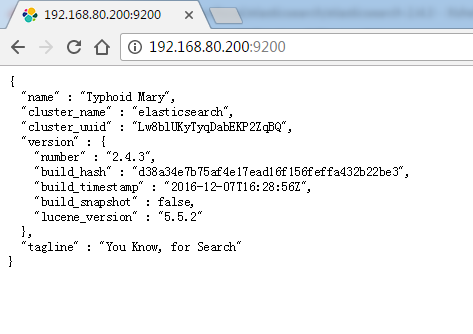
启动es,请移步
Elasticsearch的前后台运行与停止(tar包方式)
Elasticsearch的前后台运行与停止(rpm包方式)
创建索引库,我这里命名为zhouls

[hadoop@djt002 elasticsearch-2.4.3]$ curl -XPUT 'http://192.168.80.200:9200/zhouls'
{"acknowledged":true}[hadoop@djt002 elasticsearch-2.4.3]$
这里,是跟之前的elasticsearch.yml修改对应起来的。
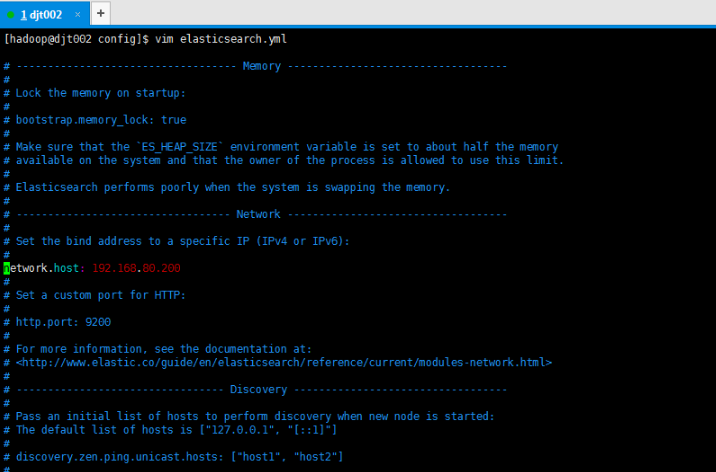
我们可以验证下,输入localhost或者127.0.0.1都会出现无法连接,不信你尝试。
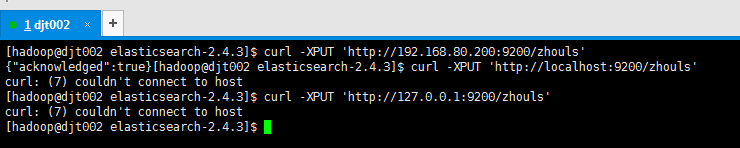
[hadoop@djt002 elasticsearch-2.4.3]$ curl -XPUT 'http://192.168.80.200:9200/zhouls'
{"acknowledged":true}[hadoop@djt002 elasticsearch-2.4.3]$ curl -XPUT 'http://localhost:9200/zhouls'
curl: (7) couldn't connect to host
[hadoop@djt002 elasticsearch-2.4.3]$ curl -XPUT 'http://127.0.0.1:9200/zhouls'
curl: (7) couldn't connect to host
[hadoop@djt002 elasticsearch-2.4.3]$
为了方便,更改为0.0.0.0

然后,重启es

[hadoop@djt002 elasticsearch-2.4.3]$ jps
2811 Jps
2741 Elasticsearch
[hadoop@djt002 elasticsearch-2.4.3]$ curl -XPUT 'http://localhost:9200/zhouls'
{"error":{"root_cause":[{"type":"index_already_exists_exception","reason":"already exists","index":"zhouls"}],"type":"index_already_exists_exception","reason":"already exists","index":"zhouls"},"status":400}[hadoop@djt002 elasticurl -XPUT 'http://127.0.0.1:9200/zhouls'
{"error":{"root_cause":[{"type":"index_already_exists_exception","reason":"already exists","index":"zhouls"}],"type":"index_already_exists_exception","reason":"already exists","index":"zhouls"},"status":400}[hadoop@djt002 elasticurl -XPUT 'http://192.168.80.200:9200/zhouls'
{"error":{"root_cause":[{"type":"index_already_exists_exception","reason":"already exists","index":"zhouls"}],"type":"index_already_exists_exception","reason":"already exists","index":"zhouls"},"status":400}[hadoop@djt002 elasticsearch-2.4.3]$
报这个错误,是正常的,因为,你重复创建索引库。根据经验之谈,一般用内网ip。如我的192.168.80.200。建议指定内网ip
本地回环地址:127.0.0.1
内网地址:192.168.80.200
外网地址:10.29.0.2
在这里0.0.0.0 表示可以通过上面所有ip都可以访问
以上是,Elasticsearch之curl创建索引库的方式1,以下是,Elasticsearch之curl创建索引库的方式2

[hadoop@djt002 elasticsearch-2.4.3]$ curl -XPUT 'http://192.168.80.200:9200/zhouls'
{"error":{"root_cause":[{"type":"index_already_exists_exception","reason":"already exists","index":"zhouls"}],"type":"index_already_exists_exception","reason":"already exists","index":"zhouls"},"status":400}[hadoop@djt002 elasticsearch-2.4.3]$ curl -XPOST 'http://192.168.80.200:9200/zhouls1'
{"acknowledged":true}[hadoop@djt002 elasticsearch-2.4.3]$
测试完,及时删除。

[hadoop@djt002 elasticsearch-2.4.3]$ curl -XPUT 'http://192.168.80.200:9200/zhouls'
{"error":{"root_cause":[{"type":"index_already_exists_exception","reason":"already exists","index":"zhouls"}],"type":"index_already_exists_exception","reason":"already exists","index":"zhouls"},"status":400}[hadoop@djt002 elasticsearch-2.4.3]$ curl -XPOST 'http://192.168.80.200:9200/zhouls1'
{"acknowledged":true}[hadoop@djt002 elasticsearch-2.4.3]$ curl -XDELETE 'http://192.168.80.200:9200/zhouls1'
{"acknowledged":true}[hadoop@djt002 elasticsearch-2.4.3]$
Elasticsearch之curl创建索引库的更多相关文章
- Elasticsearch之curl创建索引库和索引时注意事项
前提, Elasticsearch之curl创建索引库 Elasticsearch之curl创建索引 注意事项 1.索引库名称必须要全部小写,不能以下划线开头,也不能包含逗号 2.如果没有明确指定索引 ...
- Elasticsearch之curl创建索引
前提,是 Elasticsearch之curl创建索引库 [hadoop@djt002 elasticsearch-2.4.3]$ curl -XPUT 'http://192.168.80.200: ...
- Elasticsearch之curl删除索引库
关于curl创建索引库的介绍,请移步 Elasticsearch之curl创建索引库 [hadoop@djt002 elasticsearch-2.4.3]$ curl -XPUT 'http://1 ...
- (转)ElasticSearch Java Api-检索索引库
上篇博客记录了如何用java调用api把数据写入索引,这次记录下如何搜索. 一.准备数据 String data1 = JsonUtil.model2Json(new Blog(1, "gi ...
- lucene中创建索引库
package com.hope.lucene;import org.apache.commons.io.FileUtils;import org.apache.lucene.document.Doc ...
- elasticsearch kabana中创建索引
在kabana中创建索引和索引类型语法 PUT clockin{ "mappings": { "time": { } }} 查询索引下的所有数据 GET clo ...
- Elasticsearch之cur查询索引
前提, Elasticsearch之curl创建索引库 Elasticsearch之curl创建索引 Elasticsearch之curl创建索引库和索引时注意事项 Elasticsearch之cur ...
- Elasticsearch之CURL命令的DELETE
也可以看我写的下面的博客 Elasticsearch之curl删除 Elasticsearch之curl删除索引库 删除,某一条数据,如下 [hadoop@master elasticsearch-] ...
- Elasticsearch之curl删除
扩展下, Elasticsearch之curl删除索引库 [hadoop@djt002 elasticsearch-2.4.3]$ curl -XDELETE 'http://192.168.80.2 ...
随机推荐
- HDU - 1134 Game of Connections 【DP】
题目链接 http://acm.hdu.edu.cn/showproblem.php?pid=1134 题意 给出一个n 然后有2n个点 给两个点连一条边,最后连N条边,要求所有的边不能够交叉 问最多 ...
- Kattis - entertainmentbox 【贪心】
思路 先将 N 个 电视节目 排序 根据 结束时间 ,结束的早的 排在前面 然后 弄 K个标记 记录 结束时间 然后 遍历一下 每次 如果能插入的话 插入到 结束时间最小的那个 队列里面去然后 每次插 ...
- c++ 之重要性
c++的功能比c语言大的多,c语言偏最底层,且程序短小,而对于一个大的系统,用c++,因为它具备了c语言的优点. 很多学嵌入式的觉得学了c语言之后,就不用学c++了,会认为c++很简单,然而,c++并 ...
- 《程序员代码面试指南》第五章 字符串问题 去掉字符串中连续出现k 个0 的子串
题目 去掉字符串中连续出现k 个0 的子串 java代码 package com.lizhouwei.chapter5; /** * @Description: 去掉字符串中连续出现k 个0 的子串 ...
- python编写脚本应用实例
这里主要记录工作中应用python编写脚本的实例.由于shell脚本操作数据库(增.删.改.查)并不是十分直观方便,故这里采用python监控mysql状态,然后将状态保存到数据库中,供前台页面进行调 ...
- android电池(五):电池 充电IC(PM2301)驱动分析篇【转】
本文转载自:http://blog.csdn.net/xubin341719/article/details/8970363 android充电这块,有的电源管理芯片内部包含充电管理,如s5pv210 ...
- Windows 7 比Windows XP 难用的功能
Windows 7 的搜索功能做得实在难用,不仅慢,还经常搜不到文件(明明存在的文件却搜不到).相比Windows XP,这个功能差的太远了. Windows 7 的无线连网功能,即使设置为不要自动连 ...
- CentOS下查看MySQL的安装路径
Linux下查看mysql.apache是否安装,并卸载. 指令 ps -ef|grep mysql 得出结果 root 17659 1 0 2011 ? 00:00 ...
- TinkPHP 简单知识摘要
1.Session处理 赋值:session('name','value'); //设置session 与 $_SESSION['think']['name'] = 'value';相等 取值:$va ...
- L103
Give everyday the chance to become the most beautiful day of your life.把每天都过成你生命中最美好的一天.competence 能 ...