
objective-c高德地图时时定位
本人开发的开发者技术变现资源聚集地,大家支持下,下面是网址
https://www.baiydu.com
这篇随笔是对上一遍servlet接口的实现。
一、项目集成高德地图
应为我这个项目使用了cocopods这个第三方库管理工具,所以只需要很简单的步骤,就能将高德地图集成到项目中,如果你没使用过这工具,那就直接下载对应的sdk导入即可,因为这个工具的安装还是比较麻烦的,需要翻墙。 既然我用的这种方式,下面我就贴相关的使用接图。
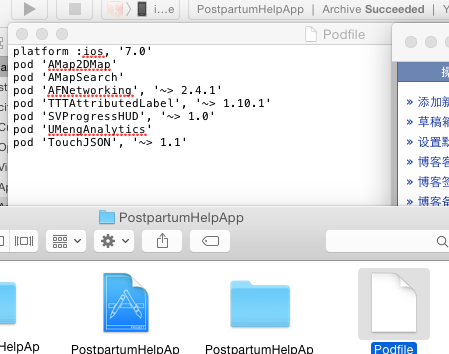
如果你项目中已经安装好了cocopods那么你只需直接在podfile中增加 pod 'Amap2DMap' 和 pod 'AmapSearch' 这两句即可, 第一个涉及到的地图功能主要是定位,地图展示...
第二个涉及到的主要功能是GPS定位,这里为什么要使用第二个? 因为我们传递参数时需要给servlet传递一个当前城市的名称,就需要它来执行一个逆地理编码获取城市名,
然后在打开打开终端 cd 拖入项目文件夹 pod install稍等即可安装。
二、时时定位
引入高德地图两个类。
#import <AMapSearchKit/AMapSearchAPI.h>
#import <MAMapKit/MAMapKit.h>
下面截图所需代理及涉及到的参数。。

上面截图中关于我们实现这个功能需要使用到的代理只有一个高德地图的:MAMapViewDelegate
1、在didFinishLaunchingWithOptions授权高德地图
[MAMapServices sharedServices].apiKey = (NSString *)APIKey;
2、启动时时定位,间隔时间为15秒 类中有时时定位的代理,但是被我使用代码控制了的,因为系统自带的不能控制定位间隔时间
_nstimer=[NSTimer scheduledTimerWithTimeInterval:15 target:self selector:@selector(timerFired:) userInfo:nil repeats:NO];
3、MAMapViewDelegate 代理实现的方法,服务人员时时定位,经纬度提交高德云图库
↓下面这个方法提示使用APP的人员是否允许该应用使用定位功能。
- (void)mapViewWillStartLocatingUser:(MAMapView *)mapView

{

    if(![CLLocationManager locationServicesEnabled]){

        UIAlertView * alertView = [[UIAlertView alloc]initWithTitle:@"定位失败" message:@"请在手机设置中开启定位功能\n开启步骤:设置 > 隐私 > 位置 > 定位服务" delegate:self cancelButtonTitle:@"确定" otherButtonTitles:nil, nil];

        [alertView show];

        return;

    }else{

        if ([CLLocationManager authorizationStatus] != kCLAuthorizationStatusAuthorizedAlways) {

            UIAlertView * alertView = [[UIAlertView alloc]initWithTitle:@"定位失败" message:@"请在手机设置中开启定位功能\n开启步骤:设置 > 隐私 > 位置 > 定位服务下《***》应用" delegate:self cancelButtonTitle:@"确定" otherButtonTitles:nil, nil];

            [alertView show];

            return;

        }

    }

}
↓下面的代码是时时定位的,15秒一次,并且将定位后的经纬度提交到高德云图库中去
- (void)mapView:(MAMapView *)mapView didUpdateUserLocation:(MAUserLocation *)userLocation

{

    _mapView=nil;

      [_nstimer invalidate];

    if ([WDUser currentUser].userType==) {

        longitude=[NSString stringWithFormat:@"%f%@", mapView.userLocation.coordinate.longitude,@","];//@"106.546128";//

        latitude= [NSString stringWithFormat:@"%f", mapView.userLocation.coordinate.latitude];

        locationGroup=[NSString stringWithFormat:@"%@%@",longitude,latitude];

        NSString *healtherName=[NSString stringWithFormat:@"%d,康复师",[WDUser currentUser].healterLoginTypes];

        NSMutableDictionary *postParameterDic=[[NSMutableDictionary alloc]init];

        [postParameterDic setObject:@"?" forKey:@"tableid"];

        [postParameterDic setObject:@"?" forKey:@"key"];

        NSMutableDictionary *dataDictionary=[[NSMutableDictionary alloc]init];

        NSString *yunClouldReturnId=[NSString stringWithFormat:@"%d",[WDUser currentUser].healtherClouldMapId];

        [dataDictionary setObject:yunClouldReturnId forKey:@"_id"];

        [dataDictionary setObject:healtherName forKey:@"_name"];

        [dataDictionary setObject:locationGroup forKey:@"_location"];//点后6位 格式示例:104.394729,31.125698

        NSString *dateStr=[AFDataDefine shareGetStr:dataDictionary];

        [postParameterDic setObject:dateStr forKey:@"data"];

        // 设置返回格式

        AFHTTPRequestOperationManager *postManager = [AFHTTPRequestOperationManager manager];

        postManager.responseSerializer.acceptableContentTypes =  [NSSet setWithObjects:@"text/html",@"charset=UTF-8",@"Content-Type",@"application/x-www-form-urluncoded",nil];;

        postManager.requestSerializer = [AFJSONRequestSerializer serializer];

        postManager.responseSerializer = [AFHTTPResponseSerializer serializer];

        [postManager GET:@"http://yuntuapi.amap.com/datamanage/data/update" parameters:postParameterDic success:^(AFHTTPRequestOperation *operation, id responseObject)

         {

             //  NSString *result = [[NSString alloc] initWithData:responseObject encoding:NSUTF8StringEncoding];

               [_nstimer invalidate];

            _nstimer=[NSTimer scheduledTimerWithTimeInterval: target:self selector:@selector(timerFired:) userInfo:nil repeats:NO];

         } failure:^(AFHTTPRequestOperation *operation, NSError *error) {

             //  NSLog(@"1");

               [_nstimer invalidate];

            _nstimer=[NSTimer scheduledTimerWithTimeInterval: target:self selector:@selector(timerFired:) userInfo:nil repeats:NO];

         }

         ];

    }

  else

  {

        [_nstimer invalidate];

     _nstimer=[NSTimer scheduledTimerWithTimeInterval: target:self selector:@selector(timerFired:) userInfo:nil repeats:NO];

  }

}
↓下面的代码是timer控件调用的方法
-(void)timerFired:(NSTimer *)timer{

    [_nstimer invalidate];

    _mapView=[[MAMapView alloc]init];

    _mapView.userTrackingMode = ,

    _mapView.showsUserLocation = YES;

    _mapView.userTrackingMode = MAUserTrackingModeNone;

    _mapView.delegate=self;

}
↓下面的代码是应用进入后台,以及从后台进入前台时的定位处理
- (void)applicationDidEnterBackground:(UIApplication *)application {//在后台

      _mapView=nil;

     UIApplication *app = [UIApplication sharedApplication];

         __block UIBackgroundTaskIdentifier bgTask = [app beginBackgroundTaskWithExpirationHandler:^{

             dispatch_async(dispatch_get_main_queue(), ^{

                 if (bgTask != UIBackgroundTaskInvalid) {

                     [app endBackgroundTask:bgTask];

                     bgTask = UIBackgroundTaskInvalid;

                 }

             });

         }];

         dispatch_async(dispatch_get_global_queue(DISPATCH_QUEUE_PRIORITY_DEFAULT, ), ^{

          [_nstimer invalidate];

           _nstimer=[NSTimer scheduledTimerWithTimeInterval: target:self selector:@selector(timerFired:) userInfo:nil repeats:NO];

             [[NSRunLoop currentRunLoop] addTimer:_nstimer forMode:NSRunLoopCommonModes];

             [[NSRunLoop currentRunLoop] run];

             dispatch_async(dispatch_get_main_queue(), ^{

                 if (bgTask != UIBackgroundTaskInvalid) {

                     [app endBackgroundTask:bgTask];

                     bgTask = UIBackgroundTaskInvalid;

                 }

             });

         });

      }

- (void)applicationWillEnterForeground:(UIApplication *)application {//在前台

   _mapView=nil;

    [_nstimer invalidate];

   _nstimer=[NSTimer scheduledTimerWithTimeInterval: target:self selector:@selector(timerFired:) userInfo:nil repeats:NO];

    [[NSRunLoop currentRunLoop] addTimer:_nstimer forMode:NSRunLoopCommonModes];

}
上面的方法实现的主要功能就是时时定位,然后网高德云图中传递服务人员的位置经纬度,它们针对的是服务人员。
4:被服务人员跳转服务人员页面,提交经纬度和地理位置给 servlet接口处理。
这个方法针对的是被服务人员,因为被服务人员也需要提供自己当前经纬度,但是不是时时提供,只是跳转到服务人员页面时,才提供,而且是直接调用servlet写的接口,
而且被服务人员还需要提供当前城市的名称,所以这里还需要使用一个GPS定位,通过经纬度去查询地理位置名称。
↓下面的代码是申明高德地图
 _longitude=[[NSString alloc]init];

            _latitude=[[NSString alloc]init];

            computeFrame=self.LeftButton.frame;

            self.mapView=[[MAMapView alloc]initWithFrame:CGRectMake(, , , )];

            self.mapView.userTrackingMode = ,

            _mapView.showsUserLocation = YES;

            self.mapView.userTrackingMode = MAUserTrackingModeNone;

            self.mapView.delegate=self;
↓下面的代码主要是GPS定位获取城市名称。
- (void)mapViewDidStopLocatingUser:(MAMapView *)mapView

{

    _longitude=[NSString stringWithFormat:@"%f",mapView.userLocation.location.coordinate.longitude];//@"106.546128";//

    _latitude= [NSString stringWithFormat:@"%f",mapView.userLocation.location.coordinate.latitude];          //@"29.559153";

    [WDUser currentUser].longitude=_longitude;

    [WDUser currentUser].latitude=_latitude;

    [[WDUser currentUser] saveUserInfo];

    _search = [[AMapSearchAPI alloc] initWithSearchKey:@"?" Delegate:self];

    AMapReGeocodeSearchRequest *regeoRequest = [[AMapReGeocodeSearchRequest alloc] init];

    regeoRequest.searchType = AMapSearchType_ReGeocode;

    regeoRequest.location =[AMapGeoPoint locationWithLatitude:[_latitude floatValue] longitude:[_longitude floatValue]];

    regeoRequest.radius = ;

    regeoRequest.requireExtension = YES;

    //发起逆地理编码

    [_search AMapReGoecodeSearch: regeoRequest];

}

//逆编码查询代理

- (void)onReGeocodeSearchDone:(AMapReGeocodeSearchRequest *)request response:(AMapReGeocodeSearchResponse *)response

{

    if(response.regeocode != nil)

    {

        _compantAddress=response.regeocode.addressComponent;

        _currentCityName=_compantAddress.province;

        _currentCityName=  [_currentCityName stringByReplacingOccurrencesOfString:@"市" withString:@""];

        _currentCityName=  [_currentCityName stringByReplacingOccurrencesOfString:@"省" withString:@""];

        [ WDUser currentUser].currentCity=_currentCityName;

        [[WDUser currentUser] saveUserInfo];

        [SVProgressHUD dismiss];

    }

    else{

        showMessage(@"请检查网是否畅通!");

    }

}

- (void)mapView:(MAMapView *)mapView didUpdateUserLocation:(MAUserLocation *)userLocation

{

    mapView.showsUserLocation = NO;

}//联系客户
最后服务人员将这些获取的参数提交到servlet处理。
本人创业做的一款androidApp, 下载量已经有2000多万,各种当前热门的网络手机奖励红包全部集成,另外还有热门电影和淘宝高额优惠券!很适合各类型的用户。

objective-c高德地图时时定位的更多相关文章
- Android Studio之高德地图实现定位和3D地图显示
在应用开发中,地图开发是经常需要使用的“组件”,国内比较出名的是就是百度地图和高德地图. 此博客讲的是高德地图实现定位和3D地图显示,并标注相应位置,话不多说,先看看效果,在上代码. 效果如图: 首先 ...
- [OC][地图] 高德地图之定位初探(一)
使用前的说明 高德地图开放平台的iOS定位模块网址-->http://lbs.amap.com/api/ios-location-sdk/summary/ 高德地图有Web端.android平台 ...
- Unity与Android交互-Unity接入高德地图实现定位以及搜索周边的功能(使用Android Studio)详细操作
刚进公司给安排的任务就是Unity接入高德地图,算是踩了不少坑总算做出来了,抽点时间写个博客记录一下 废话不多说 先上效果图 获取定位并根据手机朝向显示周边信息 使用的Unity ...
- vue2使用高德地图vue-amap定位以及AMapUI标注
前言 最近在vue里使用了高德地图vue-amap以及AMapUI,我在这里就说下如何在vue2里引入vue-amap和AmapUI以及使用定位 (在这里默认你已经安装了vue-cli) 安装 npm ...
- iOS高德地图SDK定位和搜索附近信息的具体使用
1.显示地图.定位.显示当前位置. 导入你需要的功能的头文件,申明全局变量,代理方法等等. 初始化地图,在控制器即将显示额时候打开定位和跟踪用户,这里对参数不懂的话康忙进去都有注释. 对了.i ...
- js高德地图手机定位
<!DOCTYPE HTML PUBLIC "-//W3C//DTD HTML 4.01 Transitional//EN"> <html> <hea ...
- cordova 配置 高德地图sdk定位
获取 sha1 打开 cmd 1. cd .android 2. keytool -list -v -keystore debug.keystore 3. 输入密钥: android 4. 复制 sh ...
- Android学习十一:高德地图使用
写这篇文章主要有三个目的: 1.使用高德地图api定位 2.获取天气数据 3.编程练手 文件结构 清单文件信息说明: <?xml version="1.0" encoding ...
- 高德地图添加marker及反地理编码获取POI
项目中集成百度.高德.腾讯地图已是司空见惯的事情,今天我总结了一下项目中用到的高德地图常用的功能: 1.展示高德地图并定位显示定位图标: 2.添加实时大头针: 3.反地理编码获取周围兴趣点 效果如下: ...
随机推荐
- Java-练习方法之模拟摇号抽奖
3.采用多种算法,模拟摇奖:从1-36中随机抽出8个不重复的数字 int[] shuzu=new int[8]; Random ran=new Random(); for(int i=0;i<s ...
- Atitit 基于图片图像 与文档混合文件夹的分类
Atitit 基于图片图像 与文档混合文件夹的分类 太小的文档(txt doc csv exl ppt pptx)单独分类 Mov10KminiDoc 但是可能会有一些书法图片迁移,因为他们很微小,需 ...
- Mongodb 的基本使用
一.cmd连接mongodb 服务 进入mongodb的bin目录下:[D:\mongodb3.2.5\bin]$ mongo 127.0.0.1:27017 常用查询: show dbs 查看所有数 ...
- vue-cli需要的包
vue-cli需要的包 npm install webpack webpack-dev-server --save-dev npm install vue-loader vue-html-loader ...
- Netty学习三:线程模型
1 Proactor和Reactor Proactor和Reactor是两种经典的多路复用I/O模型,主要用于在高并发.高吞吐量的环境中进行I/O处理. I/O多路复用机制都依赖于一个事件分发器,事件 ...
- [转]Java并发编程:Lock
链接: http://www.cnblogs.com/dolphin0520/p/3923167.html
- WP、Win10开发或者WPF开发时绘制自定义窗体~例如:一个手机
WP and Win10 效果:(数字是参考值,和UI无关) <Page x:Class="_05.AllControls._BorderUsePage" xmlns=&qu ...
- Supplemental Logging
Supplemental Logging分为两种:Database-Level Supplemental Logging和Table-Level Supplemental Logging,即数据库级别 ...
- backbone库学习-Collection
backbone库的结构: http://www.cnblogs.com/nuysoft/archive/2012/03/19/2404274.html 本文所有例子来自于http://blog.cs ...
- 使用ZeroClipboard解决跨浏览器复制到剪贴板的问题
Zero Clipboard的实现原理Zero Clipboard 利用透明的Flash让其漂浮在复制按钮之上,这样其实点击的不是按钮而是 Flash ,这样将需要的内容传入Flash,再通过Flas ...