
Linux x64 下 Matlab R2013a 300 kb 脚本文件调试的 CPU 占用过高问题的解决办法
(1) 系统+软件版本
CentOS 6.5 (Final), 64 位,内核initramfs-2.6.32-431.5.1.el6.x86_64,
MATLAB Version: 8.1.0.604 (R2013a)
Java 1.6.0_17-b04 with Sun Microsystems Inc. Java HotSpot(TM) 64-Bit Server VM mixed mode
(2) 问题描述
通常在这个环境下,小文件的代码都可以调试通过.
最近,把所有函数集合到一个M文件(332.4 kb),只是简单地设置了几个断点, 运行到断点位置再停止运行, cpu和内存占用都还算正常.
但接下来对m文件的编辑就开始变得非常慢, 甚至是只添加几个单词就会卡住, 一直没有响应, 内存占用不变, 而1/4核CPU的占用高达100%, 只能从系统监视器里杀死进程.
我猜想, Matlab对M文件大小的支持,是不是非常有限? 子函数版本太多也是罪过,想着集成起来可以方便调用和标注,没想到弄巧成拙了...


(3) 解决办法
找到两个解决办法.
一是使用 '-singleCompThread' 参数启动matlab. 亲测可用. 调试编辑都和原来基本一样, 不再卡顿了. 这要感谢水木网友 @RSVP 的耐心解答.
[usr@usr ~]$ matlab -help

    Usage:  matlab [-h|-help] | [-n | -e]

                   [-arch | v=variant | v=arch/variant]

                   [-c licensefile] [-display Xdisplay | -nodisplay]

                   [-nosplash] [-mwvisual visualid] [-debug] [-softwareopengl]

                   [-desktop | -nodesktop | -nojvm]

                   [-r MATLAB_command] [-logfile log]

                   [-Ddebugger [options]]

    -h|-help             - Display arguments.

    -n                   - Display final environment variables,

                           arguments, and other diagnostic

                           information. MATLAB is not run.

    -e                   - Display ALL the environment variables and

                           their values to standard output. MATLAB

                           is not run. If the exit status is not

                            on return then the variables and values

                           may not be correct.

    -arch                - Start MATLAB assuming architecture arch.

    v=variant            - Start the version of MATLAB found

                           in bin/glnxa64/variant instead of bin/glnxa64.

    v=arch/variant       - Start the version of MATLAB found

                           in bin/arch/variant instead of bin/glnxa64.

    -c licensefile       - Set location of the license file that MATLAB

                           should use.  It can have the form port@host or

                           be a colon separated list of license files.

                           The LM_LICENSE_FILE and MLM_LICENSE_FILE

                           environment variables will be ignored.

    -display Xdisplay    - Send X commands to X server display, Xdisplay.

    -nodisplay           - Do not display any X commands. The MATLAB

                           desktop will not be started. However, unless

                           -nojvm is also provided the Java virtual machine

                           will be started.

    -nosplash            - Do not display the splash screen during startup.

    -mwvisual visualid   - The default X visual to use for figure windows.

    -debug               - Provide debugging information especially for X

                           based problems.

    -desktop             - Allow the MATLAB desktop to be started by a

                           process without a controlling terminal. This is

                           usually a required command line argument when

                           attempting to start MATLAB from a window manager

                           menu or desktop icon.

    -nodesktop           - Do not start the MATLAB desktop. Use the current

                           terminal for commands. The Java virtual machine

                           will be started.

    -singleCompThread    - Limit MATLAB to a single computational thread.

                           By default, MATLAB makes use of the multithreading

                           capabilities of the computer on which it is running.

    -nojvm               - Shut off all Java support by not starting the

                           Java virtual machine. In particular the MATLAB

                           desktop will not be started.

    -jdb [port]          - Enable remote Java debugging on port (default )

    -r MATLAB_command    - Start MATLAB and execute the MATLAB_command.

    -logfile log         - Make a copy of any output to the command window

                           in file log. This includes all crash reports.

    -Ddebugger [options] - Start debugger to debug MATLAB.

    -nouserjavapath      - Ignore custom javaclasspath.txt and javalibrarypath.txt files.
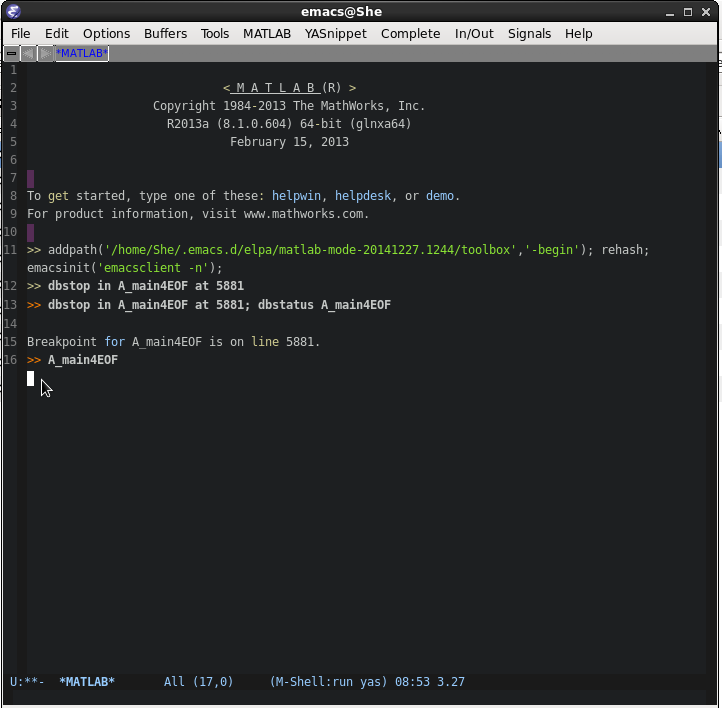
二是使用外部编辑器 Emacs 来编辑和调试. 调试采用 matlab-shell mode, 稍微复杂一些, 传统的快捷键都不怎么能用, 只能用命令设置断点和运行, 涉及到的命令有: dbstop & dbstatus & dbcont & dbquit 等, 可参阅这篇博客<MATLAB的简单debug功能>. 在调试过程中编辑脚本也没问题, matlab 占用也小. 有关 Emacs 多窗口之间切换的快捷键可以参考 学习Emacs系列教程(十):多窗口.
全文完.
Linux x64 下 Matlab R2013a 300 kb 脚本文件调试的 CPU 占用过高问题的解决办法的更多相关文章
- linux系统下重启tomcat的shell脚本
linux系统下重启tomcat的shell脚本: #!/bin/shtomcat_home=/opt/apache-tomcat- #找到tomcat进程的id并kill掉 ps -ef |grep ...
- Linux环境下段错误的产生原因及调试方法小结(转)
最近在Linux环境下做C语言项目,由于是在一个原有项目基础之上进行二次开发,而且 项目工程庞大复杂,出现了不少问题,其中遇到最多.花费时间最长的问题就是著名的“段错误”(Segmentation F ...
- Linux环境下段错误的产生原因及调试方法小结
转载自http://www.cnblogs.com/panfeng412/archive/2011/11/06/2237857.html 最近在Linux环境下做C语言项目,由于是在一个原有项目基础之 ...
- Linux环境下段错误的产生原因及调试方法小结【转】
转自:http://www.cnblogs.com/panfeng412/archive/2011/11/06/2237857.html 最近在Linux环境下做C语言项目,由于是在一个原有项目基础之 ...
- 转:Linux环境下段错误的产生原因及调试方法小结
源地址:http://www.cnblogs.com/panfeng412/archive/2011/11/06/2237857.html 补充:http://baike.baidu.com/link ...
- 【转】解决ubuntu13.10下,无法双击运行脚本文件
解决ubuntu13.10下,无法双击运行脚本文件 转自:http://www.aichengxu.com/other/975350.htm 首先,必须先设定好脚本的运行方法,当然如果只是she ...
- Linux系统下 MYSQL数据库中的数据库文件在本机内迁移 (需暂停服务的方式)
Linux系统下 MYSQL数据库中的数据库文件在本机内迁移 本机采用Ubuntu16.04系统,tar方式安装MySQL5.7.21 数据库安装文件夹为 /home/devil/mysql 现 ...
- Linux kswapd0 进程CPU占用过高
图便宜买了个1核1G虚拟机,启动两个jar后cpu飙升直接卡死,查看cpu及内存占用 发现kswapd0进程cpu占用一直居高不下,于是查询资料,总结如下. swap分区的作用是当物理内存不足时,会将 ...
- linux(x64)下安装Matlab 2015b破解版(含安装包)
注意:在安装前请查看安装目录是否有足够空间!完全安装大概需要12G的空间!本人在安装后系统盘满了,导致无法启动图形界面.小伙伴们不要重蹈覆辙~ Environment Linux debian8 (x ...
随机推荐
- python之禅
>>> import this The Zen of Python, by Tim Peters Beautiful is better than ugly. Explicit is ...
- WebForm简单控件,复合控件
简单控件: 1.Label 会被编译成span标签 属性: Text:文本内容 CssClass:CSS样式 Enlabled:是否可用 Visible:是否可见 __________________ ...
- Mybatis-Spring集成
MyBatis-Spring用来将MyBatis无缝整合到Spring中.使用这个类库中的类, Spring将会加载必要的MyBatis工厂类和Session类. 这个类库也提供一个简单的方式来注入 ...
- mybatis.xml文件中#与$符号的区别以及数学符号的处理
1.#{}表示一个占位符号,通过#{}可以实现preparedStatement向占位符中设置值,自动进行java类型和jdbc类型转换,#{}可以有效防止sql注入. #{}可以接收简单类型值或po ...
- 关于freemaker的一点使用技巧
在做国泰君安2016年中秋送电影票活动中,需要做这样一个手机页面,展示所有中奖用户的中奖信息.如下图: 要求对用户的后记号码中间5位做隐藏处理.最开始的处理方法是在对用户实体的get()方法做处理 / ...
- Openstack+Kubernetes+Docker微服务实践之路--Kubernetes
经过几番折腾终于搞定Kubernetes了,我们要在Openstack上部署Kubernetes集群,使用最新工具Kubeadm来安装,由于不能直接访问Kubernetes的源,我们需要一台可以穿墙的 ...
- 一次java性能调优总结
我们的系统中新开发了一个数据抽取的功能,东西做完后,一看执行时间那叫一个恼火.参考同类系统同样功能的执行时间,目标:将本地数据处理时间压缩到5秒以内. 第一步: 要想知道哪个地方需要优化,仅凭感觉 ...
- apache虚拟主机访问原理
www.a.com www.b.org www.c.net 都放在10.0.0.10这个服务器上 那么客户访问这三个域名 服务器是怎么分辨访问的是哪个目录呢 GET http://download.m ...
- IDEA建立---- java web项目
1.新建一个javaweb项目 2.给项目命名 3.建立完的项目结构大概是这样(在web 下新建 两个目录lib 和 classes) 4.找到project Structure---------&g ...
- SQL SERVER 分区
“索引要与其基表对齐,并不需要与基表参与相同的命名分区函数.但是,索引和基表的分区函数在实质上必须相同,即: 1) 分区函数的参数具有相同的数据类型: 2) 分区函数定义了相同数目的分区: 3) 分区 ...