
4.CXF所支持的数据类型
前言:jdk提供了webService,但为什么使用jdk来开发webService相对少呢?
一个重要原因就是jdk支持的数据类型相对不足,例如Map就不为jdk所支持!
CXF支持的数据类型:
基本数据类型:
int、boolean、float等...
引用类型:
String、集合(Set、List、Map)、自定义数据类型...
补充说明:cxf支持所有的数据类型!
测试案例:
1.构建一个实体类Animals,为了测试基本数据类型,定义了三个属性,int型的id,String的name和float型的price
public class Animals {

    private int id;

    private String name;//动物名称

    private float price;//动物价格

    public Animals() {

        super();

    }

    public Animals(int id, String name, float price) {

        super();

        this.id = id;

        this.name = name;

        this.price = price;

    }

    public int getId() {

        return id;

    }

    public void setId(int id) {

        this.id = id;

    }

    public String getName() {

        return name;

    }

    public void setName(String name) {

        this.name = name;

    }

    public float getPrice() {

        return price;

    }

    public void setPrice(float price) {

        this.price = price;

    }

    @Override

    public String toString() {

        return "Animals [id=" + id + ", name=" + name + ", price=" + price

                + "]";

    }

}
2.编写SEI以及SEI实现类
@WebService

public interface DataType {

    //添加一个动物

    @WebMethod

    boolean addAnimal(Animals a);

    //查找一只动物

    @WebMethod

    Animals findAnimalById(int id);

    //查找所有动物(测试List)

    @WebMethod

    List<Animals> findAllAnimals();

    //查找所有动物(测试Map)

    @WebMethod

    Map<Integer,Animals> findAllForMap();

}
public class DataTypeImpl implements DataType {

    @Override

    public boolean addAnimal(Animals a) {

        //为方便测试,直接返回true

        return true;

    }

    @Override

    public Animals findAnimalById(int id) {

        return new Animals(1, "car", 50);

    }

    @Override

    public List<Animals> findAllAnimals() {

        List<Animals> list = new ArrayList<Animals>();

        list.add(new Animals(1, "pig", 2000));

        list.add(new Animals(2, "dog", 100));

        list.add(new Animals(3, "duck", 40));

        return list;

    }

    @Override

    public Map<Integer, Animals> findAllForMap() {

        Map<Integer, Animals> map = new HashMap<Integer, Animals>();

        map.put(1, new Animals(1, "rabbit", 20));

        map.put(2, new Animals(1, "chick", 30));

        map.put(3, new Animals(1, "wolf", 20000));

        return map;

    }

}
3.发布
public class Publish {

    public static void main(String[] args) {

        String address = "http://localhost:8080/cxfServer";

        Endpoint.publish(address, new DataTypeImpl());

        System.out.println("如果发布成功,打印!");

    }

}
4.使用cxf生成客户端代码

生成后的结构为:
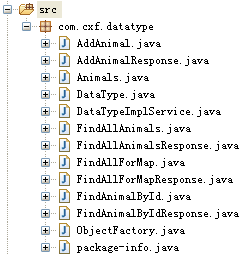
5.查看wsdl文档
<?xml version='1.0' encoding='UTF-8'?><wsdl:definitions xmlns:xsd="http://www.w3.org/2001/XMLSchema" xmlns:wsdl="http://schemas.xmlsoap.org/wsdl/" xmlns:tns="http://datatype.cxf.com/" xmlns:soap="http://schemas.xmlsoap.org/wsdl/soap/" xmlns:ns1="http://schemas.xmlsoap.org/soap/http" name="DataTypeImplService" targetNamespace="http://datatype.cxf.com/">

  <wsdl:types>

<xs:schema xmlns:xs="http://www.w3.org/2001/XMLSchema" xmlns:tns="http://datatype.cxf.com/" elementFormDefault="unqualified" targetNamespace="http://datatype.cxf.com/" version="1.0">

<xs:element name="addAnimal" type="tns:addAnimal"/>

<xs:element name="addAnimalResponse" type="tns:addAnimalResponse"/>

<xs:element name="findAllAnimals" type="tns:findAllAnimals"/>

<xs:element name="findAllAnimalsResponse" type="tns:findAllAnimalsResponse"/>

<xs:element name="findAllForMap" type="tns:findAllForMap"/>

<xs:element name="findAllForMapResponse" type="tns:findAllForMapResponse"/>

<xs:element name="findAnimalById" type="tns:findAnimalById"/>

<xs:element name="findAnimalByIdResponse" type="tns:findAnimalByIdResponse"/>

<xs:complexType name="findAllAnimals">

<xs:sequence/>

</xs:complexType>

<xs:complexType name="findAllAnimalsResponse">

<xs:sequence>

<xs:element maxOccurs="unbounded" minOccurs="0" name="return" type="tns:animals"/>

</xs:sequence>

</xs:complexType>

<xs:complexType name="animals">

<xs:sequence>

<xs:element name="id" type="xs:int"/>

<xs:element minOccurs="0" name="name" type="xs:string"/>

<xs:element name="price" type="xs:float"/>

</xs:sequence>

</xs:complexType>

<xs:complexType name="findAllForMap">

<xs:sequence/>

</xs:complexType>

<xs:complexType name="findAllForMapResponse">

<xs:sequence>

<xs:element name="_return">

<xs:complexType>

<xs:sequence>

<xs:element maxOccurs="unbounded" minOccurs="0" name="entry">

<xs:complexType>

<xs:sequence>

<xs:element minOccurs="0" name="key" type="xs:int"/>

<xs:element minOccurs="0" name="value" type="tns:animals"/>

</xs:sequence>

</xs:complexType>

</xs:element>

</xs:sequence>

</xs:complexType>

</xs:element>

</xs:sequence>

</xs:complexType>

<xs:complexType name="addAnimal">

<xs:sequence>

<xs:element minOccurs="0" name="arg0" type="tns:animals"/>

</xs:sequence>

</xs:complexType>

<xs:complexType name="addAnimalResponse">

<xs:sequence>

<xs:element name="return" type="xs:boolean"/>

</xs:sequence>

</xs:complexType>

<xs:complexType name="findAnimalById">

<xs:sequence>

<xs:element name="arg0" type="xs:int"/>

</xs:sequence>

</xs:complexType>

<xs:complexType name="findAnimalByIdResponse">

<xs:sequence>

<xs:element minOccurs="0" name="return" type="tns:animals"/>

</xs:sequence>

</xs:complexType>

</xs:schema>

  </wsdl:types>

  <wsdl:message name="findAnimalById">

    <wsdl:part element="tns:findAnimalById" name="parameters">

    </wsdl:part>

  </wsdl:message>

  <wsdl:message name="addAnimal">

    <wsdl:part element="tns:addAnimal" name="parameters">

    </wsdl:part>

  </wsdl:message>

  <wsdl:message name="findAllAnimalsResponse">

    <wsdl:part element="tns:findAllAnimalsResponse" name="parameters">

    </wsdl:part>

  </wsdl:message>

  <wsdl:message name="findAllForMapResponse">

    <wsdl:part element="tns:findAllForMapResponse" name="parameters">

    </wsdl:part>

  </wsdl:message>

  <wsdl:message name="findAnimalByIdResponse">

    <wsdl:part element="tns:findAnimalByIdResponse" name="parameters">

    </wsdl:part>

  </wsdl:message>

  <wsdl:message name="addAnimalResponse">

    <wsdl:part element="tns:addAnimalResponse" name="parameters">

    </wsdl:part>

  </wsdl:message>

  <wsdl:message name="findAllAnimals">

    <wsdl:part element="tns:findAllAnimals" name="parameters">

    </wsdl:part>

  </wsdl:message>

  <wsdl:message name="findAllForMap">

    <wsdl:part element="tns:findAllForMap" name="parameters">

    </wsdl:part>

  </wsdl:message>

  <wsdl:portType name="DataType">

    <wsdl:operation name="findAllAnimals">

      <wsdl:input message="tns:findAllAnimals" name="findAllAnimals">

    </wsdl:input>

      <wsdl:output message="tns:findAllAnimalsResponse" name="findAllAnimalsResponse">

    </wsdl:output>

    </wsdl:operation>

    <wsdl:operation name="findAllForMap">

      <wsdl:input message="tns:findAllForMap" name="findAllForMap">

    </wsdl:input>

      <wsdl:output message="tns:findAllForMapResponse" name="findAllForMapResponse">

    </wsdl:output>

    </wsdl:operation>

    <wsdl:operation name="addAnimal">

      <wsdl:input message="tns:addAnimal" name="addAnimal">

    </wsdl:input>

      <wsdl:output message="tns:addAnimalResponse" name="addAnimalResponse">

    </wsdl:output>

    </wsdl:operation>

    <wsdl:operation name="findAnimalById">

      <wsdl:input message="tns:findAnimalById" name="findAnimalById">

    </wsdl:input>

      <wsdl:output message="tns:findAnimalByIdResponse" name="findAnimalByIdResponse">

    </wsdl:output>

    </wsdl:operation>

  </wsdl:portType>

  <wsdl:binding name="DataTypeImplServiceSoapBinding" type="tns:DataType">

    <soap:binding style="document" transport="http://schemas.xmlsoap.org/soap/http"/>

    <wsdl:operation name="findAllAnimals">

      <soap:operation soapAction="" style="document"/>

      <wsdl:input name="findAllAnimals">

        <soap:body use="literal"/>

      </wsdl:input>

      <wsdl:output name="findAllAnimalsResponse">

        <soap:body use="literal"/>

      </wsdl:output>

    </wsdl:operation>

    <wsdl:operation name="findAllForMap">

      <soap:operation soapAction="" style="document"/>

      <wsdl:input name="findAllForMap">

        <soap:body use="literal"/>

      </wsdl:input>

      <wsdl:output name="findAllForMapResponse">

        <soap:body use="literal"/>

      </wsdl:output>

    </wsdl:operation>

    <wsdl:operation name="addAnimal">

      <soap:operation soapAction="" style="document"/>

      <wsdl:input name="addAnimal">

        <soap:body use="literal"/>

      </wsdl:input>

      <wsdl:output name="addAnimalResponse">

        <soap:body use="literal"/>

      </wsdl:output>

    </wsdl:operation>

    <wsdl:operation name="findAnimalById">

      <soap:operation soapAction="" style="document"/>

      <wsdl:input name="findAnimalById">

        <soap:body use="literal"/>

      </wsdl:input>

      <wsdl:output name="findAnimalByIdResponse">

        <soap:body use="literal"/>

      </wsdl:output>

    </wsdl:operation>

  </wsdl:binding>

  <wsdl:service name="DataTypeImplService">

    <wsdl:port binding="tns:DataTypeImplServiceSoapBinding" name="DataTypeImplPort">

      <soap:address location="http://localhost:8080/cxfServer"/>

    </wsdl:port>

  </wsdl:service>

</wsdl:definitions>
6.测试(获取服务端各种数据类型的数据)
public class TestDataType {

    public static void main(String[] args) {

        DataTypeImplService factory = new DataTypeImplService();

        DataType dataType = factory.getDataTypeImplPort();

        boolean bool = dataType.addAnimal(new Animals());

        System.out.println(bool);

        Animals a = dataType.findAnimalById(1);

        System.out.println(a);

        List<Animals> list = dataType.findAllAnimals();

        System.out.println(list);

        Return r = dataType.findAllForMap();

        List<FindAllForMapResponse.Return.Entry> entrys = r.getEntry();

        for(Return.Entry entry : entrys){

            int id = (int) entry.getKey();

            Animals name = entry.getValue();

            System.out.println(id+":"+name);

        }

    }

}
运行结果:
true

Animals [id=1, name=car, price=50.0]

[Animals [id=1, name=pig, price=2000.0], Animals [id=2, name=dog, price=100.0], Animals [id=3, name=duck, price=40.0]]

1:Animals [id=1, name=rabbit, price=20.0]

2:Animals [id=1, name=chick, price=30.0]

3:Animals [id=1, name=wolf, price=20000.0]
注意:
map的使用方法略不同,使用dataType.findAllForMap();后,返回的是个Return类,下面是Return类代码:
public class FindAllForMapResponse {

    @XmlElement(required = true)

    protected FindAllForMapResponse.Return _return;

    public FindAllForMapResponse.Return getReturn() {

        return _return;

    }

    public void setReturn(FindAllForMapResponse.Return value) {

        this._return = value;

    }

    @XmlAccessorType(XmlAccessType.FIELD)

    @XmlType(name = "", propOrder = {

        "entry"

    })

    public static class Return {

        protected List<FindAllForMapResponse.Return.Entry> entry;

        public List<FindAllForMapResponse.Return.Entry> getEntry() {

            if (entry == null) {

                entry = new ArrayList<FindAllForMapResponse.Return.Entry>();

            }

            return this.entry;

        }

        @XmlAccessorType(XmlAccessType.FIELD)

        @XmlType(name = "", propOrder = {

            "key",

            "value"

        })

        public static class Entry {

            protected Integer key;

            protected Animals value;

            public Integer getKey() {

                return key;

            }

            public void setKey(Integer value) {

                this.key = value;

            }

            public Animals getValue() {

                return value;

            }

            public void setValue(Animals value) {

                this.value = value;

            }

        }

    }

}
4.CXF所支持的数据类型的更多相关文章
- MySQL知识树-支持的数据类型
本篇学习笔记的主要内容: 介绍MySQL支持的各种数据类型(常用),并讲解其主要特点. MySQL支持多种数据类型,主要包括数值类型.日期和时间类型.字符串类型. 数值类型 MySQL的数值类型包 ...
- Cassandra在CQL语言层面支持多种数据类型
Cassandra在CQL语言层面支持多种数据类型. CQL类型 对应Java类型 描述 ascii String ascii字符串 bigint long 64位整数 blob ByteBuffer ...
- 【原创】C++链表如何像Python List一样支持多种数据类型
用过Python的码友都知道,Python中List支持多种数据类型,如下面代码所示链表li内的数据类型可以是整数,同时也可以是字符串,当然也可以是其他数据类型. 1: >>> li ...
- android sqlite支持的数据类型
Sqlite3支持的数据类型 :NULL.INTEGER.REAL.TEXT.BLOB 但实际上,sqlite3也接受如下的数据类型: smallint 16 位元的整数. interge ...
- Memcache仅仅支持简单数据类型
Memcache仅仅支持简单数据类型 ,复杂数据类型需要应用自己处理 从数据库当中取出数据[User [id=1, username=guowuxin, password=guowuxin], Use ...
- mysql支持的数据类型及其测试
原文:mysql支持的数据类型及其测试 1.基础知识 1.1如何来查看mysql的帮助手册 ?int Help float; 1.2创建表的规则 CREATE TABLE [IF NOT EXISTS ...
- MongoDB 所支持的数据类型 创建和删除集合 创建和删除数据库
数据类型 MongoDB 支持如下数据类型: String:字符串.存储数据常用的数据类型.在 MongoDB 中,UTF-8 编码的字符串才是合法的. Integer:整型数值.用于存储数值.根据你 ...
- 初识Redis系列之三:Redis支持的数据类型及使用
支持的数据类型有五种: string(字符串).hash(哈希).list(列表).set(集合)及zset(sorted set:有序集合): 下面分别对这几种类型进行简单的Redis存取操作 1: ...
- 数据库 -- mysql支持的数据类型
mysql支持的数据类型 数值类型 MySQL支持所有标准SQL数值数据类型. 这些类型包括严格数值数据类型(INTEGER.SMALLINT.DECIMAL和NUMERIC),以及近似数值数据类型( ...
随机推荐
- leveldb 学习笔记之log结构与存取流程
log文件的格式 log文件每一条记录由四个部分组成: CheckSum,即CRC验证码,占4个字节 记录长度,即数据部分的长度,2个字节 类型,这条记录的类型,后续讲解,1个字节 数据,就是这条记录 ...
- june 14
Thank you for your applying for employment with our company. Your application is now being processed ...
- zabbix微信告警实践
首先你得有个企业号!!!具体操作步骤可以参考http://itnihao.blog.51cto.com/1741976/1733245,里面写的很详细就不重复了. 微信公众号注册并配置完成后,还需要让 ...
- EF 连接MySQL 数据库 保存中文数据后乱码问题
EF 连接MySQL 数据库 保存中文数据后乱码问题 采用Code First 生成的数据库,MySQL数据库中,生成的表的编码格式为***** 发现这个问题后,全部手动改成UTF8(图是另一个表的 ...
- Be a new gentleman
有人说:'生活是个大染缸',对于自制力不强的我深表无奈,时常自省的我虽然徘徊在层次边缘,但还是依着光明一点点靠近: 着装得体(改善消费观念,价值观) 讲个人卫生,保持公共环境卫生 女士优先 与人保持安 ...
- numberOfRowsInSection方法什么时候调用
昨天在代码里遇到个问题,很简单的数组越界,但是真心觉得自己把数据处理的思路都理清了不应该会出现这种情况,而且打印出来出现了"灵异事件",那就是行数只有14行,但是cell加载到了1 ...
- MAC 安装j2ee.sh的办法
It says it needs the DISPLAY variable set - what do I need to set it to? Instead of saying: ./java_e ...
- Tomcat单向Https验证搭建,亲自实现与主流浏览器、Android/iOS移动客户端安全通信
众所周知,iOS9已经开始在联网方面默认强制使用Https替换原来的Http请求了,虽然Http和Https各有各的优势,但是总得来说,到了现在这个安全的信息时代,开发者已经离不开Https了. 网上 ...
- JavaScript数组删除重复元素(去重)的方法
1. var arr=str.split(""); ;arr.length->i;i++){ ;j<arr.length;j++){ if(arr[j]==arr[i] ...
- iOS通过手势拿到当前的View
UITapGestureRecognizer *tap = [[UITapGestureRecognizer alloc] initWithTarget:self action:@selector(t ...