
4.CXF所支持的数据类型
前言:jdk提供了webService,但为什么使用jdk来开发webService相对少呢?
一个重要原因就是jdk支持的数据类型相对不足,例如Map就不为jdk所支持!
CXF支持的数据类型:
基本数据类型:
int、boolean、float等...
引用类型:
String、集合(Set、List、Map)、自定义数据类型...
补充说明:cxf支持所有的数据类型!
测试案例:
1.构建一个实体类Animals,为了测试基本数据类型,定义了三个属性,int型的id,String的name和float型的price
public class Animals {

    private int id;

    private String name;//动物名称

    private float price;//动物价格

    public Animals() {

        super();

    }

    public Animals(int id, String name, float price) {

        super();

        this.id = id;

        this.name = name;

        this.price = price;

    }

    public int getId() {

        return id;

    }

    public void setId(int id) {

        this.id = id;

    }

    public String getName() {

        return name;

    }

    public void setName(String name) {

        this.name = name;

    }

    public float getPrice() {

        return price;

    }

    public void setPrice(float price) {

        this.price = price;

    }

    @Override

    public String toString() {

        return "Animals [id=" + id + ", name=" + name + ", price=" + price

                + "]";

    }

}
2.编写SEI以及SEI实现类
@WebService

public interface DataType {

    //添加一个动物

    @WebMethod

    boolean addAnimal(Animals a);

    //查找一只动物

    @WebMethod

    Animals findAnimalById(int id);

    //查找所有动物(测试List)

    @WebMethod

    List<Animals> findAllAnimals();

    //查找所有动物(测试Map)

    @WebMethod

    Map<Integer,Animals> findAllForMap();

}
public class DataTypeImpl implements DataType {

    @Override

    public boolean addAnimal(Animals a) {

        //为方便测试,直接返回true

        return true;

    }

    @Override

    public Animals findAnimalById(int id) {

        return new Animals(1, "car", 50);

    }

    @Override

    public List<Animals> findAllAnimals() {

        List<Animals> list = new ArrayList<Animals>();

        list.add(new Animals(1, "pig", 2000));

        list.add(new Animals(2, "dog", 100));

        list.add(new Animals(3, "duck", 40));

        return list;

    }

    @Override

    public Map<Integer, Animals> findAllForMap() {

        Map<Integer, Animals> map = new HashMap<Integer, Animals>();

        map.put(1, new Animals(1, "rabbit", 20));

        map.put(2, new Animals(1, "chick", 30));

        map.put(3, new Animals(1, "wolf", 20000));

        return map;

    }

}
3.发布
public class Publish {

    public static void main(String[] args) {

        String address = "http://localhost:8080/cxfServer";

        Endpoint.publish(address, new DataTypeImpl());

        System.out.println("如果发布成功,打印!");

    }

}
4.使用cxf生成客户端代码

生成后的结构为:
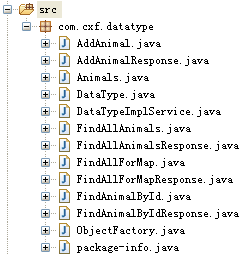
5.查看wsdl文档
<?xml version='1.0' encoding='UTF-8'?><wsdl:definitions xmlns:xsd="http://www.w3.org/2001/XMLSchema" xmlns:wsdl="http://schemas.xmlsoap.org/wsdl/" xmlns:tns="http://datatype.cxf.com/" xmlns:soap="http://schemas.xmlsoap.org/wsdl/soap/" xmlns:ns1="http://schemas.xmlsoap.org/soap/http" name="DataTypeImplService" targetNamespace="http://datatype.cxf.com/">

  <wsdl:types>

<xs:schema xmlns:xs="http://www.w3.org/2001/XMLSchema" xmlns:tns="http://datatype.cxf.com/" elementFormDefault="unqualified" targetNamespace="http://datatype.cxf.com/" version="1.0">

<xs:element name="addAnimal" type="tns:addAnimal"/>

<xs:element name="addAnimalResponse" type="tns:addAnimalResponse"/>

<xs:element name="findAllAnimals" type="tns:findAllAnimals"/>

<xs:element name="findAllAnimalsResponse" type="tns:findAllAnimalsResponse"/>

<xs:element name="findAllForMap" type="tns:findAllForMap"/>

<xs:element name="findAllForMapResponse" type="tns:findAllForMapResponse"/>

<xs:element name="findAnimalById" type="tns:findAnimalById"/>

<xs:element name="findAnimalByIdResponse" type="tns:findAnimalByIdResponse"/>

<xs:complexType name="findAllAnimals">

<xs:sequence/>

</xs:complexType>

<xs:complexType name="findAllAnimalsResponse">

<xs:sequence>

<xs:element maxOccurs="unbounded" minOccurs="0" name="return" type="tns:animals"/>

</xs:sequence>

</xs:complexType>

<xs:complexType name="animals">

<xs:sequence>

<xs:element name="id" type="xs:int"/>

<xs:element minOccurs="0" name="name" type="xs:string"/>

<xs:element name="price" type="xs:float"/>

</xs:sequence>

</xs:complexType>

<xs:complexType name="findAllForMap">

<xs:sequence/>

</xs:complexType>

<xs:complexType name="findAllForMapResponse">

<xs:sequence>

<xs:element name="_return">

<xs:complexType>

<xs:sequence>

<xs:element maxOccurs="unbounded" minOccurs="0" name="entry">

<xs:complexType>

<xs:sequence>

<xs:element minOccurs="0" name="key" type="xs:int"/>

<xs:element minOccurs="0" name="value" type="tns:animals"/>

</xs:sequence>

</xs:complexType>

</xs:element>

</xs:sequence>

</xs:complexType>

</xs:element>

</xs:sequence>

</xs:complexType>

<xs:complexType name="addAnimal">

<xs:sequence>

<xs:element minOccurs="0" name="arg0" type="tns:animals"/>

</xs:sequence>

</xs:complexType>

<xs:complexType name="addAnimalResponse">

<xs:sequence>

<xs:element name="return" type="xs:boolean"/>

</xs:sequence>

</xs:complexType>

<xs:complexType name="findAnimalById">

<xs:sequence>

<xs:element name="arg0" type="xs:int"/>

</xs:sequence>

</xs:complexType>

<xs:complexType name="findAnimalByIdResponse">

<xs:sequence>

<xs:element minOccurs="0" name="return" type="tns:animals"/>

</xs:sequence>

</xs:complexType>

</xs:schema>

  </wsdl:types>

  <wsdl:message name="findAnimalById">

    <wsdl:part element="tns:findAnimalById" name="parameters">

    </wsdl:part>

  </wsdl:message>

  <wsdl:message name="addAnimal">

    <wsdl:part element="tns:addAnimal" name="parameters">

    </wsdl:part>

  </wsdl:message>

  <wsdl:message name="findAllAnimalsResponse">

    <wsdl:part element="tns:findAllAnimalsResponse" name="parameters">

    </wsdl:part>

  </wsdl:message>

  <wsdl:message name="findAllForMapResponse">

    <wsdl:part element="tns:findAllForMapResponse" name="parameters">

    </wsdl:part>

  </wsdl:message>

  <wsdl:message name="findAnimalByIdResponse">

    <wsdl:part element="tns:findAnimalByIdResponse" name="parameters">

    </wsdl:part>

  </wsdl:message>

  <wsdl:message name="addAnimalResponse">

    <wsdl:part element="tns:addAnimalResponse" name="parameters">

    </wsdl:part>

  </wsdl:message>

  <wsdl:message name="findAllAnimals">

    <wsdl:part element="tns:findAllAnimals" name="parameters">

    </wsdl:part>

  </wsdl:message>

  <wsdl:message name="findAllForMap">

    <wsdl:part element="tns:findAllForMap" name="parameters">

    </wsdl:part>

  </wsdl:message>

  <wsdl:portType name="DataType">

    <wsdl:operation name="findAllAnimals">

      <wsdl:input message="tns:findAllAnimals" name="findAllAnimals">

    </wsdl:input>

      <wsdl:output message="tns:findAllAnimalsResponse" name="findAllAnimalsResponse">

    </wsdl:output>

    </wsdl:operation>

    <wsdl:operation name="findAllForMap">

      <wsdl:input message="tns:findAllForMap" name="findAllForMap">

    </wsdl:input>

      <wsdl:output message="tns:findAllForMapResponse" name="findAllForMapResponse">

    </wsdl:output>

    </wsdl:operation>

    <wsdl:operation name="addAnimal">

      <wsdl:input message="tns:addAnimal" name="addAnimal">

    </wsdl:input>

      <wsdl:output message="tns:addAnimalResponse" name="addAnimalResponse">

    </wsdl:output>

    </wsdl:operation>

    <wsdl:operation name="findAnimalById">

      <wsdl:input message="tns:findAnimalById" name="findAnimalById">

    </wsdl:input>

      <wsdl:output message="tns:findAnimalByIdResponse" name="findAnimalByIdResponse">

    </wsdl:output>

    </wsdl:operation>

  </wsdl:portType>

  <wsdl:binding name="DataTypeImplServiceSoapBinding" type="tns:DataType">

    <soap:binding style="document" transport="http://schemas.xmlsoap.org/soap/http"/>

    <wsdl:operation name="findAllAnimals">

      <soap:operation soapAction="" style="document"/>

      <wsdl:input name="findAllAnimals">

        <soap:body use="literal"/>

      </wsdl:input>

      <wsdl:output name="findAllAnimalsResponse">

        <soap:body use="literal"/>

      </wsdl:output>

    </wsdl:operation>

    <wsdl:operation name="findAllForMap">

      <soap:operation soapAction="" style="document"/>

      <wsdl:input name="findAllForMap">

        <soap:body use="literal"/>

      </wsdl:input>

      <wsdl:output name="findAllForMapResponse">

        <soap:body use="literal"/>

      </wsdl:output>

    </wsdl:operation>

    <wsdl:operation name="addAnimal">

      <soap:operation soapAction="" style="document"/>

      <wsdl:input name="addAnimal">

        <soap:body use="literal"/>

      </wsdl:input>

      <wsdl:output name="addAnimalResponse">

        <soap:body use="literal"/>

      </wsdl:output>

    </wsdl:operation>

    <wsdl:operation name="findAnimalById">

      <soap:operation soapAction="" style="document"/>

      <wsdl:input name="findAnimalById">

        <soap:body use="literal"/>

      </wsdl:input>

      <wsdl:output name="findAnimalByIdResponse">

        <soap:body use="literal"/>

      </wsdl:output>

    </wsdl:operation>

  </wsdl:binding>

  <wsdl:service name="DataTypeImplService">

    <wsdl:port binding="tns:DataTypeImplServiceSoapBinding" name="DataTypeImplPort">

      <soap:address location="http://localhost:8080/cxfServer"/>

    </wsdl:port>

  </wsdl:service>

</wsdl:definitions>
6.测试(获取服务端各种数据类型的数据)
public class TestDataType {

    public static void main(String[] args) {

        DataTypeImplService factory = new DataTypeImplService();

        DataType dataType = factory.getDataTypeImplPort();

        boolean bool = dataType.addAnimal(new Animals());

        System.out.println(bool);

        Animals a = dataType.findAnimalById(1);

        System.out.println(a);

        List<Animals> list = dataType.findAllAnimals();

        System.out.println(list);

        Return r = dataType.findAllForMap();

        List<FindAllForMapResponse.Return.Entry> entrys = r.getEntry();

        for(Return.Entry entry : entrys){

            int id = (int) entry.getKey();

            Animals name = entry.getValue();

            System.out.println(id+":"+name);

        }

    }

}
运行结果:
true

Animals [id=1, name=car, price=50.0]

[Animals [id=1, name=pig, price=2000.0], Animals [id=2, name=dog, price=100.0], Animals [id=3, name=duck, price=40.0]]

1:Animals [id=1, name=rabbit, price=20.0]

2:Animals [id=1, name=chick, price=30.0]

3:Animals [id=1, name=wolf, price=20000.0]
注意:
map的使用方法略不同,使用dataType.findAllForMap();后,返回的是个Return类,下面是Return类代码:
public class FindAllForMapResponse {

    @XmlElement(required = true)

    protected FindAllForMapResponse.Return _return;

    public FindAllForMapResponse.Return getReturn() {

        return _return;

    }

    public void setReturn(FindAllForMapResponse.Return value) {

        this._return = value;

    }

    @XmlAccessorType(XmlAccessType.FIELD)

    @XmlType(name = "", propOrder = {

        "entry"

    })

    public static class Return {

        protected List<FindAllForMapResponse.Return.Entry> entry;

        public List<FindAllForMapResponse.Return.Entry> getEntry() {

            if (entry == null) {

                entry = new ArrayList<FindAllForMapResponse.Return.Entry>();

            }

            return this.entry;

        }

        @XmlAccessorType(XmlAccessType.FIELD)

        @XmlType(name = "", propOrder = {

            "key",

            "value"

        })

        public static class Entry {

            protected Integer key;

            protected Animals value;

            public Integer getKey() {

                return key;

            }

            public void setKey(Integer value) {

                this.key = value;

            }

            public Animals getValue() {

                return value;

            }

            public void setValue(Animals value) {

                this.value = value;

            }

        }

    }

}
4.CXF所支持的数据类型的更多相关文章
- MySQL知识树-支持的数据类型
本篇学习笔记的主要内容: 介绍MySQL支持的各种数据类型(常用),并讲解其主要特点. MySQL支持多种数据类型,主要包括数值类型.日期和时间类型.字符串类型. 数值类型 MySQL的数值类型包 ...
- Cassandra在CQL语言层面支持多种数据类型
Cassandra在CQL语言层面支持多种数据类型. CQL类型 对应Java类型 描述 ascii String ascii字符串 bigint long 64位整数 blob ByteBuffer ...
- 【原创】C++链表如何像Python List一样支持多种数据类型
用过Python的码友都知道,Python中List支持多种数据类型,如下面代码所示链表li内的数据类型可以是整数,同时也可以是字符串,当然也可以是其他数据类型. 1: >>> li ...
- android sqlite支持的数据类型
Sqlite3支持的数据类型 :NULL.INTEGER.REAL.TEXT.BLOB 但实际上,sqlite3也接受如下的数据类型: smallint 16 位元的整数. interge ...
- Memcache仅仅支持简单数据类型
Memcache仅仅支持简单数据类型 ,复杂数据类型需要应用自己处理 从数据库当中取出数据[User [id=1, username=guowuxin, password=guowuxin], Use ...
- mysql支持的数据类型及其测试
原文:mysql支持的数据类型及其测试 1.基础知识 1.1如何来查看mysql的帮助手册 ?int Help float; 1.2创建表的规则 CREATE TABLE [IF NOT EXISTS ...
- MongoDB 所支持的数据类型 创建和删除集合 创建和删除数据库
数据类型 MongoDB 支持如下数据类型: String:字符串.存储数据常用的数据类型.在 MongoDB 中,UTF-8 编码的字符串才是合法的. Integer:整型数值.用于存储数值.根据你 ...
- 初识Redis系列之三:Redis支持的数据类型及使用
支持的数据类型有五种: string(字符串).hash(哈希).list(列表).set(集合)及zset(sorted set:有序集合): 下面分别对这几种类型进行简单的Redis存取操作 1: ...
- 数据库 -- mysql支持的数据类型
mysql支持的数据类型 数值类型 MySQL支持所有标准SQL数值数据类型. 这些类型包括严格数值数据类型(INTEGER.SMALLINT.DECIMAL和NUMERIC),以及近似数值数据类型( ...
随机推荐
- jquery取框架当前的url
前提,当前frame无名或动态生成的: var url = eval($("#ifr1").attr("name")+".location.href; ...
- Android开发学习---sharedpreference的使用
在前面文章中,为了使数据回显,使用的技术思路是,首先,将数据持久化写到ROM或者SDCard中,其中name和password以":"分隔;然后,将数据记取出来,再用split方法 ...
- 浅谈rem、em、px
1.px:像素(Pixel) px是相对长度单位,他是相对于显示器屏幕分辨率而言的 优点:比较稳定.精确 缺点:在浏览器 中放大或者缩小浏览页面,会出现页面混乱的情况. 如下例子: .buttonPX ...
- css 字间距、CSS字体间距、css 字符间距设置
1.text-indent设置抬头距离css缩进 2.letter-spacing来设置字与字间距_字符间距离,字体间距css样式
- tomcat(二)--tomcat结构
Tomcat结构及组件介绍 上面的层次结构在server.xml中有体现 <Server> <Service> <Connector> <Engine> ...
- Linux内核完全注释阅读笔记1:O(1)时间复杂度查找timeout定时器
前言 一直有Linux kernel情节,之前也一直在看Linux kernel相关的书和代码,但是每次到最后又由于兴趣转变而荒废了.这次终于静下心来想把Linux内核相关的代码好好看看,算是对自己的 ...
- 强大的Spring缓存技术(上)
缓存是实际工作中非常常用的一种提高性能的方法, 我们会在许多场景下来使用缓存. 本文通过一个简单的例子进行展开,通过对比我们原来的自定义缓存和 spring 的基于注释的 cache 配置方法,展现了 ...
- Sql Server 2008卸载后再次安装一直报错
sql server 2008卸载之后再次安装一直报错问题. 第一:由于上一次的卸载不干净,可参照百度完全卸载sql server2008 的方式 1. 用WindowsInstaller删除所有与S ...
- echarts绘制甘特图
在setoption之后添加这段代码: window.addEventListener('resize', function () { myChart.resize(); }); 图表就能随着 ...
- Oracle数据导入导出
Oracle数据导入导出imp/exp 在oracle安装目录下有EXP.EXE与IMP.EXE这2个文件,他们分别被用来执行数据库的导入导出.所以Oracle数据导入导出imp/exp就相当与ora ...