
在linux使用make编译ArduPilot for Pixhawk/PX4 ArduPilot 编译环境搭建
Building ArduPilot for Pixhawk/PX4 on Linux with Make
使用Make编译 ArduPilot for Pixhawk 2, Pixhawk and PX4 在linux上.
Note: 编译 Pixhawk 2 and Pixhawk使用 (make px4-v2). 编译 PX4 使用 make px4-v1.
Quick start
系统ubuntu16.04
Setup
安装 git:
sudo apt-get -qq -y install git
安装 arm-none-eabi-gcc编译器

安装gawk,cmake
apt-get install gawk cmake
克隆源码到本地:
git clone https://github.com/diydrones/ardupilot.git
运行ubuntu安装脚本:
ardupilot/Tools/scripts/install-prereqs-ubuntu.sh -y
Reload the path (log-out and log-in to make permanent):
. ~/.profile
Build 编译
以下是编译不同机型 Pixhawk2/Pixhawk 的命令. 编译PX4使用make px4-v2 而不是make px4-v1
To build for PX4 replace make px4-v2 with make px4-v1.
Build for Copter:
cd ardupilot/ArduCopter

make px4-v2
编译过程中出现的问题:
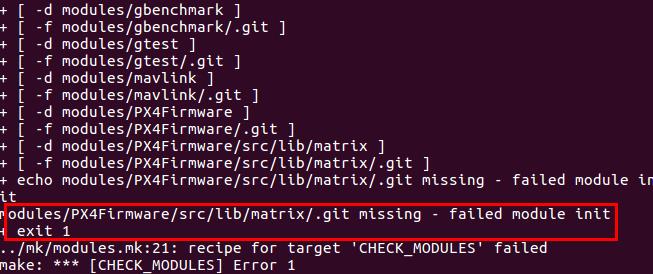
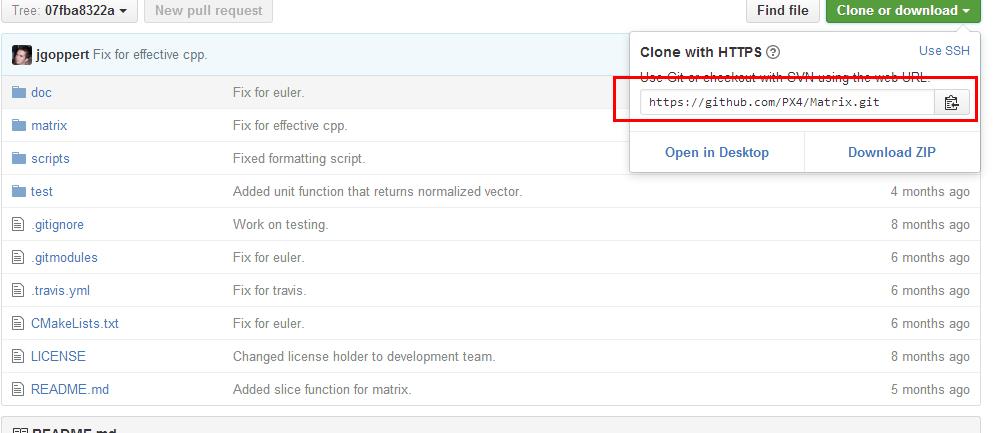
在github上的matrix目录名已经变化,所以找不到,手动git clone下载即可
之后又出现的问题是:
少python-empy,pip,catkin-pkg,直接使用apt-get install 安装即可

按照提示少哪个就安装哪个
又出现问题:genromfs没有找到
直接apt-get install genromfs

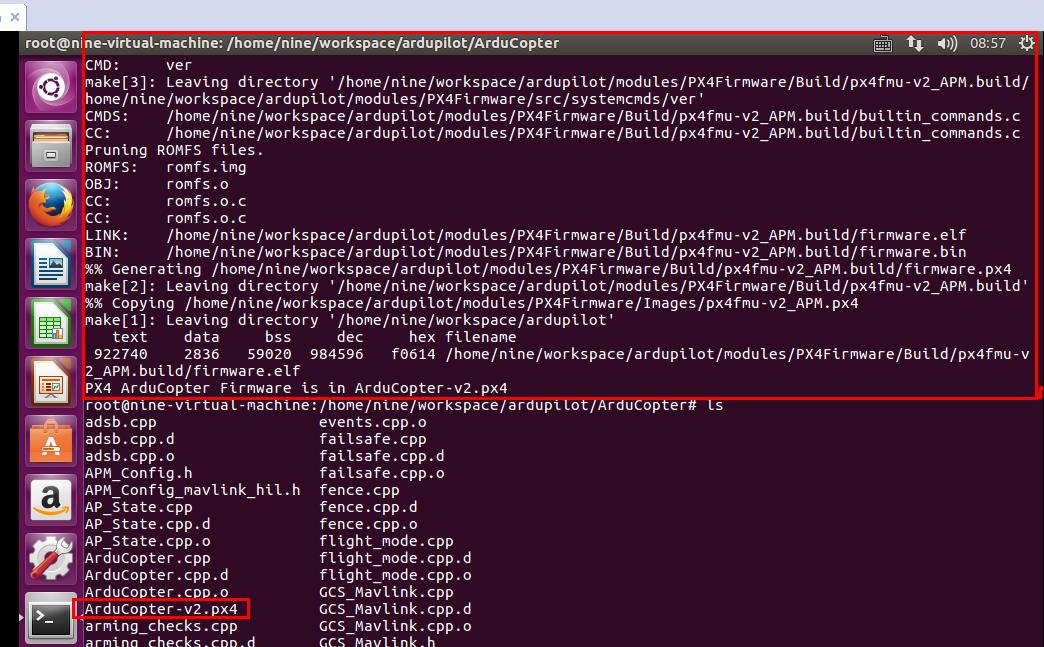
最后编译成功,生成px4固件文件
Build for Plane:
cd ardupilot/ArduPlane

make px4-v2
Build for Rover:
cd ardupilot/APMrover2

make px4-v2
Build for Antenna Tracker:
cd ardupilot/AntennaTracker

make px4-v2
Building
One you have the 3 git trees and compiler setup you do the build in your vehicle directory. For example, if building Plane then do this:
cd ardupilot/ArduPlane

make px4
That will build two files ArduPlane-v1.px4 and ArduPlane-v2.px4. The v1 file is for PX4v1, the v2 file is for PX4v2 (the Pixhawk).
你可以只编译一个使用 “make px4-v1” or “make px4-v2”.
The first time you build it will take quite a long time as it builds the px4 archives. Subsequent builds will be faster (especially if you setup ccache correctly).
Loading firmware
To load the firmware onto the board use
make px4-v1-upload
or
make px4-v2-upload
After it says “waiting for bootloader” plugin your PX4 on USB.
If upload consistently fails in the erase step then check if you are running ‘modemmanager’ which can take control of the PX4 USB port. Removing modemmanager can help.
Cleaning
If there have been updates to the PX4NuttX or PX4Firmware git submodules you may need to do a full clean build. To do that use:
make px4-clean
that will remove the PX4NuttX archives so you can do a build from scratch
在linux使用make编译ArduPilot for Pixhawk/PX4 ArduPilot 编译环境搭建的更多相关文章
- Spark入门实战系列--2.Spark编译与部署(上)--基础环境搭建
[注] 1.该系列文章以及使用到安装包/测试数据 可以在<倾情大奉送--Spark入门实战系列>获取: 2.Spark编译与部署将以CentOS 64位操作系统为基础,主要是考虑到实际应用 ...
- Linux移植到自己的开发板(一)环境搭建
环境搭建 vmware:VMware Workstation 15 Pro Linux系统:Ubuntu16.04 x64 1. 在Windows系统安装VMware15软件: 2. 网上下载并解压u ...
- Linux巩固记录(3) hadoop 2.7.4 环境搭建
由于要近期使用hadoop等进行相关任务执行,操作linux时候就多了 以前只在linux上配置J2EE项目执行环境,无非配置下jdk,部署tomcat,再通过docker或者jenkins自动部署上 ...
- Linux 4.10.8 根文件系统制作(一)---环境搭建
一.工具 制作工具为busybox 下载地址:https://busybox.net/ 解压: 二.制作文件系统 进入目录,执行make menuconfig: 2.1 busybox setting ...
- kali linux 入门(1) 基于win10和docker的环境搭建
1. 前言 渗透测试并没有一个标准的定义.国外一些安全组织达成共识的通用说法是,渗透测试是通过模拟恶意黑客的攻击方法,来评估计算机网络系统安全的一种评估方法,这个过程包括对系统的任何弱点.技术缺陷或漏 ...
- Android开发环境搭建 for windows (linux类似) 详细可参考“文件”中“Android开发环境搭建.pdf ”
ADT-Bundle for Windows 是由Google Android官方提供的集成式IDE,已经包含了Eclipse,你无需再去下载Eclipse,并且里面已集成了插件,它解决了大部分新手通 ...
- pixhawk在linux(ubuntu16.04)下的开发环境搭建和源码编译
1查找安装文档(http://dev.px4.io/starting-installing-linux.html)(本文仅针对硬件为PIXHAWK的开发环境搭建,其他硬件请参考官方文档) ...
- 【转】Linux(ubuntu14.04)上编译Android4.4源码的环境搭建及编译全过程
原文网址:http://jileniao.net/linux-android-building.html sublime text让我伤心.本来很信任sublime text的自动保存功能,之前使用一 ...
- linux下安卓编译apk环境搭建
ubuntu下linux安卓编译环境搭建. 配置好编译环境 (前提是已经安装了jdk,可以用java -verison 命令查看) 一.设置环境变量 用vi ~/.bashrc 打开编译环境 JA ...
随机推荐
- int(3)和int(10)的区别
int(M) 在 integer 数据类型中,M 表示最大显示宽度.在 int(M) 中,M 的值跟 int(M) 所占多少存储空间并无任何关系. int(3).int(4).int(8) 在磁盘上都 ...
- DFA敏感词过滤
import java.io.UnsupportedEncodingException; import java.nio.ByteBuffer; import java.util.ArrayList; ...
- 将项目上传到git上,并在测试服务器上运行
上周我完成了我人生的第一个项目,并将它上传到gitHub上完成了团队合作.下面我将用倒叙的方法记录下,我的这段经历. 星期五,项目完成准备上传gitHub启动测试服务器. 1.git clone 项目 ...
- CSS 日常问题总结
1.关于文本多余部分用省略号代替: http://www.cnblogs.com/hellman/p/5755376.html
- 仿W8屏保
<!DOCTYPE html PUBLIC "-//W3C//DTD XHTML 1.0 Transitional//EN" "http://www.w3.org/ ...
- 复制物料(参考的MMCC想法)
MMCC这个事务码没用过,也是才听到的,都是业务搞起来的...然后感觉这个东西有点意思,就搞搞咯 网上找的一篇文章,自己修改的.改了默认收货工厂为创建时的工厂,因为这边一直报收货工厂必输...不管是不 ...
- JBoss-7.1.1 http访问端口修改
修改http服务端口 找到 jboss-as-7.1.1.Final/standalone/configuration/standalone.xml文件,找到第298行,如下图: 如果我们想改成80端 ...
- Windows Store App 全球化 资源匹配规则
上面几个小节通过示例介绍了如何引用资源以及设置应用语言来显示不同语言的信息,这些示例都只是添加了简体中文和英语两种语言来显示资源,而在一些复杂的应用程序中,字符串资源可能会被定义成多种语言,文件资源也 ...
- tfs中如何创建团队项目及如何操作团队项目
创建团队项目集合 tfs server管理控制台\团队项目集合页面.选择'创建集合'链接,按向导即可创建项目集合. 创建团队项目 创建好团队项目集合后,就要开始创建团队项目了. 进入vs,连接上tfs ...
- mac 安装mvn 失败
安装过程遇到2个问题 1.java版本不对 2.Error: JAVA_HOME is not defined correctly. We cannot execute $/usr/libexec/j ...